
1. Introduction
This manual provides essential information for the safe and efficient use of your IKEA UPPSPEL Gaming Desk. Please read these instructions carefully before assembly and operation, and retain them for future reference. The IKEA UPPSPEL Gaming Desk is designed to offer a versatile and ergonomic workspace with adjustable height functionality.
2. Safety Information
- Maximum Load Capacity: Do not exceed the recommended weight limit of 70 kg (154 lbs) on the desk surface. Overloading can cause instability and damage.
- Assembly and Anchoring: Ensure proper assembly and anchoring of the desk according to the separate assembly instructions to guarantee stability.
- Clearance: Ensure there are no obstructions above or below the desk when adjusting its height to prevent damage or injury.
- Children and Pets: Keep children and pets away from the desk during height adjustment to prevent accidents.
- Power Cord: Ensure the power cord is not pinched or damaged. Disconnect power before cleaning or maintenance.
3. Product Overview
The IKEA UPPSPEL Gaming Desk features an electric height adjustment mechanism, allowing you to switch between sitting and standing positions. It includes a durable black tabletop, sturdy metal legs, and integrated cable management solutions.

Figure 3.1: The IKEA UPPSPEL Gaming Desk in its assembled state, showcasing its black finish and adjustable legs.
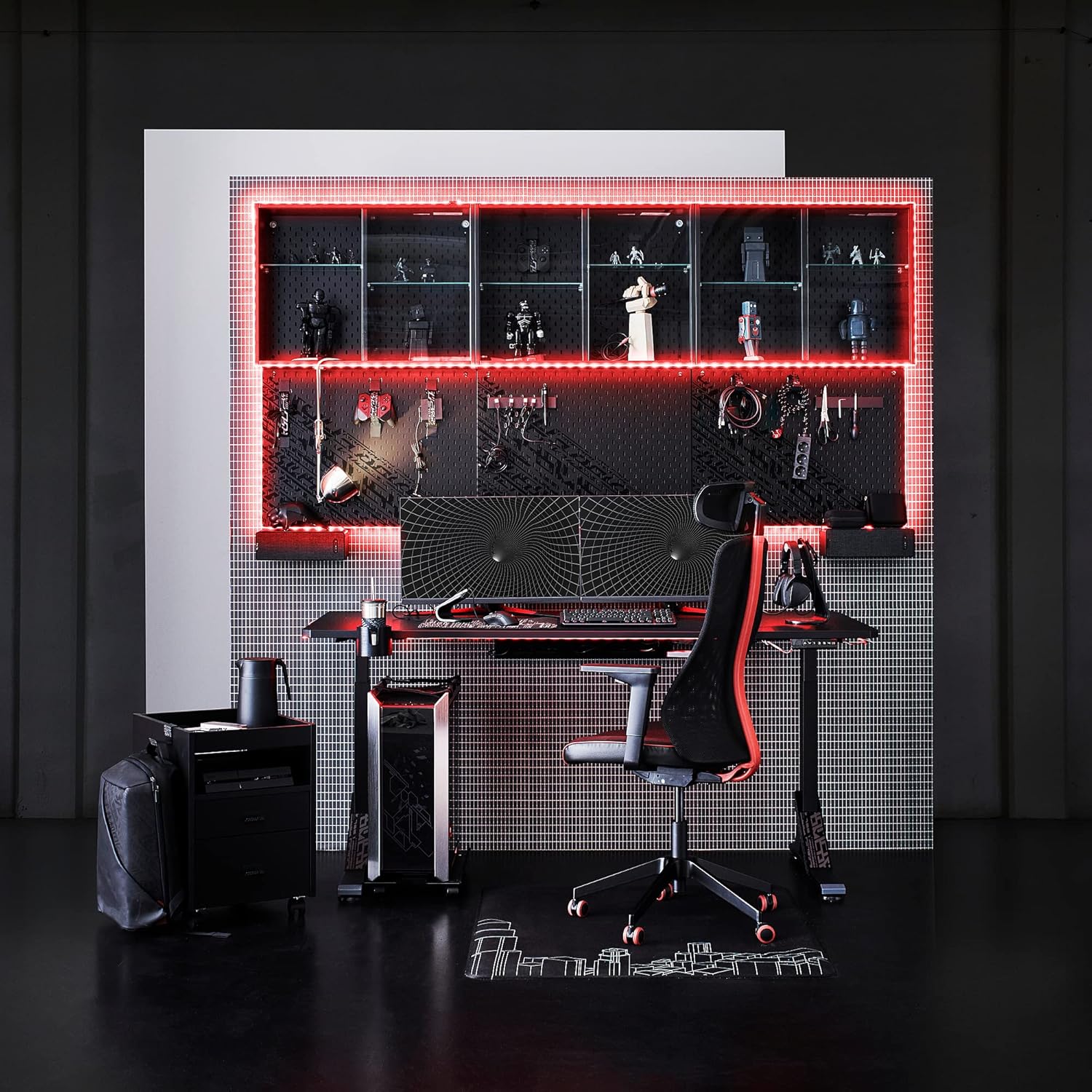
Figure 3.2: The UPPSPEL desk integrated into a modern gaming environment, highlighting its spacious surface and ergonomic design.

Figure 3.3: Detail view of the integrated cable management system, designed to keep your workspace tidy and organized.

Figure 3.4: A smartphone charging via a conveniently located integrated USB port on the desk, illustrating a practical feature for users.
4. Setup
Assembly of the IKEA UPPSPEL Gaming Desk is required. Please refer to the separate assembly instructions provided with your product for detailed, step-by-step guidance. Ensure all components are securely fastened and the desk is properly anchored for stability before use.
- Unpacking: Carefully unpack all components and verify against the parts list in the assembly guide.
- Assembly: Follow the graphical instructions for assembling the frame, legs, and tabletop.
- Cable Connection: Connect the power cable and control panel cable as instructed.
- Placement: Place the desk on a level surface, ensuring adequate space for height adjustment.
5. Operating Instructions
The UPPSPEL Gaming Desk features an intuitive control panel for height adjustment and memory presets.

Figure 5.1: A detailed view of the desk's control panel, showing the up/down arrows and memory preset buttons (1-4).

Figure 5.2: A hand demonstrating interaction with the control panel, illustrating the ease of height adjustment.
5.1. Adjusting Height
- To Raise: Press and hold the Up arrow (▲) button until the desired height is reached.
- To Lower: Press and hold the Down arrow (▼) button until the desired height is reached.
5.2. Using Memory Presets
The desk allows you to save up to four preferred height settings.
- Adjust the desk to your desired height using the up/down arrows.
- Press the 'M' button (or similar memory set button, if present) once. The display may flash.
- Within a few seconds, press one of the numbered preset buttons (1, 2, 3, or 4) to save the current height to that position.
- To recall a saved height, simply press the corresponding numbered preset button (1, 2, 3, or 4). The desk will automatically move to the saved position.

Figure 5.3: A user comfortably operating a keyboard at the UPPSPEL desk, demonstrating its suitability for extended use.
6. Maintenance
Proper care ensures the longevity and optimal performance of your desk.
- Cleaning: Regularly clean and dust the desk surface and legs with a soft, damp cloth. Use a mild cleaning solution if necessary, and wipe dry immediately. Avoid abrasive cleaners or harsh chemicals.
- Inspection: Periodically check all screws and fasteners to ensure they are tight. Retighten if necessary.
- Electrical Components: Keep the control panel and power connections dry. Do not attempt to service electrical components yourself.
7. Troubleshooting
If you encounter issues with your IKEA UPPSPEL Gaming Desk, consider the following common solutions:
- Desk Not Moving:
- Check if the power cable is securely plugged into both the desk and the wall outlet.
- Ensure the control panel cable is properly connected to the desk motor.
- Verify that the wall outlet is functional by plugging in another device.
- Uneven Movement:
- Ensure the desk is not overloaded beyond its 70 kg capacity.
- Check that all leg components are securely tightened according to assembly instructions.
- Error Codes on Display:
- If an error code appears, try unplugging the desk from the power outlet for 30 seconds, then plug it back in. This may reset the system.
- Consult the IKEA support website or contact customer service for specific error code interpretations.
If these steps do not resolve the issue, please contact IKEA customer support for further assistance.
8. Specifications
| Feature | Detail |
|---|---|
| Brand | IKEA |
| Model | UPPSPEL |
| Dimensions (Length x Width) | 180 cm x 80 cm (70.87 in x 31.5 in) |
| Minimum Height | 75 cm (29.5 in) |
| Maximum Height | 123 cm (48.4 in) |
| Maximum Load Capacity | 70 kg (154 lbs) |
| Color | Black |
| Main Material | Processed Wood (Tabletop), Metal (Base) |
| Finish Type | Painted |
| Key Feature | Electric Height Adjustment |
| Assembly Required | Yes |
| Care Instructions | Clean and dust regularly |
9. Warranty and Support
The IKEA UPPSPEL Gaming Desk comes with a 3-year warranty. Please refer to the warranty brochure provided with your product for detailed terms and conditions.
For technical support, spare parts, or warranty claims, please contact IKEA customer service through their official website or visit your nearest IKEA store. When contacting support, please have your product model (UPPSPEL) and purchase information readily available.


