
Introduction
The Ikea BEKANT Left Corner Sit/Stand Desk is designed to promote a more active and ergonomic working environment. This desk allows you to easily switch between sitting and standing positions, helping to improve your well-being and productivity. The electric height adjustment mechanism ensures a comfortable working height for various users.
Key features include a 10-year warranty, electric height adjustment from 65 to 125 cm, an integrated cable management net, and a contoured table top for wrist and forearm support.

Image: The Ikea BEKANT Left Corner Sit/Stand Desk in a typical office setup, showcasing its design and functionality.
Setup Instructions
Assembly is required for the BEKANT desk. Please follow the detailed instructions provided in the packaging. Ensure all components are present before beginning assembly.
- Unpack Components: Carefully remove all parts from the packaging and verify against the parts list in the assembly manual.
- Assemble Frame: Attach the leg frames to the crossbar according to the diagrams. Ensure all screws are tightened securely.
- Attach Tabletop: Carefully place the tabletop onto the assembled frame. Align the pre-drilled holes and secure the tabletop with the provided screws.
- Install Cable Management Net: The desk includes a cable management net located under the tabletop. Attach this net to the designated points to organize power cords and cables, keeping your workspace tidy.
- Connect Power: Plug the power cord for the electric height adjustment mechanism into a suitable power outlet.

Image: View of the underside of the BEKANT desk, highlighting the integrated cable management net for organizing wires.
Operating Instructions
The BEKANT desk features an electric height adjustment system for seamless transitions between sitting and standing positions.
- Adjusting Height: Locate the control panel, typically on the underside of the tabletop near the front edge. Press and hold the up arrow button to raise the desk, or the down arrow button to lower it.
- Height Range: The desk height can be adjusted electrically from a minimum of 65 cm (25 5/8 inches) to a maximum of 125 cm (49 1/4 inches).
- Ergonomic Positioning: Adjust the desk to a height that allows your elbows to be at a 90-degree angle when typing, whether sitting or standing.
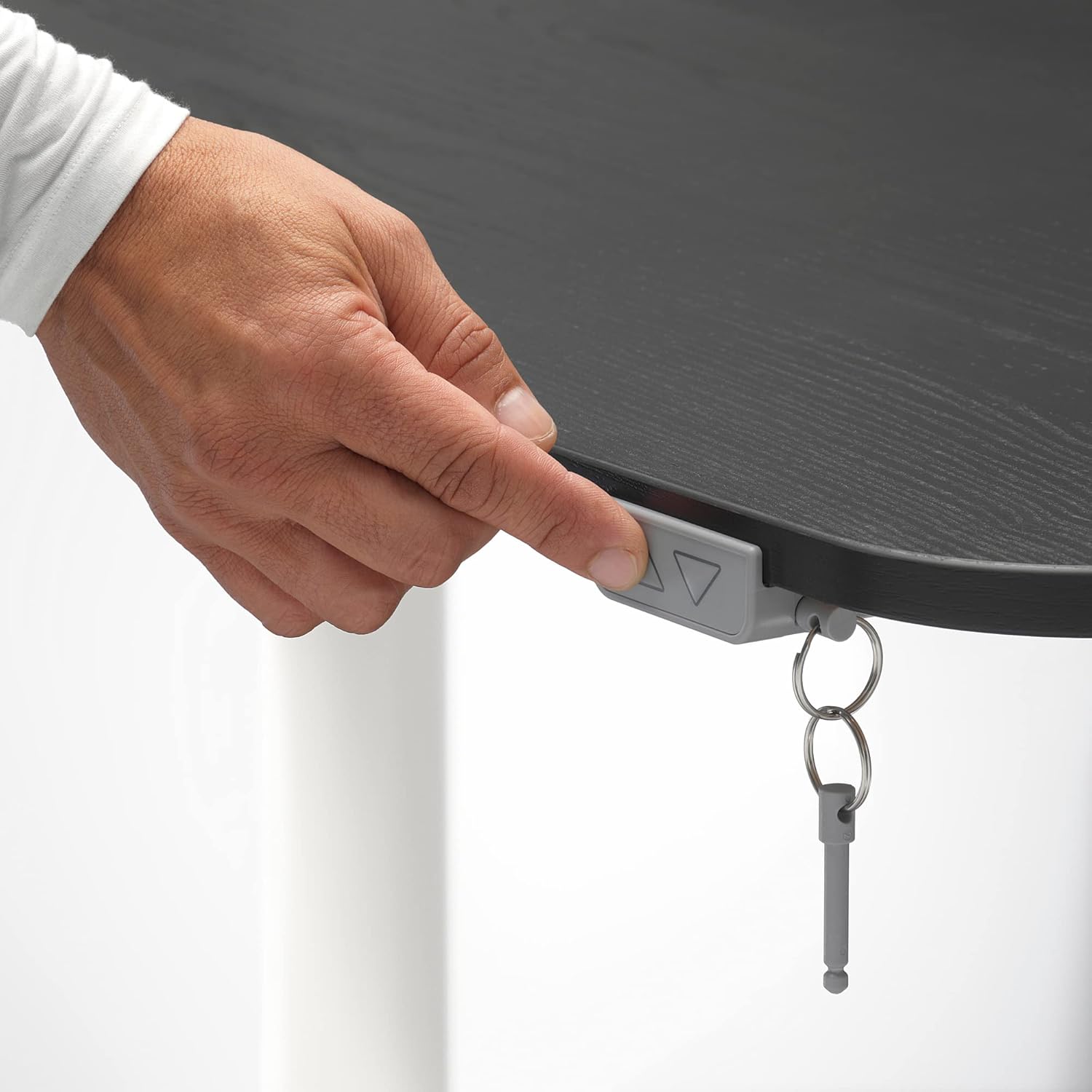
Image: A hand demonstrating the use of the height adjustment control panel, located discreetly under the desk edge.
Maintenance
To ensure the longevity and proper function of your BEKANT desk, follow these simple maintenance guidelines:
- Cleaning: Wipe the tabletop and frame regularly with a damp cloth and a mild cleaner. Avoid abrasive cleaners or harsh chemicals that could damage the surface.
- Cable Management: Periodically check the cable management net to ensure cables are neatly organized and not interfering with the desk's movement.
- Motor Care: The electric motor is designed for durability. Avoid overloading the desk beyond its specified weight capacity. Do not attempt to disassemble the motor unit.
- Inspection: Regularly inspect all screws and fittings to ensure they remain tight. Retighten if necessary.

Image: A close-up view of the desk's stained ash veneer surface, illustrating its texture and finish.
Troubleshooting
If you encounter issues with your BEKANT sit/stand desk, refer to the following common problems and solutions:
- Desk Not Moving:
- Check if the power cord is securely plugged into both the desk and the wall outlet.
- Ensure there are no obstructions preventing the desk from moving up or down.
- If the desk has been overloaded, remove some weight and try again.
- Uneven Movement:
- Ensure the desk is placed on a level surface.
- Check that all assembly screws are tightened evenly.
- Motor Noise:
- A slight humming sound during adjustment is normal. Excessive or unusual noise may indicate an issue. Contact support if persistent.
For issues not covered here, please consult the full troubleshooting guide in your product manual or contact customer support.
Specifications
| Feature | Detail |
|---|---|
| Brand | Ikea |
| Model Number | IK.192.822.93 |
| Manufacturer | IKEA |
| Dimensions (Length x Width) | 160 cm x 110 cm (63" x 43 1/4") |
| Adjustable Height Range | 65 cm - 125 cm (25 5/8" - 49 1/4") |
| Shape | Rectangular (Left Corner) |
| Number of Drawers | 0 (No integrated drawers) |
| Assembly Required | Yes |
| Spare Parts Availability | Information unavailable |

Image: Technical diagram illustrating the precise dimensions of the BEKANT desk, including length, width, and height adjustment range.
Warranty Information
The Ikea BEKANT Left Corner Sit/Stand Desk comes with a 10-year warranty. This warranty covers defects in materials and workmanship under normal use. For full terms and conditions, please refer to the separate warranty brochure included with your product or visit the official Ikea website.
Keep your proof of purchase (receipt) as it will be required for any warranty claims.
Customer Support
For further assistance, spare parts, or to report any issues with your Ikea BEKANT desk, please contact Ikea customer service. You can find contact information on the official Ikea website or in the documentation provided with your product.
When contacting support, please have your model number (IK.192.822.93) and proof of purchase readily available.