
Introduction
This manual provides detailed instructions for the safe and efficient operation of your Moiswell Defender MP70 Commercial Dehumidifier. Please read this manual thoroughly before installation and use, and retain it for future reference.
The Moiswell Defender MP70 is a high-capacity dehumidifier designed for commercial, industrial, and large residential spaces such as crawl spaces, basements, attics, warehouses, and construction sites. It features a robust design, efficient moisture removal, and flexible drainage options.
Safety Information
WARNING: Risk of Fire. This appliance uses a flammable refrigerant. It should only be repaired by trained service personnel. Do not puncture refrigerant tubing. Dispose of property in accordance with federal or local regulations. Flammable refrigerant used.
- Always ensure the unit is placed on a stable, level surface.
- Do not operate the unit near flammable materials or gases.
- Keep children and pets away from the unit during operation.
- Unplug the unit before cleaning or performing any maintenance.
- Ensure proper ventilation around the unit to prevent overheating.
Package Contents
- Moiswell Defender MP70 Dehumidifier with Built-in Pump
- 13 Ft Pump Drain Hose
- 6.5 Ft Gravity Drain Hose
- Reusable Filter
- User Manual (this document)
Setup
1. Placement
Place the dehumidifier in the desired location, such as a crawl space, basement, attic, or large room. Ensure there is adequate space around the unit for proper airflow. The compact design allows for flexible installation, including floor or overhead placement.

Image: The Moiswell Defender MP70 dehumidifier, showcasing its compact design suitable for various placements.
2. Drainage Options
The Defender MP70 offers two drainage methods:
Gravity Drain:
For gravity drainage, ensure the dehumidifier is placed on a surface higher than the drain outlet. Remove the stopper from the "Gravity Drain Outlet" and connect the 6.5 ft gravity drain hose. Direct the hose to a suitable drain.
Image: Diagram illustrating the gravity drain setup with the dehumidifier placed above the drain point.
Video: This video demonstrates the setup and operation of the Moiswell Commercial Dehumidifier, including drainage options.
Internal Pump Drain:
For pump drainage, seal the "Gravity Drain Outlet" with the included stopper. Connect the 13 ft pump drain hose to the "Pump Drain Outlet." The internal pump can discharge condensate vertically or horizontally up to 16.5 feet, allowing for flexible drainage to a sink, window, or other elevated drain point.

Image: Diagram illustrating the internal pump drain setup, showing the hose extending upwards to a higher drain point.
3. Power Connection
Plug the dehumidifier into a standard 115V (AC) electrical outlet. Ensure the outlet is properly grounded.
Important: After delivery, allow the dehumidifier to acclimate to room temperature for 24 hours before plugging it in. This helps prevent potential issues with the compressor.
Operating Instructions
Control Panel Overview
The dehumidifier features an easy-to-use control panel with a digital display and several buttons for various functions.

Image: Close-up view of the dehumidifier's control panel, showing the digital display for humidity and temperature, and control buttons.
1. Power On/Off
- Press the Power button (
 ) to turn the unit ON or OFF.
2. Setting Desired Humidity Level
- Use the Up (
 ) and Down (
 ) buttons to adjust the target humidity percentage. The unit will operate until the set humidity level is reached.
3. Timer Function
- Press the Timer/Function button (
 ) to activate the timer. Use the Up/Down buttons to set the desired operating duration (in hours) for automatic shut-off or delayed start.
Video: This video demonstrates how to set the "Auto OFF" timer function on the dehumidifier.
Video: This video demonstrates how to set the "Auto ON" timer function on the dehumidifier.
4. Auto Features
- Auto ON/OFF: The unit will automatically turn on or off to maintain the set humidity level.
- Auto Defrost: The unit automatically defrosts when frost builds up on the evaporator coils.
- Auto Restart: In case of a power outage, the unit will automatically restart with the previous settings once power is restored.
Video: This video provides an overview of the Moiswell MP70 commercial dehumidifier, highlighting its features including auto restart.
5. Pump Purge
- To manually drain the pump, long press the Power ON/OFF button for 5 seconds. This will activate the pump purge function.
Maintenance
1. Filter Cleaning
The dehumidifier is equipped with a washable and reusable filter. Regularly cleaning the filter ensures optimal performance and extends the unit's lifespan.
- Slide out the filter from the side of the unit.
- Wash the filter with warm, soapy water.
- Rinse thoroughly and allow it to air dry completely before reinserting.
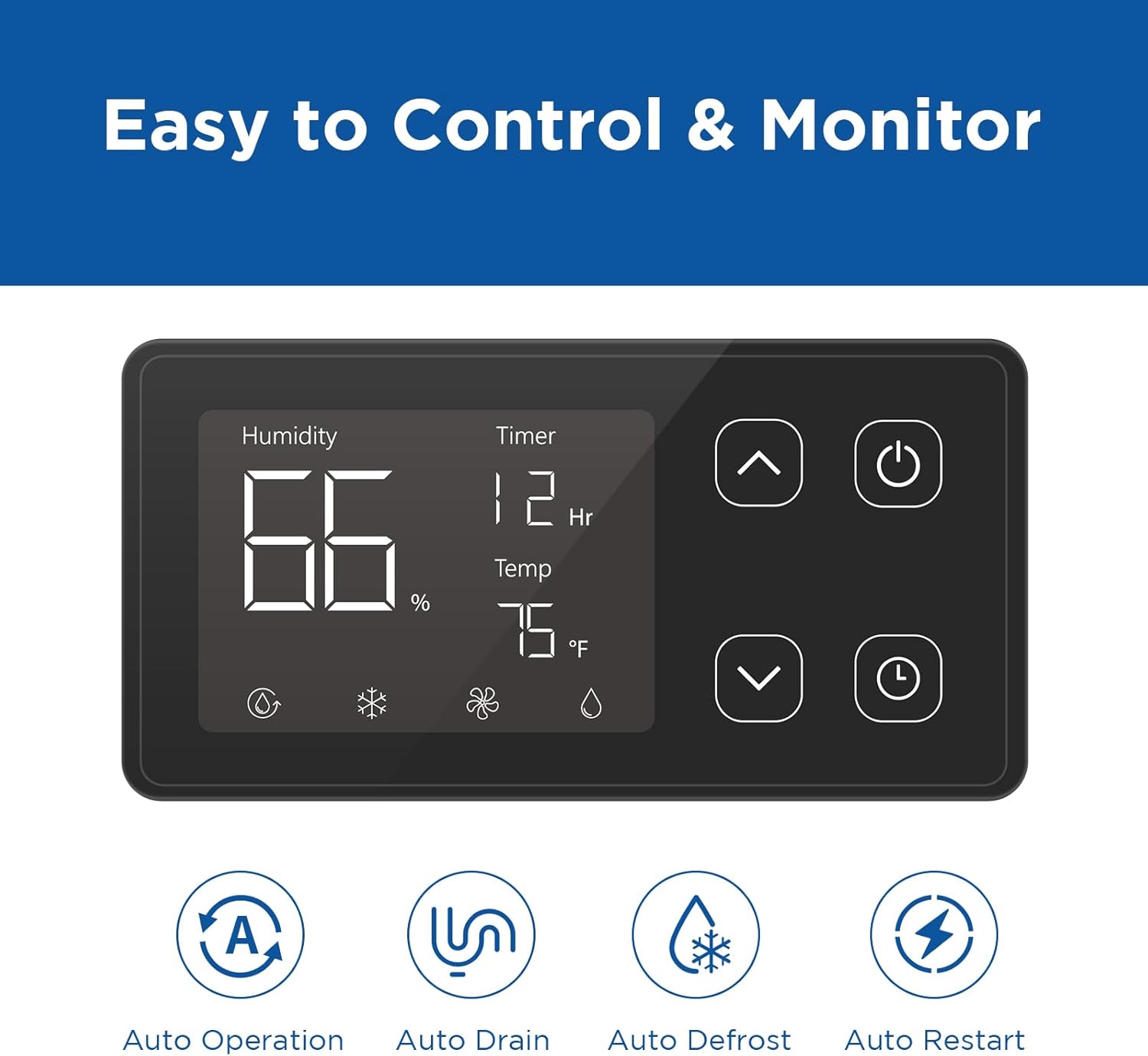
Image: The side of the dehumidifier showing the removable and washable air filter.
2. General Cleaning
- Wipe the exterior of the unit with a soft, damp cloth.
- Do not use abrasive cleaners or solvents.
Troubleshooting
If the dehumidifier is not operating as expected, refer to the following common issues and solutions:
| Problem | Possible Cause | Solution |
|---|---|---|
| Unit does not turn on | No power supply; Power button not pressed. | Check power connection; Press the Power button. |
| Dehumidifier not removing moisture | Humidity setting too high; Filter is clogged; Room temperature too low. | Lower the humidity setting; Clean the air filter; Ensure room temperature is above 41°F (5°C). |
| Flashing water droplet icon | Compressor is not ready (delay); Water sink is full. | Wait for 3-5 minutes for compressor to start; Check and empty the water collection area or ensure drain hose is clear. |
| Unit is noisy | Unit not level; Filter is clogged. | Ensure unit is on a stable, level surface; Clean the air filter. |
Video: This video explains the meaning of the "Droplet Icon" on the control panel, indicating either compressor delay or a full water tank.
Specifications
| Feature | Detail |
|---|---|
| Model Name | Defender MP70 |
| Brand | Moiswell |
| Dehumidification Capacity (AHAM) | 70 Pints per Day |
| Dehumidification Capacity (Saturation) | 145 Pints per Day |
| Coverage Area | Up to 6000 Square Feet |
| Air Flow Capacity | 206 Cubic Feet Per Minute (CFM) |
| Product Dimensions | 13.38"D x 14.56"W x 22.05"H |
| Item Weight | 62.2 Pounds |
| Voltage | 115 Volts (AC) |
| Wattage | 1050 watts |
| Material | Alloy Steel |
| Special Features | Built-In Pump, Adjustable Humidity Control, Auto Defrost, Auto Restart, Timer, Washable Reusable Filter, Carrying Handle, Adjustable Foot |
| Recommended Uses | Crawl Space, Basements, Attics, Warehouses, Construction Sites |
Warranty and Support
For warranty information or technical support, please contact Moiswell customer service:
- Website: moiswell.com
- Email: service@moiswell.com
Please have your model number (MP70) and purchase date available when contacting support.