
1. Introduction
This user manual provides essential information for the safe and effective use of your BCXY CS-HYA210BT replacement battery. This battery is specifically designed for compatibility with ADT ADT5AIO and ADT7AIO Command Smart Security Panels. Please read these instructions carefully before installation and retain this manual for future reference.
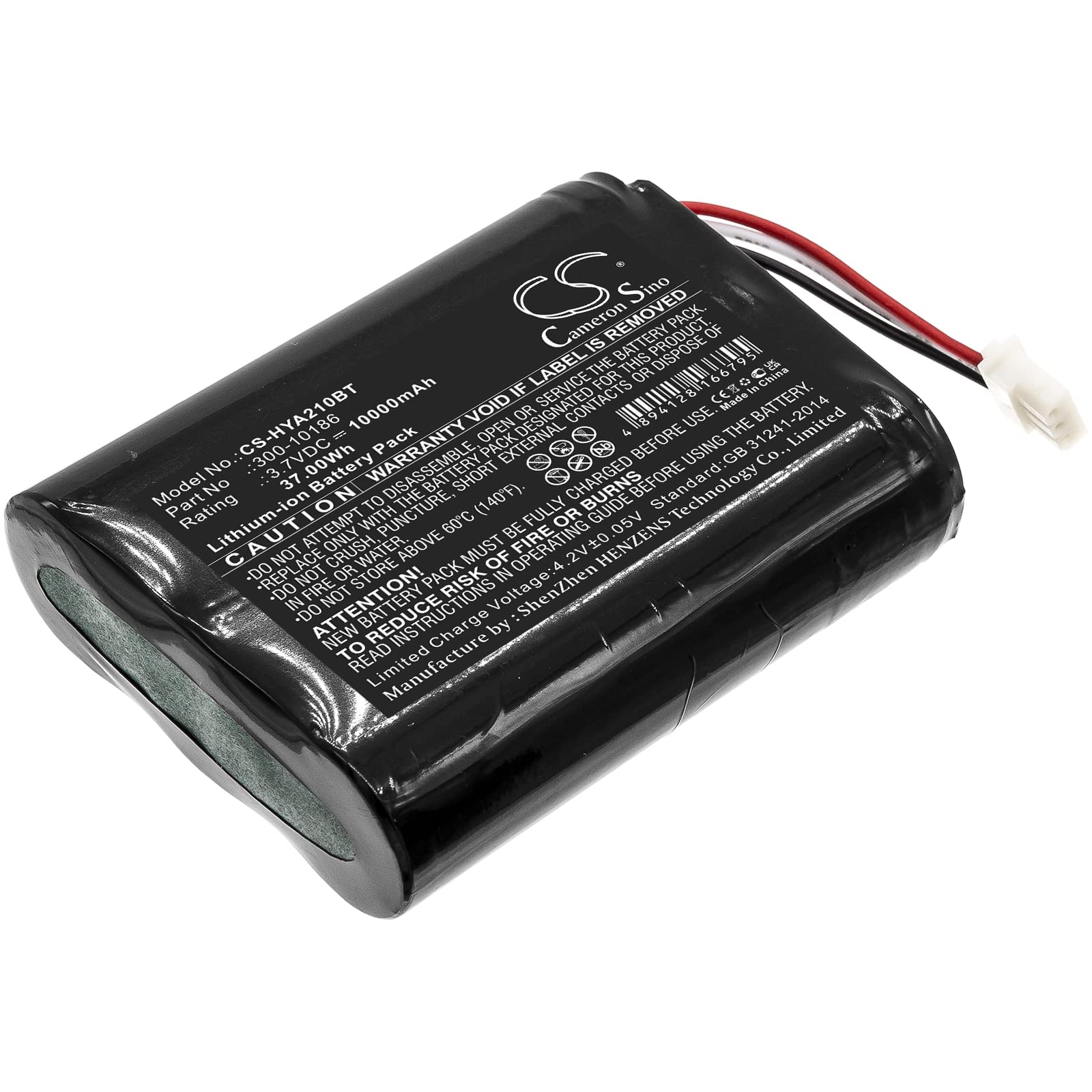
Image: BCXY CS-HYA210BT Battery Replacement. This image displays the battery unit, highlighting its compact design and connection terminals, ready for installation into compatible ADT security panels.
2. Safety Information
Observe the following safety precautions to prevent injury or damage to the battery and your security panel:
- Do not disassemble, crush, puncture, or short-circuit the battery.
- Do not expose the battery to high temperatures (above 60°C / 140°F) or direct sunlight.
- Do not immerse the battery in water or other liquids.
- Keep the battery away from children and pets.
- Dispose of used batteries according to local regulations. Do not dispose of with household waste.
- If the battery shows signs of damage, swelling, or leakage, discontinue use immediately.
- Only use the battery with compatible ADT ADT5AIO and ADT7AIO Command Smart Security Panels.
3. Package Contents
Your package should contain the following item:
- 1 x BCXY CS-HYA210BT Battery Replacement
4. Setup and Installation
Follow these steps to replace the battery in your ADT ADT5AIO or ADT7AIO Command Smart Security Panel. Always refer to your security panel's specific manual for detailed instructions if available.
- Power Down: Before beginning, ensure your ADT security panel is completely powered off and disconnected from its main power source. This may involve unplugging the AC adapter and confirming the panel is inactive.
- Locate Battery Compartment: Identify and open the battery compartment on your ADT security panel. This is typically located on the back or side of the panel and may require a small screwdriver to open.
- Disconnect Old Battery: Carefully disconnect the old battery from its connector. Note the orientation of the connector to ensure correct installation of the new battery.
- Remove Old Battery: Remove the old battery from the compartment.
- Install New Battery: Insert the new BCXY CS-HYA210BT battery into the compartment, ensuring it fits securely.
- Connect New Battery: Connect the new battery's connector to the panel's battery port, matching the orientation noted earlier. Do not force the connector.
- Secure Compartment: Close and secure the battery compartment cover.
- Power On: Reconnect the security panel to its main power source and power it on. The panel should recognize the new battery and begin charging it.
5. Operating Instructions
Once installed, the BCXY CS-HYA210BT battery operates as the primary backup power source for your ADT security panel. It will automatically provide power to the panel during a power outage and recharge when main power is restored. The security panel's internal charging circuit manages the battery's charge cycle.
6. Maintenance
Proper maintenance can extend the life of your battery:
- Regular Checks: Periodically check your security panel's status for any battery-related alerts or low battery warnings.
- Temperature: Ensure the security panel and battery are operated within recommended temperature ranges (typically room temperature) to prevent degradation.
- Cleaning: Keep the battery compartment clean and free of dust.
- Storage: If storing the battery for an extended period, ensure it is partially charged (around 50%) and stored in a cool, dry place.
7. Troubleshooting
If you encounter issues with your battery, consider the following:
| Problem | Possible Cause | Solution |
|---|---|---|
| Panel displays 'Low Battery' after replacement | Battery needs to charge; incorrect installation. | Allow 24-48 hours for full charge. Verify battery is correctly connected. |
| Battery not holding charge | Faulty battery; panel charging issue. | Ensure panel is receiving main power. Contact support if issue persists. |
| Panel does not power on with battery | Battery not connected; completely discharged. | Check battery connection. Connect panel to main power to initiate charging. |
8. Specifications
| Feature | Detail |
|---|---|
| Model Number | CS-HYA210BT |
| Compatible Models | ADT5AIO, ADT7AIO Command Smart Security Panel |
| Battery Cell Composition | Lithium Ion |
| Voltage | 3.7V |
| Capacity | 10000mAh |
| Watt-Hours (Wh) | 37.0Wh |
| Dimensions | 68.8 x 55.4 x 18.8mm (2.71 x 2.18 x 0.74 inches) |
| Weight | 174.0g |
| Certifications | ISO9001, RoHS, CE, UN38.3, MSDS |
| Protection Features | Overcharge, over discharge, over voltage, short circuit protection |
9. Warranty and Support
For warranty information or technical support regarding your BCXY CS-HYA210BT battery, please contact the manufacturer directly through their official website or the retailer from whom you purchased the product. Please have your purchase details and model number available when contacting support.