
Introduction
Thank you for choosing the FMART T9pro Window Cleaner Robot. This device is designed to simplify window cleaning with its advanced features, including ultrasonic spray, strong suction, and intelligent navigation. Please read this manual carefully before use to ensure safe and optimal performance.
Safety Precautions
- Always ensure the safety rope is securely attached to a solid object before operating the robot, especially on high-rise windows.
- Do not use the robot on cracked or damaged glass surfaces.
- Keep the robot and its accessories out of reach of children and pets.
- Ensure the power cord is properly connected and free from damage before each use.
- The robot is equipped with an embedded UPS system, providing up to 30 minutes of power in case of an unexpected outage. However, always monitor the device during operation.
- Use only the recommended cleaning solution or water in the water tank.
Setup
Initial Charging
Before first use, charge the window cleaning robot for 3-5 hours to activate its battery.
Connecting Power and Safety Rope
- Fill the water tank with the appropriate cleaning solution or water.
- Connect the power cord to the robot.
- Connect the adapter to the power cord.
- Connect the main electrical plug to a power outlet.
- Securely connect the safety rope to the designated attachment point on the robot.
- Wrap the safety rope around a solid piece of furniture or a sturdy anchor point to provide double protection against falls.

Image: Power connection diagram showing the robot, power cord, adapter, and main electrical plug, along with the UPS system and its 20-minute, 750mAh capacity.

Image: Diagram illustrating the correct method for securing the safety rope to a solid furniture piece for enhanced safety.
Attaching Microfiber Cloths
- Spray the microfiber cloths with water or cleaning solution approximately 5 times to dampen them.
- Attach the damp microfiber cloths to the cleaning discs on the robot.

Image: Close-up view of the high-density microfiber cloths, highlighting their texture for effective dust and dirt removal.
Remote Control Preparation
Pull out the plastic sheet from the remote control's battery compartment to activate it.
Powering On
Press and hold the power button on the robot until the blue indicator light illuminates.
Video: This video demonstrates the basic operation of the T9 window cleaning robot, including power-on, attaching the safety rope, and initial placement on the window.
Operating the Robot
Starting a Cleaning Cycle
Once the robot is powered on and securely attached to the window, press the start button on the remote control to begin cleaning. The robot will automatically detect the window frame and plan its cleaning path.

Image: The remote control for the FMART T9pro, used for remote cleaning operation and mode selection.
Cleaning Modes
The FMART T9pro offers three cleaning modes to suit various needs:
- Automatic Cleaning: The robot intelligently plans its path and adjusts suction based on dirt levels.
- Deep Cleaning: Provides a more thorough cleaning for heavily soiled surfaces.
- Manual Cleaning: Allows you to control the robot's movement using the remote control.
After completing its task, the robot will return to its starting point.

Image: A visual comparison highlighting the benefits of automatic window cleaning robots over traditional manual methods, emphasizing ease of use and intelligent path planning.
Ultrasonic Water Spray
The robot features an automatic ultrasonic atomization water outlet design with a 20ml constant voltage electronically controlled water tank. This system effectively maintains a consistent moistening state, dissolving stubborn stains with 12-micron water droplets. A single fill can cover an area of 20-25m².

Image: The FMART T9pro robot on a window, illustrating its automatic ultrasonic atomization water spray technology.
Video: This video showcases the upgraded ultrasonic spray feature of the FMART T9 window cleaner robot, demonstrating its fine mist application.
Intelligent Features
- Strong Suction: With up to 3800Pa suction power, the robot intelligently adjusts suction based on the glass's dirt level for deep cleaning.
- AI Edge Detection: The built-in artificial intelligence detects window frames and adjusts direction, preventing falls and avoiding obstacles.

Image: The FMART T9pro robot on a window, highlighting its 3800Pa strong suction capability and intelligent suction adjustment based on dirt detection.

Image: The FMART T9pro robot on a window, illustrating its smart frame detection feature that stops spraying and reduces speed near edges.
Video: This video demonstrates the Fmart T9 window cleaning robot in action, showcasing its intelligent path planning and cleaning capabilities.
Surface Compatibility
The FMART T9pro is suitable for cleaning various smooth surfaces, including:
- Glass windows
- Tiles
- Mirrors
- Wooden doors
- Marble surfaces

Image: A collage demonstrating the FMART T9pro's versatility across multiple surfaces, including glass, tile, mirror, wooden doors, and marble.
Maintenance
Cleaning Cloths
It is recommended to wipe the glass once and then replace the microfiber cloths. The frequency of replacement can be adjusted based on the degree of dirtiness of the glass. The robot uses a double wipe tray cleaning system.
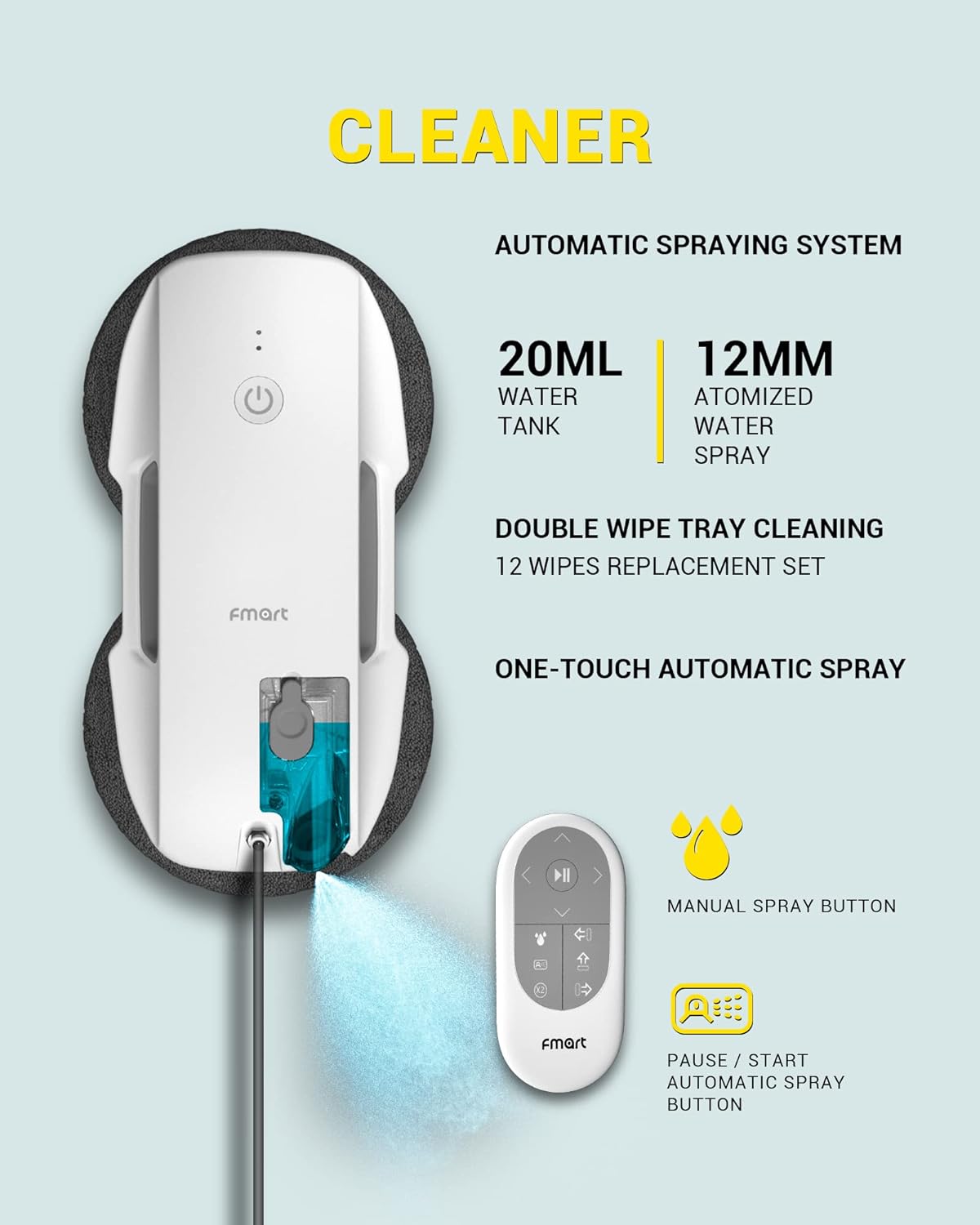
Image: Detailed view of the FMART T9pro's cleaning system, highlighting the 20ml water tank, 12mm atomized water spray, double wipe tray cleaning, and one-touch automatic spray feature.
Optimal Cleaning Conditions
For best results, especially on very dirty windows, follow these steps:
- First, wipe the window dry to remove loose dust and dirt.
- Change to clean microfiber cloths.
- Then, wipe with damp cloths using the robot's spray function.

Image: Visual guide for using the window cleaner on sunny days, recommending a two-step process: dry wipe first, then change cloths and wipe with a damp cloth.
Troubleshooting
Red Light Flashing / Poor Contact
If the red light flashes or you experience poor contact, check the power socket. Unplug the device, wait a few minutes, and then reconnect it. Ensure all connections are secure.
Robot Not Moving or Sticking
- Ensure the microfiber cloths are clean and properly attached. Excessively dirty cloths can reduce suction.
- Verify that the suction cups are clean and free from debris.
- Check for any obstructions on the window surface.
Specifications
| Brand | FMART |
| Model Name | T9Pro |
| Special Feature | Automatic Dust Collection, Self-refilling |
| Product Dimensions | 11"L x 5"W x 3"H |
| Filter Type | Cloth |
| Battery Life | 3 months (standby/usage dependent) |
| Voltage | 14.8 Volts (DC) |
| Power Source | Battery Powered |
| Control Method | Voice, Remote Control |
| Compatible Devices | Amazon Echo |
| Form Factor | Robotic |
| Item Weight | 5.19 pounds |
| Surface Recommendation | Glass, Tile |
| Suction Power | 3800Pa |
| Water Tank Capacity | 20ml |
| UPS Battery Runtime | Up to 30 minutes |
Warranty and Support
The FMART T9pro Window Cleaner Robot comes with a 365-day warranty. If you encounter any issues during use, please contact our customer support team via email. We are committed to resolving your concerns within 24 hours.
