
1. Introduction and Overview
The EGO POWER+ PAD5000 Nexus Escape 400W Inverter provides high-quality, clean power for sensitive electronics. This portable inverter delivers 400 watts of continuous power and 800 watts of peak power, making it suitable for a wide range of devices. It is fully compatible with all EGO 56V ARC Lithium batteries, offering a versatile and reliable power solution for various situations, including home use, camping, and power outages.

Figure 1: EGO POWER+ PAD5000 Portable Inverter with a 56V ARC Lithium battery attached.
2. Key Features
- 400W Continuous Power / 800W Peak Power: Provides reliable power for various devices, with extra capacity for startup surges.
- Pure Sine Wave Output: Delivers clean and stable electricity, safe for sensitive electronics.
- Multiple Charging Ports: Features one 120V AC power outlet, one USB-C port, one USB-C PD (100W) port, and one USB-A (18W) port for simultaneous device charging.
- Pass-Through Charging: Allows an EGO 56V ARC Lithium battery to charge via the 100W USB-C PD port while simultaneously powering devices.
- Built-in LED Lights: Provides ambient lighting during power outages or in low-light conditions.
- EGO 56V ARC Lithium Battery Compatibility: Utilizes the same interchangeable batteries as other EGO POWER+ tools.

Figure 2: The EGO POWER+ Portable Inverter leverages advanced 56V ARC Lithium battery technology for efficient power delivery.
3. Setup and Battery Installation
The PAD5000 inverter is designed for easy battery installation and removal. It can accommodate up to four EGO 56V ARC Lithium batteries simultaneously, allowing for increased power capacity.
Battery Installation:
- Align the battery with the battery slot on the inverter.
- Slide the battery firmly into the slot until it clicks into place.
- Repeat for additional batteries (up to four).
Battery Removal:
- Press the battery release button (usually located on the battery itself or near the slot).
- Slide the battery out of the slot.

Figure 3: The inverter can hold up to four EGO 56V ARC Lithium batteries, providing substantial power capacity.
The total battery capacity will depend on the size (Amp-hour) of the individual batteries inserted. For example, with four 5.0Ah batteries, the total capacity is approximately 1120Wh. Using larger 9.6Ah batteries can increase the total capacity to around 1600Wh.
4. Operating Instructions
Powering On/Off:
Press and hold the main power button on the inverter's front panel to turn the unit on or off. The indicator light around the button will illuminate when the unit is active.
Activating Outlets and Ports:
Once the inverter is powered on, individual buttons are available to activate the AC outlets and USB ports. Press the respective button for the desired output (e.g., AC outlet button, USB button). The indicator light for each port will turn green when active.

Figure 4: Front panel showing the 120V AC outlet, USB-C, USB-C PD, and USB-A ports.
Built-in LED Lights:
The inverter features built-in LED lights for ambient illumination. Press the light button to cycle through different brightness settings or activate an SOS mode for emergencies. The lights are located on the sides of the battery housing.
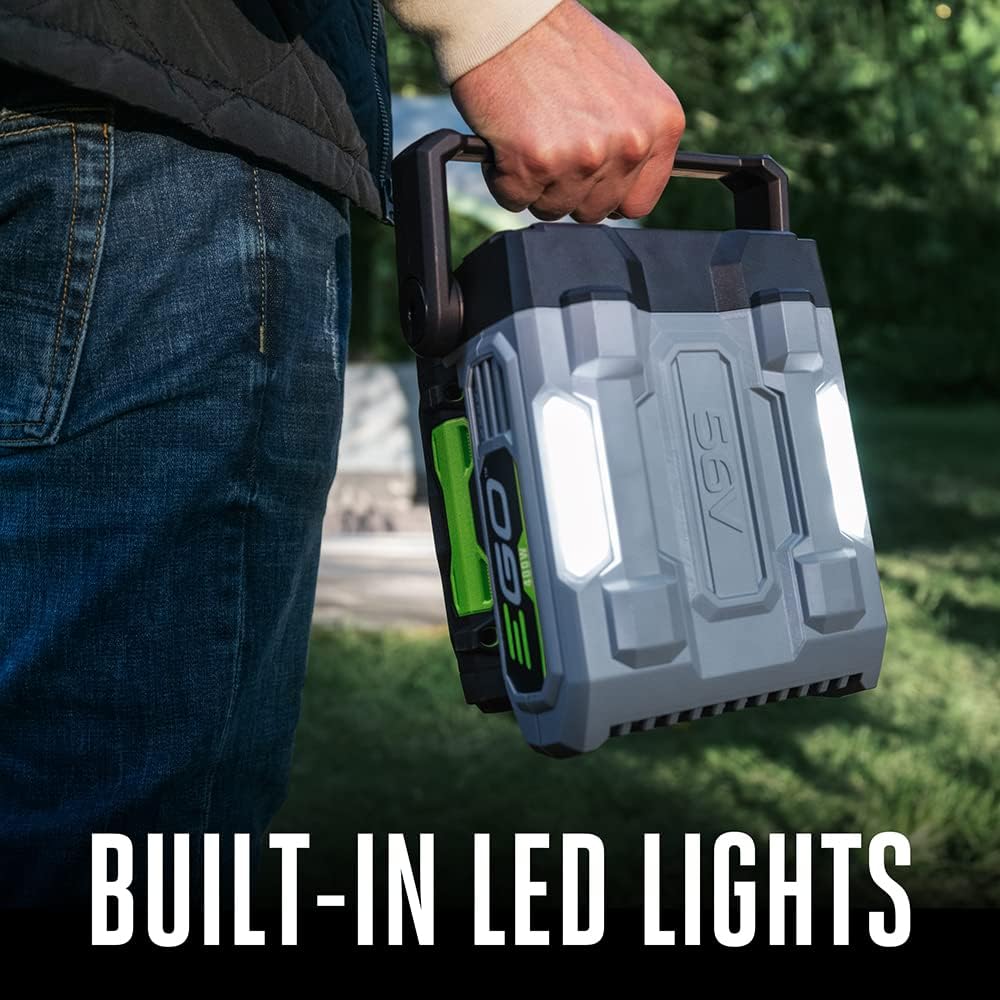
Figure 5: Built-in LED lights provide convenient illumination.
5. Charging Batteries
The PAD5000 inverter includes a charging adapter that allows you to charge the inserted EGO 56V ARC Lithium batteries by plugging the inverter into a wall outlet. However, this method is relatively slow, taking approximately 8-10 hours to fully charge four batteries.
Recommended Charging Method:
For faster charging, it is recommended to use dedicated EGO POWER+ fast chargers (sold separately). These chargers can charge individual batteries or two at a time much more quickly, allowing for continuous power by swapping out depleted batteries with fully charged ones.
The inverter also supports pass-through charging via the 100W USB-C PD port, allowing an EGO 56V ARC Lithium battery to charge while simultaneously powering other devices.
6. Portable Power Options
EGO also offers smaller, more portable inverter options for lighter power needs:
- EGO POWER+ 400W Portable Inverter: Features one 120V AC outlet, one 100W USB-C PD port, one 18W USB-C port, and one 18W USB-A port. Ideal for charging laptops, phones, and other small devices.
- EGO POWER+ 150W Portable Inverter: Features one 120V AC outlet and two USB-A ports. This is the most compact option for minimal power requirements.
These smaller units are convenient for situations where the full capacity of the PAD5000 is not needed, or when greater portability is desired for activities like hiking.
7. Performance Tests
The EGO POWER+ PAD5000 Portable Inverter has been tested with various household appliances to demonstrate its capability:
- Panini Maker (approx. 1000W) & Toaster (approx. 800W): The inverter successfully powered both a panini maker and a toaster simultaneously, drawing approximately 1800W. This demonstrates its ability to handle high-wattage appliances continuously.
- Blender (approx. 400W): The inverter powered a blender without issues, confirming its 400W continuous output capability.
The inverter's overload protection feature ensures that it will safely shut off if the power draw exceeds its continuous or peak limits, preventing damage to the unit or connected devices.
Video 1: Official EGO POWER+ Nexus Escape 400W Inverter product overview, demonstrating features and usage scenarios.
8. Specifications
| Feature | Specification |
|---|---|
| Brand | EGO Power+ |
| Model Name | Nexus Escape 400W Inverter (PAD5000) |
| Continuous Power | 400W |
| Peak Power | 800W |
| Output Waveform | Pure Sine Wave |
| AC Outlets | 1 x 120V |
| USB Ports | 1 x USB-C, 1 x USB-C PD (100W), 1 x USB-A (18W) |
| Input Voltage | 120 Volts |
| Output Voltage | 120 Volts |
| Frequency | 60 Hz |
| Dimensions (L x W x H) | 7.7" x 4.72" x 8.2" |
| Item Weight | 3.3 Pounds |
| Battery Compatibility | All EGO 56V ARC Lithium batteries |
9. Maintenance
To ensure optimal performance and longevity of your EGO POWER+ PAD5000 Portable Inverter, follow these maintenance guidelines:
- Cleaning: Keep the inverter clean and free from dust and debris. Use a dry cloth to wipe down the exterior. Do not use harsh chemicals or abrasive cleaners.
- Storage: Store the inverter and batteries in a cool, dry place away from direct sunlight and extreme temperatures.
- Battery Care: For long-term storage, ensure batteries are partially charged (around 30-50%) to prevent over-discharge. EGO 56V ARC Lithium batteries have a self-discharge feature that drains them to 30% after a month of inactivity to preserve battery health.
- Inspection: Regularly inspect the inverter and cables for any signs of damage or wear. Do not use if damaged.
10. Troubleshooting
If you encounter issues with your EGO POWER+ PAD5000 Portable Inverter, refer to the following common troubleshooting tips:
- Inverter Not Turning On: Ensure batteries are properly inserted and fully charged. Check battery indicator lights.
- No Output from Ports/Outlets: Verify that the inverter is powered on and the specific port/outlet is activated (indicator light should be green).
- Overload Protection Activated: If the inverter shuts off or shows a red flashing light, it indicates an overload. Disconnect the device drawing excessive power, reset the inverter by turning it off and on, and then reconnect devices with lower power requirements.
- Slow Charging: Charging batteries directly through the inverter is slow. Use a dedicated EGO POWER+ fast charger for quicker results.
11. Warranty and Support
The EGO POWER+ PAD5000 Portable Inverter comes with a 5-year tool warranty. For warranty claims, technical support, or additional information, please refer to the official EGO Power+ website or contact their customer service.


