
1. Overview
The Range Tour Dash Camera Car Charger (Model Z1) is a versatile power solution for your vehicle, designed to simultaneously power your dash camera and charge mobile devices. It features a dedicated Mini USB cable for dash cams and an 18W USB-C port for fast phone charging. With its wide voltage compatibility and real-time voltage display, this compact charger ensures your devices stay powered and your car battery health is monitored.
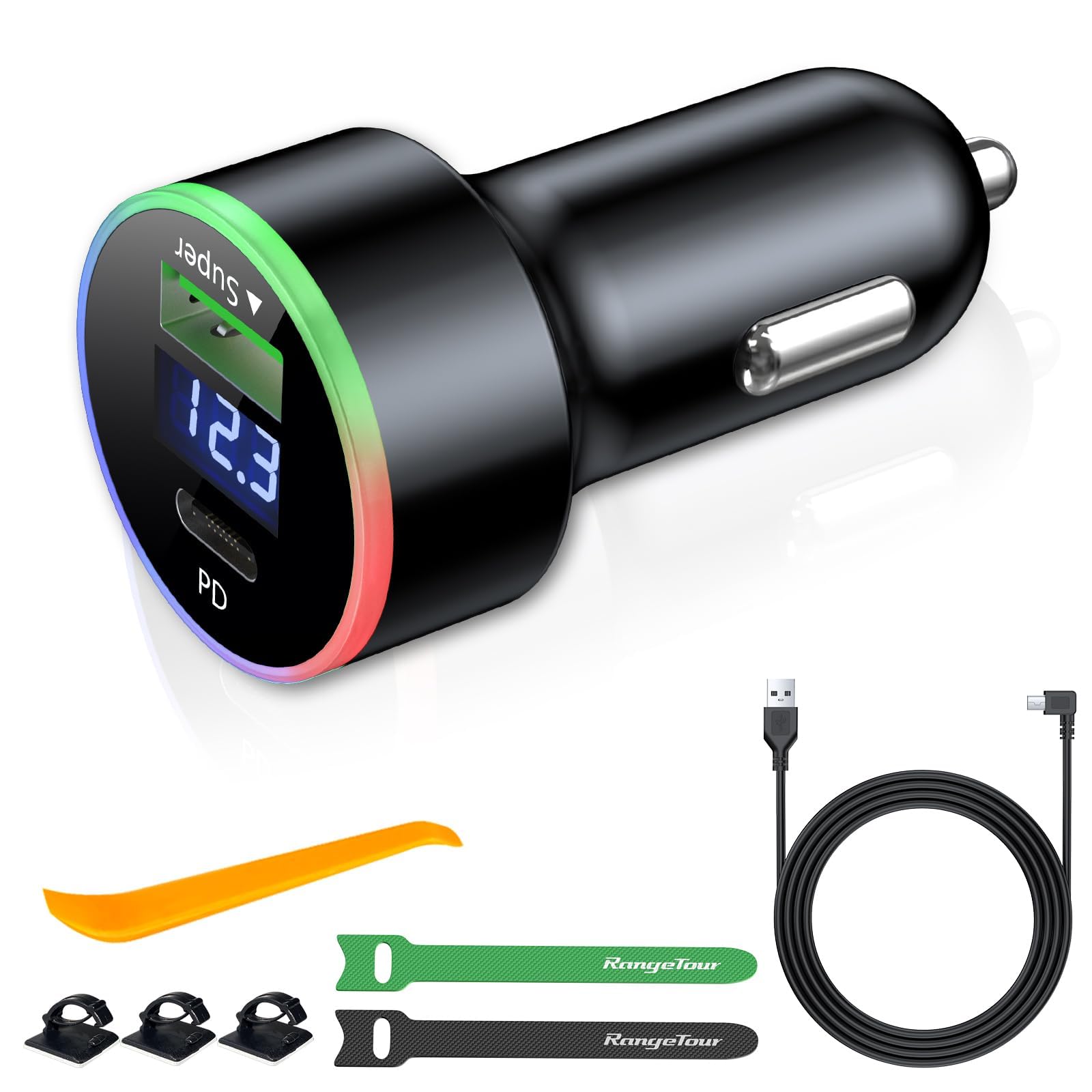
Image 1.1: Range Tour Dash Camera Car Charger with integrated Mini USB cable and USB-C port, displaying current voltage.
2. Package Contents
Please verify that all items listed below are included in your package:
- 1 x Vehicle Charging Adapter (with USB-C and USB-A ports)
- 1 x Dash Cam Charging Cable (3.5m/11.5ft, Mini USB L-Type connector)
- 1 x Installation Auxiliary Rod (Pry Tool)
- 3 x Wire Buckles
- 2 x Magic Paste (Cable Ties)
- 1 x User Manual

Image 2.1: All components included in the package.
Video 2.1: Unboxing video demonstrating the contents of the Dash Camera Car Charger package.
3. Product Features
- Dual Charging Ports: Features one dedicated 3.5m (11.5ft) Mini USB cable (5V 1.5A) for dash cameras and one 18W USB-C port for fast charging compatible mobile phones and other devices.
- Wide Voltage Compatibility: Supports 12V and 24V vehicle power inputs, providing a stable DC 5V output.
- Real-time Voltage Display: An integrated digital display shows your car battery's voltage, allowing for timely monitoring of battery health.
- Extended Cable Length: The 3.5m (11.5ft) dash cam power cord offers ample length for discreet cable routing around the vehicle's interior.
- Multi-Protection Safety: Built-in safeguards prevent overheating, overcurrent, short circuits, overvoltage, overcharge, and over-temperature conditions.
- Compact Design: Designed to be space-efficient and easily plug into your car's cigarette lighter socket.
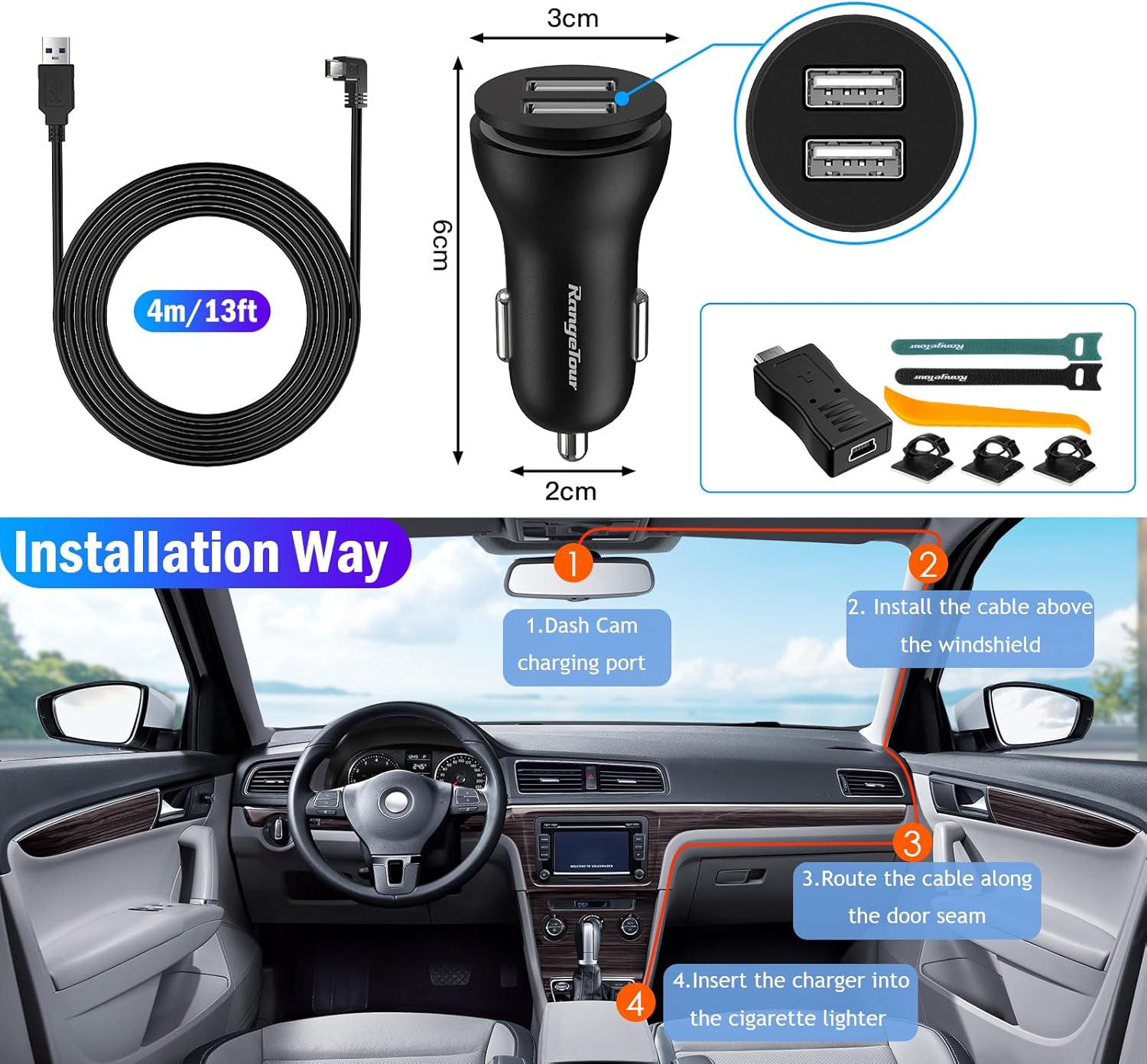
Image 3.1: Product dimensions and cable length for planning installation.

Image 3.2: Internal components and safety features for multi-protection.
4. Setup & Installation
- Connect Dash Cam: Plug the L-type Mini USB connector of the 3.5m cable into your dash camera's power input port.
- Route Cable: Use the provided installation auxiliary rod (pry tool) to tuck the cable neatly along the windshield trim, A-pillar, and door seam to conceal it. Use the wire buckles and magic paste (cable ties) to secure the cable in place.
- Insert Charger: Plug the main charging adapter into your vehicle's cigarette lighter socket.
- Power On: Start your car. The charger's indicator light will illuminate, and the real-time voltage display will activate, confirming the connection status.

Image 4.1: Visual guide for cable installation and routing within the vehicle.
Video 4.1: Demonstration of the Range Tour Dash Camera Car Charger installation process.
5. Operating Instructions
- Dash Cam Power: Once installed and the vehicle is running, your dash camera will receive continuous power through the Mini USB cable.
- Phone Charging (USB-C): Connect your mobile phone or other compatible device to the USB-C port using a fast charging-enabled cable (not included). The 18W output supports rapid charging for quick power-ups.
- Voltage Monitoring: Observe the digital display on the charger to view your car's real-time battery voltage. This helps in identifying potential battery issues.

Image 5.1: Charger in operation, powering a dash cam and charging a smartphone.
6. Maintenance
- Cleaning: Wipe the charger and cables with a dry, soft cloth. Avoid using liquid cleaners or solvents.
- Storage: When not in use for extended periods, disconnect the charger from the cigarette lighter socket and store it in a cool, dry place.
- Cable Care: Avoid sharp bends or excessive pulling on the cables to prevent damage.
7. Troubleshooting
| Problem | Possible Cause | Solution |
|---|---|---|
| Charger not powering on / No voltage display | Loose connection in cigarette lighter socket; Vehicle's cigarette lighter socket is not receiving power; Blown fuse in vehicle or charger. | Ensure the charger is firmly seated in the cigarette lighter socket. Check your vehicle's fuse box for a blown fuse related to the cigarette lighter. Consult your vehicle's manual for fuse location. |
| Dash cam not receiving power | Mini USB cable not properly connected; Dash cam power port issue; Cable damage. | Verify the Mini USB cable is securely connected to both the charger and the dash cam. Try using a different Mini USB cable if available to rule out cable damage. |
| Phone not fast charging via USB-C | Non-fast charging compatible cable; Device does not support fast charging; Cable not fully inserted. | Ensure you are using a USB-C cable that supports fast charging. Confirm your device is compatible with 18W fast charging. Check for a secure connection. |
| Dash cam does not turn on automatically with car ignition | Vehicle's cigarette lighter socket provides constant power; Dash cam settings. | Some vehicle cigarette lighter sockets provide constant power even when the ignition is off. Check your dash cam's settings for auto power-on/off features. If the issue persists, consult your dash cam's manual. |
8. Specifications
| Feature | Detail |
|---|---|
| Brand | Range Tour |
| Model Number | Z1 |
| Input Voltage | 12V-24V DC |
| Output Voltage | 5V DC |
| Output Current (Dash Cam) | 1.5A |
| Output Wattage (USB-C PD) | 18W |
| Total USB Ports | 2 (1x Mini USB cable, 1x USB-C port) |
| Dash Cam Cable Length | 3.5m (11.5ft) |
| Connector Type | Mini USB (L-Type), USB-C |
| Compatible Devices | Dashcams, Smartphones, Tablets, Smartwatches |
| Material | Plastic |
| Item Weight | 128 Grams |

Image 8.1: Overview of compatible devices and vehicle types.
9. Warranty & Support
This product comes with a standard manufacturer's warranty. For detailed warranty information, technical support, or assistance with your Range Tour Dash Camera Car Charger, please contact Range Tour customer service directly. You can often find contact information on the product packaging or the official Range Tour website.
For more products and information, visit the Range Tour Store.