Introduction
This manual provides instructions for the proper setup, operation, and maintenance of your ZdalaMit RC877S Replacement Remote Control. This remote is designed to be a direct replacement for specific Onkyo Sound Bar models.
Compatible Models: Onkyo Sound Bar LS-B50, LS-T10, LB401
Setup
1. Battery Installation
The RC877S remote control requires 1 AAA battery for operation.
- Locate the battery compartment on the back of the remote control.
- Slide open the battery compartment cover.
- Insert one AAA battery, ensuring the positive (+) and negative (-) terminals align correctly with the markings inside the compartment.
- Close the battery compartment cover securely.
2. Initial Use
No programming is required for this replacement remote control. Once batteries are installed, the remote is ready for immediate use with compatible Onkyo Sound Bar models.
Operating
Remote Control Functions
The ZdalaMit RC877S remote control provides direct access to essential functions of your Onkyo Sound Bar. Refer to the image below for button layout and descriptions.
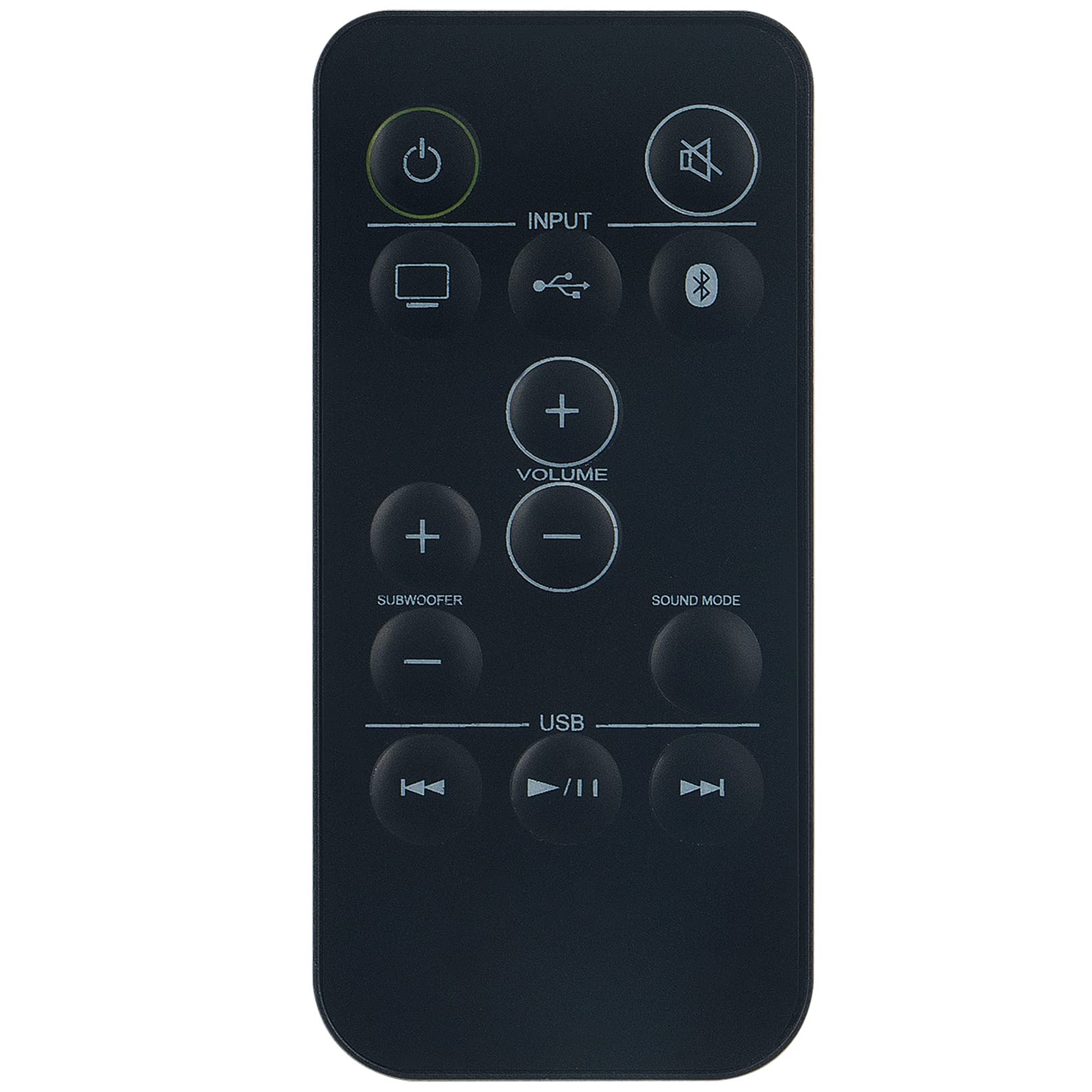
Image: ZdalaMit RC877S Replacement Remote Control. This image displays the front face of the remote, highlighting the power, input, volume, subwoofer, sound mode, and USB playback control buttons.
- Power Button (Green Circle with Line): Turns the sound bar on or off.
- Mute Button (Circle with X): Mutes or unmutes the sound.
- Input Button (TV Icon): Selects the TV input source.
- Input Button (USB Icon): Selects the USB input source.
- Input Button (Bluetooth Icon): Selects the Bluetooth input source.
- Volume Up (+): Increases the main volume.
- Volume Down (-): Decreases the main volume.
- Subwoofer Up (+): Increases the subwoofer level.
- Subwoofer Down (-): Decreases the subwoofer level.
- Sound Mode: Cycles through available sound modes (e.g., Movie, Music, Voice).
- USB Playback Controls (Rewind, Play/Pause, Fast Forward): Controls media playback when USB input is selected.
Maintenance
Cleaning
To clean the remote control, gently wipe the surface with a soft, dry cloth. Do not use liquid cleaners, abrasive materials, or chemical solvents, as these may damage the remote.
Battery Replacement
Replace the AAA battery when the remote control's performance diminishes or it stops responding. Always use fresh batteries and dispose of old batteries responsibly according to local regulations.
Storage
When not in use for extended periods, remove the battery to prevent leakage and potential damage to the remote control. Store the remote in a cool, dry place away from direct sunlight and extreme temperatures.
Troubleshooting
Common Issues and Solutions
Remote Not Responding
- Check Batteries: Ensure the AAA battery is inserted correctly with the correct polarity (+/-) and is not depleted. Replace with a fresh battery if necessary.
- Line of Sight: Make sure there is a clear line of sight between the remote control and the Onkyo Sound Bar. Obstructions can block the infrared signal.
- Distance: Operate the remote within the effective range of the sound bar.
- Sound Bar Power: Confirm that the Onkyo Sound Bar is powered on and functioning correctly.
Buttons Not Working
- Clean Buttons: If specific buttons are unresponsive, gently clean around them with a soft, dry cloth to remove any dust or debris.
- Battery Check: A low battery can sometimes cause intermittent button functionality. Replace the battery.
If troubleshooting steps do not resolve the issue, please refer to the Support section.
Specifications
Product Specifications
| Feature | Detail |
|---|---|
| Model Number | RC877S |
| Compatible Devices | Onkyo Sound Bar LS-B50, LS-T10, LB401 |
| Power Source | 1 x AAA Battery (not included) |
| Dimensions | 6 x 2 x 0.5 inches (approximately) |
| Weight | 2 ounces (approximately, without battery) |
| Color | Black |
| Special Feature | Ergonomic design |
Warranty Information
This product is typically covered by a 30-day refund/replacement policy from the date of purchase. Please refer to your purchase documentation or contact the seller for specific warranty terms and conditions.
Customer Support
If you encounter any issues or have questions regarding the ZdalaMit RC877S Replacement Remote Control that are not addressed in this manual, please do not hesitate to contact the seller or manufacturer for assistance.
For faster service, please have your product model number (RC877S) and purchase details ready when contacting support.


