
Introduction
This manual provides detailed instructions for the ZdalaMit Replacement Remote Control, designed for use with specific Onn Soundbar models. Please read this manual thoroughly to ensure proper operation and to maximize your experience with the remote control.
Package Contents
- 1x ZdalaMit Replacement Remote Control
Setup
1. Installing Batteries
The remote control requires 1 AAA battery for operation. Follow these steps to install the battery:
- Locate the battery compartment cover on the back of the remote control.
- Slide the cover downwards or press the latch to open it.
- Insert one AAA battery, ensuring the positive (+) and negative (-) terminals align correctly with the markings inside the compartment.
- Replace the battery compartment cover until it clicks securely into place.
2. Initial Use and Programming
This ZdalaMit Replacement Remote Control is pre-programmed and does not require any additional setup or programming for the compatible Onn Soundbar models ONA18SB001, ONA19SB003, and 100004120. Once batteries are installed, it is ready for immediate use.
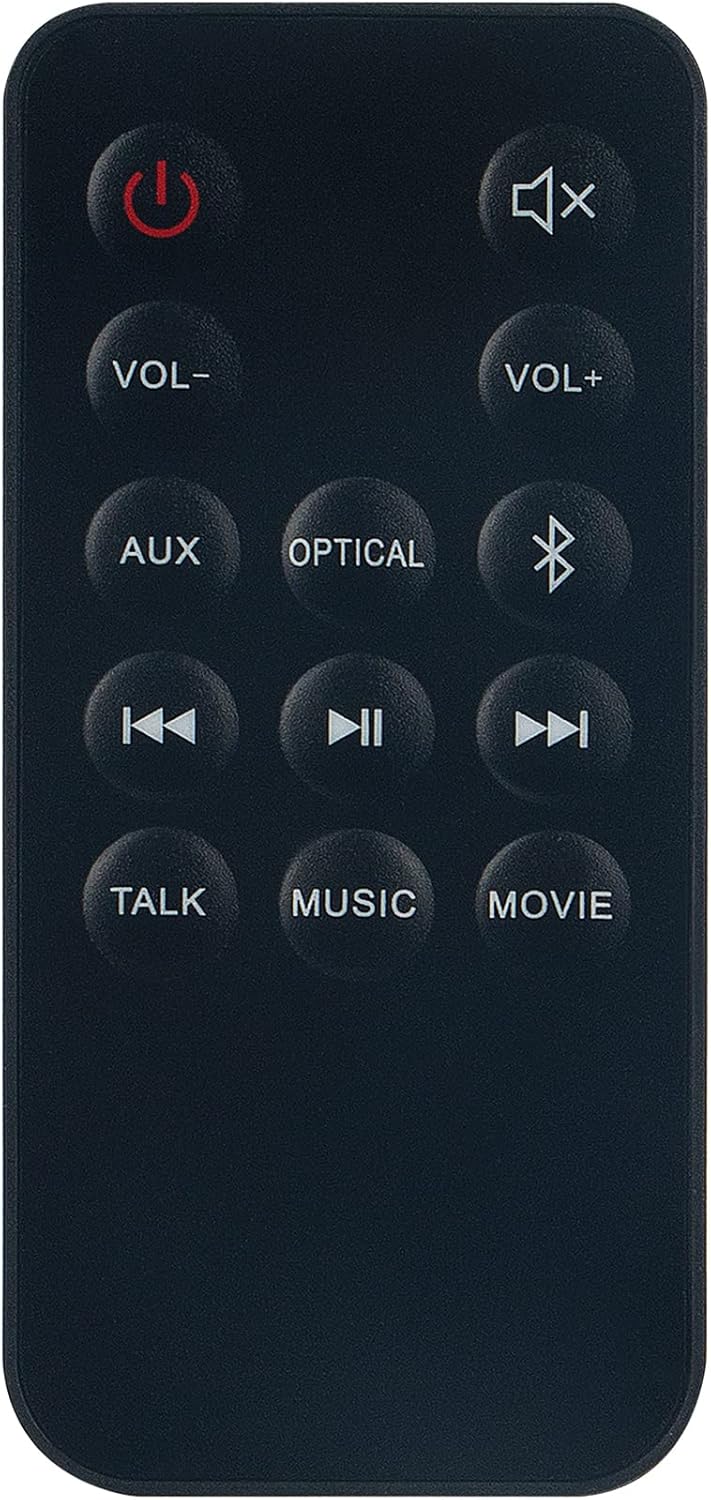
An image showing the black ZdalaMit replacement remote control with all its buttons clearly visible, including power, volume, input selection, and playback controls.
Operating Instructions
Point the remote control directly towards your Onn Soundbar. Ensure there are no obstructions between the remote and the soundbar for optimal performance.
Button Functions
| Button | Function |
|---|---|
| Power (Red Circle with Line) | Turns the soundbar on or off. |
| Mute (Speaker with X) | Mutes or unmutes the sound. |
| VOL- | Decreases the volume level. |
| VOL+ | Increases the volume level. |
| AUX | Selects the Auxiliary input source. |
| OPTICAL | Selects the Optical input source. |
| Bluetooth (BT Symbol) | Selects the Bluetooth input source. |
| Previous Track (Double Left Arrow) | Skips to the previous track (when applicable). |
| Play/Pause (Double Vertical Lines) | Plays or pauses media playback (when applicable). |
| Next Track (Double Right Arrow) | Skips to the next track (when applicable). |
| TALK | Activates Talk mode or voice enhancement (if supported by soundbar). |
| MUSIC | Selects Music sound mode (if supported by soundbar). |
| MOVIE | Selects Movie sound mode (if supported by soundbar). |
Maintenance
- Cleaning: Wipe the remote control with a soft, dry cloth. Do not use liquid cleaners or abrasive materials.
- Battery Replacement: Replace the AAA battery when the remote control's performance diminishes or stops working. Always use fresh batteries and dispose of old batteries responsibly.
- Storage: Store the remote control in a cool, dry place away from direct sunlight and extreme temperatures.
Troubleshooting
- Remote not responding:
- Ensure the remote is pointed directly at the soundbar.
- Check if the batteries are correctly installed with the correct polarity.
- Replace the batteries with fresh ones.
- Remove any obstructions between the remote and the soundbar.
- Only some buttons work:
- Verify that your soundbar model is one of the compatible models (ONA18SB001, ONA19SB003, 100004120).
- Ensure the soundbar is powered on and in a state to receive commands.
- Some functions may be specific to certain soundbar features or modes.
Specifications
| Feature | Detail |
|---|---|
| Product Dimensions | 4 x 2 x 0.5 inches |
| Item Weight | 1 ounces |
| Batteries Required | 1 AAA battery |
| Compatible Devices | Onn Soundbar models ONA18SB001, ONA19SB003, 100004120 |
| Color | Black |
| Special Feature | Ergonomic design |
Warranty and Support
For any questions, concerns, or support regarding your ZdalaMit Replacement Remote Control, please do not hesitate to contact the manufacturer or seller. Refer to your purchase documentation for specific warranty information and contact details.