
1. Introduction
Thank you for choosing the KREAFUNK aMAJOR2 Portable Bluetooth Speaker. This manual provides essential information for the proper setup, operation, and maintenance of your speaker. Please read these instructions carefully before use and retain them for future reference.

Image 1.1: Front view of the KREAFUNK aMAJOR2 Portable Bluetooth Speaker.
2. Safety Information
- Do not expose the speaker to extreme temperatures or direct sunlight for extended periods.
- Avoid dropping or subjecting the speaker to strong impacts.
- Do not disassemble, repair, or modify the speaker yourself. Contact authorized service personnel for any repairs.
- Keep the speaker away from water and liquids, despite its IPX5 rating, to prevent damage to internal components. The IPX5 rating indicates resistance to splashing water, not submersion.
- Use only the charging cable provided or a certified equivalent.
- Dispose of the battery and speaker according to local regulations. Do not dispose of batteries in fire.
3. Package Contents
Ensure all items are present in the package:
- KREAFUNK aMAJOR2 Portable Bluetooth Speaker
- Charging Cable (USB)
- User Manual (this document)
4. Product Overview
Familiarize yourself with the speaker's components and controls.

Image 4.1: Angled view of the speaker, highlighting the top control panel and leather handle.

Image 4.2: Top view of the speaker, detailing the power, volume up, and volume down buttons.
Controls:
- Power Button: Press and hold to turn the speaker on or off. Press briefly to play/pause music.
- Volume Up (+): Press to increase volume.
- Volume Down (-): Press to decrease volume.
- LED Indicator: Shows power status, charging status, and Bluetooth pairing status.
- Charging Port: Located on the back or bottom, for connecting the USB charging cable.
- Leather Handle: For convenient portability.
5. Setup
5.1 Charging the Speaker
- Connect the provided USB charging cable to the speaker's charging port.
- Connect the other end of the USB cable to a compatible USB power adapter (not included) or a computer's USB port.
- The LED indicator will show the charging status. A full charge typically takes 4-5 hours.
- Once fully charged, the LED indicator will change (refer to LED status in section 4). Disconnect the charging cable.
The speaker provides up to 30 hours of wireless play on a full charge.
5.2 Initial Bluetooth Pairing
- Ensure the speaker is fully charged.
- Press and hold the Power Button until the speaker turns on and the LED indicator begins to flash, indicating it is in pairing mode.
- On your device (smartphone, tablet, laptop), enable Bluetooth and search for available devices.
- Select "KREAFUNK aMAJOR" from the list of devices.
- Once paired, the LED indicator will stop flashing and remain solid, and you may hear a confirmation sound.
- The speaker will automatically attempt to reconnect to the last paired device when powered on.
6. Operating Instructions
6.1 Power On/Off
- To Power On: Press and hold the Power Button for approximately 2-3 seconds.
- To Power Off: Press and hold the Power Button for approximately 2-3 seconds.
6.2 Music Playback
- Play/Pause: Briefly press the Power Button.
- Volume Up: Press the (+) button.
- Volume Down: Press the (-) button.
- Next Track: (Functionality may vary by device) Typically, a long press on the (+) button or double-press on the Power button. Refer to your device's Bluetooth controls.
- Previous Track: (Functionality may vary by device) Typically, a long press on the (-) button or triple-press on the Power button. Refer to your device's Bluetooth controls.
6.3 Voice Assistant
The speaker supports voice assistant functionality. Briefly press the Power Button twice to activate your device's voice assistant (e.g., Siri, Google Assistant).
6.4 Stereo Play (Pairing Two aMAJOR2 Speakers)
To enhance your audio experience, you can pair two KREAFUNK aMAJOR2 speakers for stereo sound.

Image 6.1: Two aMAJOR2 speakers positioned for stereo audio playback.
- Ensure both aMAJOR2 speakers are charged and powered on.
- Disconnect both speakers from any previously paired Bluetooth devices.
- On one speaker (this will be your primary speaker), press and hold both the (+) and (-) buttons simultaneously for a few seconds until you hear a confirmation tone or see a specific LED pattern (refer to product documentation for exact LED behavior). This speaker is now in stereo pairing mode.
- Repeat the same step on the second speaker (secondary speaker).
- The speakers will automatically connect to each other. Once connected, the LED indicator on the primary speaker will flash slowly, and the secondary speaker's LED will be solid.
- Now, connect your device to the primary speaker via Bluetooth as described in section 5.2.
- Audio will now play in stereo through both speakers.
7. Maintenance
7.1 Cleaning
- Wipe the speaker with a soft, dry, lint-free cloth.
- Do not use abrasive cleaners, alcohol, or chemical solvents.
- Ensure the charging port is free of dust and debris.
7.2 Storage
- Store the speaker in a cool, dry place away from direct sunlight and extreme temperatures.
- If storing for an extended period, charge the battery periodically (e.g., every 3-6 months) to maintain battery health.
8. Troubleshooting
| Problem | Possible Cause | Solution |
|---|---|---|
| Speaker does not turn on. | Low battery. | Charge the speaker for 4-5 hours. |
| Cannot pair with Bluetooth device. | Bluetooth is off on device; speaker not in pairing mode; device too far. | Ensure Bluetooth is enabled on your device. Put speaker in pairing mode (flashing LED). Move device closer to speaker (within 10 meters). |
| No sound or low volume. | Volume too low on speaker or device; speaker not connected. | Increase volume on both speaker and connected device. Re-establish Bluetooth connection. |
| Sound distortion. | Volume too high; interference; low battery. | Reduce volume. Move speaker away from other electronic devices. Charge the speaker. |
| Stereo pairing not working. | Speakers not properly disconnected from other devices; incorrect pairing sequence. | Ensure both speakers are disconnected from all devices. Follow stereo pairing instructions in section 6.4 carefully. |
9. Specifications
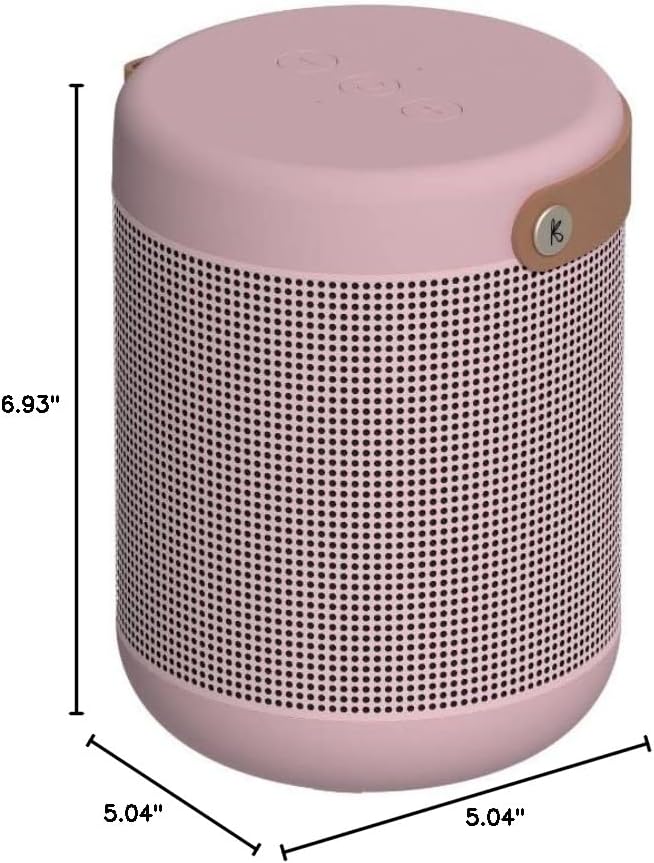
Image 9.1: Dimensions of the KREAFUNK aMAJOR2 Portable Bluetooth Speaker.
| Feature | Detail |
|---|---|
| Model Name | aMAJOR2 |
| Brand | KREAFUNK |
| Connectivity Technology | Bluetooth |
| Speaker Type | Surround Sound (when paired) |
| Special Features | Hi-Res Audio, Water Resistant (IPX5), Voice Assistant, Stereo Play |
| Recommended Uses | Indoor, Outdoor |
| Audio Output Mode | Stereo |
| Amplifier Power | 40W Digital Amplifier |
| Play Time | Up to 30 hours |
| Charging Time | 4-5 hours |
| Water Resistance Level | IPX5 (Splashproof) |
| Product Dimensions | 5.04"D x 5.04"W x 6.93"H |
| Item Weight | 3.5 Pounds (approx. 1.59 kg) |
| Battery | 1 Lithium Ion battery (included) |
| Included Components | Charging Cable |
10. Warranty and Support
10.1 Warranty Information
The KREAFUNK aMAJOR2 Portable Bluetooth Speaker comes with a 2-Year Limited Warranty. This warranty covers manufacturing defects and workmanship under normal use. It does not cover damage caused by misuse, accidents, unauthorized modifications, or normal wear and tear.
Please retain your proof of purchase for warranty claims.
10.2 Customer Support
For technical assistance, warranty claims, or further inquiries, please contact KREAFUNK customer support. Refer to the official KREAFUNK website or your product packaging for the most up-to-date contact information.
You can also visit the KREAFUNK Store on Amazon for more information: KREAFUNK Amazon Store


