
1. Introduction
Thank you for choosing the Sauder East Rock Writing Desk. This manual provides detailed instructions for the safe and efficient assembly, operation, and maintenance of your new furniture. Please read all instructions carefully before beginning assembly and retain this manual for future reference.

Image 1.1: Front view of the Sauder East Rock Writing Desk, showcasing its Ashen Oak finish and faux white marble top.
2. Safety Information
Always follow these safety guidelines to prevent injury and damage to your product:
- Two-Person Assembly: Assembly of this product is recommended with two adults to ensure safety and ease.
- Clear Workspace: Ensure your assembly area is clear of obstructions and has adequate space.
- Hardware Check: Verify all hardware is securely tightened before use and periodically thereafter. Do not overtighten.
- Weight Limits: Do not exceed the recommended weight capacity for the desk surface or storage areas.
- Proper Placement: Place the desk on a level surface to prevent wobbling and instability.
- Children Safety: Keep small parts and packaging materials away from children during assembly.
3. Package Contents
Before beginning assembly, ensure all parts and hardware are present. Refer to the included parts list and hardware diagram in your physical assembly guide. Typical contents include:
- Desk Top Panel (with faux marble finish)
- Side Panels (2)
- Back Panel
- Drawer Components (front, back, sides, bottom)
- Drawer Slides/Runners
- Open Shelf Panel
- Hardware Pack (screws, dowels, cam locks, etc.)
- Assembly Tools (e.g., Allen wrench, if required)
4. Setup and Assembly
Follow the step-by-step instructions provided in the separate assembly manual included with your product. General steps typically involve:
- Unpack all components and identify each part using the provided diagrams.
- Attach drawer slides to the side panels.
- Assemble the drawer box and install the drawer handle.
- Connect the side panels and open shelf panel to form the main frame.
- Carefully place and secure the desk top panel onto the assembled frame.
- Insert the assembled drawer into its runners.
- Attach the back panel to complete the structure.
- Ensure all connections are secure and the desk is stable.

Image 4.1: Dimensional diagram of the Sauder East Rock Writing Desk, providing key measurements for planning your space.
5. Operating Instructions
Your Sauder East Rock Writing Desk is designed for versatile use in your home or office. Here's how to best utilize its features:
5.1. Desk Surface
The spacious top surface is ideal for laptops, notebooks, and other work essentials. Its DuraGraph faux white marble accent provides a durable and elegant workspace.

Image 5.1: The writing desk positioned in a room, demonstrating its compact size and suitability for various settings.
5.2. Storage Drawer
The integrated drawer features smooth metal runners and safety stops, ensuring easy access and preventing accidental removal. It is perfect for storing pens, sticky notes, and other small office supplies.
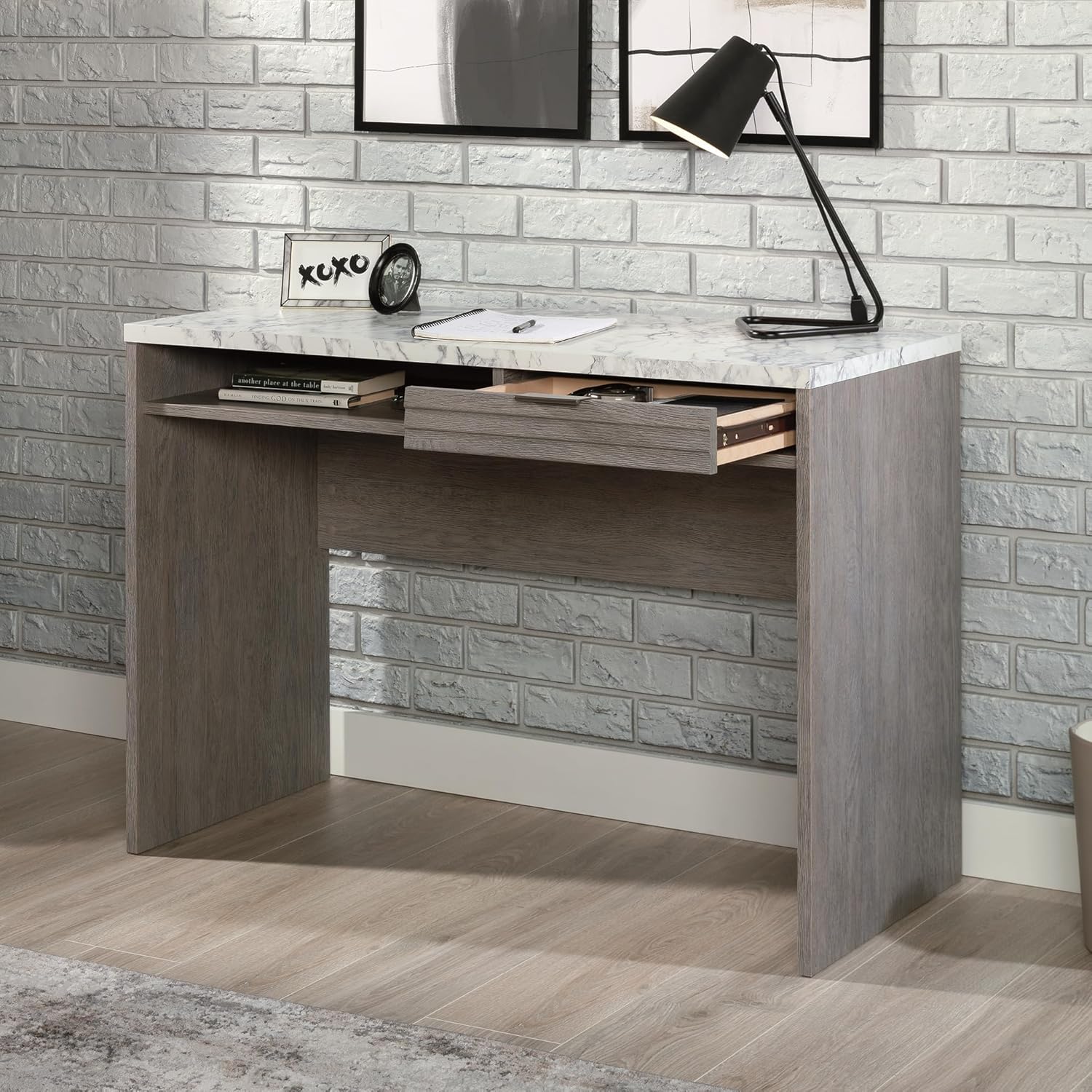
Image 5.2: The desk with its storage drawer partially open, revealing ample space for small items.

Image 5.3: A detailed view of the drawer, highlighting its louvered front design and sleek handle.
5.3. Open Shelf
An open shelf below the desk surface provides convenient storage for larger items such as laptops, books, or binders, keeping them easily accessible yet off the main workspace.

Image 5.4: A close-up of the open storage shelf, demonstrating its capacity for books and other items.
5.4. Cord Management
A discreet cord management cut-out on the back panel helps organize cables for electronic devices, maintaining a tidy and functional workspace.
6. Maintenance
To keep your Sauder East Rock Writing Desk in optimal condition, follow these maintenance tips:
- Cleaning: Wipe surfaces with a soft, damp cloth. Avoid using harsh chemicals, abrasive cleaners, or polishes that may damage the finish.
- Spills: Clean up spills immediately to prevent staining, especially on the faux marble top.
- Hardware: Periodically check and tighten all hardware connections to ensure stability. Do not overtighten.
- Sunlight: Avoid prolonged exposure to direct sunlight to prevent fading or discoloration of the finish.
7. Troubleshooting
If you encounter any issues with your desk, refer to the following common problems and solutions:
| Problem | Possible Cause | Solution |
|---|---|---|
| Desk is wobbly | Loose hardware; Uneven floor | Tighten all screws and bolts. Ensure desk is on a level surface; use shims if necessary. |
| Drawer does not slide smoothly | Misaligned drawer slides; Obstruction in runner | Check that drawer slides are correctly installed and aligned. Remove any debris from the runners. |
| Parts missing or damaged | Shipping damage; Packaging error | Contact Sauder customer support immediately for replacement parts. Do not attempt to assemble with damaged parts. |
8. Specifications
- Model Number: 431757
- Dimensions (L x W x H): 43.15" x 19.45" x 30.00"
- Item Weight: 68.1 pounds
- Finish: Ashen Oak with DuraGraph Faux White Marble accent
- Storage: 1 drawer with metal runners and safety stops, 1 open shelf
- Features: Cord management cut-out, finished on all sides
9. Warranty & Support
Your Sauder East Rock Writing Desk is backed by a 5-Year Limited Warranty. This warranty covers defects in material and workmanship under normal use. For detailed warranty information, please refer to the warranty card included with your product or visit the Sauder website.
Should you require assistance with assembly, missing parts, or have any questions, please contact Sauder Customer Support:
- Website: sauder.com/service
- Phone: 800-523-3987

Image 9.1: Sauder's Domestic Call Center is available to provide support and assistance.