
1. Product Overview
The Pomya Large Button Corded Landline Phone (Model Pomyab6gso87pg2) is designed for ease of use, particularly for individuals with visual or hearing impairments. It features large, clear buttons, amplified sound, and caller ID functionality, ensuring reliable communication.
Key Features:
- Premium Material: Constructed from durable ABS material with rounded corners for comfortable handling and wear resistance.
- Speed Dial: Easily program up to 10 groups for shortcut dialing. Press the "STORE/AUTO" button and a number to dial a stored contact.
- Large Buttons: Features oversized number buttons for clear visibility, beneficial for the elderly or those with impaired vision.
- Thunder Design: Engineered for resilience, allowing normal operation even during thunderstorms.
- Amplification Design: Includes an amplification feature, making it suitable for users with hearing impairment or in noisy environments.
- Caller ID: Supports DTMF/FSK dual-standard caller ID with automatic identification. Records up to 50 incoming calls (8 digits) or 32 incoming calls (16 digits).
- Date and Time Display: Real-time date and week display with 5 adjustable LCD brightness levels.
- Automatic Line Pickup: Automatically picks up the line if the handset is not properly hung up or forgotten.

Image 1: A person using the Pomya Large Button Corded Landline Phone.
2. Package Contents
Verify that all items listed below are included in your package:
- 1 x Corded Landline Telephone Unit
- 1 x Telephone Receiver (Handset)
- 1 x Coiled Handset Cord
- 2 x Straight Line Cords (for wall connection)
- 1 x User Manual
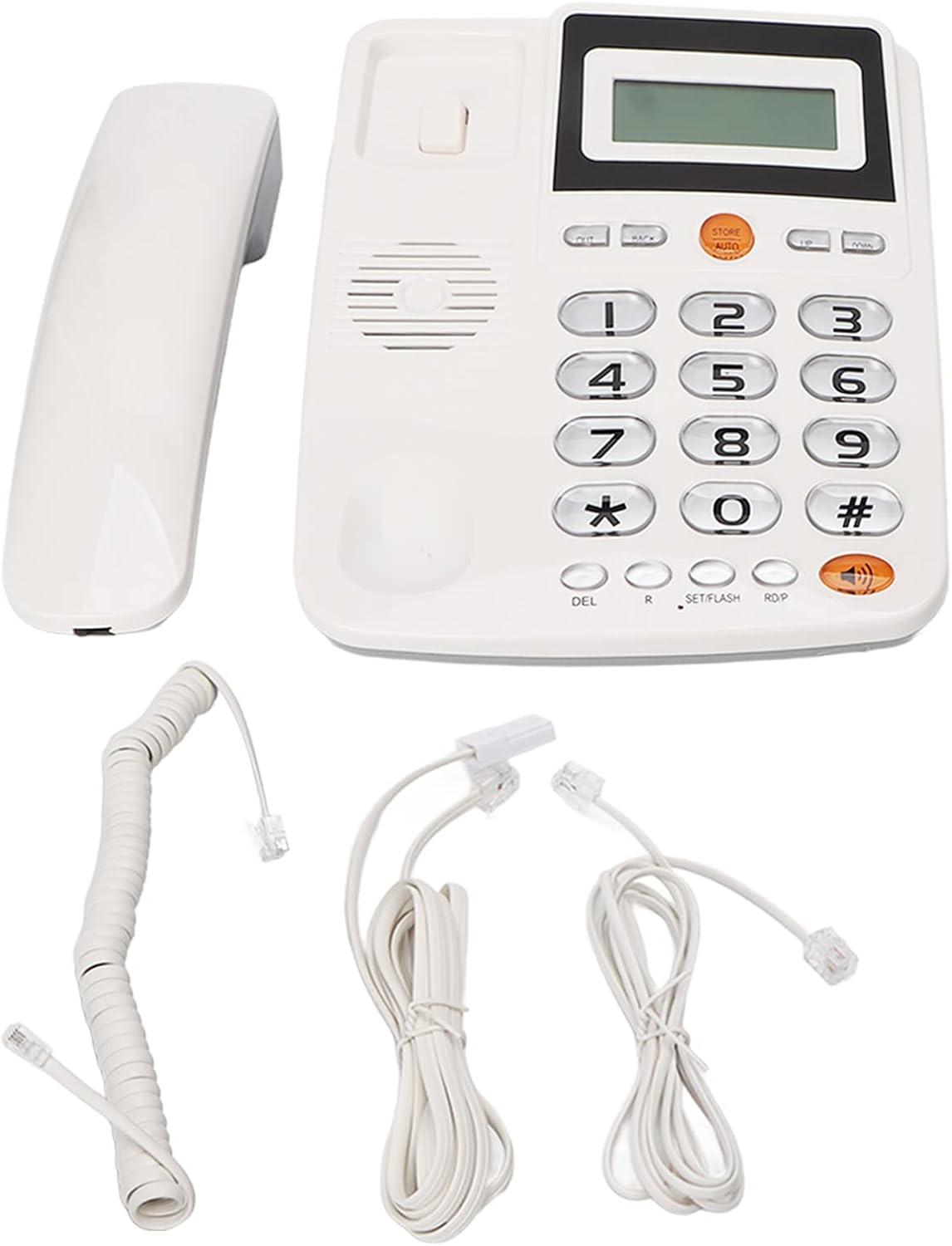
Image 2: The complete package contents, including the phone unit, handset, coiled cord, straight line cords, and manual.
3. Setup Instructions
Follow these steps to set up your Pomya Corded Landline Phone:
3.1 Connect the Handset
- Take the coiled cord.
- Connect one end of the coiled cord into the port on the bottom of the telephone handset.
- Connect the other end of the coiled cord into the port on the side of the main telephone unit, typically marked with a handset icon.

Image 3: Connecting the coiled cord to the handset.
3.2 Connect to the Telephone Line
- Take one of the straight line cords.
- Connect one end of the straight line cord into the port on the back of the main telephone unit, typically marked with a wall jack icon.
- Connect the other end of the straight line cord into your wall telephone jack.

Image 4: Connecting the straight line cord to the telephone unit.
Your phone is now ready for use. No external power supply is required as the phone is powered by the telephone line.
3.3 Setup Video Guide
Video 1: A visual guide demonstrating the unboxing and connection process for the Pomya Corded Landline Phone.
4. Operating Instructions
4.1 Making a Call
- Lift the handset.
- Listen for a dial tone.
- Dial the desired phone number using the large number buttons.
- Wait for the call to connect.
4.2 Receiving a Call
- When the phone rings, lift the handset to answer the call.
- To use the speakerphone function, press the Speaker button (often indicated by a speaker icon) instead of lifting the handset. Press it again to end the call or switch to the handset.
4.3 Speed Dial Setup (10 Groups)
The phone allows you to store up to 10 frequently called numbers for quick dialing:
- Press the STORE/AUTO button.
- Dial the phone number you wish to save.
- Press the STORE/AUTO button again.
- Press one of the number buttons (0-9) where you want to store this number.
- The number is now saved to that speed dial location.
To use speed dial: Lift the handset, then press the STORE/AUTO button followed by the stored number (0-9).

Image 5: Detail of the large number buttons and the "STORE/AUTO" button for speed dial functionality.
4.4 Ringtone Selection and Volume Adjustment
The phone features a side switch to adjust the ringtone volume between High (HI) and Low (LO). Note that setting it to HI might disable the ringtone on some units, effectively muting it. For more precise ringtone settings, refer to the on-screen menu if available, which may allow volume adjustment via the keypad.

Image 6: The side of the phone showing the HI/LO switch for ringtone volume.
4.5 Caller ID and Call History
The phone's display shows incoming caller ID information. It stores a history of incoming and outgoing calls.
- Incoming Call History: Records up to 50 groups (8 digits) or 32 groups (16 digits) of call numbers and times.
- Outgoing Call History: Records up to 14 groups (8 digits) or 8 groups (16 digits) of outgoing numbers and times.
- Missed Calls: If a call is missed, the display will show "NEW". To view missed calls, press and hold the # key for several seconds. This will display the timestamp and phone number of the missed call(s). Remember to clear missed call notifications to ensure new ones are properly indicated.

Image 7: The phone's display showing caller ID and other information.
5. Maintenance
To ensure the longevity and optimal performance of your phone:
- Cleaning: Wipe the phone's surface with a soft, damp cloth. Avoid using harsh chemicals or abrasive cleaners.
- Placement: Place the phone on a stable, flat surface away from direct sunlight, heat sources, and excessive moisture.
- Cord Care: Avoid tangling or excessive pulling of the coiled and line cords to prevent damage.
6. Troubleshooting
If you encounter issues with your phone, refer to the following common solutions:
| Problem | Possible Cause | Solution |
|---|---|---|
| No dial tone or cannot make/receive calls. | Loose cable connections or issue with the telephone line. | Ensure all cords (handset and line cord) are securely plugged into their respective ports and the wall jack. Test the wall jack with another phone if possible. |
| Ringtone is too loud or too quiet/silent. | Ringtone volume switch setting. | Adjust the HI/LO switch on the side of the phone. Note that setting it to HI might mute the ringtone on some units. If available, use the phone's menu to adjust ringtone volume via the keypad. |
| Speakerphone volume is too loud. | No direct volume control for the speaker. | Consider placing a small object (e.g., a business card) over the speaker opening to slightly muffle the sound if it's consistently too loud. |
| "NEW" indicator for missed calls doesn't clear or shows old missed calls. | Missed call history not cleared. | After viewing missed calls by holding the # key, ensure the notification is cleared. If it persists, you may need to briefly disconnect and reconnect the phone line to reset the display. |
| Caller ID not displaying. | Caller ID service not active or phone line issue. | Ensure you have Caller ID service enabled with your telephone provider. Check all connections. |
7. Specifications
| Feature | Detail |
|---|---|
| Brand | Pomya |
| Model Number | Pomyab6gso87pg2 |
| Item Weight | 1.43 pounds |
| Package Dimensions | 8.66 x 8.54 x 2.56 inches |
| Power Source Type | Corded Electric (Line Powered) |
| Caller ID Standard | DTMF FSK Dual Standard |
| Incoming Call Record Capacity | 50 groups (8 digits) or 32 groups (16 digits) |
| Outgoing Call Record Capacity | 14 groups (8 digits) or 8 groups (16 digits) |
| LCD Brightness | Level 5 Adjustable |
| Flash Time Options | 90, 95, 100, 120, 180, 300, 600, 1000ms (Software Optional) |
8. Warranty and Support
For warranty information and customer support regarding your Pomya Large Button Corded Landline Phone (Model Pomyab6gso87pg2), please refer to the documentation included in your product packaging or contact Pomya customer service directly. Contact details can typically be found on the manufacturer's website or in the provided user manual.