Product Overview
This CHUNGHOP remote control is designed as a direct replacement for various VIZIO Home Theater Soundbar Speaker Systems. It offers immediate functionality without the need for complex programming or setup, providing a convenient solution if your original remote is lost or damaged.
Key features include:
- Direct Compatibility: Specifically designed for VIZIO soundbar models such as SB4021M-B1, SB4020M-B0, SB4021M-A1, SB4021M, SB4020M-A0, SB4021E-A0, SB4021E-B0.
- No Programming Required: Ready to use right out of the box after battery installation.
- Responsive Performance: Equipped with an intelligent and upgraded chip for quick command execution.
- Ergonomic Design: Lightweight and comfortable to hold for extended use.
- Durable Construction: Made from high-quality ABS material for longevity.

Image: Front and back view of the CHUNGHOP remote control, showcasing its sleek black design and button layout on the front, and the battery compartment on the back.
Setup
Battery Installation
The remote control requires two (2) AAA batteries (not supplied). Follow these steps to install them:
- Locate the battery compartment on the back of the remote control.
- Press down on the latch and slide the battery cover downwards to open it.
- Insert two AAA batteries, ensuring the positive (+) and negative (-) terminals align correctly with the markings inside the compartment.
- Slide the battery cover back into place until it clicks securely.
Once batteries are installed, the remote is ready for immediate use with compatible VIZIO soundbar systems. No pairing or programming is required.

Image: A visual guide illustrating the battery compartment of the remote control and the correct orientation for inserting two AAA batteries.
Operating Instructions
This remote control provides intuitive access to your VIZIO soundbar's functions. Ensure a clear line of sight between the remote's infrared emitter and the soundbar's receiver for optimal performance.
Button Functions:
- Power Button (⏻): Turns the soundbar on or off.
- Volume Up (+): Increases the soundbar's volume.
- Volume Down (-): Decreases the soundbar's volume.
- Mute: Toggles sound on or off.
- Input: Cycles through available audio input sources (e.g., HDMI, Optical, Bluetooth).
- Menu: Accesses the soundbar's on-screen menu for settings adjustments.
- Playback Controls (⏸, ⏮, ⏭): Play/Pause, Skip Back, Skip Forward for media playback (functionality may vary based on soundbar model and connected device).

Image: The remote control highlighting its ease of use and the integrated smart chip for efficient operation.
Maintenance
Battery Replacement
Replace batteries when the remote's responsiveness decreases or it stops functioning. Always replace both batteries at the same time with new AAA batteries. Do not mix old and new batteries, or different types of batteries.
Cleaning
To clean the remote control, gently wipe its surface with a soft, dry cloth. For stubborn dirt, a slightly damp cloth can be used, followed by a dry cloth. Avoid using abrasive cleaners, solvents, or excessive moisture, as these can damage the remote's finish or internal components.
Storage
When not in use for extended periods, it is recommended to remove the batteries to prevent leakage, which could damage the remote.
Troubleshooting
| Problem | Possible Cause | Solution |
|---|---|---|
| Remote not responding. | Dead or incorrectly installed batteries. Obstruction between remote and soundbar. Remote out of range. | Replace batteries with new AAA batteries, ensuring correct polarity. Remove any obstructions. Move closer to the soundbar. |
| Buttons are unresponsive or sticky. | Dirt or debris under buttons. | Clean the remote's surface. If problem persists, internal damage may be present. |
| Remote works intermittently. | Low battery power. Weak signal due to interference or distance. | Replace batteries. Ensure clear line of sight. Reduce distance to soundbar. |

Image: A visual representation of the remote control's effective long-distance operation, highlighting its stable performance even from across a room.
Specifications
| Feature | Detail |
|---|---|
| Brand | CHUNGHOP |
| Model Number | SB4021M Remote |
| Compatible Devices | VIZIO Home Theater Soundbar Speaker Systems: SB4021M-B1, SB4020M-B0, SB4021M-A1, SB4021M, SB4020M-A0, SB4021E-A0, SB4021E-B0, etc. |
| Connectivity Technology | Infrared |
| Power Source | 2 x AAA Batteries (Not Included) |
| Item Weight | 1.44 ounces (approx. 40.8 grams) |
| Package Dimensions | 4.49 x 2.09 x 0.87 inches (approx. 11.4 x 5.3 x 2.2 cm) |
| Special Feature | Ergonomic Design |
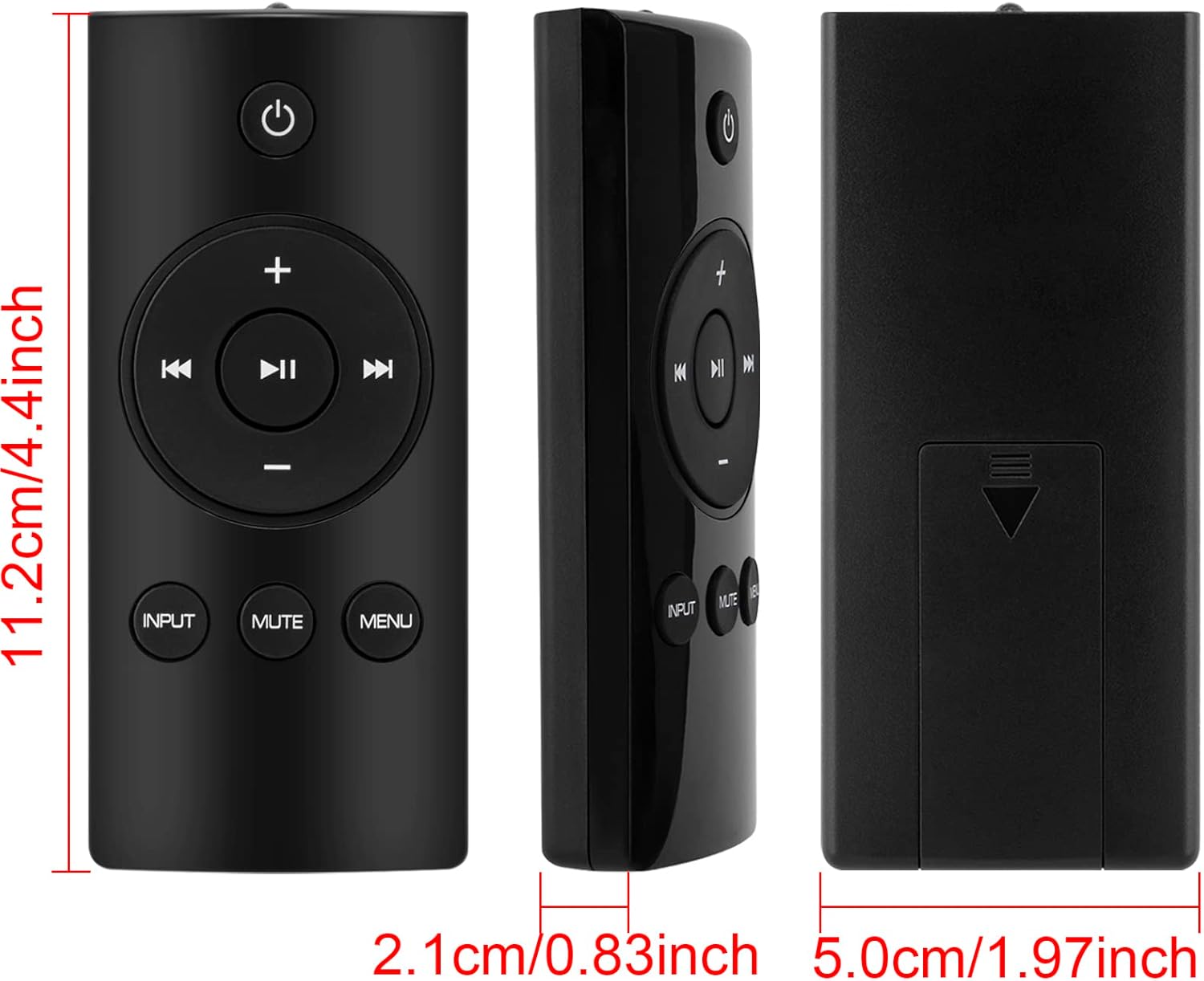
Image: Detailed measurements of the remote control, indicating its length, width, and thickness in both centimeters and inches.
Warranty and Support
Specific warranty information for this CHUNGHOP remote control is not provided within this manual. For details regarding warranty coverage, technical support, or service inquiries, please refer to the official CHUNGHOP website or contact their customer service directly.
You may also find additional support resources by visiting the CHUNGHOP Store on Amazon.


