1. Introduction
This manual provides detailed instructions for the setup, operation, and maintenance of your Desobry Portable Bluetooth CD Player. Please read this manual thoroughly before use to ensure proper functionality and to keep it for future reference.
2. Package Contents
Verify that all items listed below are included in your package:
- 1 x Desobry Portable Bluetooth CD Player
- 1 x Remote Control
- 1 x USB to Type-C Charging Cable
- 1 x USB Power Adapter
- 1 x 3.5mm AUX Cable
- 1 x Wall-Mounted Plate
- 1 x Desk Stand
- 1 x Pack of Screws (for wall mounting)
- 1 x User Manual

Figure 2.1: Contents included in the Desobry CD Player package.
3. Product Overview & Features
The Desobry Portable Bluetooth CD Player is a versatile audio device designed for various listening environments. It features:
- Rechargeable Battery: Built-in Lithium Polymer battery (2000mAh) provides 4-5 hours of playback on a full charge (approx. 4 hours charging time).
- Bluetooth Connectivity: Functions as a Bluetooth speaker, allowing wireless audio streaming from smartphones, computers, and tablets.
- Multi-functional Playback: Supports CD, CDR, HDCD, MP3, and WMA formats. Includes FM radio (76MHz-108MHz), USB flash drive playback, and 3.5mm AUX input/output.
- Integrated Speakers & Display: Features dual stereo speakers and a front LED display for clear indication of playback mode, volume, and track information.
- Flexible Placement: Designed for both desktop use with an included stand and wall mounting with a provided plate and screws.
- Convenient Control: Operable via on-device buttons or the included remote control.
- Dust Cover: A protective dust cover shields the CD from environmental elements.

Figure 3.1: Front view of the Desobry Portable Bluetooth CD Player.
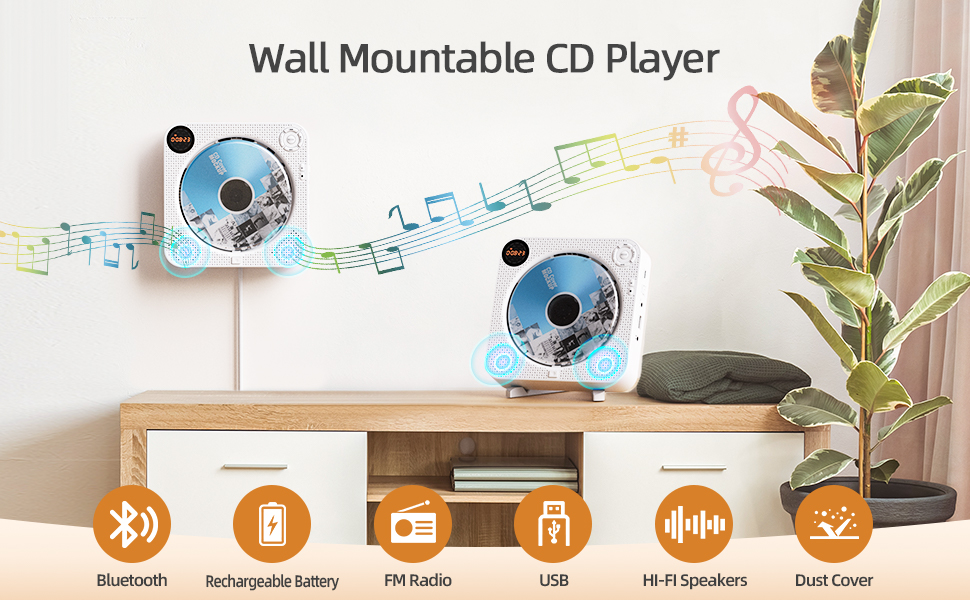
Figure 3.2: Key features of the CD player including Bluetooth, rechargeable battery, FM radio, USB, Hi-Fi speakers, and dust cover.
Video 3.1: An overview of the portable CD player's features and functionality, demonstrating its various modes and uses.
4. Setup
4.1 Charging the Device
The CD player comes with a built-in rechargeable battery. To charge:
- Connect the USB to Type-C charging cable to the DC IN 5V port on the side of the CD player.
- Plug the USB end of the cable into the provided USB power adapter.
- Plug the adapter into a standard wall outlet.
- The device takes approximately 4 hours to fully charge. A full charge provides 4-5 hours of playback.

Figure 4.1: The CD player connected to a power source for charging, showing the indicator light.
4.2 Powering On/Off
Locate the POWER switch on the side of the device. Slide it to the 'ON' position to power on, and 'OFF' to power off.
4.3 Mounting Options
The CD player offers two placement options:
- Desktop Use: Attach the provided desk stand to the back of the CD player for stable placement on any flat surface.
- Wall Mounting: Use the provided wall-mounted plate and screws to securely attach the player to a wall.
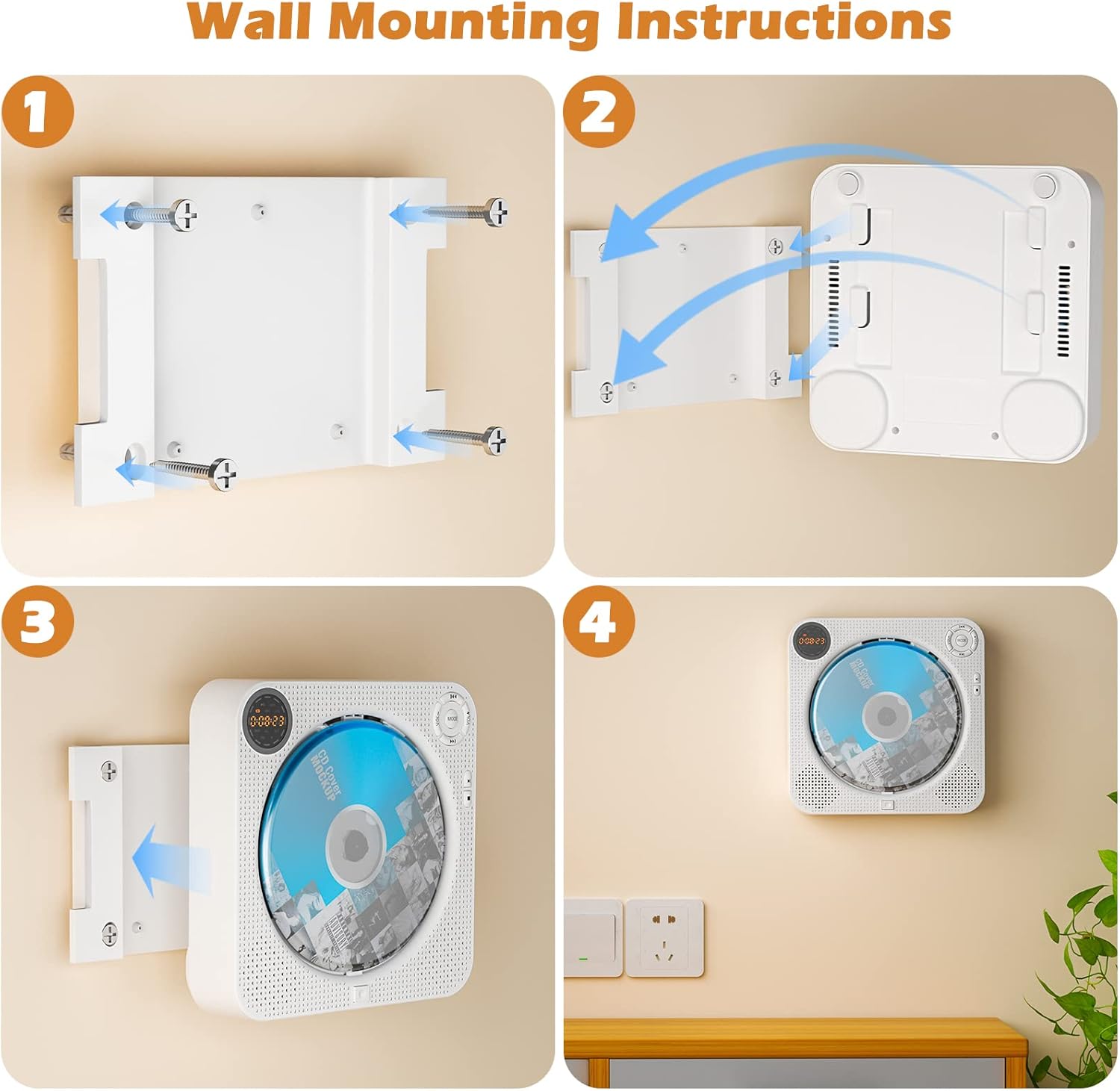
Figure 4.2: Step-by-step guide for wall mounting the CD player.
5. Operating Instructions
5.1 CD Playback
- Press the EJECT button on the front bottom of the player to open the disc cover.
- Carefully place a CD (CD, CDR, HDCD, MP3, WMA format) onto the spindle, ensuring it is seated correctly.
- Close the disc cover. The player will automatically detect the disc and begin playback.
- Use the Play/Pause, Previous/Next Track, and Volume buttons on the device or remote control to manage playback.
5.2 Bluetooth Mode
- Press the 'MODE' button on the device or remote until 'BT' appears on the LED display.
- Enable Bluetooth on your external device (smartphone, tablet, computer).
- Search for 'Desobry CD Player' in your device's Bluetooth settings and pair.
- Once connected, audio from your external device will play through the CD player's speakers.

Figure 5.1: The CD player operating in FM Radio mode and connected via Bluetooth to a smartphone.
5.3 FM Radio Mode
- Press the 'MODE' button on the device or remote until 'FM' appears on the LED display.
- Use the Previous/Next Track buttons to scan for radio stations.
- The FM radio range is 76MHz-108MHz.
5.4 USB Playback
- Insert a USB flash drive containing MP3/WMA audio files into the 'USB IN' port on the side of the player.
- Press the 'MODE' button until 'USB' appears on the LED display.
- The player will automatically begin playing audio files from the USB drive.
5.5 AUX Input/Output
- AUX Input: Connect an external audio source (e.g., car audio system, non-Bluetooth device) to the 'AUX IN' port using the provided 3.5mm AUX cable. Select 'AUX' mode using the 'MODE' button.
- Headphone Jack: Plug wired headphones into the 3.5mm headphone jack for private listening.
5.6 Play Modes & EQ Settings
The player supports various play modes and 5 sound effects:
- Play Modes: Play in order, A-B repeat, Repeat all, Random play, Repeat 1. Select using the 'REPEAT' button on the remote.
- EQ Sound Effects: POP, JAZZ, ROCK, CLASSIC, FLAT. Select using the 'EQ' button on the remote.

Figure 5.2: Visual representation of supported CD formats, multiple play modes, and 5 EQ sound effects.
6. Maintenance
To ensure the longevity and optimal performance of your CD player:
- Keep the device clean and free from dust. The integrated dust cover helps protect the disc mechanism.
- Use a soft, dry cloth to clean the exterior. Avoid abrasive cleaners or solvents.
- Handle CDs by their edges to prevent scratches and fingerprints.
- Store the device in a cool, dry place when not in use.
7. Troubleshooting
If you encounter any issues, refer to the following common solutions:
- No Disc / Disc Read Error: Ensure the CD is clean, free of scratches, and correctly placed on the spindle. Try a different CD to rule out disc damage.
- No Sound: Check the volume level on both the CD player and any connected external devices. Ensure headphones are properly plugged in if used. Verify the correct mode (CD, BT, FM, AUX, USB) is selected.
- Bluetooth Pairing Issues: Ensure the CD player is in Bluetooth mode and discoverable. Turn off and on Bluetooth on your external device and try pairing again. Make sure no other devices are currently connected to the CD player.
- Remote Control Not Working: Check the battery in the remote control. Ensure there are no obstructions between the remote and the player.
- Battery Not Charging: Verify that the charging cable and adapter are securely connected and the power outlet is functional.
For persistent issues, please contact customer support.
8. Specifications
| Feature | Specification |
|---|---|
| Product Dimensions | 6.5 x 6.5 x 1.6 inches |
| Item Weight | 1.1 pounds |
| ASIN | B0BW3KF15W |
| Batteries | 1 Lithium Polymer battery required (included) |
| Connectivity Technology | Bluetooth, USB |
| Special Feature | Portable |
| FM Radio Range | 76MHz-108MHz |
| Supported CD Formats | CD, CDR, HDCD, MP3, WMA |
9. Warranty & Support
Your Desobry CD Player comes with a commitment to quality. If you encounter any problems with this wall CD player, please contact us. We are dedicated to providing a positive solution within 24 hours.


