
NineSky CT2
NineSky Dehumidifier Model CT2 User Manual
Model: CT2 | Brand: NineSky
1. Introduction
This manual provides detailed instructions for the safe and efficient operation of your NineSky Dehumidifier Model CT2. Please read this manual thoroughly before using the appliance and retain it for future reference. This dehumidifier is designed to reduce excess moisture in areas up to 800 square feet, such as bedrooms, basements, and bathrooms, helping to create a more comfortable and healthier environment.

Image 1.1: NineSky Dehumidifier Model CT2. This image shows the front view of the black NineSky dehumidifier with its control panel and a visible water tank window.
2. Product Overview
2.1 Key Features
- Coverage Area: Up to 800 sq.ft.
- Water Tank Capacity: 95 Fluid Ounces (approximately 70 OZ as per product title).
- Dehumidification Capacity: Up to 34 oz/day (tested at 86°F, 80% RH).
- Operating Modes: Day Mode (Fast Dehumidification) and Night Mode (Sleep Mode with light off).
- LED Light: 7-color ambient light with multiple options.
- Auto Shut-Off: Automatically turns off when the water tank is full.
- Technology: Dual Semiconductors for efficient moisture removal.
2.2 Components
Familiarize yourself with the main components of your dehumidifier:
- Control Panel (Power button, Mode button, Light button)
- Air Inlet (rear or side)
- Air Outlet (top or side)
- Water Tank
- Power Cord

Image 2.1: Internal view of the NineSky Dehumidifier's dual semiconductor technology. This diagram illustrates how air flows through the unit, showing two semiconductor cooling elements and the water collection tank below, indicating a dehumidification capacity of 34 oz/day and a tank capacity of 95 oz.
3. Setup
3.1 Unpacking
Carefully remove the dehumidifier from its packaging. Inspect the unit for any signs of damage. Retain the packaging materials for future storage or transport.
3.2 Placement
For optimal performance, place the dehumidifier on a flat, stable surface. Ensure there is at least 8 inches (20 cm) of clear space around the air inlet and outlet to allow for proper airflow. Avoid placing the unit near heat sources, in direct sunlight, or in areas where it might be exposed to splashing water.
The dehumidifier is suitable for use in various rooms, including bedrooms, basements, and bathrooms. Consider the dimensions of the unit when choosing a location:
- Product Dimensions: 5.5"D x 8.3"W x 14"H
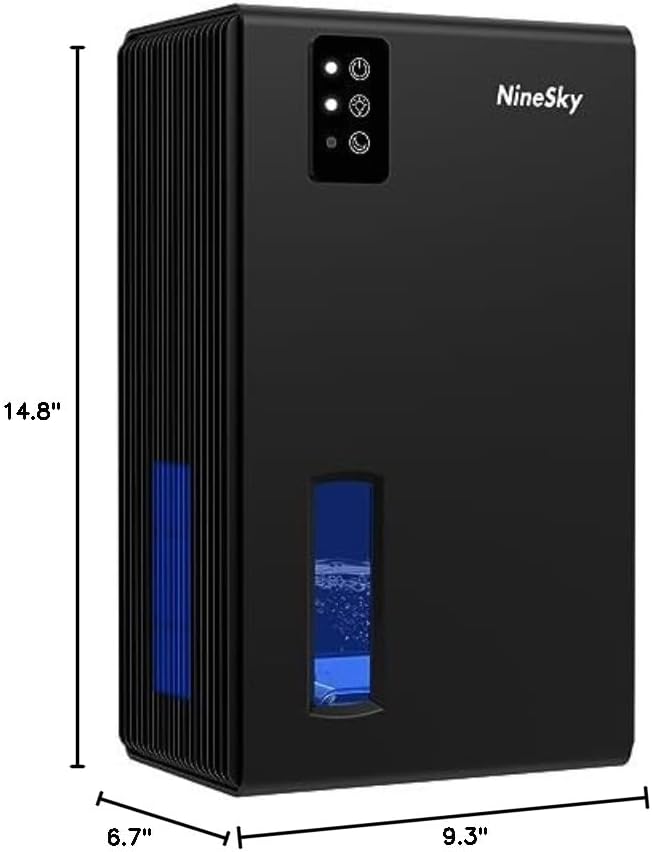
Image 3.1: Dimensions of the NineSky Dehumidifier. This image displays the dehumidifier with measurements indicating its height (14.8"), width (9.3"), and depth (6.7").
3.3 Power Connection
Plug the power cord into a suitable electrical outlet. Ensure the voltage matches the specifications listed on the product label.
4. Operating Instructions
4.1 Control Panel Overview
The control panel features three main buttons:
- Power Button: Turns the unit On/Off.
- Mode Button: Switches between Day Mode and Night Mode.
- Light Button: Controls the 7-color LED ambient light.

Image 4.1: NineSky Dehumidifier showing the control panel and two working modes. This image highlights the control buttons and explains the Day Mode for fast dehumidification (30-40db) and Night Mode for quiet operation with lights off (<30db).
4.2 Power On/Off
Press the Power Button once to turn the dehumidifier on. Press it again to turn the unit off.
4.3 Selecting Operating Mode
Press the Mode Button to cycle between the available modes:
- Day Mode: Provides fast dehumidification. The fan operates at a higher speed, resulting in a noise level of approximately 30-40 dB.
- Night Mode (Sleep Mode): Designed for quiet operation, typically with the ambient light turned off. The fan speed is reduced, and the noise level is generally below 30 dB.
4.4 LED Ambient Light Control
The dehumidifier features a 7-color LED ambient light. Press the Light Button to control its operation:
- First Press: Activates the 7-color light cycle.
- Second Press: Locks the light on the currently displayed color.
- Third Press: Turns the ambient light off.
- Fourth Press: Restarts the 7-color light cycle.
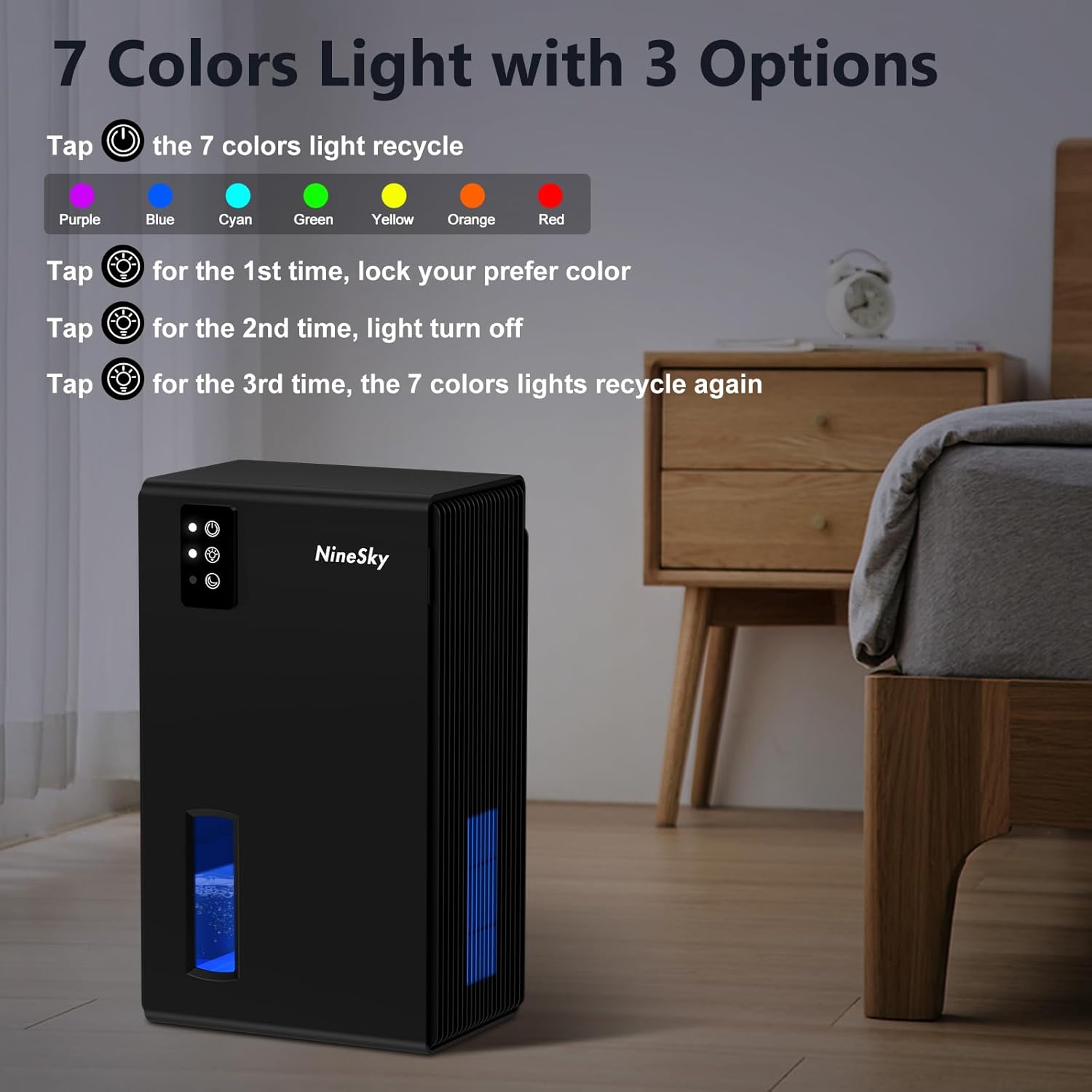
Image 4.2: NineSky Dehumidifier demonstrating the 7-color LED light options. This image shows the dehumidifier in a bedroom setting, with the control panel indicating how to cycle through colors, lock a color, or turn the light off.
4.5 Water Tank Management
The dehumidifier will automatically shut off when the water tank is full. The full tank indicator light (if present, typically on the control panel) will illuminate. To empty the tank:
- Carefully pull out the water tank from the unit.
- Pour out the collected water.
- Reinsert the empty water tank firmly into the dehumidifier. Ensure it is properly seated to resume operation.
For continuous drainage, if your model supports it, connect a suitable hose (not included) to the continuous drainage port and direct it to a floor drain or larger container. Refer to the product's physical ports for this feature.
5. Maintenance
Regular maintenance ensures optimal performance and extends the lifespan of your dehumidifier.
5.1 Cleaning the Water Tank
Clean the water tank regularly, especially if you notice any mold or mildew growth. Use mild soap and warm water. Rinse thoroughly and dry before reinserting.
5.2 Cleaning the Air Filter (if applicable)
While not explicitly detailed in the product information, most dehumidifiers have an air filter that should be cleaned periodically (e.g., every 2-4 weeks) to prevent dust buildup and maintain efficiency. If your model has a removable filter, gently remove it, clean it with a vacuum cleaner or wash it with warm, soapy water, rinse, and dry completely before reinstalling.
5.3 Exterior Cleaning
Wipe the exterior of the unit with a soft, damp cloth. Do not use abrasive cleaners or solvents.
5.4 Storage
If storing the dehumidifier for an extended period, ensure the water tank is empty and clean. Clean the unit's exterior and filter. Store it in a dry, upright position, preferably in its original packaging.
6. Troubleshooting
Before contacting support, review the following common issues and solutions:
| Problem | Possible Cause | Solution |
|---|---|---|
| Dehumidifier does not turn on. |
|
|
| Unit is running but not collecting water. |
|
|
| Unusual noise or grinding sound. |
|
|
| LED light not working as expected. |
|
|

Image 6.1: Visual representation of dampness problems solved by the NineSky Dehumidifier. This image shows various issues like furniture damage, damp walls, musty odors, moldy floors, mirror mist, and damp clothes, indicating the dehumidifier's role in improving indoor air quality.
7. Specifications
| Feature | Detail |
|---|---|
| Brand | NineSky |
| Model Name | CT2 |
| Floor Area Coverage | 800 Square Feet |
| Color | Silver (Note: Product image shows black/zinc yellow, but specifications list silver. User should refer to their specific product color.) |
| Capacity (Weight) | 5.9 Pounds |
| Tank Volume | 95 Fluid Ounces |
| Product Dimensions | 5.5"D x 8.3"W x 14"H |
| Recommended Uses | Bathroom, Home |
| Item Weight | 2.69 Kilograms (5.92 pounds) |
| Operation Mode | Standard |
| Dehumidification Capacity | 1 Liters per Day (approx. 34 oz/day) |
| ASIN | B0BW3J4T44 |
8. Warranty and Support
NineSky provides a warranty for its products. The specific terms and duration of the warranty may vary. Please refer to the warranty card included with your product or contact the retailer from whom you purchased the dehumidifier for detailed warranty information.
For technical support or assistance with product issues, it is recommended to first contact the retailer or platform where the purchase was made. They can often provide initial troubleshooting or guide you through the warranty claim process.
When contacting support, please have your model number (CT2) and purchase information readily available.
Related documentsCT2

Ask a question about this manual
Ask about setup, troubleshooting, compatibility, parts, safety, or missing instructions. Manuals+ will review the question and use this page’s manual context to help answer it.