
1. Introduction
Thank you for choosing the Caline Salhanas Distortion CP-501S Guitar Effect Pedal. This pedal is designed to deliver a powerful, versatile distortion sound, emulating the characteristics of a cranked British 100-watt amplifier stack. It is suitable for a wide range of genres, from blues to various metal styles.
This manual provides essential information for the proper setup, operation, and maintenance of your Salhanas Distortion pedal. Please read it thoroughly before use to ensure optimal performance and longevity of your device.

Figure 1: Front view of the Caline Salhanas Distortion CP-501S pedal.
2. Safety Information
To prevent electric shock, short circuit, damage, fire, or other hazards, always observe the following basic precautions:
- Power Supply: Use only a 9V DC center-negative power adapter. The power supply is not included with the pedal. Using an incorrect power adapter can damage the unit and void the warranty.
- Do Not Open: Do not open the pedal casing or attempt to modify the internal components. There are no user-serviceable parts inside.
- Water and Moisture: Do not expose the unit to rain, use it near water, or in damp or wet conditions.
- Heat Sources: Keep the unit away from heat sources such as radiators, heat registers, stoves, or other apparatus (including amplifiers) that produce heat.
- Cleaning: Clean only with a dry cloth.

Figure 2: Important notice regarding power supply requirements.
3. Setup
Follow these steps to connect your Caline Salhanas Distortion pedal to your guitar and amplifier:
- Connect Guitar: Plug one end of a standard 1/4-inch instrument cable into your guitar and the other end into the IN jack on the right side of the Salhanas pedal.
- Connect Amplifier: Plug one end of another 1/4-inch instrument cable into the OUT jack on the left side of the Salhanas pedal and the other end into your amplifier's input.
- Connect Power: Connect a 9V DC center-negative power adapter (not included) to the DC 9V input jack on the top of the pedal. Ensure the power adapter is plugged into a suitable power outlet.
- Power On: Once all connections are secure, turn on your amplifier. The pedal is now ready for use.

Figure 3: Angled view showing the input (right) and output (left) jacks.
4. Controls and Functions
The Salhanas Distortion pedal features a straightforward three-knob control layout for intuitive sound shaping:
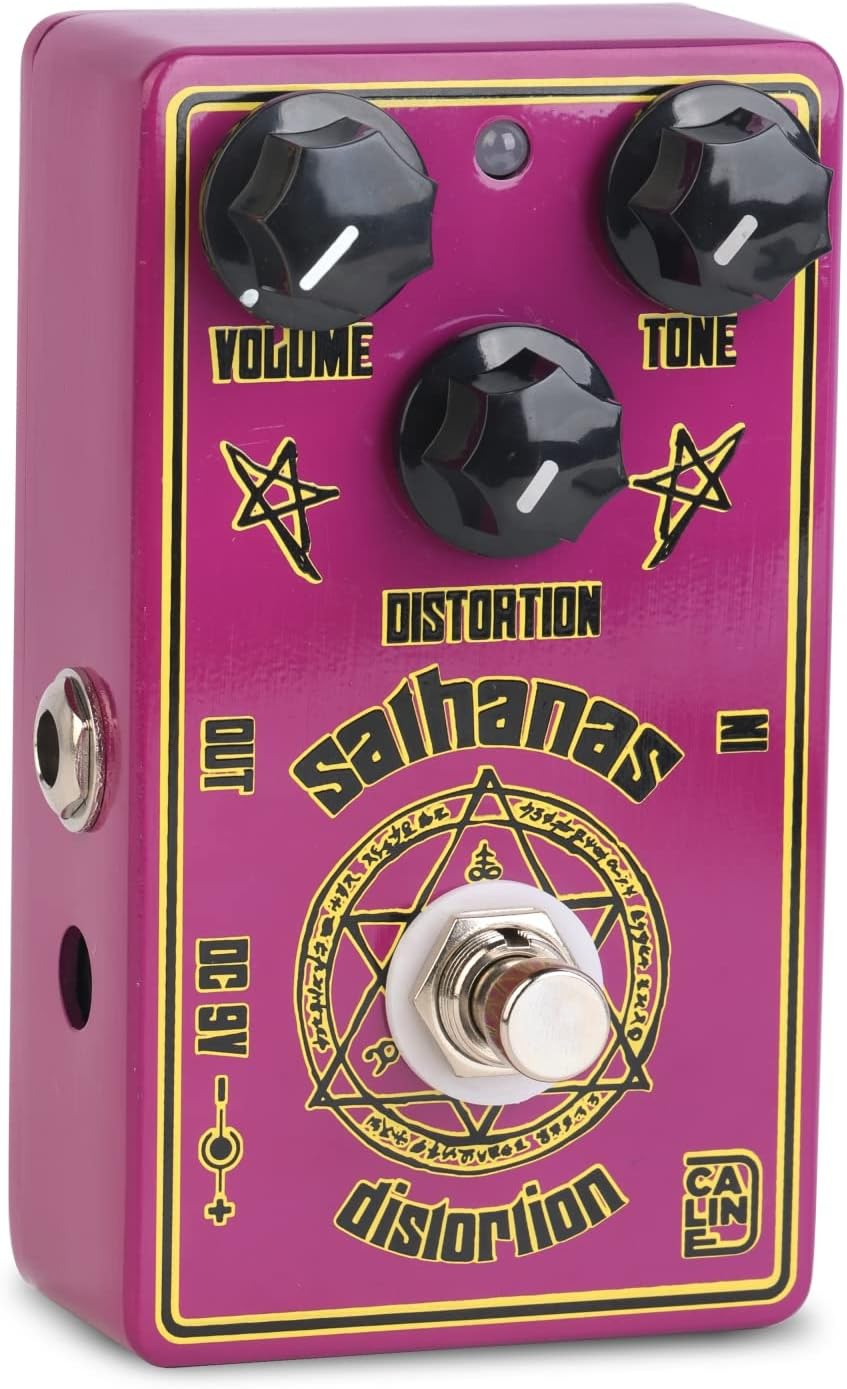
Figure 4: Top view highlighting the control knobs.
- VOLUME Knob: Controls the overall output level of the pedal. Turn clockwise to increase volume, counter-clockwise to decrease. This control can also provide a significant boost for solos.
- TONE Knob: Adjusts the tonal character of the distortion. Turning it clockwise will increase treble and brightness, while turning it counter-clockwise will result in a darker, warmer tone. This control is voiced to work effectively across a wide range of guitar and amplifier setups.
- DISTORTION Knob: Determines the amount of gain and saturation. Turn clockwise for more aggressive, high-gain distortion, and counter-clockwise for lighter crunch or overdrive. This control ranges from Texas blues crunch to full-on thrash and metal tones.
- Footswitch: A true bypass footswitch that engages or disengages the effect. When the effect is engaged, the LED indicator will illuminate.
- LED Indicator: Illuminates when the effect is active.
5. Operating Instructions
The Caline Salhanas Distortion pedal is designed for ease of use. Experiment with the controls to find your desired sound:
- Start with Moderate Settings: Begin with the VOLUME and TONE knobs at the 12 o'clock position, and the DISTORTION knob at a lower setting (e.g., 9 o'clock).
- Engage the Effect: Press the footswitch to activate the distortion. The LED will light up.
- Adjust Distortion: Slowly turn the DISTORTION knob clockwise to increase the gain. Listen to how the sound changes from a subtle crunch to a heavy, saturated distortion.
- Shape the Tone: Use the TONE knob to brighten or darken your sound. Adjust it to complement your guitar's pickups and amplifier's characteristics.
- Set Volume: Adjust the VOLUME knob to match the bypassed signal level or to boost your signal for solos.
- Experiment: The Salhanas is highly versatile. Try different combinations of the DISTORTION and TONE knobs to achieve sounds ranging from classic rock to modern metal. It can also be used to push a dirty tube amp further into saturation.
Video 1: Demonstration of the Caline Salhanas Distortion Guitar Effect Pedal. This video showcases the pedal's sound characteristics and control adjustments.
6. Maintenance
Proper care will ensure your pedal remains in excellent condition:
- Cleaning: Use a soft, dry cloth to clean the exterior of the pedal. Do not use liquid cleaners, abrasive cleaners, or solvents.
- Storage: When not in use for extended periods, disconnect the power supply and store the pedal in a cool, dry place away from direct sunlight and extreme temperatures.
- Connections: Periodically check all cable connections for wear and tear. Replace damaged cables to prevent signal loss or noise.
7. Troubleshooting
If you encounter issues with your Salhanas Distortion pedal, try the following:
- No Sound:
- Ensure the power supply is correctly connected and is a 9V DC center-negative adapter.
- Check all instrument cables. Try swapping them with known working cables.
- Verify your guitar and amplifier are working correctly.
- Ensure the footswitch is engaged (LED illuminated).
- Weak or Distorted Sound (unintended):
- Check the power supply. Insufficient power can cause poor performance.
- Ensure all cables are fully inserted into their jacks.
- Adjust the VOLUME and DISTORTION knobs.
- Excessive Noise/Hum:
- Ensure you are using a regulated power supply designed for guitar pedals. Unregulated power supplies can introduce noise.
- Check for ground loops in your setup.
- Move the pedal away from other electronic devices that might cause interference.
- Ensure your guitar's electronics are properly shielded.
If problems persist, contact your retailer or Caline customer support for further assistance.
8. Specifications
| Model | CP-501S |
| Effect Type | Distortion |
| Power Requirement | 9V DC center-negative (not included) |
| Current Draw | 50mA |
| Input Impedance | 1/4-inch Mono Audio Jack |
| Output Impedance | 1/4-inch Mono Audio Jack |
| Signal Format | Analog |
| Dimensions (L x W x H) | 4.33 x 2.76 x 1.77 inches (110 x 70 x 45 mm) |
| Weight | 270 g (0.6 lbs) |
Specifications are subject to change without notice.

Figure 5: Bottom view of the pedal with model and power input details.
9. Warranty and Support
Warranty: The manufacturer's warranty for this product is not applicable as per product specifications. Please refer to your point of purchase for their specific return or exchange policies.
Support: For any questions, technical assistance, or service inquiries, please contact the retailer from whom you purchased this product. You may also visit the official Caline website for more information and potential support resources.