
1. Introduction
This manual provides essential instructions for the safe and efficient installation, operation, and maintenance of the Mean Well LRS-600-12 600W 12V 50A Switching Power Supply. Please read this manual thoroughly before using the product.
The LRS-600 series is a 600W single-output enclosed power supply featuring a low-profile design. It supports selectable input voltages of 115VAC or 230VAC and provides a stable 12V output. Designed for industrial applications, it offers high efficiency and robust performance with built-in long-life components and 5G anti-vibration capability, complying with international safety regulations.
Safety Information
- Electrical Hazard: This unit operates with high voltage. Installation and servicing should only be performed by qualified personnel.
- Ventilation: Ensure adequate ventilation around the power supply to prevent overheating. Do not obstruct cooling vents.
- Input Voltage Selection: Verify the correct input voltage (115VAC or 230VAC) is selected via the switch before connecting to power. Incorrect selection can cause damage.
- Grounding: Always connect the protective earth (PE) terminal to ground.
- Overload Protection: Do not exceed the rated output power of 600W or output current of 50A.
2. Setup and Installation
Follow these steps for proper installation of your LRS-600-12 power supply.
2.1 Unpacking and Inspection
Carefully remove the power supply from its packaging. Inspect the unit for any signs of physical damage. If damage is found, do not proceed with installation and contact your supplier.
2.2 Mounting
Mount the power supply in a location that allows for sufficient airflow and heat dissipation. Ensure the cooling fan is not obstructed. The unit is designed for indoor use in a clean, dry environment.

Figure 2.2.1: Top view of the LRS-600-12 power supply, showing the input/output terminal blocks and cooling fan.
2.3 Input Voltage Selection
Before connecting the AC input, ensure the voltage selector switch is set to the correct input voltage for your region (115VAC or 230VAC). This switch is typically located on the side or front panel of the unit. Incorrect selection can lead to severe damage.
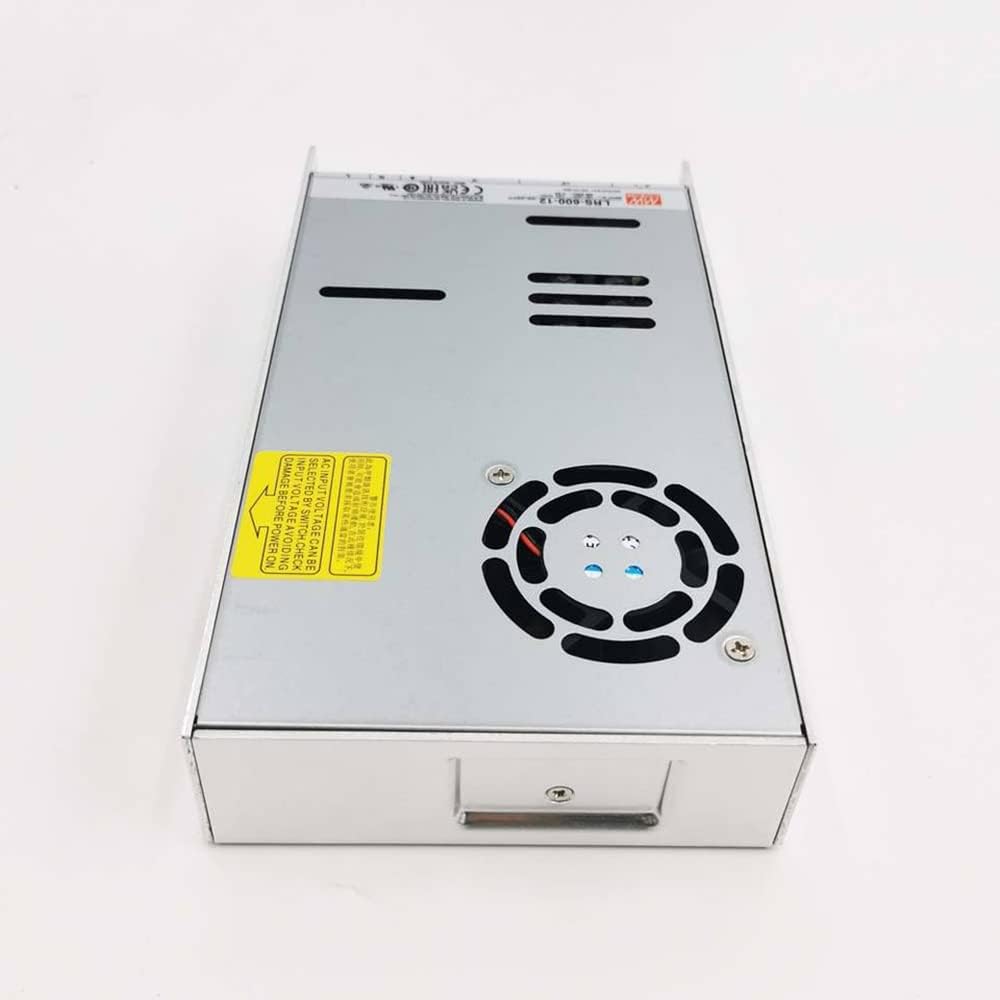
Figure 2.3.1: Side view highlighting the warning label regarding input voltage selection and the cooling fan.
2.4 Wiring Connections
Connect the input and output wires to the designated terminal blocks. Use appropriate wire gauges for the expected current. Ensure all connections are secure to prevent loose contacts and potential hazards.
- AC Input: Connect Live (L), Neutral (N), and Earth Ground (PE) to the input terminal block.
- DC Output: Connect positive (+V) and negative (-V) load wires to the output terminal block.

Figure 2.4.1: Detailed view of the terminal blocks for AC input and DC output connections.
3. Operating Instructions
Once properly installed and wired, the LRS-600-12 power supply is ready for operation.
- Power On: Apply AC power to the unit. The power supply should begin operation, and the internal fan will activate if cooling is required.
- Output Voltage Adjustment: If equipped, a potentiometer (V.ADJ) may be present near the output terminals to fine-tune the output voltage within a small range. Refer to specifications for the adjustable range.
- Load Connection: Connect your load to the DC output terminals. Ensure the load's current draw does not exceed the power supply's rated output of 50A.
- Monitoring: Observe the connected load for proper operation. The power supply includes protection features against overcurrent, overvoltage, and short circuits.
4. Maintenance
The LRS-600-12 power supply is designed for long-term reliability with minimal maintenance. However, periodic checks can help ensure optimal performance and longevity.
- Cleaning: Periodically inspect the unit for dust accumulation, especially around the cooling fan and vents. Disconnect power before cleaning. Use a soft brush or compressed air to remove dust.
- Fan Check: Ensure the cooling fan operates freely and without unusual noise. A failing fan can lead to overheating.
- Connection Integrity: Periodically check all wiring connections for tightness and signs of corrosion or damage.
- Environmental Conditions: Ensure the operating environment remains within specified temperature and humidity ranges.
5. Troubleshooting
If you encounter issues with your LRS-600-12 power supply, refer to the following common problems and solutions:
| Problem | Possible Cause | Solution |
|---|---|---|
| No output voltage / Unit not powering on |
|
|
| Output voltage too low or unstable |
|
|
| Unit overheating / Fan noisy |
|
|
For issues not listed above or if troubleshooting steps do not resolve the problem, please contact customer support.
6. Specifications
| Feature | Detail |
|---|---|
| Model | LRS-600-12 |
| Manufacturer | EnhanBili (Mean Well) |
| Output Voltage | 12V DC |
| Output Current | 50A |
| Output Wattage | 600W |
| Input Voltage | 115VAC / 230VAC (selectable by switch) |
| Efficiency | Up to 92% |
| Cooling Method | Built-in fan |
| Operating Temperature | -10℃ to 70℃ (14°F to 158°F) |
| Operating Humidity | 0-95% (non-condensing) |
| Dimensions (L x W x H) | 8.86 x 4.92 x 1.57 inches (225 x 125 x 40 mm) |
| Item Weight | 2.09 pounds (0.95 kg) |
| Certifications | CE, FCC, RoHS |
| Compatible Devices | Computer Systems, Components |
| Form Factor | ATX (Note: This might be a generic classification, the unit itself is an enclosed type) |
7. Warranty and Support
For warranty information, technical support, or service inquiries, please contact the retailer or manufacturer directly. Keep your purchase receipt as proof of purchase.
Manufacturer: EnhanBili


