
Introduction
This manual provides essential information for the proper use and maintenance of your Samsung AKG USB-C Earbuds. These in-ear headphones are designed to deliver clear, balanced audio and feature an inline remote with a microphone for convenient control and communication.
The earbuds are compatible with a range of Samsung Galaxy devices, including the Galaxy S23 Ultra, A53, S21, S21 FE, S20, Note 10, Note 10+, S10, and S10 Plus. Please note that these earbuds utilize a USB Type-C connector and do not have a 3.5mm headphone jack.
Product Features
- AKG-Tuned Audio: Engineered by AKG for clear, authentic-sounding, and balanced output.
- Inline Remote & Microphone: Integrated controls for volume adjustment, music playback, and call management.
- USB Type-C Connectivity: Direct digital audio connection for compatible devices.
- Braided Cable Design: Enhances durability and reduces tangling.
- Comfortable In-Ear Fit: Designed for secure and comfortable wear.
- Lightweight Design: Weighing approximately 0.63 ounces for extended comfort.
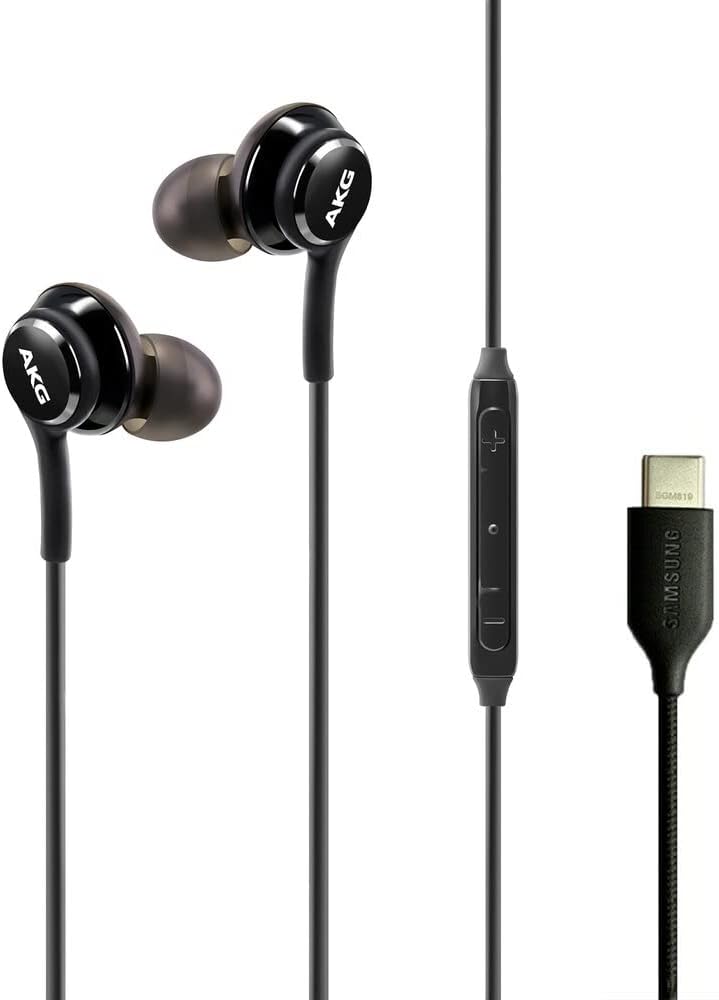


Package Contents
Verify that all items are present in the package:
- Samsung AKG USB-C Earbuds
- Ear Cushions (multiple sizes)
- Protective Velvet Pouch

Setup
1. Selecting Ear Tips
Choose the ear tip size that provides the most comfortable and secure fit for your ears. A proper fit is crucial for optimal sound quality and noise isolation. Gently pull off the pre-installed ear tips and replace them with the desired size by pushing them onto the earbud nozzle until secure.

2. Connecting to Your Device
Insert the USB Type-C connector of the earbuds into the USB Type-C port on your compatible Samsung Galaxy device. The earbuds are plug-and-play and should be recognized automatically by your device.

For a visual guide on the product and its features, please refer to the video below:
Video 1: An overview of the Samsung AKG USB-C Earbuds, highlighting key features and design elements.
Operating Instructions
The inline remote provides convenient control over your audio and calls:
| Button/Action | Function |
|---|---|
| Volume Up (+) | Increase audio volume. |
| Volume Down (-) | Decrease audio volume. |
| Center Button (Single Press) | Play/Pause music; Answer/End call. |
| Center Button (Double Press) | Skip to next track. |
| Center Button (Triple Press) | Go to previous track. |
| Microphone | For hands-free calls and voice commands. |

Maintenance
Cleaning
- Gently wipe the earbuds and cable with a soft, dry cloth.
- For ear tips, remove them from the earbuds and clean with a mild soap solution and water. Ensure they are completely dry before reattaching.
- Do not use harsh chemicals or abrasive materials for cleaning.
Storage
When not in use, store the earbuds in the provided velvet pouch to protect them from dust, dirt, and tangling. Avoid extreme temperatures and direct sunlight.
Troubleshooting
| Problem | Possible Solution |
|---|---|
| No sound or low volume |
|
| Microphone not working |
|
| Poor sound quality |
|
| Earbuds do not fit comfortably |
|
Specifications
| Feature | Detail |
|---|---|
| Brand | Samsung |
| Model Number | AKG-TYPE-C-Wired-Velvet-S23 |
| Color | Black |
| Ear Placement | In Ear |
| Form Factor | In Ear |
| Impedance | 32 Ohms |
| Connectivity Technology | Wired (USB Type-C) |
| Frequency Range | 20 Hz - 20,000 Hz |
| Audio Driver Type | Dynamic Driver |
| Additional Features | Microphone Included, Inline Remote Control |
| Noise Control | None |
| Water Resistance Level | Not Water Resistant |
| Carrying Case Material | Fabric (Velvet) |
| Weight | 0.63 ounces (approx.) |
| Compatible Devices | Samsung Galaxy devices (S23 Ultra, A53, S21, S21 FE, S20, Note 10, Note 10+, S10, S10 Plus) |
Warranty and Support
These Samsung AKG USB-C Earbuds come with a manufacturer's warranty. For specific warranty terms and conditions, please refer to the documentation included with your purchase or visit the official Samsung support website.
For further assistance, technical support, or to view additional product information, please visit the Samsung Store on Amazon or the official Samsung website.


