
1. Introduction
Welcome to the user manual for your Livato Spark HD Android 9.0 Projector. This high-performance projector is designed to deliver a cinematic experience with stunning image quality and seamless connectivity. Powered by Android 9.0, it features Full HD resolution, Miracast, and advanced digital Keystone correction. With 5G WiFi and Bluetooth 5.0, you can easily stream content from various devices. This manual provides essential information for setup, operation, maintenance, and troubleshooting to ensure optimal performance and an immersive viewing experience.
2. What's in the Box
Please check the contents of your package to ensure all items are present:
- Livato Spark HD Android 9.0 Projector
- Power Cable
- HDMI Cable
- Remote Control
- User Manual (this document)
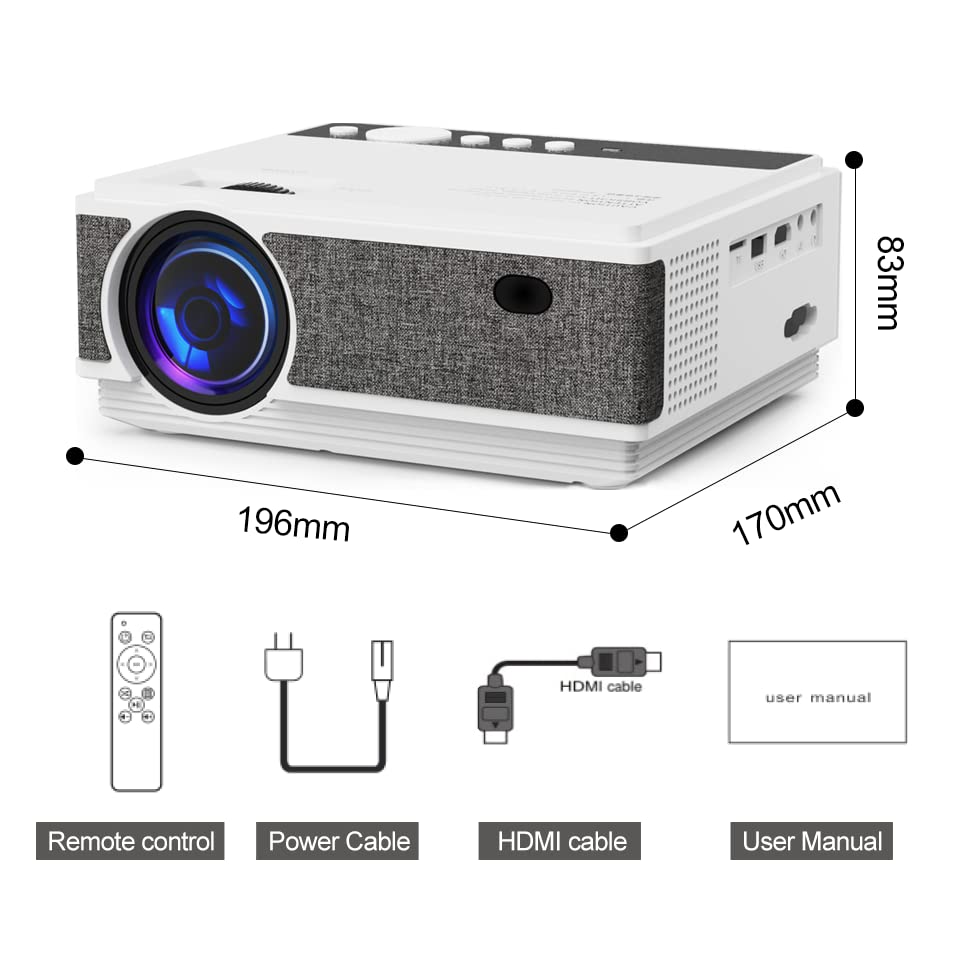
Image: Livato Spark Projector and its included accessories.
3. Product Features
The Livato Spark Projector is equipped with advanced features for a superior entertainment experience:
- Enjoy seamless streaming with 5G WiFi and Bluetooth 5.0 connectivity.
- Access the Android 9.0 operating system for a smart TV experience.
- Experience stunning image quality with real HD resolution (1280x720 native, supports 1920x1080).
- Wirelessly project from your devices with the Miracast feature.
- Ensure perfectly aligned and proportionate images with digital and manual Keystone correction.

Image: Visual representation of the projector's core features.
Video: An overview of the Livato Spark HD Android 9.0 Projector's capabilities, highlighting its 5G WiFi, Bluetooth 5.0, and Digital Keystone features.
Video: A detailed look at the Livato Spark HD Android 9.0 Projector's various features and functionalities.
4. Setup Guide
4.1 Physical Setup
Follow these steps to set up your projector:
- Placement: Place the projector on a stable, flat surface or mount it on a ceiling/tripod. Ensure it is positioned directly in front of your projection screen or wall for the best image quality.
- Power Connection: Connect the power cable to the projector's power input and then to a power outlet.
- Power On: Press the power button on the projector or the remote control to turn on the device.

Image: The Livato Spark Projector ready for setup.
4.2 Connecting Devices
The Livato Spark Projector offers multiple connectivity options:
- HDMI: Connect your laptop, gaming console (PS4), or other HDMI-enabled devices using the provided HDMI cable.
- USB: Insert a USB drive into the USB port to play media files directly.
- SD Card: Use the SD card slot for additional media playback.
- 3.5mm Audio Jack: Connect external speakers or headphones for enhanced audio.
- AV Port: Connect older devices like DVD players or set-top boxes using an AV cable.
- VGA Port: Connect computers or laptops with a VGA output.

Image: Overview of the projector's rich interface and connectivity options.

Image: The projector in use for efficient meetings and teaching, highlighting HDMI/TF/USB connectivity.
5. Operating Instructions
5.1 Android 9.0 Operating System
Your Livato Spark Projector runs on Android 9.0, providing a smart and intuitive interface:
- Navigate the home screen using the remote control.
- Access pre-installed apps like YouTube, Netflix, and Prime Video.
- Download additional applications from the Google Play Store.
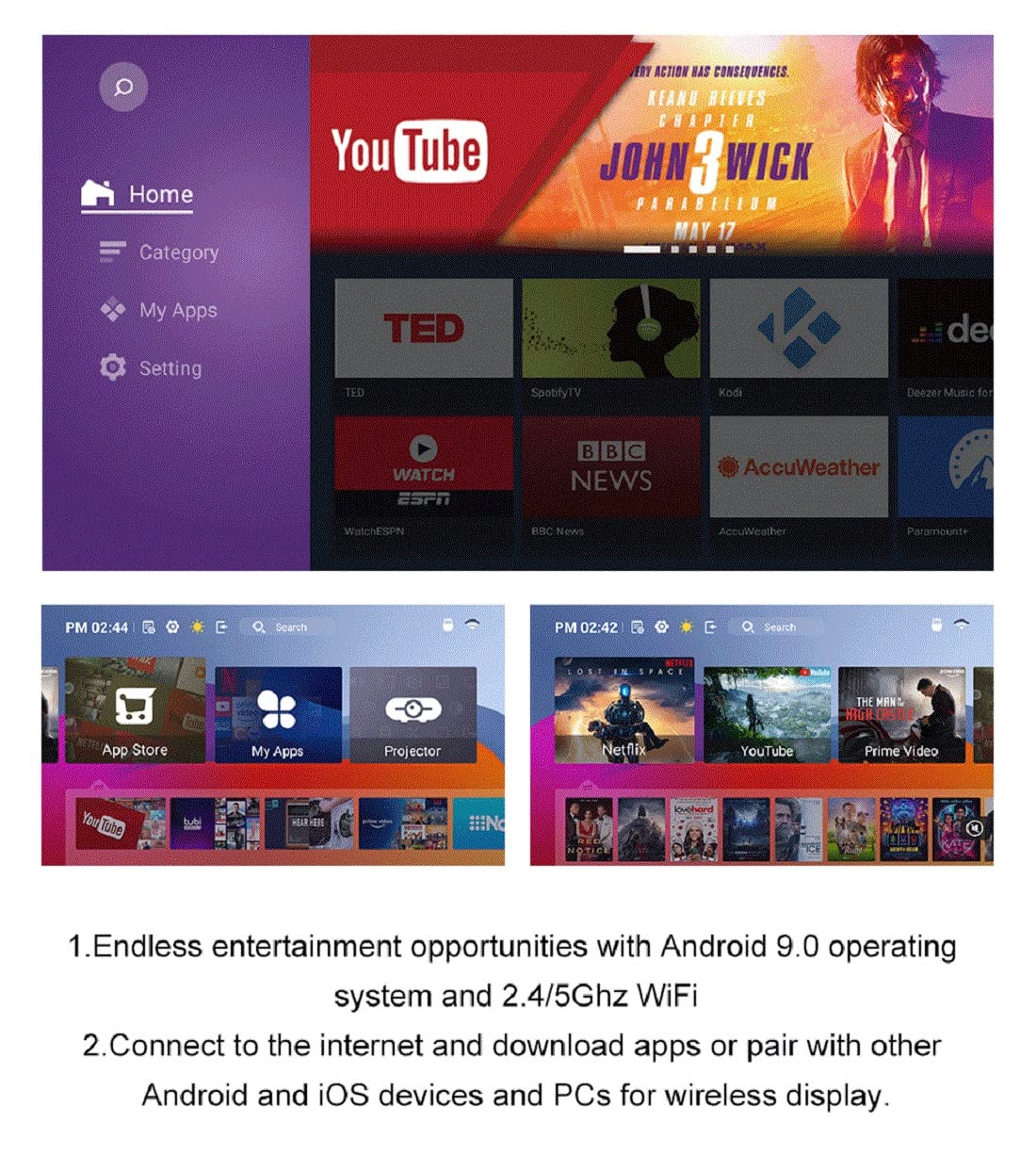
Image: The Android 9.0 operating system interface, offering endless entertainment opportunities.
5.2 Wireless Connectivity (WiFi & Bluetooth)
Connect wirelessly for seamless content sharing:
- WiFi: Go to Settings > Network > Wi-Fi to connect to your 2.4G or 5G wireless network.
- Bluetooth: Enable Bluetooth in Settings to pair with Bluetooth-enabled devices like speakers or headphones.
- Miracast: Use the Miracast feature to wirelessly mirror the screen of your smartphone, tablet, or laptop.

Image: Wireless display options for connecting various devices.
5.3 Image Adjustment (Keystone & Focus)
Achieve a clear and perfectly shaped image:
- Focus Adjustment: Use the focus ring near the lens to sharpen the image until it is clear.
- Keystone Correction: The projector supports both digital and manual keystone correction. Use the remote control or the physical adjustment on the projector to correct trapezoidal distortion, ensuring a rectangular image even if the projector is not perfectly aligned with the screen.

Image: Digital Keystone Correction for vivid and perfectly aligned images.
5.4 Projection Size and Distance
The optimal projection size depends on the distance between the projector and the screen:
- The Livato Spark can project a screen size from 36 inches to 150 inches.
- Refer to the projection chart in the specifications section for recommended distances for various screen sizes.

Image: Projection distance guide for optimal viewing experience.
6. Maintenance
To ensure the longevity and optimal performance of your projector, follow these maintenance guidelines:
- Cleaning the Lens: Use a soft, lint-free cloth specifically designed for optical lenses. Do not use abrasive cleaners or cloths that could scratch the lens.
- Cleaning the Exterior: Wipe the projector's exterior with a soft, dry cloth. For stubborn dirt, a slightly damp cloth can be used, but ensure no moisture enters the device.
- Ventilation: Ensure the projector's ventilation vents are clear and unobstructed to prevent overheating. Do not place the projector on soft surfaces that might block airflow.
- Storage: When not in use for extended periods, store the projector in a cool, dry place, away from direct sunlight and extreme temperatures.
7. Troubleshooting
If you encounter issues with your Livato Spark Projector, refer to the common problems and solutions below:
| Problem | Possible Cause | Solution |
|---|---|---|
| No Power | Power cable not connected; Power outlet faulty; Projector in standby mode. | Ensure power cable is securely connected. Try a different power outlet. Press the power button on the projector or remote. |
| No Image | Input source not selected; Cable connection loose/incorrect; Lens cap on. | Select the correct input source (HDMI, USB, etc.). Check all cable connections. Remove the lens cap. |
| Blurry Image | Focus not adjusted; Keystone not corrected; Projector too close/far from screen. | Adjust the focus ring. Use keystone correction. Adjust projection distance. |
| No Sound | Volume too low; Muted; External audio device not connected/selected. | Increase volume. Unmute. Check external speaker connection or select internal speaker. |
| WiFi/Bluetooth Connectivity Issues | Incorrect password; Out of range; Interference. | Verify password. Move closer to router/device. Reduce interference from other electronics. |
If the problem persists after trying these solutions, please contact customer support.
8. Specifications
Detailed technical specifications for the Livato Spark Projector:
| Feature | Specification |
|---|---|
| Brand | Livato |
| Model Name | Livato Spark |
| Manufacturer | Livato Ecommerce Solutions |
| Model Year | 2023 |
| Product Dimensions | 12 x 18 x 8 cm |
| Item Weight | 5 g |
| Hardware Interface | Bluetooth |
| Compatible Devices | Laptops, Smartphones, WiFi-enabled devices, Bluetooth-enabled devices |
| Special Features | Wireless, Portable, Built In Wi Fi |
| Display Type | LED |
| Screen Resolution | 1920 x 1080 (Supported) |
| Native Resolution | 1280 x 720 |
| Voltage | 220 Volts (AC) |
| Wattage | 50 Watt Hours |
| Power Source | AC |
| Total USB Ports | 1 |
| Connector Type | Wi-Fi |
| Form Factor | Portable |
| Mounting Type | Tabletop Mount |
| Includes Remote | Yes |
| Recommended Uses | Home |
| Operating System | Android 9.0 |
| RAM | 1GB (from video) |
| ROM | 8GB (from video) |
9. Warranty and Support
Your Livato Spark Projector comes with:
- 1 Year Warranty: Enjoy peace of mind with a one-year warranty from the date of purchase.
- 24x7 Technical Support: For any technical assistance or queries, our support team is available 24 hours a day, 7 days a week.
Please refer to the warranty card included in your package for detailed terms and conditions, or visit the official Livato website for contact information.