
PROZOR PRR025
PROZOR 192KHz DAC Converter ARC Audio Extractor
User Manual
1. Product Overview
The PROZOR 192KHz DAC Converter ARC Audio Extractor is designed to convert digital PCM/LPCM 2.0CH audio signals from an HDMI input into analog L/R RCA and 3.5mm stereo audio outputs simultaneously. It also supports Audio Return Channel (ARC) functionality, allowing sound from ARC-enabled TVs to be transmitted to the adapter's optical fiber and 3.5mm headphone interfaces, with simultaneous output. This device is ideal for integrating modern TVs with older audio systems or for expanding audio output options.

Figure 1: PROZOR 192KHz DAC Converter ARC Audio Extractor.
2. Package Contents
Please verify that all items listed below are included in your package:
- HDMI ARC Audio Adapter (PROZOR 192KHz DAC Converter ARC Audio Extractor)
- USB Power Cable with Magnetic Ring
- User Manual

Figure 2: Package contents of the PROZOR ARC Audio Extractor.
3. Key Features and Interface Overview
- Digital to Analog Audio Conversion: Converts HDMI input digital PCM/LPCM 2.0CH audio signals to analog L/R RCA and 3.5mm stereo audio outputs.
- ARC Function Support: Transmits sound from HDMI ARC-enabled TVs to the adapter’s optical fiber and 3.5mm headphone interface, with simultaneous output. (Note: Only supports TVs with HDMI ARC function, not eARC.)
- 5.1ch Audio Support: Supports optical fiber + RCA + 3.5mm headphone audio separation, with audio synchronous output. The optical fiber interface can connect to a home theater for 5.1CH surround sound or 2.0CH stereo sound.
- 192KHz Audio Sampling Rate: Supports high-quality sound and clear, accurate audio transmission.
- Magnetic Ring Power Cord: Included power cord with a magnetic ring ensures stable product operation and improved signal integrity.
- Durable Construction: Features an anti-interference aluminum alloy shell with 24K Gold Plate plated interfaces for lossless sound quality conversion.

Figure 3: Interface overview of the PROZOR ARC Audio Extractor.

Figure 4: Magnetic ring on the power cord for stable operation.
4. Setup and Installation
Follow these steps to properly set up your PROZOR ARC Audio Extractor:
- Identify HDMI ARC Port: Locate the HDMI port on your TV labeled "HDMI ARC" or "HDMI (ARC)". This is crucial for the ARC function to work.
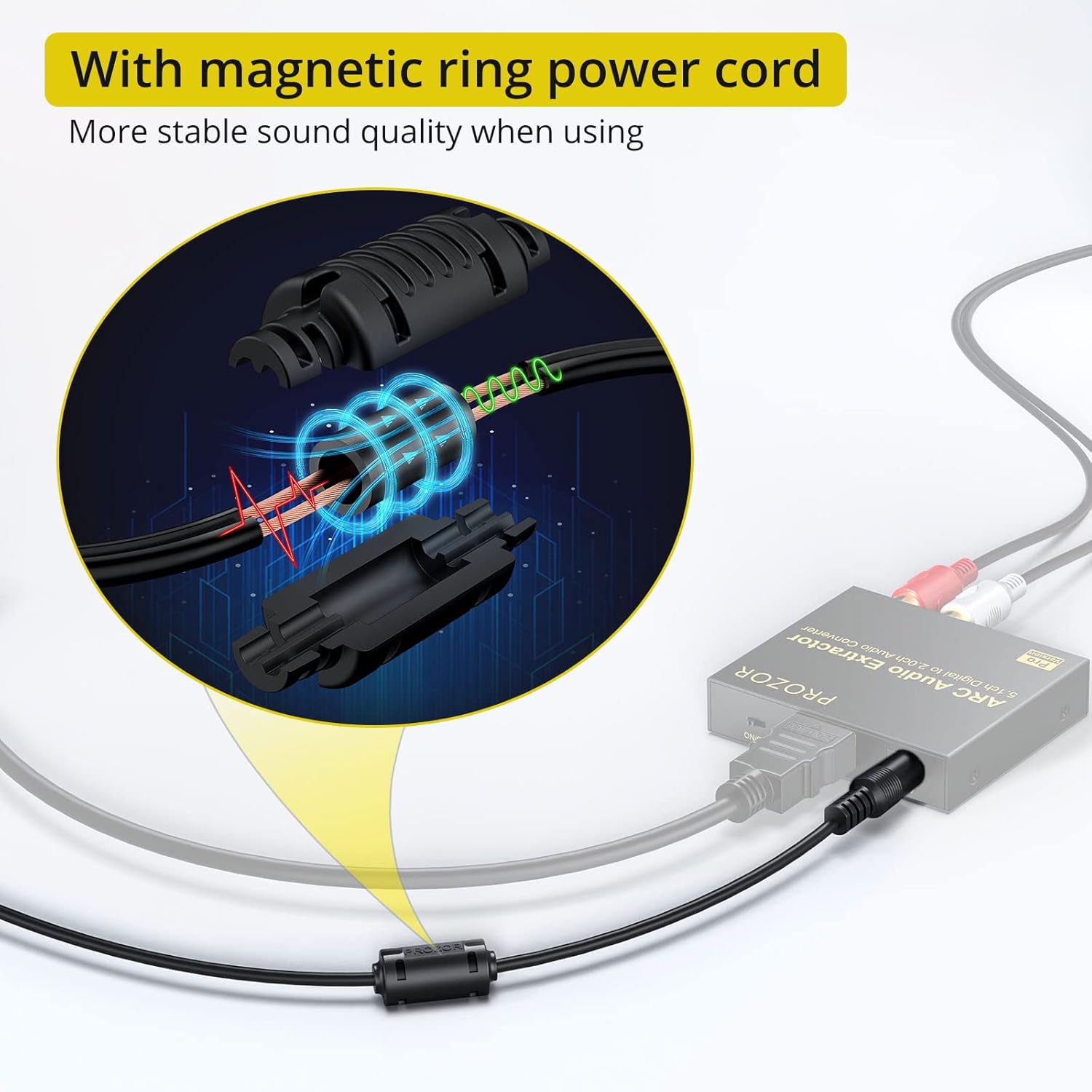
Figure 5: Example of an HDMI ARC port on a TV.
- Connect HDMI Cable: Connect one end of an HDMI cable (not included) to the HDMI ARC port on your TV and the other end to the "HDMI ARC Input" port on the PROZOR Audio Extractor.
- Connect Audio Output: Choose your desired audio output method:
- Optical Output: Connect an optical cable (Toslink) from the "Optical Out" port on the extractor to your soundbar, AV receiver, or home theater system.
- RCA L/R Output: Connect RCA cables (red for right, white for left) from the "R-Out" and "L-Out" ports on the extractor to the corresponding analog audio inputs on your amplifier or stereo system.
- 3.5mm Stereo Output: Connect a 3.5mm audio cable from the "3.5mm Stereo Output" port on the extractor to headphones or a stereo speaker system.

Figure 6: Connection options for audio output.
- Connect Power: Connect the provided USB power cable to the "DC 5V/1A" port on the extractor and the USB-A end to a USB port on your TV or a 5V USB power adapter (not included). Ensure the power switch on the extractor is in the "ON" position.
- Configure TV Audio Settings: Access your TV's audio settings menu.
- Navigate to Sound or Audio Output settings.
- Select HDMI ARC as the audio output source.
- For optimal compatibility, set the TV's digital audio output format to PCM (Pulse Code Modulation) if you are using the RCA or 3.5mm outputs. If using the optical output for 5.1CH, ensure your TV and connected audio system support Dolby AC-3/DTS 5.1CH.
Video 1: A visual guide demonstrating the setup and connection process for the PROZOR ARC Audio Extractor.
5. Operating Instructions
Once the setup is complete, the PROZOR ARC Audio Extractor operates automatically. When your TV is turned on and set to output audio via HDMI ARC, the extractor will receive the digital audio signal and convert it to the selected analog or optical outputs.
- Ensure the power indicator light on the extractor is illuminated, indicating it is receiving power.
- Adjust the volume using your TV remote or the volume control on your connected audio system (amplifier, soundbar, headphones).
- If you experience no sound or distorted sound, double-check all connections and TV audio settings.
6. Troubleshooting
If you encounter issues with your PROZOR ARC Audio Extractor, please refer to the following common problems and solutions:
| Problem | Possible Cause | Solution |
|---|---|---|
| No sound output. |
|
|
| Distorted or poor sound quality. |
|
|
| ARC function not working. |
|
|
7. Technical Specifications
| Feature | Detail |
|---|---|
| Model | PRR025 |
| Input | 1 x HDMI ARC |
| Outputs | 1 x Optical (Toslink), 1 x RCA L/R, 1 x 3.5mm Stereo Jack |
| Audio Format Support (Optical) | PCM 2.0CH, Dolby AC-3, DTS 5.1CH |
| Audio Format Support (RCA/3.5mm) | PCM 2.0CH |
| Sampling Rate | Up to 192KHz |
| Power Supply | DC 5V/1A (via USB) |
| Shell Material | Aluminum Alloy |
| Interface Type | HDMI |
| Package Dimensions | 7.13 x 4.45 x 0.83 inches |
| Weight | 5.64 ounces |
8. Warranty and Support
PROZOR products are designed for reliability and performance. For warranty information, technical support, or any inquiries regarding your PROZOR 192KHz DAC Converter ARC Audio Extractor, please refer to the contact information provided on the product packaging or visit the official PROZOR website. Keep your purchase receipt for warranty claims.
For further assistance, you may also contact the seller directly through the platform where the product was purchased.
Ask a question about this manual
Ask about setup, troubleshooting, compatibility, parts, safety, or missing instructions. Manuals+ will review the question and use this page’s manual context to help answer it.