
ANCHEER TR51
ANCHEER TR51 Treadmill User Manual
Model: TR51 | Brand: ANCHEER
1. Product Overview
The ANCHEER TR51 Treadmill is a versatile and robust fitness machine designed for home gym use. It features a powerful 3.25 HP motor, manual incline settings, a wide running belt with a shock-absorbing system, and a multi-function LCD display. This treadmill is also equipped with Bluetooth connectivity for the G-Fit APP and an MP3 input speaker, enhancing your workout experience. Its folding design and built-in wheels ensure easy assembly, storage, and portability.

Figure 1: ANCHEER TR51 Treadmill in operation, showcasing its design and a user exercising.
2. Safety Information
Before operating the ANCHEER TR51 Treadmill, please read and understand all safety instructions. Failure to follow these instructions may result in injury or damage to the product.
- Always consult with a healthcare professional before starting any new exercise program.
- Place the treadmill on a flat, stable surface with adequate clearance around it (at least 6 feet behind and 2 feet on each side).
- Ensure the safety key is properly attached to both the treadmill and your clothing before beginning your workout. The safety key is designed to immediately stop the treadmill in case of an emergency.
- Do not allow children or pets near the treadmill while it is in operation.
- Wear appropriate athletic footwear and clothing.
- Do not step on or off the treadmill while the belt is moving.
- If you feel faint, dizzy, or experience pain, stop exercising immediately.
- Unplug the treadmill from the power outlet when not in use or before cleaning and maintenance.
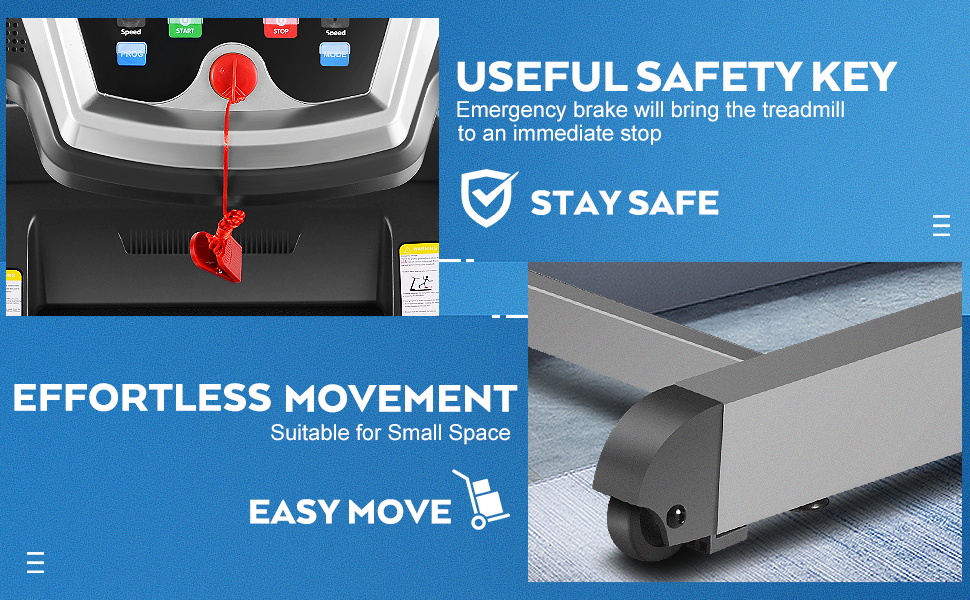
Figure 2: The emergency safety key and stop button on the console, crucial for user safety.
3. Setup and Assembly
The ANCHEER TR51 Treadmill is designed for easy assembly, with approximately 90% of the unit pre-installed. One person can typically complete the setup in about 10 minutes.
Unpacking and Placement:
- Carefully remove all components from the packaging.
- Place the main frame on a clear, level surface.
- Ensure all packing materials are removed before proceeding.
Folding and Unfolding:
The treadmill features a Soft Drop System for convenient folding and unfolding, saving space when not in use.
- To Unfold: Gently push the running deck downwards. The hydraulic rod will assist in a slow, controlled descent until the deck is fully flat.
- To Fold: Lift the running deck upwards until it locks into the vertical position. The hydraulic rod will support the weight.

Figure 3: Demonstration of the Soft Drop System for easy folding and storage.
Portability:
With built-in wheels, the treadmill can be easily moved to any desired location for storage or use.

Figure 4: Product dimensions and features, including portability, highlighted.
4. Operating Instructions
The ANCHEER TR51 Treadmill offers a range of features to customize your workout.
Control Panel and Display:
The 5-inch LCD display provides real-time feedback on your workout metrics, including speed, time, distance, calories consumed, and heart rate. The control panel allows for easy adjustment of settings and program selection.

Figure 5: The treadmill's control panel with LCD display, showing various workout metrics and control buttons.
Starting a Workout:
- Ensure the treadmill is plugged in and the safety key is in place.
- Step onto the running belt, holding onto the handrails for balance.
- Press the "Start" button to begin. The belt will start moving at a low speed.
- Adjust the speed using the "+" and "-" buttons on the console or handrails. The treadmill supports speeds from 0.6 to 9 MPH (1-14.5 KM/H).
Adjusting Incline:
The TR51 treadmill features 3% and 5% manual incline settings. Adjusting the incline can increase workout intensity and calorie burn.
- To adjust the incline, manually lift or lower the rear of the running deck to the desired incline level (3% or 5%). Ensure it is securely locked in place before use.

Figure 6: Manual incline adjustment points on the treadmill for varied workout intensity.
Pre-set Programs and G-Fit APP:
The treadmill includes 12 pre-set programs for varied workouts. For an advanced experience, connect to the G-Fit APP via Bluetooth to track your exercise data and access additional features.
- Download the G-Fit APP from your device's app store.
- Enable Bluetooth on your device and pair with the treadmill.
- Follow the in-app instructions to record and monitor your workouts.
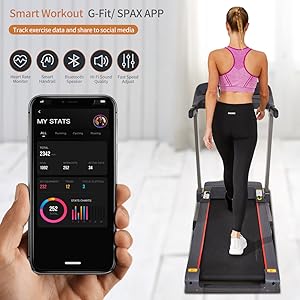
Figure 7: The G-Fit APP interface, allowing users to track and manage their fitness data.
Audio Connectivity:
Connect your mobile phone to the treadmill's MP3 input speaker to enjoy your favorite music during your workout.
Running Belt and Shock Absorption:
The treadmill features a wide (16.5'' x 48.5'') multi-layer tread belt and an advanced shock-absorbing system to provide a comfortable and joint-friendly running experience.

Figure 8: Illustration of the multi-layer running belt and shock absorption technology for enhanced comfort.
Product Demonstration Video:
Video 1: Official ANCHEER Treadmill demonstration, showcasing various features and usage scenarios.
5. Maintenance
Regular maintenance ensures the longevity and optimal performance of your ANCHEER TR51 Treadmill.
- Cleaning: Regularly wipe down the treadmill with a damp cloth to remove dust and sweat. Avoid using abrasive cleaners.
- Lubrication (Self-Refueling): The treadmill features a self-service refueling hole for easy lubrication of the running belt. This extends the life of the belt and ensures smooth operation. Refer to the specific instructions in the included user manual for frequency and type of lubricant.
- Belt Tension and Alignment: Periodically check the running belt for proper tension and alignment. Adjust as needed according to the detailed instructions in the full user manual.

Figure 9: The self-service refueling hole, designed for easy lubrication of the running belt.
6. Troubleshooting
This section addresses common issues you might encounter with your ANCHEER TR51 Treadmill.
| Problem | Possible Cause | Solution |
|---|---|---|
| Treadmill does not start. | Power cord not plugged in; Safety key not in place; Circuit breaker tripped. | Ensure power cord is securely plugged in; Insert safety key fully; Reset circuit breaker. |
| Running belt slips or hesitates. | Belt too loose; Belt needs lubrication. | Adjust belt tension (refer to manual); Lubricate the running belt. |
| Unusual noise during operation. | Loose components; Motor issues; Belt friction. | Check for loose bolts and tighten; Contact customer support if motor noise persists; Lubricate belt. |
| Inaccurate display readings. | Sensor issue; APP connectivity problem. | Ensure sensors are clean; Reconnect G-Fit APP; Restart treadmill. |
For more detailed troubleshooting or issues not listed here, please refer to the comprehensive user manual or contact ANCHEER customer support.
7. Specifications
| Feature | Detail |
|---|---|
| Brand | ANCHEER |
| Model Name | TR51 (also known as T4098) |
| Motor Horsepower | 3.25 HP (Peak) / 3.0 HP (Continuous) |
| Speed Range | 0.6 - 9 MPH (1 - 14.5 KM/H) |
| Incline | 3% / 5% Manual Incline |
| Running Belt Dimensions | 16.5'' W x 48.5'' L |
| Maximum Weight Recommendation | 300 LBS |
| Display Type | LCD (5 inches) |
| Programs | 12 Pre-set Programs |
| Connectivity | Bluetooth (G-Fit APP), MP3 Input Speaker |
| Special Features | Folding Design, Soft Drop System, Built-in Wheels, Shock-absorbing System, Self-refueling |
| Material | Stainless Steel Frame |
| Product Dimensions (LxWxH) | 24"D x 51"W x 61"H |
8. Warranty and Support
The ANCHEER TR51 Treadmill comes with a 2-year warranty.
For warranty claims, technical support, or any inquiries regarding your product, please contact ANCHEER customer service through their official website or the contact information provided in your product packaging.
Please have your model number (TR51 or T4098) and purchase date ready when contacting support.