Introduction
This manual provides essential information for the proper installation, use, and maintenance of your Panasonic Cosmo Series WN3021SW5 Wide 21 Telephone Guide. This product is designed as an accessory for the Cosmo Series Wide 21 telephone system, providing a clean and functional finish. Please read this manual thoroughly before installation and retain it for future reference.
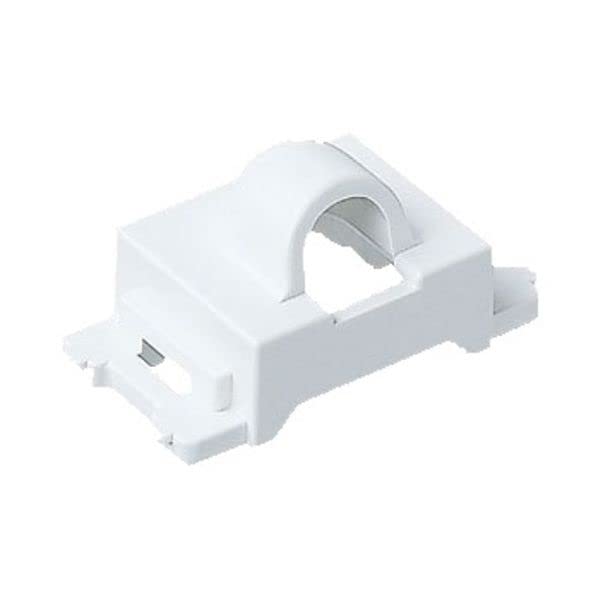
Figure 1: Panasonic Cosmo Series WN3021SW5 Wide 21 Telephone Guide. This image displays the white ABS resin guide, featuring a single circular hole with a diameter of 0.4 inches (9.5 mm), designed for integration with compatible telephone systems.
Setup and Installation
The Panasonic WN3021SW5 is designed for straightforward installation as part of the Cosmo Series Wide 21 system. Ensure you have the necessary tools and that power to the telephone system is disconnected before proceeding.
- Preparation: Confirm that the existing telephone outlet or mounting box is compatible with the Cosmo Series Wide 21 standard.
- Mounting: Align the WN3021SW5 guide with the mounting points of the telephone unit or wall plate. The guide features a 0.4-inch (9.5 mm) diameter hole, which should align with the corresponding telephone jack or cable entry point.
- Securing: Gently press the guide into place or use appropriate fasteners (not included, typically supplied with the main telephone unit or mounting box) to secure it. Ensure it sits flush against the surface.
- Final Check: Verify that the guide is securely attached and does not obstruct any functionality of the telephone unit.
Note: This product is a cosmetic and functional guide. Refer to your main telephone system's manual for specific wiring and connection instructions.
Operating Instructions
The Panasonic WN3021SW5 is a passive component designed to provide a finished appearance and guide for telephone connections within the Cosmo Series Wide 21 system. It does not require active operation.
- Once installed, the guide serves to frame the telephone jack or cable, contributing to the aesthetic integration of the telephone unit.
- Ensure that any telephone cables or connectors pass smoothly through the guide's opening without excessive force or bending.
Maintenance and Care
To ensure the longevity and appearance of your Panasonic WN3021SW5 Telephone Guide, follow these simple maintenance guidelines:
- Cleaning: Wipe the surface with a soft, dry cloth. For stubborn marks, a slightly damp cloth with mild soap can be used, followed by drying thoroughly. Avoid abrasive cleaners, solvents, or harsh chemicals, as these can damage the ABS resin finish.
- Inspection: Periodically check the guide for any signs of damage or loosening. If the guide becomes loose, gently re-secure it.
- Environment: Avoid exposing the guide to extreme temperatures or direct sunlight for prolonged periods, which could lead to discoloration or material degradation.
Troubleshooting
This section addresses common concerns you might encounter with the Panasonic WN3021SW5 Telephone Guide.
| Problem | Possible Cause | Solution |
|---|---|---|
| Guide does not fit properly. | Incompatible telephone unit or mounting box. | Ensure your telephone system is a Panasonic Cosmo Series Wide 21. This guide is specifically designed for that series. |
| Guide is loose after installation. | Improper securing during installation. | Gently press the guide firmly into place. If fasteners are used, ensure they are tightened appropriately (without overtightening). |
| Discoloration or damage to the guide. | Exposure to harsh chemicals, extreme temperatures, or physical impact. | Avoid using harsh cleaners. Protect the guide from direct sunlight and physical damage. Replacement may be necessary if damage is significant. |
Specifications
| Feature | Detail |
|---|---|
| Model Number | WN3021SW5 |
| Brand | Panasonic |
| Color | White |
| Material | ABS resin |
| Hole Diameter | 0.4 inches (9.5 mm) |
| Product Dimensions | 1.73 x 0.47 x 0.91 inches (4.4 x 1.2 x 2.3 cm) |
| Item Weight | 0.704 ounces (20 grams) |
| Compatibility | Cosmo Series Wide 21 |
| Quantity | Set of 5 (as per product listing) |
Warranty and Support
Panasonic products are manufactured to high-quality standards. For specific warranty information regarding your WN3021SW5 Telephone Guide, please refer to the documentation provided with your main Panasonic Cosmo Series Wide 21 telephone system or visit the official Panasonic website.
For technical support or inquiries, please contact Panasonic customer service through their official channels. Keep your purchase receipt as proof of purchase.
- Official Panasonic Website: www.panasonic.com
- Customer Support: Refer to the contact information available on the Panasonic website for your region.


