
1. Introduction
Thank you for choosing the LifePlus Evaporative Air Cooler. This versatile 3-in-1 unit is designed to provide efficient cooling, humidification, and air circulation for various environments, including large rooms, commercial spaces, garages, and outdoor areas. With its powerful airflow and user-friendly features, it offers a comfortable and refreshing experience.

Image: The LifePlus Evaporative Air Cooler, highlighting its large water tank and included ice packs for enhanced cooling.
Key Features:
- Powerful Cooling: Delivers 1800 CFM airflow, suitable for areas up to 270 sq.ft.
- 3-in-1 Functionality: Operates as a fan, humidifier, and evaporative cooler.
- Large Water Tank: Features a 5.2-gallon capacity for extended operation (8-9 hours).
- Dual Water Refilling: Supports both manual top-fill and automatic hose connection.
- Adjustable Airflow: Offers 120° horizontal oscillation and 90° manual vertical tilt.
- Convenient Control: Includes a remote control and an LED display for easy operation.
- Timer Function: Programmable 1-12 hour timer for energy saving.
- Portability: Equipped with 360° casters and a built-in handle for easy movement.
2. Safety Information
Please read all safety instructions carefully before operating the appliance. Failure to follow these instructions may result in electric shock, fire, or serious injury.
- Always unplug the unit from the power outlet before cleaning, servicing, or moving.
- Do not operate the unit with a damaged cord or plug.
- Do not immerse the unit, plug, or cord in water or other liquids.
- Ensure the unit is placed on a stable, level surface to prevent tipping.
- Keep children and pets away from the unit during operation.
- Do not block air inlets or outlets.
- Use only clean water in the water tank. Do not add any chemicals or additives.
- Do not refrigerate without water.
3. Package Contents
Please check the box for the following items:
- 1X LifePlus 5.2 Gallon Evaporative Cooler
- 1X Remote Control
- 1X Adapter
- 4X Wheels (Casters)
- 4X Ice Boxes (Ice Packs)
4. Setup
4.1 Attaching the Wheels
The evaporative cooler comes with four casters for easy mobility. To attach them:
- Carefully tilt the unit onto its side or back, ensuring it is stable.
- Insert each wheel into the designated slots at the bottom corners of the unit.
- Secure the wheels by screwing them in firmly.
- Return the unit to an upright position.

Image: The evaporative cooler with its 360-degree casters, demonstrating its portability.

Image: A close-up view of one of the convenient wheels, highlighting its design for easy movement.
4.2 Filling the Water Tank
The unit offers two ways to fill the 5.2-gallon water tank:
- Manual Filling: Open the top cover of the unit and pour clean water directly into the water tank.
- Automatic Filling: Connect a standard garden hose to the water inlet located at the back of the unit for continuous water supply.
Ensure the water level is between the 'MIN' and 'MAX' indicators on the water level window.

Image: A hand manually filling the water tank from the top, showing the ease of access.
4.3 Adding Ice Packs
For enhanced cooling, place the included ice packs (ice boxes) into the designated compartments within the water tank. Ensure they are frozen before use.

Image: Blue ice packs being inserted into the top compartment of the cooler to boost cooling performance.
5. Operating Instructions
The LifePlus Evaporative Air Cooler can be operated using the control panel on top of the unit or the included remote control.
5.1 Power On/Off
- Press the ON/OFF button to turn the unit on or off.
5.2 Adjusting Fan Speed
The unit offers three fan speeds: Low, Medium, and High.
- Press the SPEED button repeatedly to cycle through the fan speeds.
5.3 Selecting Operating Mode
Choose from three operating modes: Fan, Humid, and Cooling.
- Press the MODE button to select the desired mode.
- Fan Mode: Circulates air without humidification or cooling.
- Humid Mode: Adds moisture to the air.
- Cooling Mode: Activates the evaporative cooling function, using water and ice packs for cooler air.

Image: The cooler illustrating its three modes (Natural, Normal, Cool) and three speed settings (Low, Medium, High).
5.4 Oscillation (Swing) Function
The unit features both horizontal and vertical oscillation for wide area coverage.
- Horizontal Oscillation (Auto Swing): Press the SWING button to activate 120° automatic horizontal oscillation.
- Vertical Oscillation (Manual Tilt): Manually adjust the vertical louvers to direct airflow up or down (90° range).
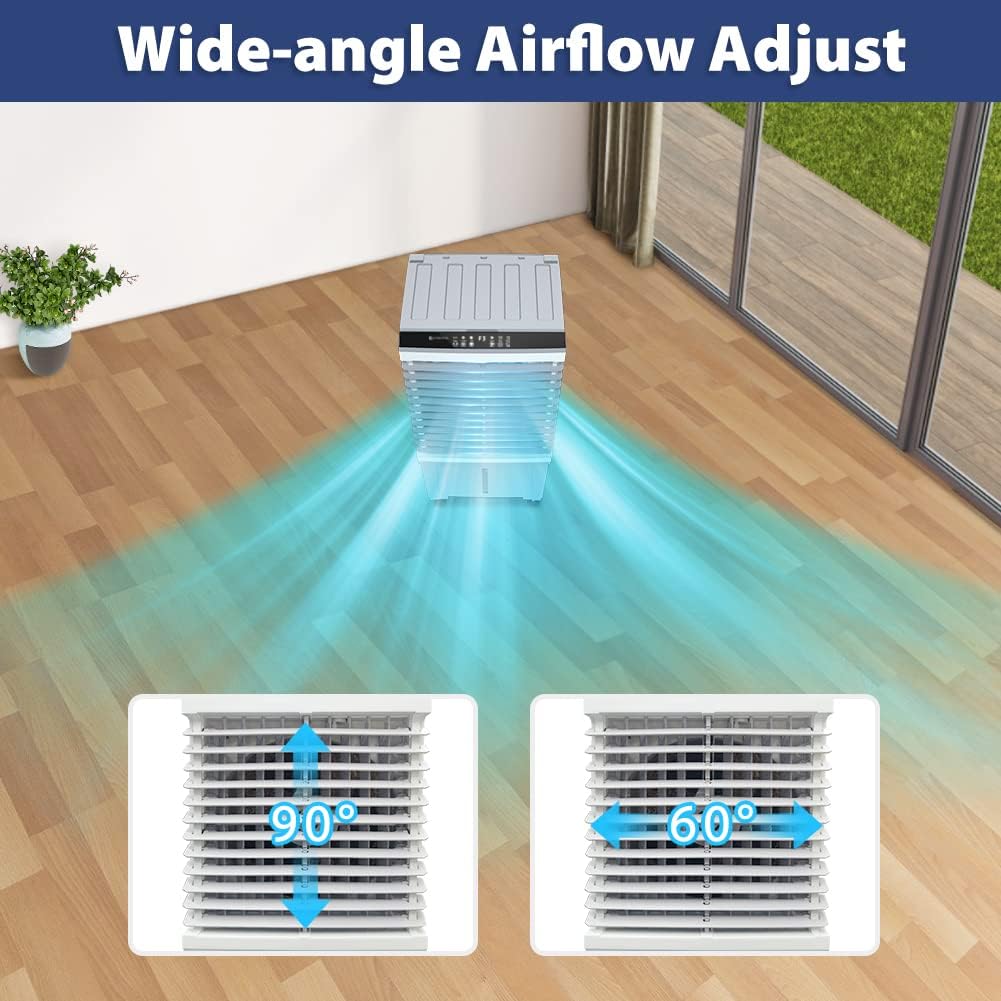
Image: Visual representation of the wide-angle airflow adjustment, including 90° vertical and 60° horizontal swing capabilities.
5.5 Setting the Timer
The 1-12 hour timer allows you to set the unit to automatically turn off after a specified period.
- Press the TIMER button repeatedly to select the desired operating duration.

Image: The evaporative cooler next to a clock graphic indicating its 1-12 hour timer function, designed to save on electricity bills.
5.6 Official Product Video
Video: An official demonstration of the LifePlus Commercial Evaporative Air Cooler, showcasing its features, portability, water filling, ice pack usage, speed modes, cool mode, manual tilt adjustment, auto swing, and timer functionality.
6. Maintenance
Regular maintenance ensures optimal performance and longevity of your evaporative air cooler.
6.1 Cleaning the Water Tank
To prevent mold and mildew, clean the water tank regularly, especially if the unit is used frequently.
- Unplug the unit from the power outlet.
- Drain any remaining water from the tank.
- Wipe the inside of the tank with a soft cloth and a mild detergent solution.
- Rinse thoroughly with clean water and dry before refilling.
6.2 Cleaning/Replacing the Filter
The unit features a removable filter that should be cleaned periodically to maintain air quality and cooling efficiency.
- Unplug the unit.
- Locate and remove the filter panel (usually at the back or side).
- Gently rinse the filter under running water. For stubborn dirt, use a soft brush.
- Allow the filter to air dry completely before reinserting.

Image: A visual guide to the removable filter, indicating its easy access for cleaning and maintenance.
7. Troubleshooting
If you encounter issues with your LifePlus Evaporative Air Cooler, please refer to the following common problems and solutions:
| Problem | Possible Cause | Solution |
|---|---|---|
| Unit does not turn on | No power supply; Power button not pressed; Unit is unplugged. | Check power outlet and plug; Press the ON/OFF button. |
| No cool air | Water tank empty; Cooling mode not activated; Ice packs not frozen/used. | Fill water tank; Select Cooling mode; Ensure ice packs are frozen and placed in tank. |
| Weak airflow | Fan speed too low; Air filter clogged. | Increase fan speed; Clean the air filter. |
| Unpleasant odor | Stagnant water in tank; Dirty filter. | Drain and clean water tank; Clean the air filter. |
| Water leakage | Water tank overfilled; Unit not level; Drain plug loose. | Do not overfill; Place on a level surface; Ensure drain plug is secure. |
If the problem persists after trying these solutions, please contact customer support.
8. Specifications
| Feature | Specification |
|---|---|
| Model Name | evaporative cooler JH-310Y |
| Brand | LifePlus |
| Power Source | Electric |
| Voltage | 120 Volts (AC) |
| Wattage | 100 watts |
| Item Weight | 13.3 pounds |
| Product Dimensions | 15"D x 11"W x 28"H (38.1 x 27.9 x 71.1 cm) |
| Water Tank Capacity | 5.2 Gallons (19.7 Liters) |
| Air Flow Capacity | 1800 Cubic Feet Per Minute (CFM) |
| Coverage Area | Up to 300 sq.ft. |
| Noise Level | 50 dB |
| Oscillation | 120° Horizontal (Auto), 90° Vertical (Manual) |
| Timer | 1-12 hours |
| Material | Plastic |
| Color | Greyish-White |
| Country of Origin | China |
9. Warranty & Support
9.1 Warranty Information
This LifePlus Evaporative Air Cooler comes with a 1-year warranty from the date of purchase. This warranty covers manufacturing defects and malfunctions under normal use. It does not cover damage caused by misuse, accidents, unauthorized repairs, or normal wear and tear.
9.2 Customer Support
For any questions, technical assistance, or warranty claims, please contact LifePlus customer support. Refer to the product packaging or the official LifePlus website for the most current contact information.
