
1. Introduction
The EARTEC EP2LZ E-PAK PRO is a compact, full-duplex wireless communication system designed for hands-free, simultaneous talk communication between two individuals. This system integrates a transceiver with a second RF module that allows the use of lightweight wireless headsets for discreet and efficient communication.
This manual provides essential information for the proper setup, operation, and maintenance of your E-PAK PRO system. Please read it thoroughly before using the product to ensure optimal performance and longevity.
2. Product Overview
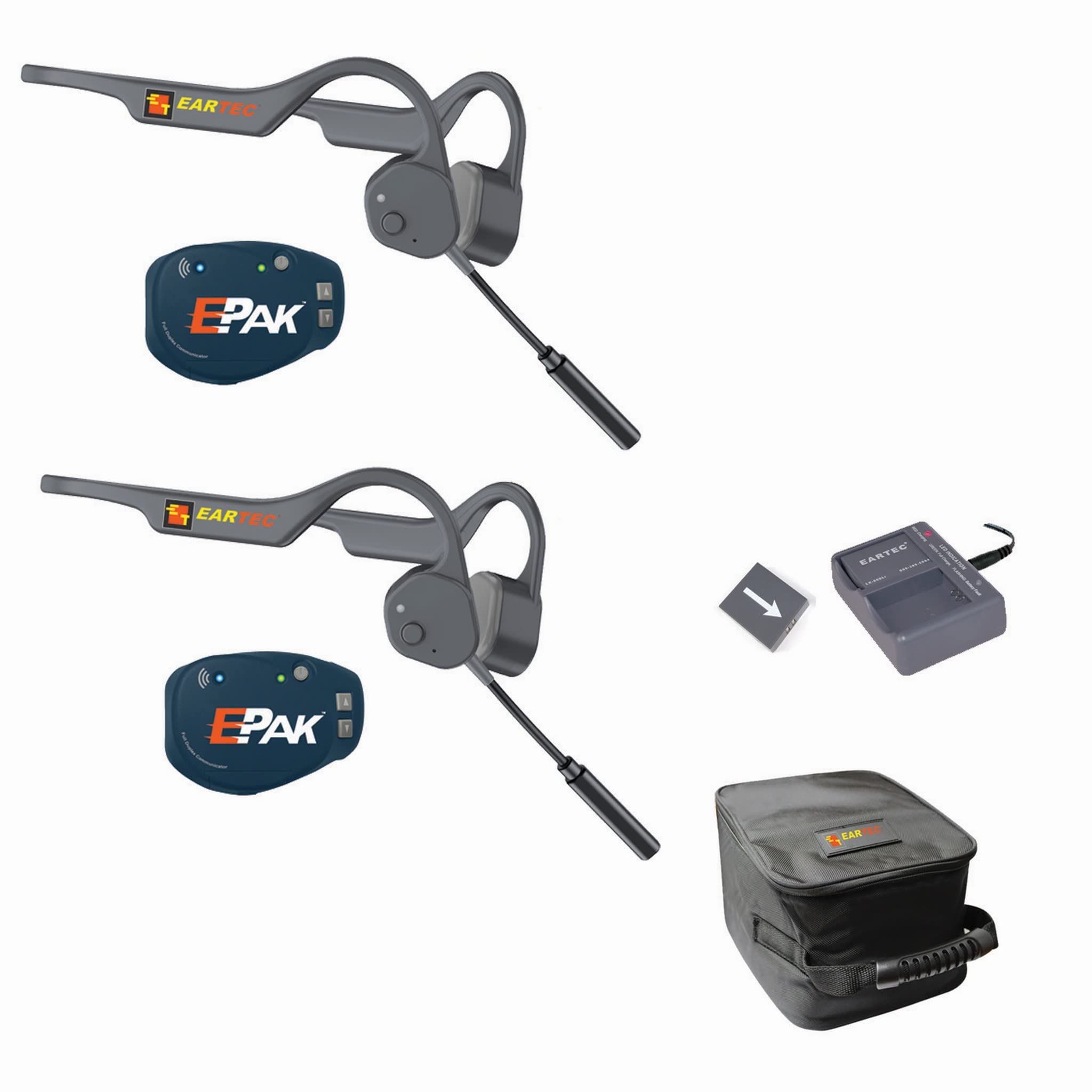
Figure 1: EARTEC EP2LZ E-PAK PRO Wireless Communication System. This image displays the main components of the system, typically including a central transceiver unit and two communication devices (headsets or earbuds) for two-person wireless communication.
2.1. Package Contents
Verify that all items are present in your package:
- 2 x Earbuds
- 1 x Headset
- 1 x Carrying Bag
Note: The specific configuration may vary. Refer to your product packaging for exact contents.
2.2. Key Features
- Full Duplex Communication: Allows simultaneous two-way conversation.
- Wireless Operation: Utilizes RF technology for untethered communication.
- Compact Design: The E-PAK PRO transceiver is designed for portability.
- Lightweight Headsets: Designed for comfort during extended use.
- Integrated Microphone: For clear voice transmission.
3. Setup
3.1. Initial Charging
Before first use, ensure all components are fully charged. Connect the charging cables to the E-PAK PRO unit and the headsets, then plug them into a suitable power source. The charging indicator will typically show a specific color or pattern when charging and change when fully charged. Refer to the specific charging indicators on your device.
3.2. Pairing the System
The E-PAK PRO system is generally pre-paired from the factory. If re-pairing is necessary or if you are adding new components, follow these steps:
- Ensure all devices are powered off.
- Refer to the specific pairing instructions provided in a separate quick start guide or on the device itself, as pairing procedures can vary.
- Once paired, the devices should automatically connect when powered on within range.
3.3. Wearing the Headsets
Position the earbuds comfortably in your ears. Adjust the headset band (if applicable) for a secure fit. Ensure the microphone is positioned close to your mouth for optimal voice pickup.
4. Operating Instructions
4.1. Power On/Off
- To Power On: Press and hold the Power button on the E-PAK PRO unit and each headset until the indicator light illuminates.
- To Power Off: Press and hold the Power button on the E-PAK PRO unit and each headset until the indicator light turns off.
4.2. Volume Control
Use the volume up (+) and volume down (-) buttons located on the E-PAK PRO unit or individual headsets to adjust the listening volume to a comfortable level.
4.3. Mute Function
To temporarily mute your microphone, press the Mute button (if available) on your headset or the E-PAK PRO unit. Press it again to unmute.
4.4. Communication Range
The E-PAK PRO system operates using RF wireless technology. Optimal communication range is achieved in open, unobstructed environments. Factors such as walls, dense foliage, and other electronic devices can affect the effective range. For best performance, maintain line of sight between units whenever possible.
5. Maintenance
- Cleaning: Use a soft, dry cloth to clean the exterior of the E-PAK PRO unit and headsets. Do not use liquid cleaners or solvents.
- Storage: When not in use, store the system in the provided carrying bag in a cool, dry place, away from direct sunlight and extreme temperatures.
- Battery Care: To prolong battery life, avoid fully discharging the batteries frequently. Charge them regularly, even if the system is not in constant use.
6. Troubleshooting
| Problem | Possible Cause | Solution |
|---|---|---|
| No audio / Cannot communicate |
|
|
| Poor audio quality / Static |
|
|
| Device not charging |
|
|
7. Specifications
- Brand: EARTEC
- Model Number: EP2LZ
- Connectivity Technology: RF Wireless
- Ear Placement: In Ear
- Form Factor: In Ear
- Noise Control: None
- Frequency Range: 20Hz - 20,000Hz
- Audio Driver Type: Dynamic Driver
- Additional Features: Lightweight, Microphone Included
- Compatible Devices: Telephones, Cellphones (for general communication, not direct connection)
- Water Resistance Level: Not Water Resistant
- Control Method: Remote, Wireless Controller
Note: Specifications are subject to change without notice.
8. Warranty and Support
For warranty information and technical support, please refer to the documentation included with your product or visit the official EARTEC website. Keep your purchase receipt as proof of purchase for warranty claims.
If you encounter issues not covered in this manual, please contact EARTEC customer support for assistance.