1. Product Overview
The Wurkkos HD15 is a versatile LED headlamp designed for various applications, offering both spotlight and floodlight illumination. It features a rechargeable battery, magnetic tailcap, and IP68 waterproof rating, making it suitable for demanding environments.

Image: Wurkkos HD15 Headlamp with its accompanying headband.
Key Features:
- Dual LED System: LH351D (floodlight, 90CRI) and SST20 (spotlight) for versatile lighting.
- High Brightness: Up to 2000 lumens in Turbo mode.
- Rechargeable: Integrated USB-C charging port.
- Power Bank Function: Can charge other devices via reverse charging.
- Durable Construction: Aircraft-grade aluminum alloy with IP68 waterproof rating (up to 2 meters underwater).
- Magnetic Tailcap: Allows attachment to metal surfaces for hands-free use.
- Adjustable Angle: Headlamp can be adjusted up to 180 degrees.
2. Package Contents
Verify that all items are present in the package:
- Wurkkos HD15 Headlamp
- USB-C Charging Cable
- Headband
- Clip
- Short Tube (for 18350 battery, battery not included)
- 1 x 21700 Lithium Ion Battery (included)
- 2 x Spare O-rings
3. Setup and Initial Use
3.1 Battery Installation
- Unscrew the tailcap of the headlamp.
- Important: Before first use, remove the insulating paper disc from the positive end of the battery.
- Insert the included 21700 battery with the positive (+) end facing towards the head of the lamp.
- Screw the tailcap back on securely.

Image: Illustration showing the removal of the battery insulation paper before first use.
3.2 Securing Components
Ensure all parts of the headlamp are tightly screwed together to maintain water resistance and proper electrical contact.

Image: Arrows indicating to tighten both the head and tailcap sections of the headlamp.
3.3 Attaching Headband and Clip
- Slide the headlamp into the silicone mounts on the headband for hands-free operation.
- Attach the included two-way clip to the body of the headlamp for carrying on a belt, pocket, or backpack strap.
4. Operating Instructions
4.1 Basic Operation
- Turn On/Off: Single click the power button to turn the light on or off.
- Change Brightness: When the light is on, press and hold the power button to cycle through Low, Medium, and High modes. Release the button at the desired brightness.
- Turbo Mode: Double-click the power button from any state (on or off) to activate Turbo mode. Double-click again to return to the previous mode.
- Moonlight Mode: From off, press and hold the power button for 1 second to activate Moonlight mode.
4.2 Switching Between Spotlight and Floodlight
- Spotlight Only: Triple-click the power button from any state to activate the spotlight.
- Floodlight Only: Triple-click the power button again to switch to the floodlight.
- Spotlight + Floodlight: Triple-click the power button a third time to activate both emitters.
- Return to Previous Mode: Triple-click again to cycle back through the options or single click to turn off.

Image: Visual representation of spotlight and floodlight beam patterns at various brightness levels (Turbo, High, Med, Low).
4.3 Special Modes (Strobe, SOS, Beacon)
- Activate Special Modes: Quadruple-click the power button from any state to enter Strobe mode.
- Cycle Special Modes: While in Strobe, double-click to cycle through SOS and Beacon modes.
- Exit Special Modes: Single click to turn off, or press and hold to return to the last used general mode.
4.4 Charging the Headlamp
The HD15 features a built-in USB-C charging port. Use the provided USB-C cable to connect the headlamp to a power source (e.g., USB wall adapter, computer, power bank).
- Charging Indicator: The indicator light on the headlamp will flash red during charging.
- Full Charge: The indicator light will turn green when charging is complete.
- Allow approximately 3 seconds for the red light to activate after connecting the charging cable.

Image: Depicts the headlamp's indicator light showing red for 'Charging' and green for 'Full Charge'.
4.5 Power Bank Function (Reverse Charging)
The HD15 can act as a power bank to charge other USB-C compatible devices. Connect your device to the headlamp's USB-C port using a suitable cable.

Image: Diagram illustrating the headlamp charging a smartphone via its USB-C port, demonstrating the reverse charging capability.
4.6 Angle Adjustment
When mounted on the headband, the headlamp can be manually tilted up to 180 degrees to direct the light precisely where needed.

Image: The headlamp mounted on a headband, with arrows indicating its ability to adjust the illumination angle up to 180 degrees.
5. Maintenance
5.1 General Care
- Clean the headlamp with a soft, damp cloth. Avoid abrasive cleaners.
- Regularly inspect O-rings for wear and tear. Replace with spare O-rings if necessary to maintain water resistance.
- Keep the threads clean and lubricated with silicone grease to ensure smooth operation and water sealing.
- Avoid dropping the headlamp from heights exceeding 1 meter to prevent damage.
5.2 Battery Care
- Recharge the battery regularly, even if not in frequent use, to prolong its lifespan.
- Store the headlamp and battery in a cool, dry place away from direct sunlight and extreme temperatures.
- If storing for extended periods, remove the battery from the headlamp.
5.3 Water Resistance
The HD15 is rated IP68 waterproof, meaning it can be submerged up to 2 meters underwater. Ensure all parts are tightly sealed before exposing to water.

Image: The Wurkkos HD15 headlamp partially submerged in flowing water, demonstrating its IP68 waterproof capability.
6. Troubleshooting
6.1 Light Does Not Turn On
- Check if the battery insulation paper has been removed.
- Ensure the battery is inserted with the correct polarity (+/-).
- Verify that the headcap and tailcap are fully tightened. Loose connections can prevent operation.
- Charge the battery. The battery might be depleted.
- Try a different, fully charged battery if available.
6.2 Light Does Not Charge
- Ensure the USB-C cable is securely connected to both the headlamp and the power source.
- Verify the power source is active and providing power.
- Check the charging indicator light. If it does not turn red after 3 seconds, try a different cable or power source.
- Clean the USB-C port on the headlamp for any debris.
6.3 Headlamp Overheats
In high brightness modes (especially Turbo), the headlamp may become warm. This is normal. If it becomes excessively hot, the built-in Advanced Temperature Regulation (ATR) technology will automatically reduce the brightness to prevent damage. Allow the headlamp to cool down before resuming high-power use.
7. Specifications
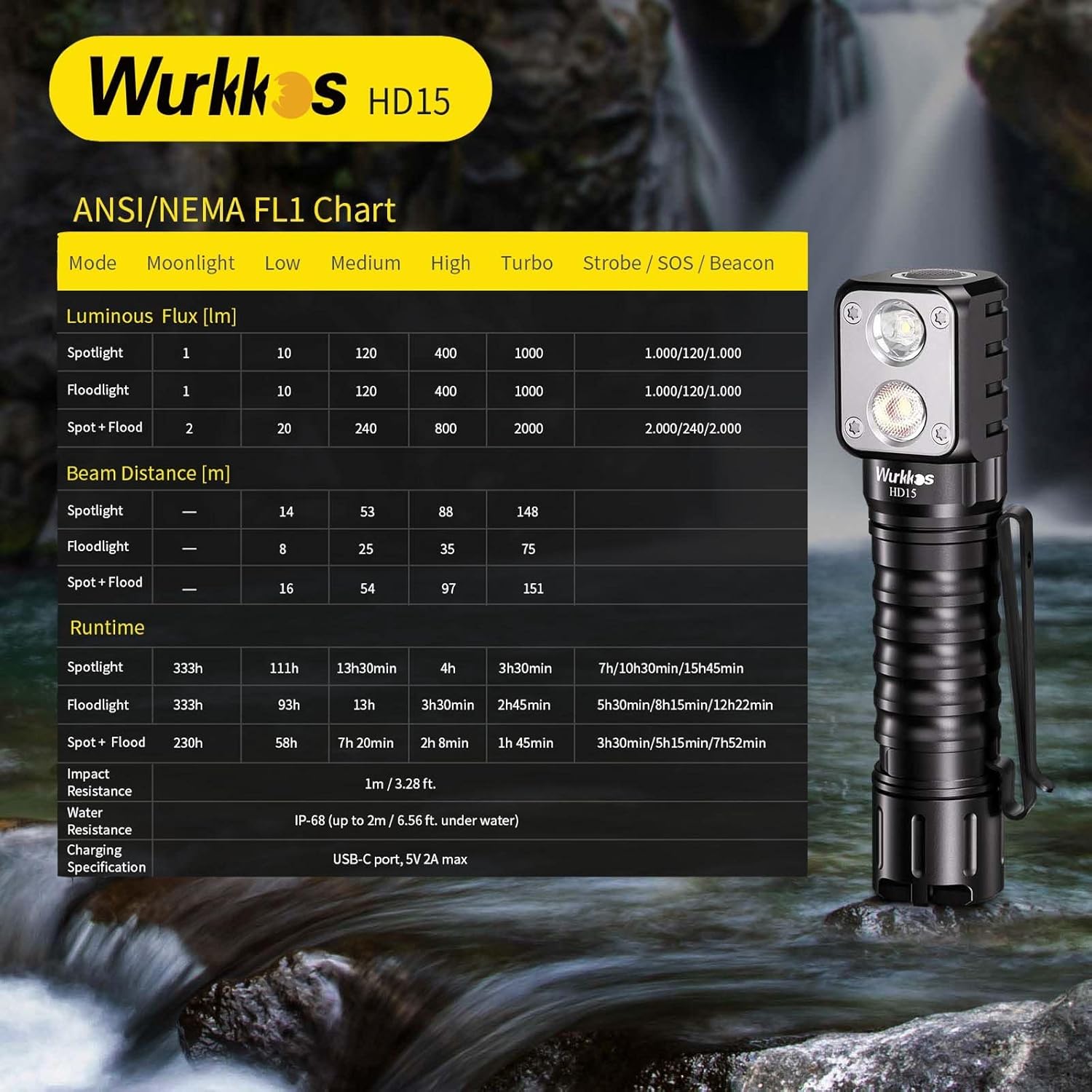
Image: Detailed ANSI/NEMA FL1 chart showing luminous flux, beam distance, and runtime for various modes (Spotlight, Floodlight, Spot+Flood).
| Feature | Detail |
|---|---|
| Model | HD15 |
| Light Source | LH351D (Floodlight, 90CRI), SST20 (Spotlight) |
| Max Luminous Flux | 2000 Lumens (Spot+Flood Turbo) |
| Max Beam Distance | 151 meters (Spot+Flood Turbo) |
| Runtime | Up to 230 hours (Spotlight Moonlight) |
| Battery | 1 x 21700 Lithium Ion (included), 5000mAh |
| Charging | USB-C, 5V 2A max |
| Water Resistance | IP68 (up to 2 meters underwater) |
| Impact Resistance | 1 meter / 3.28 feet |
| Material | Aircraft-grade Aluminum Alloy |
| Dimensions | 0.9"D x 4.4"W x 1.1"H (22.8mm D x 111.7mm W x 27.9mm H) |
| Weight | 4.8 Ounces (approx. 136g without battery) |
| Color Temperature | 5000 Kelvin |
| Color Rendering Index (CRI) | 90.00 (LH351D) |
8. Warranty and Support
8.1 Warranty Information
All Wurkkos products come with a 12-month free unlimited warranty from the date of purchase. This warranty covers manufacturing defects and issues arising from normal use.
8.2 Customer Support
For any questions, concerns, or warranty claims, please contact Wurkkos customer service. They offer 24/7 online service to assist you.
Visit the official Wurkkos store for more information: Wurkkos Store


