
1. Introduction
This manual provides essential information for the safe and efficient operation, maintenance, and troubleshooting of your Ariens IKON (52") 23HP Kawasaki Zero Turn Mower, model 918005. Please read this manual thoroughly before operating the mower to ensure proper use and to prevent injury or damage.
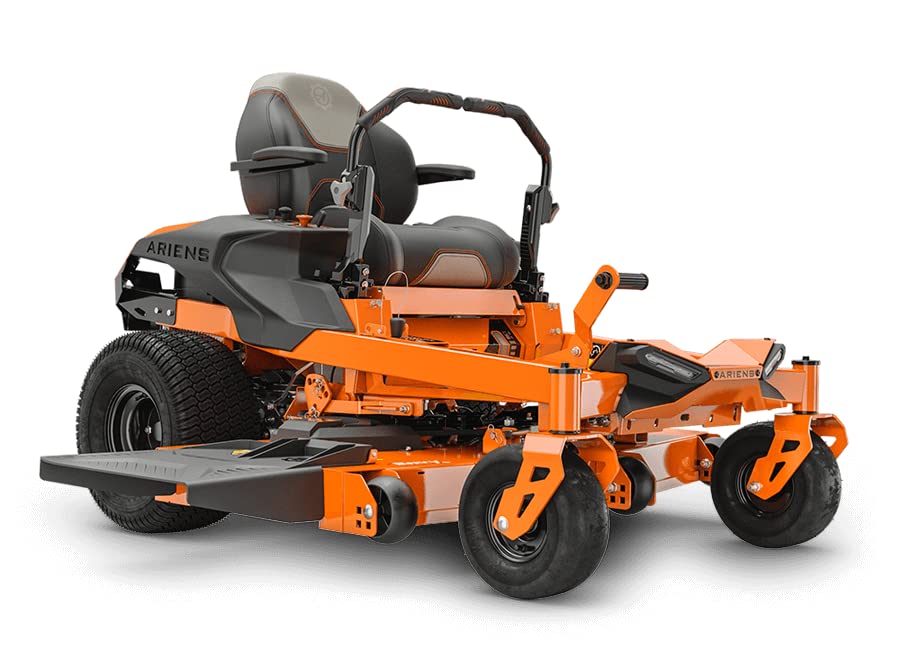
Figure 1: Ariens IKON (52") 23HP Kawasaki Zero Turn Mower, Model 918005.
2. Safety Information
Always prioritize safety when operating the mower. Failure to follow safety instructions can result in serious injury or death. Keep all guards and safety devices in place and in working order. Read and understand all safety decals on the mower.
WARNING: This product can expose you to chemicals including engine exhaust, which is known to the State of California to cause cancer. For more information go to www.P65Warnings.ca.gov.
- Always wear appropriate personal protective equipment (PPE), including eye protection, hearing protection, and sturdy footwear.
- Keep children and pets away from the operating area.
- Never operate the mower under the influence of alcohol or drugs.
- Inspect the area for debris before mowing.
- Exercise extreme caution on slopes.
- Turn off the engine and remove the key before performing any maintenance or adjustments.
3. Setup
Upon receiving your Ariens IKON Zero Turn Mower, perform the following initial setup steps:
- Unpackaging: Carefully remove the mower from its shipping pallet. Ensure all packaging materials are removed.
- Battery Connection: Connect the battery terminals as instructed in the separate battery manual (if applicable). Ensure connections are secure.
- Fluid Levels: Check engine oil and fuel levels. Refer to the engine manual for specific oil type and capacity.
- Tire Pressure: Verify tire pressure according to the specifications listed in this manual or on the tire sidewall.
- Control Familiarization: Before starting the engine, familiarize yourself with all controls, including the ignition, throttle, choke, and deck lift lever.
4. Operating Instructions
The Ariens IKON Zero Turn Mower is designed for efficient lawn care. Follow these instructions for optimal performance.
4.1 Starting the Engine
- Ensure the parking brake is engaged.
- Place the motion control levers in the neutral locked position.
- Engage the choke (if the engine is cold).
- Insert the key into the ignition and turn it to the START position. Release the key once the engine starts.
- Disengage the choke gradually as the engine warms up.
4.2 Engaging the Blades and Mowing
- With the engine running, set the throttle to full.
- Use the deck lift lever to set the desired cutting height. The mower offers 13 cutting positions, ranging from 1.5 to 4.5 inches in 0.25-inch increments.
- Engage the blade switch.
- Release the parking brake.
- Slowly move the motion control levers forward to begin moving. Adjust the levers for steering and speed. The mower has a ground speed of 7 mph forward and 3 mph reverse.
- To stop, pull the motion control levers inward to neutral, engage the parking brake, and disengage the blades.
4.3 Zero Turn Operation
The zero-turn capability allows for precise maneuvering and faster mowing times. While initially different from standard tractor mowers, the controls are intuitive and easy to learn. Practice in an open area before mowing around obstacles.
4.4 Operator Comfort Features
- Adjustable Seat: The comfortable seat can be adjusted forward and backward to suit operator preference.
- Control Levers: Handles are adjustable for height and feature textured rubber grips.
- Convenience: Includes a USB charging port and a cup holder for added convenience during operation.
- Headlights: Equipped with headlights for visibility in low-light conditions.
5. Maintenance
Regular maintenance is crucial for the longevity and optimal performance of your Ariens IKON Zero Turn Mower. Refer to the engine manual for specific engine maintenance schedules.
- Before Each Use: Check engine oil level, fuel level, tire pressure, and inspect for loose fasteners or damaged parts.
- After Each Use: Clean the mower deck and exterior. Remove grass clippings and debris.
- Blade Inspection: Regularly inspect mower blades for sharpness and damage. Sharpen or replace as needed.
- Air Filter: Clean or replace the air filter as recommended by the engine manufacturer.
- Spark Plug: Inspect and replace the spark plug according to the engine manual.
- Storage: For extended storage, prepare the mower by stabilizing fuel, disconnecting the battery, and cleaning thoroughly.
6. Troubleshooting
This section provides solutions to common operational issues. For problems not listed here, contact authorized service personnel.
| Problem | Possible Cause | Solution |
|---|---|---|
| Engine will not start | No fuel, dead battery, spark plug issue, safety interlock engaged. | Check fuel level, charge/replace battery, inspect spark plug, ensure parking brake is on and levers are neutral. |
| Poor cut quality | Dull blades, incorrect cutting height, engine speed too low. | Sharpen/replace blades, adjust cutting height, increase engine RPM. |
| Mower loses power | Clogged air filter, low fuel, engine overheating. | Clean/replace air filter, refuel, check for obstructions around engine. |
7. Specifications
| Feature | Detail |
|---|---|
| Brand | Ariens |
| Model Number | 918005 |
| Engine | 23 HP Kawasaki FR691V Twin Engine |
| Cutting Width | 52 Inches |
| Deck Type | 3-blade fabricated deck |
| Cutting Positions | 13 (1.5" to 4.5" in 0.25" increments) |
| Transmission | Hydro-Gear EZT |
| Ground Speed (Forward) | 7 mph |
| Ground Speed (Reverse) | 3 mph |
| Power Source | Gas Powered |
| Item Weight | 682 Pounds |
| Product Dimensions (D x W x H) | 80"D x 62"W x 35"H |
| Material | Plastic (referring to certain components, main frame is metal) |
| UPC | 751058048253 |
8. Warranty and Support
Your Ariens IKON Zero Turn Mower is backed by a 3-year consumer warranty. This warranty covers defects in materials and workmanship under normal use. For specific terms and conditions, please refer to the warranty documentation included with your product or visit the official Ariens website.
Product Registration: It is highly recommended to register your product with Ariens to ensure full warranty coverage and to receive important product updates. If you encounter any issues with registration, contact Ariens customer support directly.
Customer Support: For technical assistance, parts, or service, please contact your authorized Ariens dealer or visit the Ariens official support channels.


