
1. Introduction
This manual provides detailed instructions for the installation, operation, and maintenance of your DS18 RV.R1 RV Headunit. Please read this manual thoroughly before using the product to ensure proper function and to prevent damage.
2. Product Overview
The DS18 RV.R1 is a wall-mounted stereo receiver designed for recreational vehicles, offering a comprehensive audio and multimedia experience. It features a clear LCD screen, multiple connectivity options, and dual-zone audio control.

Image 2.1: Front view of the DS18 RV.R1 RV Headunit, showcasing its display and controls.
Key Features:
- 2-Zone Audio Control: Manage audio in two separate areas of your RV.
- High Voltage Preamp Outputs: 2.5V for main zones and 4V for subwoofer output.
- FM/AM Radio with RDS: Enjoy radio broadcasts with 18 FM and 12 AM preset stations.
- Multimedia Playback: USB input for MP3/WMA files (up to 64GB) and HDMI pass-through for TV integration.
- Bluetooth v5.0: Wireless audio streaming and connectivity.
- Integrated Amplifier: 4 channels x 17W continuous power at 4 ohms (50W max).
- 2-Band Equalizer: Adjustable Bass (100Hz) and Treble (10KHz) with +/- 7dB gain.
3. Setup and Installation
The RV.R1 is designed for wall-mounted installation. Ensure you have adequate space and proper wiring before beginning. Professional installation is recommended.
3.1 Wiring Connections
Refer to the wiring diagram on the unit's chassis and the included harness for correct connections. Key connections include power, ground, speaker outputs, RCA outputs, USB, HDMI, and auxiliary input.
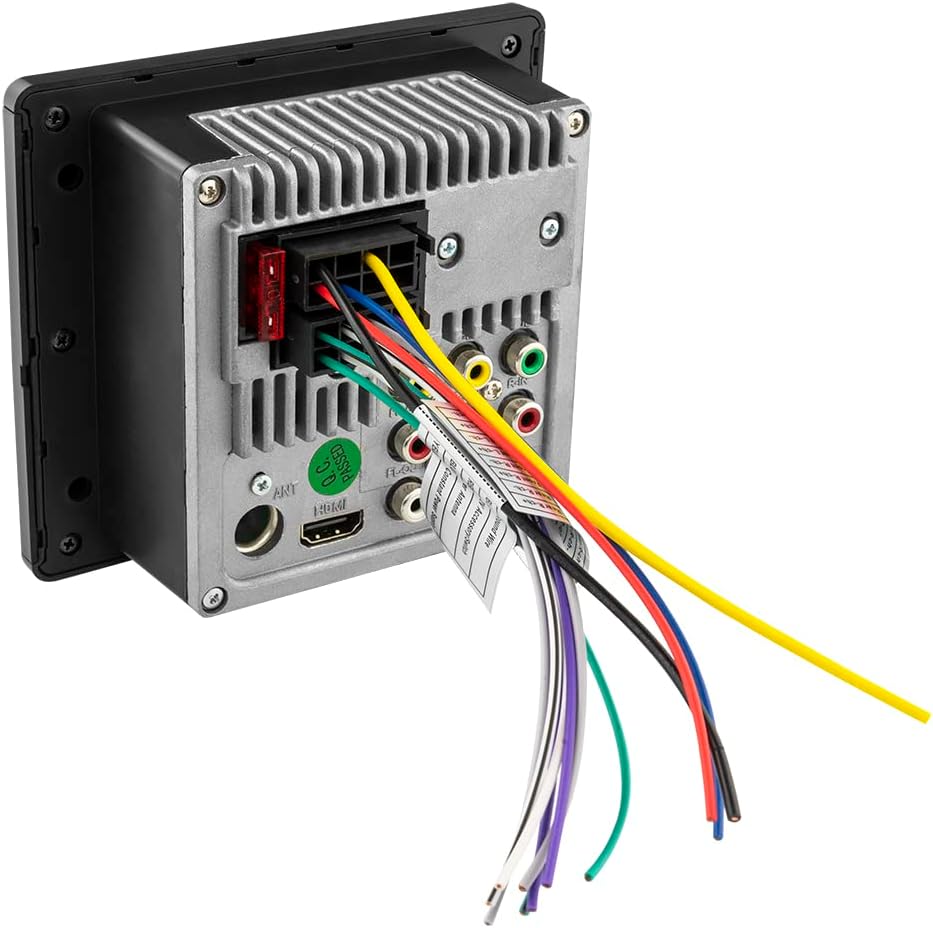
Image 3.1: Rear view of the RV.R1, illustrating the wiring harness, RCA outputs, HDMI port, and fuse location.
3.2 Dimensions
The unit's dimensions are approximately 1.83 inches (D) x 5.1 inches (W) x 4.43 inches (H). Ensure your mounting location accommodates these measurements.

Image 3.2: Dimensional drawing of the RV.R1 for installation planning.
4. Operating Instructions
The RV.R1 features an intuitive interface with a central rotary knob and dedicated buttons for various functions.
4.1 Power On/Off and Source Selection
- Press the O/SRC button to power the unit on or off.
- Short press the O/SRC button to cycle through available audio sources (FM, AM, Bluetooth, USB, AUX, HDMI).
4.2 Volume and Menu Control
- Rotate the central knob to adjust the volume.
- Press the central knob to access the menu for audio settings (Bass, Treble, Balance, EQ, Loudness) and other system configurations. Rotate the knob to navigate and press to select.
4.3 Radio Operation (FM/AM)
- Select FM or AM source.
- Use the Band button to switch between FM1, FM2, FM3, AM1, AM2 bands.
- Use the Seek buttons (|<< and >>|) to tune to the next/previous station.
- Press and hold a preset button (1-6) to save the current station. Short press to recall a saved station.
4.4 USB Playback
- Insert a USB drive containing MP3 or WMA files into the front USB port. The unit will automatically switch to USB source and begin playback.
- Use the Play/Pause, Next/Previous Track, Repeat, and Random buttons for control.
5. Connectivity
5.1 Bluetooth Pairing
- Select Bluetooth as the source. The unit will enter pairing mode.
- On your mobile device, search for "DS18 RV.R1" and connect.
- Once paired, you can stream audio wirelessly from your device.
5.2 HDMI Pass-Through
The RV.R1 includes an HDMI pass-through feature, allowing you to integrate your TV's audio into the RV.R1's sound system. Connect your TV's HDMI output to the RV.R1's HDMI input, and the RV.R1's HDMI output to another display if needed.
5.3 USB Port
The front USB port supports media playback and can also provide charging for compatible devices.
5.4 Auxiliary Input
Connect external audio devices using a 3.5mm auxiliary cable to the front AUX input.
6. Audio Features
6.1 2-Band Equalizer
Adjust the bass and treble frequencies to customize your sound. The bass control operates at 100Hz, and the treble control at 10KHz, both with a gain range of +/- 7dB.
6.2 Dual Zone Control
The RV.R1 allows for independent volume control over two separate audio zones, enabling different listening experiences in various areas of your RV.
6.3 Preamp Outputs
For enhanced audio systems, the unit provides 2.5V preamp outputs for the main zones and a dedicated 4V preamp output for a subwoofer, allowing connection to external amplifiers.
7. Specifications
| Feature | Specification |
|---|---|
| Model Number | RV.R1 |
| Output Power (Continuous) | 4 x 17W @ 4 ohms (14.4V) |
| Output Power (Max) | 4 x 50W @ 4 ohms (14.4V) |
| Pre-output Level (Zones 1/2) | 2.5 Volts (14.4V) |
| Pre-output Level (Subwoofer) | 4 Volts (14.4V) |
| Equalizer Bands | 2 Bands (Bass: 100Hz, Treble: 10KHz) |
| Equalizer Gain | +/- 7dB |
| Connectivity Technology | USB, RCA, HDMI, Auxiliary, Bluetooth |
| Bluetooth Version | v5.0 |
| USB Reader Capacity | Up to 64GB |
| Supported Audio Formats | MP3, WMA |
| HDMI Ports | 2 (1 input, 1 output for pass-through) |
| Radio Features | FM (18 presets), AM (12 presets), RDS |
| Item Dimensions (D x W x H) | 1.83" x 5.1" x 4.43" |
| Fuse | 10A |
Video 7.1: An overview of the DS18 RV.R1 RV Headunit, detailing its features and connectivity options.
8. Maintenance
8.1 Cleaning
To maintain the unit's appearance and functionality, regularly wipe the screen and buttons with a soft, dry cloth. Avoid using abrasive cleaners or solvents.
8.2 Fuse Replacement
The unit is equipped with a 10A fuse located at the rear. If the unit fails to power on or experiences electrical issues, check and replace the fuse if necessary. Always use a fuse of the correct rating (10A) to prevent damage.
9. Troubleshooting
If you encounter issues with your RV.R1 headunit, refer to the following common troubleshooting steps:
- No Power: Check all power connections, including the 10A fuse at the rear of the unit. Ensure the vehicle's battery has sufficient charge.
- No Sound: Verify speaker connections, volume levels, and selected audio source. Check if the mute function is active.
- Bluetooth Connection Issues: Ensure Bluetooth is enabled on your device and the RV.R1 is in pairing mode. Try unpairing and re-pairing the device.
- USB Playback Errors: Ensure the USB drive is formatted correctly (FAT32) and contains supported audio files (MP3, WMA). Try a different USB drive.
- Radio Reception Poor: Check the antenna connection. Ensure you are in an area with good signal strength.
For persistent issues, contact DS18 customer support.
10. Warranty and Support
10.1 Warranty Information
The DS18 RV.R1 RV Headunit comes with a 1 Year Limited Warranty from the date of purchase. This warranty covers manufacturing defects and workmanship under normal use. Please retain your proof of purchase for warranty claims.
10.2 Customer Support
For technical assistance, warranty inquiries, or further information, please visit the official DS18 website or contact their customer support department. Contact details can typically be found on the manufacturer's website or product packaging.
11. What's in the Box
The product package for the DS18 RV.R1 RV Headunit includes:
- DS18 RV.R1 Stereo Headunit Receiver