
DIZO DA2105
DIZO GoPods Neo True Wireless Earbuds Instruction Manual
Model: DA2105
Brand: DIZO (by realme Techlife)
Introduction
This manual provides comprehensive instructions for the DIZO GoPods Neo True Wireless Earbuds. Please read carefully to ensure proper use, maintenance, and to maximize your audio experience. These earbuds feature Active Noise Cancellation (ANC), Transparency Mode, and a long-lasting battery, designed for a seamless listening experience.

The DIZO GoPods Neo earbuds and their charging case, showcasing the compact design and deep blue color.
Key Features
Active Noise Cancellation (ANC)
Immerse yourself in music by reducing ambient noise up to 25dB, allowing for a focused listening experience.

Experience tranquility with ANC.
Transparency Mode
Stay aware of your surroundings without removing your earbuds. This mode allows external sounds to pass through.

Hear your environment clearly.
Dual Mic Noise Cancellation for Calls
Ensure clear voice calls even in noisy environments, thanks to advanced dual microphone technology.

Crystal-clear calls, anywhere.
10mm Bass Boost Driver
Experience rich, deep bass and high-quality audio with the powerful 10mm dynamic drivers.

Powerful audio performance.
Long Battery Life & Fast Charging
Enjoy up to 28 hours of total playback with the charging case. A quick 10-minute charge provides 3 hours of playback.

Extended listening with quick top-ups.
88ms Super Low Latency Game Mode
Experience synchronized audio and video for an immersive gaming experience with minimal delay.

Optimized for gaming.
IPX5 Water Resistance
Designed to withstand splashes and sweat, making them suitable for workouts and outdoor activities.

Durable for active lifestyles.
Setup Guide
1. Charging the Earbuds and Case
Before first use, fully charge the DIZO GoPods Neo charging case and earbuds. Use the provided USB-C charging cable.
- Place both earbuds into the charging case.
- Connect the USB-C cable to the charging port on the case and the other end to a power adapter (not included) or a computer's USB port.
- The indicator light on the case will show charging status. A full charge typically takes about 120 minutes.
Ensure your earbuds and case are fully charged for optimal performance.
2. Pairing with Your Device
Follow these steps to pair your DIZO GoPods Neo with a new device via Bluetooth:
- Ensure the earbuds are in the charging case and the case lid is open.
- On your device (smartphone, tablet, laptop), go to the Bluetooth settings and turn Bluetooth on.
- The DIZO GoPods Neo should appear in the list of available devices. Select it to initiate pairing.
- Once connected, you will hear an audible confirmation, and the earbuds will be ready for use.
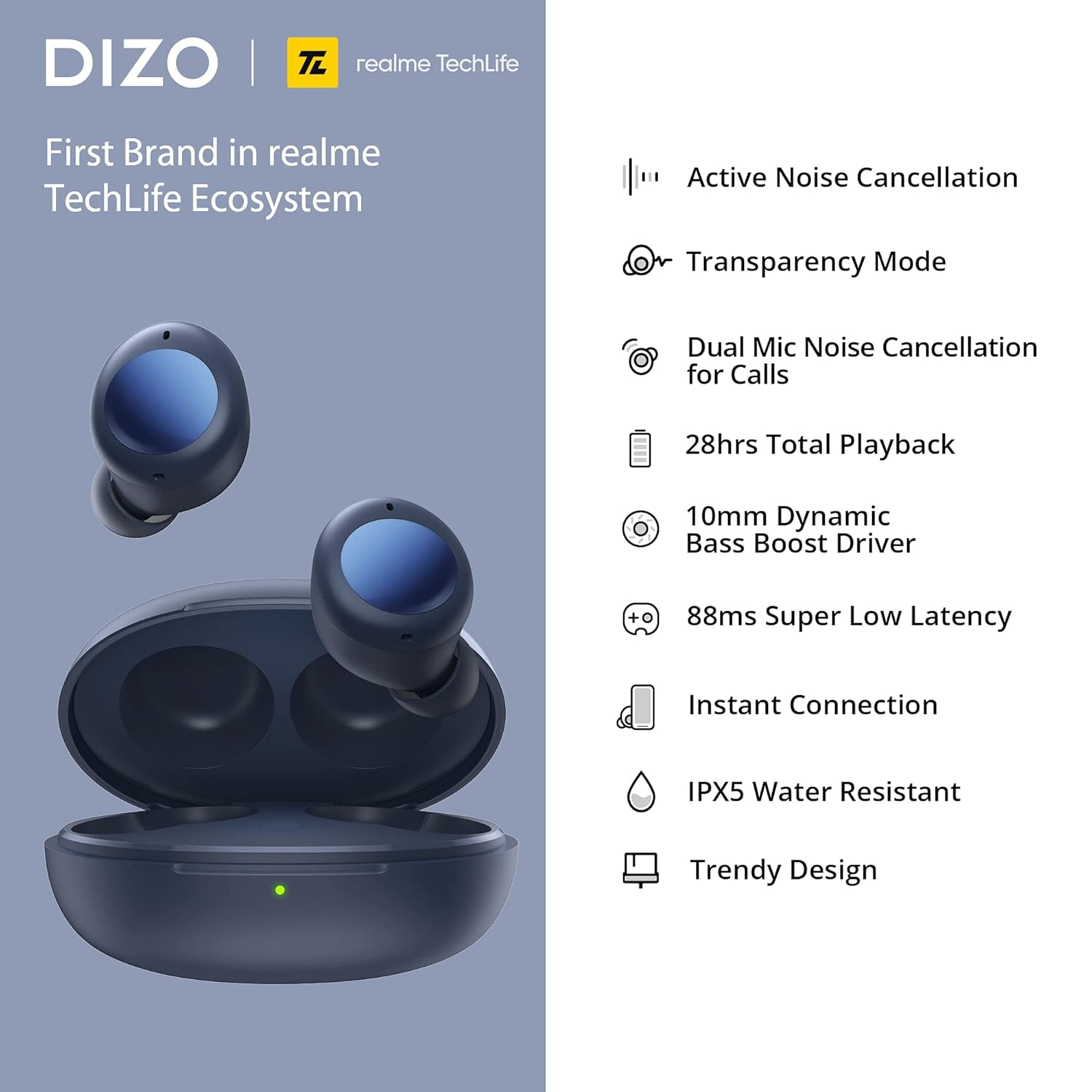
The earbuds offer instant connection for quick pairing.
Operating Instructions
Touch Controls
The DIZO GoPods Neo earbuds feature intuitive touch controls on their outer surface. The following table outlines the default functions:
| Action | Function |
|---|---|
| Double Tap | Play/Pause music, Answer/End call |
| Triple Tap | Next song |
| Press and Hold (one earbud) | Toggle between ANC / Transparency Mode / Normal Mode |
| Press and Hold (both earbuds simultaneously) | Enter/Exit Game Mode |
Note: Some touch controls may be customizable via the realme Link app (if applicable).
Sound Modes
- Active Noise Cancellation (ANC): Reduces external noise for an immersive audio experience. Activate by pressing and holding one earbud.
- Transparency Mode: Allows you to hear your surroundings clearly without removing the earbuds. Activate by pressing and holding one earbud.
- Normal Mode: Standard audio mode without noise cancellation or transparency.
Making Calls
When a call comes in, double-tap either earbud to answer. Double-tap again to end the call. The dual microphones ensure clear communication.
Maintenance and Care
Cleaning
- Regularly clean the earbuds and charging case with a soft, dry, lint-free cloth.
- For stubborn dirt, lightly dampen the cloth with water. Avoid using harsh chemicals or abrasive materials.
- Gently clean the ear tips and speaker mesh to prevent wax buildup, which can affect sound quality.
Storage
- Always store the earbuds in their charging case when not in use to protect them from dust, dirt, and damage.
- Store the case and earbuds in a cool, dry place, away from direct sunlight and extreme temperatures.
Battery Care
- To prolong battery life, avoid fully discharging the earbuds and case frequently.
- Charge the device regularly, even if not in frequent use, to maintain battery health.
Troubleshooting
If you encounter issues with your DIZO GoPods Neo, try the following solutions:
- Earbuds not pairing/connecting:
- Ensure both earbuds are in the charging case and the case has sufficient battery.
- Turn off and on Bluetooth on your device.
- Forget the device from your Bluetooth list and try pairing again.
- Reset the earbuds (refer to the product's specific reset procedure if available, typically involves holding a button on the case).
- No sound from one earbud:
- Place both earbuds back into the case, close the lid, wait a few seconds, then open and try again.
- Ensure both earbuds are charged.
- Clean the charging contacts on both the earbuds and the case.
- Charging issues:
- Check the charging cable and adapter for damage.
- Ensure the charging port on the case is clean and free of debris.
- Try a different charging cable or power source.
- ANC not working effectively:
- Ensure the earbuds are properly seated in your ears to create a good seal.
- Check if ANC mode is correctly activated via touch controls.
Technical Specifications
| Feature | Specification |
|---|---|
| Model Name | DIZO GoPods Neo |
| Model Number | DA2105 |
| Connectivity Technology | Wireless (Bluetooth) |
| Noise Control | Active Noise Cancellation |
| Driver Size | 10mm Dynamic Bass Boost Driver |
| Frequency Response | 20000 KHz |
| Sensitivity | 103 dB |
| Total Playback Time | Up to 28 Hours (with charging case) |
| Single Playback Time | Up to 7 Hours |
| Single Talk Time | Up to 4 Hours |
| Charging Time | Approx. 120 Minutes |
| Fast Charging | 10 mins charge for 3 hrs playback |
| Low Latency | 88ms (Game Mode) |
| Water Resistance Level | IPX5 Water Repellent |
| Control Type | Touch, Voice Control |
| Compatible Devices | Cellphones, Laptops, Telephones |
| Material | Plastic |
| Item Weight | 10 Grams (earbuds) |
| Product Dimensions (Case) | 6 x 4.5 x 3.3 cm |
| Included Components | USB Charging Cable |
Warranty Information
The DIZO GoPods Neo comes with a 12-month warranty from the date of purchase. This warranty covers manufacturing defects and issues arising from normal use. Please retain your proof of purchase for warranty claims. The warranty does not cover damage caused by misuse, accidents, unauthorized repairs, or normal wear and tear.
Support
For further assistance, technical support, or warranty claims, please visit the official DIZO website or contact their customer service. Refer to the packaging or the official website for the most up-to-date contact information and support resources.
You can often find FAQs, troubleshooting guides, and software/firmware updates on the official product support page.
Related documentsDA2105


Ask a question about this manual
Ask about setup, troubleshooting, compatibility, parts, safety, or missing instructions. Manuals+ will review the question and use this page’s manual context to help answer it.