
Product Overview
The Cobbawe 7-in-1 Hydrogen Oxygen Facial Bubble Beauty Skin Cleaning Machine is an advanced skincare device designed for comprehensive facial treatment. This multi-functional system integrates various technologies to address a wide range of skin concerns, including cleansing, hydration, exfoliation, and anti-aging. It is engineered to provide professional-grade skincare results in a convenient and user-friendly format.
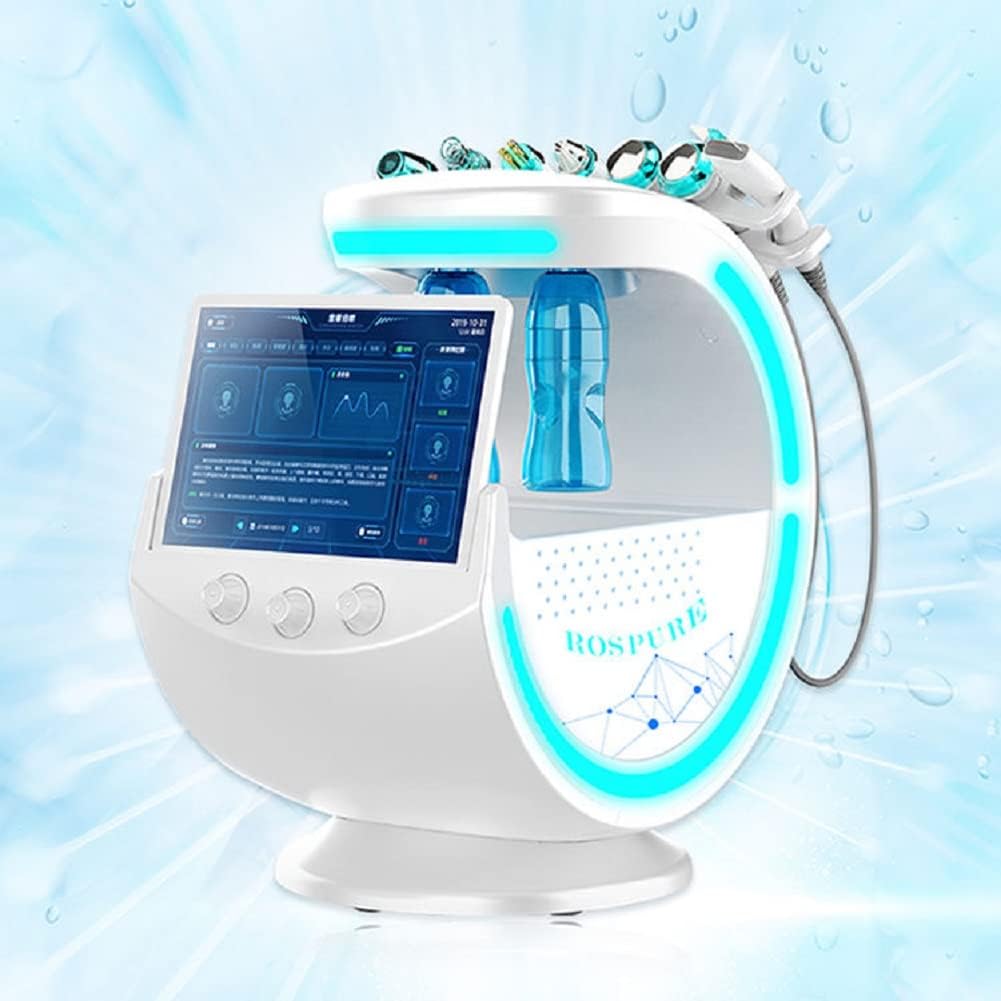
Figure 1: Main unit of the Cobbawe 7-in-1 Hydrogen Oxygen Facial Machine. This image displays the central console with a touchscreen interface, integrated solution bottles, and various treatment handles connected to the unit, highlighting its compact and modern design.

Figure 2: Diagram illustrating the "Smart Ice Blue Skin Management System PLUS" and its targeted skin concerns. This visual highlights the machine's capabilities in addressing issues such as stains, wrinkles, pores, acne, sensitivity, roughness, moisture balance, and oil control.
Setup Instructions
- Unpacking: Carefully remove all components from the packaging. Verify that all parts listed in the packing list are present and undamaged.
- Placement: Place the main unit on a stable, flat surface in a well-ventilated area, away from direct sunlight or heat sources.
- Power Connection: Connect the power cord to the machine's power input port, then plug it into a standard 100V-240V AC electrical outlet. Ensure the power switch is in the OFF position before connecting.
- Solution Tank Preparation: Identify the designated solution tanks. Fill them with appropriate skincare solutions (e.g., purified water, hydrogen-oxygen solution, nutrient solutions) as per your treatment protocol. Ensure tanks are securely closed after filling.
- Handle Attachment: Connect the various treatment handles (e.g., High Frequency Shovel Knife, Golden Radio Head, Ion Airbrush Pen, Icy Head, Ion Bubble Pen, Ultrasonic Head) to their respective ports on the main unit. Ensure connections are firm and secure.
Operating Instructions
Before beginning any treatment, ensure your face is thoroughly cleansed. Apply a conductive gel or appropriate serum to the skin area to be treated, as recommended for the specific function.
- Power On: Turn on the main power switch located on the unit. The touchscreen display will illuminate.
- Mode Selection: Navigate the touchscreen interface to select the desired treatment mode. The machine offers various functions for different skin concerns.
- Parameter Adjustment: Adjust intensity levels, time settings, and other parameters as needed for the selected mode and individual skin sensitivity.
- Treatment Application:
- High Frequency Shovel Knife: For high-frequency removal of dead skin and blackheads. Gently glide the shovel knife across the skin surface.
- Golden Radio Head: For light wrinkles, skin firmness, and collagen regeneration. Apply in circular motions on target areas.
- Ion Airbrush Pen: For nano atomization and deep skin penetration of serums. Hold the pen a short distance from the skin and spray evenly.
- Icy Head: For moisturizing and skin repair. Use to soothe and calm the skin after other treatments.
- Ion Bubble Pen: For deep cleaning and blackhead removal. Move the pen gently over congested areas, allowing the bubble action to work.
- Ultrasonic Head: For high-frequency import of nutrients and fast absorption. Glide over the skin to enhance product penetration.
- Post-Treatment: After completing the treatment, turn off the machine and disconnect the power. Clean the treatment handles and the machine as per the maintenance instructions.

Figure 3: Close-up view of three primary treatment heads: the High Frequency Shovel Knife (01) for exfoliation, the Golden Radio Head (02) for anti-aging and collagen stimulation, and the Ion Airbrush Pen (03) for nutrient atomization.

Figure 4: Close-up view of three additional treatment heads: the Icy Head (04) for soothing and repair, the Ion Bubble Pen (05) for deep pore cleansing, and the Ultrasonic Head (06) for enhanced product absorption.
Maintenance
Proper maintenance ensures the longevity and optimal performance of your Cobbawe facial machine.
- Daily Cleaning: After each use, wipe down the main unit and all treatment handles with a soft, damp cloth. For disinfection, use a mild, non-abrasive disinfectant solution.
- Solution Tank Management: Empty and rinse the solution tanks after each use, especially if using different solutions. Allow them to air dry completely before refilling or storing.
- Probe Cleaning: For specific probes like the Ion Bubble Pen, ensure any residue is thoroughly cleaned from the tips to prevent clogging.
- Storage: Store the machine and its accessories in a clean, dry, and cool place, away from direct sunlight and extreme temperatures. Use the original packaging or a protective case if available.
- Regular Inspection: Periodically inspect the power cord and all connections for any signs of wear or damage. Do not use the machine if any damage is observed.
Troubleshooting
This section provides solutions to common issues you might encounter.
| Problem | Possible Cause | Solution |
|---|---|---|
| Machine does not power on. | Power cord not securely connected; power outlet issue; machine power switch off. | Ensure power cord is firmly plugged into both the machine and a working electrical outlet. Check if the power switch is in the ON position. Test the outlet with another device. |
| No output from treatment handles. | Handle not properly connected; incorrect mode selected; solution tanks empty or clogged. | Verify that the treatment handle is securely connected to its port. Confirm the correct mode is selected on the touchscreen. Check solution tank levels and ensure no blockages in the lines or handle tips. |
| "Tanks Full" error message (even if empty). | Sensor malfunction or residue on sensors. | Carefully clean the tank sensors. If the issue persists, contact customer support for assistance. |
| Touchscreen unresponsive. | Temporary software glitch; screen dirty. | Restart the machine by turning it off and on again. Clean the touchscreen with a soft, dry cloth. If the problem continues, contact customer support. |
Specifications
| Feature | Detail |
|---|---|
| Model Name | RM 7 in 1 Face Facial Machine |
| Brand | Cobbawe |
| Functions | Skin detection, Nutrition introduction, Face lift, Cleansing, Hydrating, Exfoliating, Smooth fine lines, Soothes the skin, Eye care |
| Power Source | Corded Electric |
| Input Voltage | 100V-240V |
| Color | White |
| Dimensions (L x W x H) | 30 x 40 x 50 cm (approx. 11.8 x 15.7 x 19.7 inches) |
| Weight | Approx. 25.4 Pounds (11.5 kg) |
| ASIN | B0BVRBQ78M |

Figure 5: Detailed specifications including physical dimensions and a summary of the instrument's functions, such as skin detection, nutrition introduction, and various facial treatments.
Warranty and Support
For warranty information, technical support, or service inquiries, please contact the manufacturer, Cobbawe, or your authorized reseller. Keep your purchase receipt and product serial number (if applicable) readily available when contacting support.
Manufacturer: Cobbawe
For the most up-to-date contact information, please visit the official Cobbawe website or refer to the contact details provided at the point of purchase.