
Avhrit AX001
Avhrit Cordless Wood Router User Manual
Model: AX001
Introduction
Thank you for choosing the Avhrit Cordless Wood Router. This powerful and versatile tool is designed for various woodworking applications, offering cordless convenience and precision. Please read this manual thoroughly before operation to ensure safe and efficient use.
Safety Instructions
Always follow basic safety precautions to reduce the risk of fire, electric shock, and personal injury.
- Wear appropriate personal protective equipment (PPE) such as safety glasses, hearing protection, and gloves.
- Ensure your work area is clean and well-lit. Cluttered or dark areas invite accidents.
- Do not operate power tools in explosive atmospheres, such as in the presence of flammable liquids, gases, or dust.
- Keep children and bystanders away while operating a power tool.
- Disconnect the battery pack from the tool before making any adjustments, changing accessories, or storing power tools.
- Use the correct tool for your application. Do not force the tool.
- Maintain tools with care. Keep cutting tools sharp and clean.
- Store idle tools out of reach of children and do not allow persons unfamiliar with the power tool or these instructions to operate the power tool.
Package Contents
Verify that all items listed below are included in your package. If any items are missing or damaged, please contact customer support.
- 1 x Cordless Wood Router
- 2 x 4.0Ah Batteries
- 1 x Fast Charger
- 15 x 1/4" Router Bit Kit
- 1 x Straight Guide
- 1 x Roller Guide
- 1 x Wrench

Image: Avhrit Cordless Wood Router with two batteries, a set of 15 router bits in a blue case, a charger, and various guides and wrenches.
Setup and Assembly
1. Battery Charging and Installation
Before first use, fully charge both 4.0Ah batteries.
- Connect the fast charger to a power outlet.
- Insert a battery into the charger. The indicator light will show charging status.
- Once fully charged, remove the battery from the charger.
- To install the battery, align it with the battery slot on the router and slide it in until it clicks into place.
- To remove the battery, press the release button and slide the battery out.

Image: Two 21V batteries, one connected to a fast charger plugged into a wall outlet, and the other resting on wooden crates.
2. Router Bit Installation
The router comes with a 15-piece 1/4" shank router bit kit for various applications.
- Ensure the router is turned off and the battery is removed.
- Use the provided wrench to loosen the collet nut.
- Insert the desired router bit into the collet, ensuring it is fully seated.
- Tighten the collet nut firmly with the wrench. Do not overtighten.
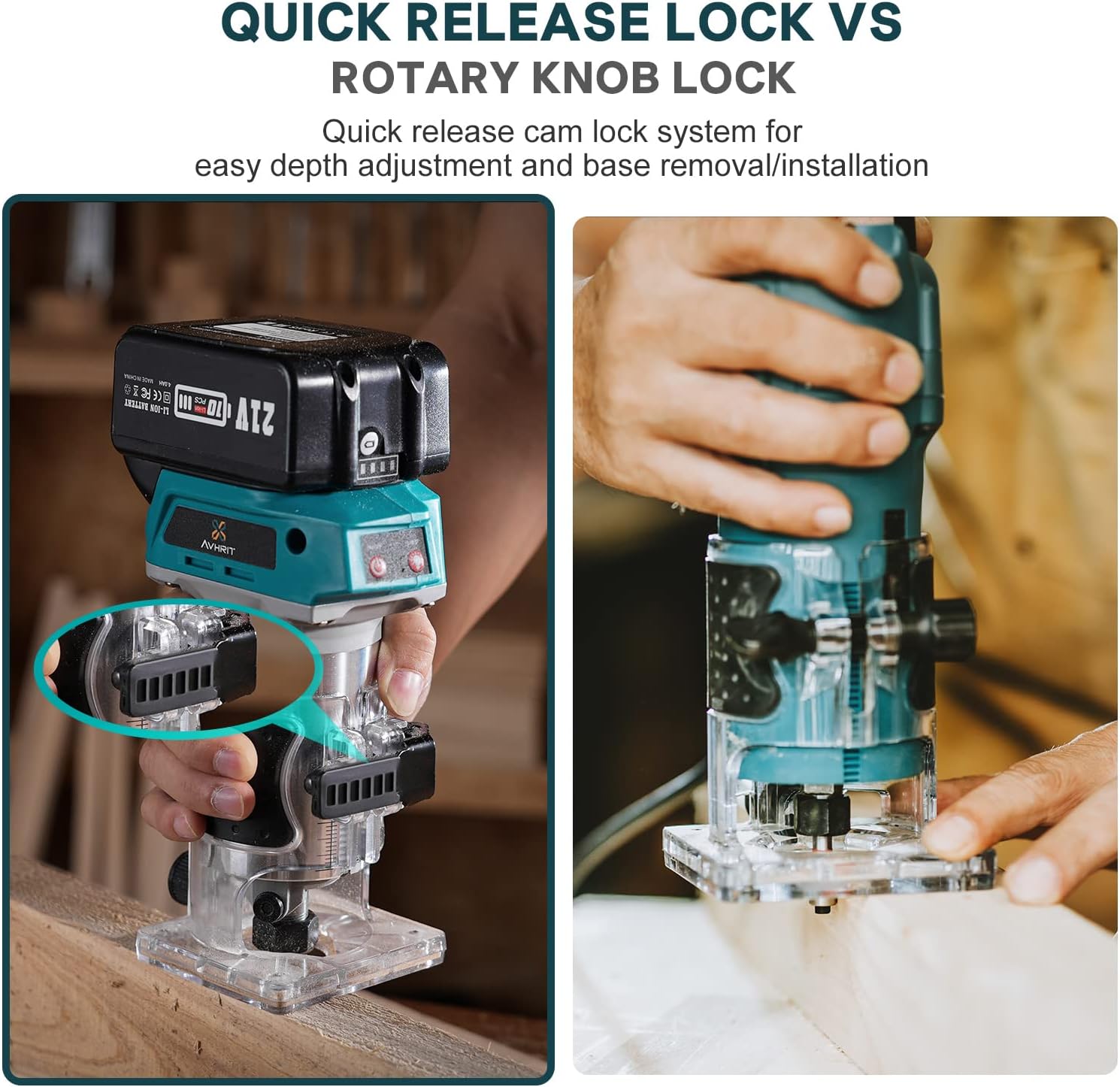
Image: A three-step visual guide showing how to install a router bit: 1) Unscrew the nut with a wrench, 2) Insert the bit, 3) Screw the nut tight with the wrench.

Image: A collection of 15 different 1/4" shank router bits, including straight bits, V-groove bits, dovetail bits, core box bits, rounding over bits, and chamfer bits.
3. Attaching the Straight Guide
The straight guide assists in making precise straight cuts, especially on thicker materials.
- Ensure the router is off and the battery is removed.
- Slide the straight guide into the designated slots on the router base.
- Adjust the guide to the desired distance from the router bit.
- Tighten the locking screw to secure the guide in place.

Image: A four-step visual guide demonstrating the installation of the straight guide onto the router base for stable straight processing.
Operating Instructions
1. Powering On/Off and Speed Adjustment
The router features a powerful brushless motor with 6 variable speed settings (10,000-33,000 RPM).
- To turn on the router, press the power switch.
- To adjust the speed, rotate the speed dial located on the top of the router. Select a speed appropriate for the material and router bit being used.
- To turn off the router, press the power switch again.

Image: A hand holding the cordless router, highlighting the speed dial with settings from 1 to 6, indicating a maximum speed of 33,000 RPM.
2. Depth Adjustment and Quick Release Lock
The quick-release cam lock system allows for easy and precise depth adjustments.
- To adjust the depth, release the quick-release cam lock lever.
- Move the router body up or down to achieve the desired routing depth.
- Once the desired depth is set, firmly close the quick-release cam lock lever to secure the router body.

Image: A comparison showing the quick-release cam lock system on the left, allowing for easy depth adjustment, versus a traditional rotary knob lock on the right.
3. General Applications
This cordless router is suitable for a wide range of woodworking tasks.
- Wood Trimming: Ideal for flush trimming edges and creating decorative profiles.
- Circle Slotting: Can be used with appropriate jigs for cutting circular grooves or slots.
- Wood Drilling: Capable of precise drilling for various joinery and assembly tasks.
- DIY Projects: Versatile for crafting small items like pet houses or custom furniture.

Image: Four panels illustrating different applications: Wood Trimming, Circle Slotting, DIY Pet House construction, and Wood Drilling, all performed with the cordless router.
Maintenance
Regular maintenance ensures the longevity and optimal performance of your router.
- Cleaning: After each use, disconnect the battery and clean the router body and base with a soft, dry cloth. Remove any sawdust or debris from the collet and motor vents.
- Bit Care: Keep router bits clean and sharp. Dull bits can cause overheating and poor cutting performance.
- Battery Storage: Store batteries in a cool, dry place away from direct sunlight and extreme temperatures. For long-term storage, charge batteries to about 50% capacity.
- Inspection: Periodically inspect the power cord of the charger for damage. Check the router for any loose screws or worn parts.
Troubleshooting
This section addresses common issues you might encounter.
| Problem | Possible Cause | Solution |
|---|---|---|
| Router does not turn on. | Battery not installed correctly or discharged. | Ensure battery is fully inserted. Charge the battery. |
| Reduced power or performance. | Battery low, dull bit, or excessive load. | Recharge battery. Replace or sharpen bit. Reduce cutting depth or feed rate. |
| Excessive vibration or noise. | Loose bit, damaged bit, or internal issue. | Ensure bit is securely tightened. Replace damaged bit. If problem persists, contact support. |
| Router bit gets stuck. | Incorrect feed rate or cutting depth. | Adjust feed rate and depth. Ensure material is properly secured. |
Specifications
| Feature | Detail |
|---|---|
| Brand | Avhrit |
| Model Number | AX001 |
| Product Dimensions (L x W x H) | 10 x 5 x 8 cm |
| Weight | 2.5 Kilograms |
| Material | Aluminum |
| Power Source | Battery Powered |
| Voltage | 20 Volts |
| Power (Watts) | 800 Watts |
| Horsepower | 1.1 hp |
| Max Rotational Speed | 33000 RPM |
| Amperage | 40 A |
| Battery Type | Lithium-ion |
| Included Components | 1 fast charger, 15 x 6.35 mm router bit kits, 1 straight guide, 1 roller guide, 1 cordless wood router, 2 x 4A batteries, 1 wrench |
| Usage | Outdoor; Professional |
Warranty and Support
For warranty information or technical support, please contact Avhrit customer service. Keep your purchase receipt as proof of purchase.
While specific spare parts availability information is not provided, please reach out to the manufacturer for any service or replacement part inquiries.
Ask a question about this manual
Ask about setup, troubleshooting, compatibility, parts, safety, or missing instructions. Manuals+ will review the question and use this page’s manual context to help answer it.