
1. Introduction
This manual provides instructions for the proper use and care of your Veridian Healthcare Non-Contact Infrared Thermometer, Model 09-183. This device is designed for non-contact measurement of body temperature, as well as the temperature of objects and rooms. It is suitable for home use across all age groups, including infants, children, and adults.
The non-contact design allows for hygienic and convenient temperature readings without physical contact, reducing the risk of cross-contamination. Please read this manual thoroughly before using the thermometer to ensure accurate results and safe operation.
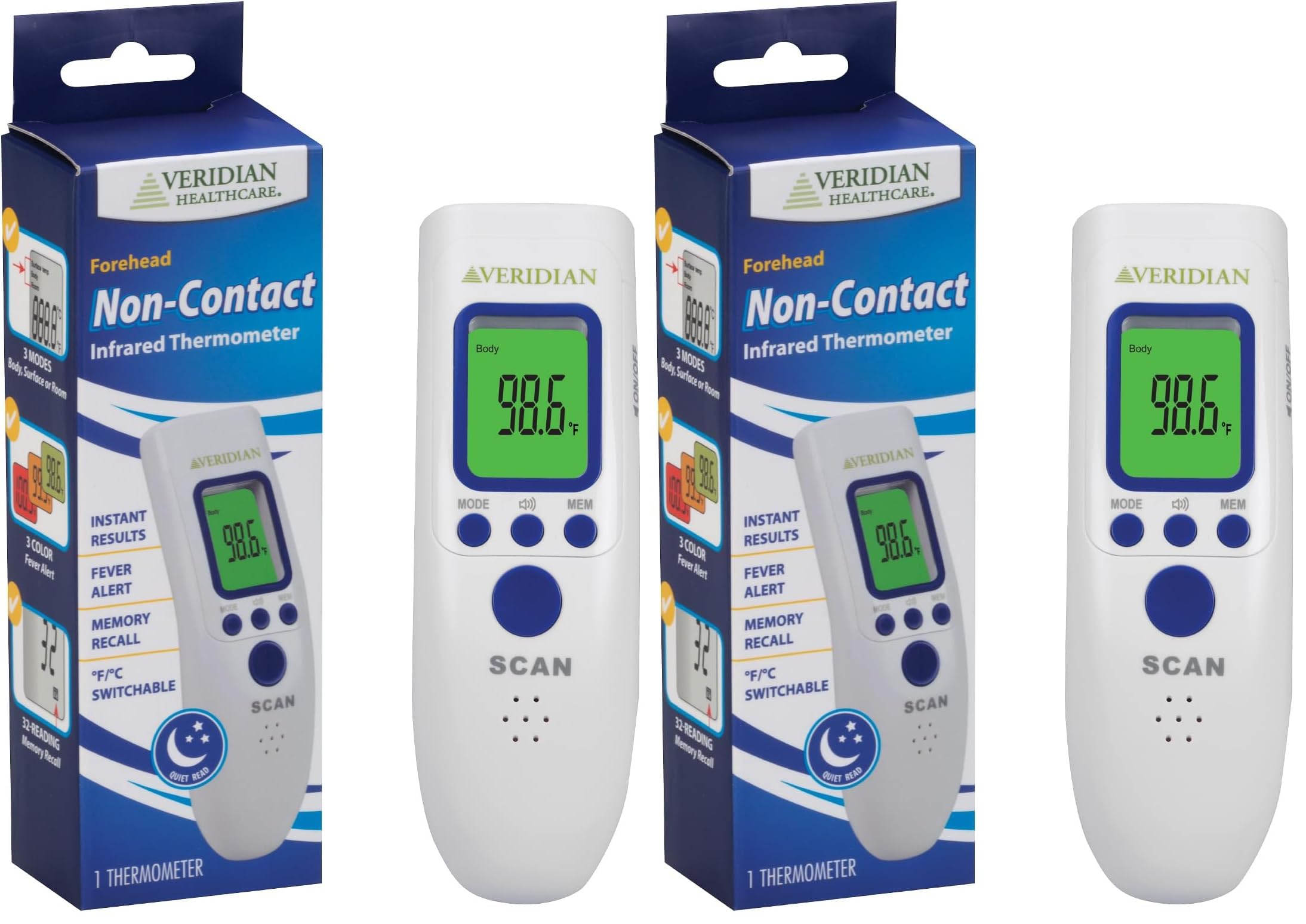
Image 1.1: Veridian Healthcare Non-Contact Infrared Thermometer, Model 09-183.
2. Safety Information
Please observe the following safety precautions to ensure safe operation and accurate readings:
- Do not attempt to disassemble or modify the thermometer.
- Keep the thermometer out of reach of children and pets.
- Avoid direct exposure to sunlight or extreme temperatures.
- Do not immerse the thermometer in water or other liquids.
- Ensure the measurement area (forehead for body temperature) is clean and free of obstructions like hair or sweat.
- Consult a healthcare professional if you have concerns about temperature readings or health conditions. This device is for monitoring purposes and does not replace medical advice.
- Use only specified batteries. Do not mix old and new batteries or different types of batteries.
3. Product Features
The Veridian Healthcare Non-Contact Infrared Thermometer offers several key features for comprehensive temperature monitoring:
- Non-Contact Measurement: Provides hygienic, touch-free readings for body, object, and room temperatures.
- 3 Measurement Modes: Easily switch between Body, Object, and Room temperature modes.
- 3-Color Fever Alert Display: The backlit display changes color to indicate normal, mild fever, or high fever.
- Silent Mode: Allows for quiet measurements, ideal for monitoring sleeping individuals.
- Memory Recall: Stores up to 32 previous readings for tracking temperature trends.
- Fahrenheit/Celsius Switchable: Easily toggle between temperature units.
- Automatic Shut-off: Conserves battery life.
4. Setup
4.1 Battery Installation
- Locate the battery compartment cover on the back of the thermometer.
- Slide the cover open.
- Insert two AAA batteries, ensuring the correct polarity (+/-) as indicated inside the compartment.
- Close the battery compartment cover until it clicks securely into place.
The thermometer is now ready for use.
5. Operating Instructions
5.1 Turning On/Off
- To turn on: Press the SCAN button. The display will show all segments briefly, then enter standby mode.
- To turn off: The thermometer will automatically shut off after approximately 30 seconds of inactivity to conserve battery life.
5.2 Selecting Measurement Mode
The thermometer has three measurement modes: Body, Object, and Room. To switch between modes:
- With the thermometer on, press the MODE button repeatedly to cycle through the available modes. The selected mode will be indicated on the display (e.g., "Body", "Object", "Room").

Image 5.1: Display indicating Body, Surface temp, and Room modes.
5.3 Taking a Measurement
- Ensure the thermometer is in the desired measurement mode (Body, Object, or Room).
- For Body Temperature: Aim the thermometer at the center of the forehead, approximately 1-2 inches (2-5 cm) away.
- For Object/Room Temperature: Aim the thermometer at the object or area you wish to measure.
- Press and release the SCAN button. A beep will sound (if silent mode is off), and the reading will appear on the display instantly.
5.4 Switching Fahrenheit/Celsius
To change the temperature unit:
- With the thermometer off, press and hold the MODE button for approximately 3 seconds. The display will show "F" or "C".
- Release the MODE button. The unit will toggle between Fahrenheit (°F) and Celsius (°C).
- Press the SCAN button to confirm your selection and exit the setting.
5.5 Silent Mode
To enable or disable the audible beep:
- With the thermometer on, press the speaker icon button (often labeled with a speaker symbol).
- The speaker icon on the display will appear or disappear, indicating whether silent mode is on or off.

Image 5.2: Display indicating silent mode is active.
6. Fever Alert System
The thermometer features a 3-color backlit display to provide a quick visual indication of temperature status in Body mode:
- Green Backlight: Indicates a normal temperature.
- Orange Backlight: Indicates a mild fever.
- Red Backlight: Indicates a high fever.

Image 6.1: Normal Temperature (Green)

Image 6.2: Mild Fever (Orange)

Image 6.3: High Fever (Red)

Image 6.4: Visual representation of the 3-color fever alert system.
7. Memory Recall
The thermometer can store up to 32 previous temperature readings.
- To access memory: With the thermometer on, press the MEM button. The display will show the last reading.
- Press the MEM button repeatedly to cycle through previous readings, from most recent to oldest.
- To exit memory mode: The thermometer will automatically return to standby mode after a few seconds of inactivity, or you can press the SCAN button.

Image 7.1: Display indicating memory recall function with 32 readings stored.
8. Maintenance and Care
8.1 Cleaning
- Use a soft, dry cloth to clean the thermometer body.
- For the probe lens, gently wipe with a cotton swab lightly moistened with alcohol. Allow to dry completely before use.
- Do not use abrasive cleaners or immerse the thermometer in water.
8.2 Storage
- Store the thermometer in a cool, dry place, away from direct sunlight and extreme temperatures.
- If not in use for an extended period, remove the batteries to prevent leakage.
9. Troubleshooting
| Problem | Possible Cause | Solution |
|---|---|---|
| No display when turned on | Batteries are dead or incorrectly inserted. | Replace batteries or check polarity. |
| Inaccurate readings | Dirty probe lens; incorrect measurement distance; environmental factors (drafts, direct sunlight). | Clean the probe lens; ensure correct distance (1-2 inches); measure in a stable environment. |
| "Lo" or "Hi" displayed | Temperature is outside the measurable range. | Ensure the thermometer is in the correct mode (Body/Object) and the temperature is within the specified range. |
| Thermometer beeps continuously | Error condition. | Remove and reinsert batteries. If the problem persists, contact customer support. |
10. Specifications
| Feature | Detail |
|---|---|
| Model Number | 09-183 |
| Measurement Type | Non-Contact Infrared |
| Measurement Modes | Body, Object, Room |
| Temperature Units | Fahrenheit (°F) / Celsius (°C) |
| Memory Recall | Up to 32 readings |
| Display | Digital with 3-color backlight (Green, Orange, Red) |
| Power Source | Battery Powered (2 x AAA, not included unless specified) |
| Automatic Shut-off | Yes |
| Product Dimensions | 9 x 6 x 2 inches |
| Item Weight | 9.1 ounces |
11. Warranty and Support
This Veridian Healthcare Non-Contact Infrared Thermometer, Model 09-183, comes with a 3-year limited warranty from the date of purchase. This warranty covers defects in materials and workmanship under normal use.
The warranty does not cover damage resulting from misuse, accident, unauthorized modification, or failure to follow operating instructions. Please retain your proof of purchase for warranty claims.
For technical support, warranty service, or questions regarding your thermometer, please contact Veridian Healthcare customer service. Contact information can typically be found on the product packaging or the official Veridian Healthcare website.


