
1. Product Overview
The ILIFE T10s is a robotic vacuum and mop designed for automated floor cleaning. It features a self-emptying station, advanced LiDAR navigation for efficient mapping, and strong suction capabilities. The device supports both vacuuming and mopping functions, is compatible with Wi-Fi and voice control systems, and is suitable for various floor types including hard floors and carpets.

2. What's in the Box
Verify that all components are present upon unpacking:
- 1x T10s Robot Vacuum
- 1x Self-empty Station
- 2x Side Brushes
- 2x Mop Cloth
- 1x 2-in-1 Water Tank
- 1x Mop Stand
- 1x Cleaning Tool
- 1x Filter
- 2x Dust Bag
- 1x User Manual
3. Setup
3.1 Charging Station Placement
Place the self-empty station against a wall in an open area, ensuring there are no obstacles within 1 meter (3 feet) to the front and 0.5 meters (1.5 feet) to the sides. Connect the power adapter to the station and a wall outlet.

3.2 Initial Charge
Place the robot onto the charging station. Ensure the charging contacts on the robot align with those on the station. Allow the robot to fully charge before its first use. The indicator light on the robot will show charging status.
3.3 App Connection and Mapping
Download the 'Smartlife' app from your device's app store. Follow the in-app instructions to connect your ILIFE T10s to your home Wi-Fi network (2.4GHz only). The robot will perform an initial scan to create a map of your home using its LiDAR navigation system.


4. Operating Instructions
4.1 Cleaning Modes
The ILIFE T10s offers various cleaning modes:
- Path Pattern: The robot cleans in an organized, back-and-forth pattern.
- Edge Mode: The robot cleans along the perimeter of rooms.
- Spot Mode: The robot focuses on a specific area for intensive cleaning.
4.2 Vacuuming and Mopping
The device performs 2-in-1 vacuuming and mopping simultaneously. Ensure the 2-in-1 water tank and mop cloth are properly installed for mopping functionality.

4.3 Suction Power
The ILIFE T10s provides up to 4000Pa of suction power. Suction levels can be adjusted via the mobile application to suit different cleaning needs and floor types.

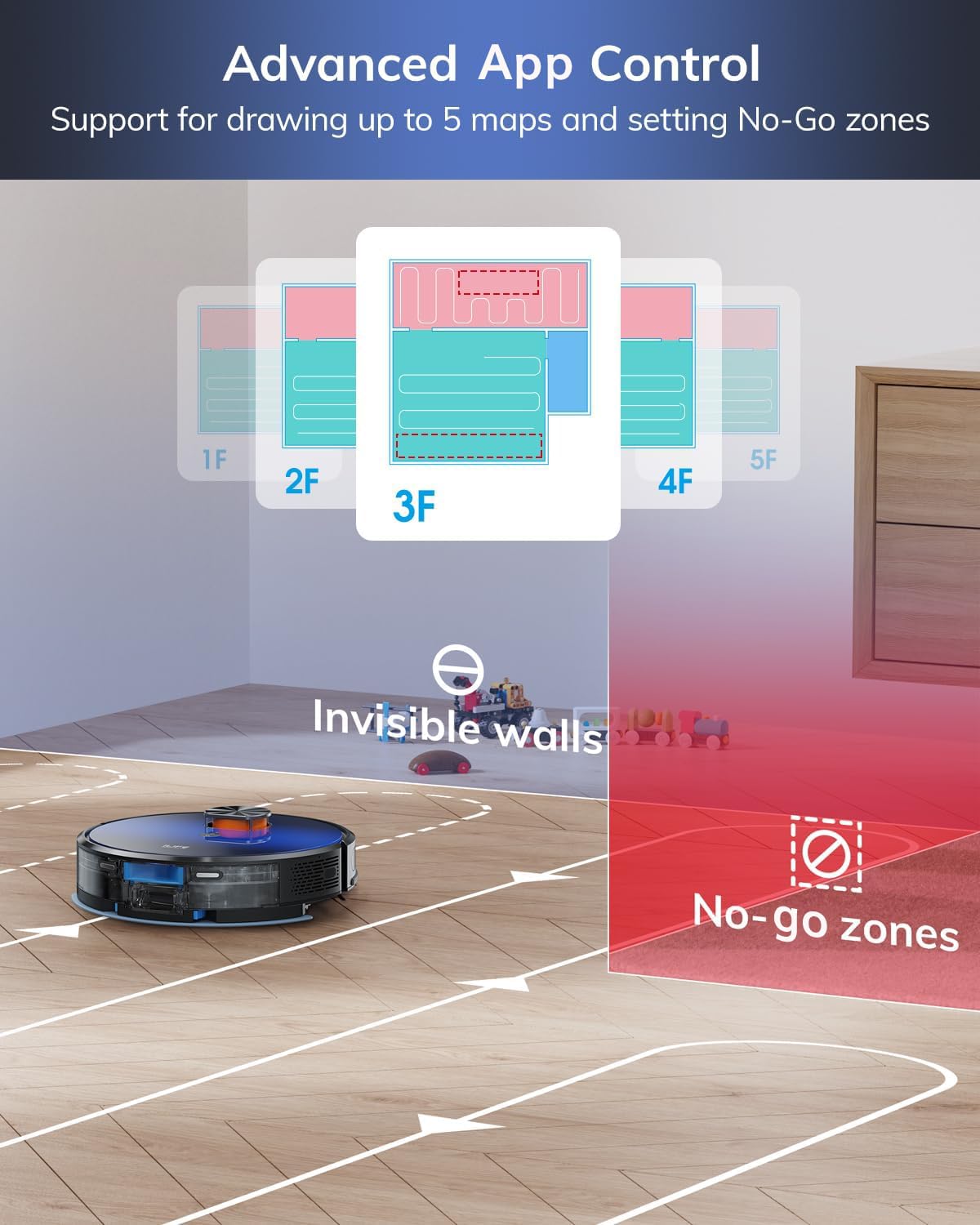
4.4 App Control and Customization
The 'Smartlife' app allows for comprehensive control and customization:
- Zone Cleaning: Define specific areas for cleaning.
- No-Go Zones & Invisible Walls: Set virtual boundaries to restrict the robot from certain areas.
- Scheduled Cleaning: Program cleaning times for specific rooms or the entire house.
- Suction & Water Volume Adjustment: Tailor cleaning intensity.

4.5 Voice Control
The ILIFE T10s is compatible with Amazon Alexa and Google Home. Link your robot to your smart home assistant to initiate cleaning with voice commands.

4.6 Automatic Charging and Resume
When the battery level is low, the robot will automatically return to its charging station. After recharging, it will resume cleaning from where it left off, provided the 'Breakpoint continuous scanning' feature is enabled in the app.

4.7 Auto Carpet Boost
The robot is equipped with an auto carpet boost feature, which automatically increases suction power when it detects carpeted surfaces for more effective cleaning.

5. Maintenance
5.1 Self-Empty Station
The self-empty station can hold up to 60 days of dust and debris, reducing the frequency of manual emptying. Replace the dust bag in the station when full.

5.2 Dustbin and Filter
Empty the robot's internal dustbin after each cleaning cycle. Clean the 4-layer filter (including HEPA and microfilter) regularly to maintain optimal suction performance. Filters can be rinsed with water and air-dried completely before reinstallation.
5.3 Brushes and Mop Cloth
Regularly inspect and clean the side brushes and main roller brush for tangled hair or debris. The mop cloth should be removed and washed after each mopping session to prevent odor and maintain cleaning effectiveness.
6. Troubleshooting
| Issue | Possible Cause | Solution |
|---|---|---|
| Robot does not start or respond. | Low battery; Power switch off; Obstruction. | Charge the robot; Ensure power switch is ON; Clear any obstructions. |
| Poor cleaning performance. | Full dustbin; Clogged filter; Worn brushes. | Empty dustbin; Clean/replace filter; Clean/replace brushes. |
| Robot cannot find charging station. | Station obstructed; Station unplugged; Robot too far. | Clear area around station; Plug in station; Manually place robot near station. |
| App connection issues. | Incorrect Wi-Fi password; 5GHz Wi-Fi network; Router issues. | Verify password; Ensure 2.4GHz Wi-Fi; Restart router and robot. |
| Mopping leaves streaks or insufficient water. | Empty water tank; Clogged water nozzle; Dirty mop cloth. | Refill water tank; Clean water nozzle; Wash/replace mop cloth. |
7. Specifications
| Brand | ILIFE |
| Model Number | T10s |
| Colour | Black |
| Product Dimensions | 32L x 32W x 9.3H Centimeters |
| Item Weight | 3 kg 300 g |
| Special Features | Self-emptying, Advanced LDS Navigation, Super Strong Suction, 2-in-1 Vacuum and Mop, 5 Floor Mapping, Long Run Time, Smartlife app, Amazon Alexa and Google Home |
| Filter Type | 4 Layer Filter, High Efficiency Filter, HEPA, Microfilter |
| Dust Bag Capacity | 2.5 litres (Self-empty Station) |
| Power Source | Battery Powered |
| Control Method | App, Amazon Echo, Google Home, Smartphones |
| Form Factor | Robotic |
| Country of Origin | Hong Kong |
8. Warranty and Support
For warranty information, please refer to the documentation included with your product or contact ILIFE customer support directly. Warranty terms and conditions may vary by region and purchase date.
Customer Support Contact:
- Phone: 1800-258-5433
- Manufacturer: ILIFE Innovations Ltd: 15 Chong Yip Street, Montery Plaza, Kwun Tong, Kowloon, Hong Kong
- Importer/Packer (India): ILIFE Innovations | Shariden Pvt. Ltd. B-37, Devasandra Industrial Estate, Mahadevapura, Bengaluru, Karnataka 560048


