
BAOFENG UV-5R Pro
Contents
BaoFeng UV-5R Pro 8Watt Ham Radio User Manual
Model: UV-5R Pro | Brand: BAOFENG
1. Product Overview
The BaoFeng UV-5R Pro 8Watt Ham Radio is a versatile and powerful handheld two-way radio designed for reliable communication. It features wide compatibility, advanced programming options, and a robust design suitable for various applications.

Image: The BaoFeng UV-5R Pro radio shown with its full kit, including the wireless programmer, 771 long antenna, earpiece, and charging accessories.
Key Features:
- Wide Compatibility: Supports 155 Private Codes and 128 Memory Channels, compatible with other Baofeng UV-5R, BF-F8HP Pro, and UV-82 series radios.
- Flexible Programming: Supports programming via phone (Bluetooth wireless programmer) and computer, in addition to traditional keypad programming.
- App Support: Compatible with CHIRP and Odmaster APP for convenient programming and configuration management.
- High Output Power: 8-watt maximum power for enhanced transmission range and clearer communication.
- Comprehensive Features: Includes Dual-band display, Dual Frequency Display, Dual-standby, VOX, Busy Channel Lock-Out, Scan, Monitor, Voice Prompt, Built-in LED Flashlight, and Emergency Alarm.
- FCC Certified: FCC ID: 2AJGM-UV5RPRO, ensuring compliance with regulatory standards.
2. What's in the Box
Upon unboxing your BaoFeng UV-5R Pro, please verify that all the following components are included:
- 1 × BaoFeng UV-5R 8W Radio
- 1 × TIDRADIO Wireless Programmer (Bluetooth)
- 1 × Li-ion Battery
- 1 × TD-771 High Gain Long Antenna
- 1 × Original Antenna
- 1 × Earpiece
- 1 × Belt Clip
- 1 × User's Manual
- 1 × USB Charging Cable
- 1 × Desktop Charger
3. Setup Guide
3.1 Initial Charging
Before first use, fully charge the Li-ion battery. Connect the desktop charger to a power source using the USB charging cable. Place the radio with the battery attached into the charging cradle. The indicator light on the charger will show the charging status.
3.2 Attaching Antenna and Battery
Screw the desired antenna (either the original or the TD-771 High Gain Long Antenna) clockwise onto the antenna connector at the top of the radio until secure. To attach the battery, align the battery pack with the grooves on the back of the radio and slide it upwards until it clicks into place. To remove, press the release latch at the bottom of the battery and slide it downwards.
3.3 Wireless Programming Setup (Odmaster App)
The BaoFeng UV-5R Pro supports wireless programming via the TIDRADIO Wireless Programmer and the Odmaster App, available for both iOS and Android devices. This allows for convenient programming without a traditional programming cable.
- Download the Odmaster App:
Scan the QR codes below or visit the respective app stores to download the Odmaster App:

Image: QR codes for downloading the Odmaster App from Apple App Store and Google Play Store.
Download on the App Store
Get it on Google Play - Connect the Wireless Programmer: Plug the TIDRADIO Wireless Programmer into the radio's accessory port.
- Pair with App: Open the Odmaster App on your phone, enable Bluetooth, and follow the in-app instructions to pair with the wireless programmer.
- Program Your Radio: Use the app to import repeater lists, manage frequency configurations, and perform offline programming.

Image: Illustration of the Bluetooth wireless programming feature, showing programming via phone and PC, offline programming, and options to import nearby repeaters and share configurations.

Image: Screenshot showing the Odmaster App's interface for importing local repeater lists and preset frequency lists with a single click.

Image: Depiction of the portable wireless programmer enabling offline programming in outdoor environments, highlighting its convenience.
4. Operating Instructions
4.1 Basic Operation
- Power On/Off: Rotate the volume knob clockwise to turn the radio on, and counter-clockwise until it clicks to turn it off.
- Volume Adjustment: Rotate the volume knob to adjust the audio output level.
- Transmit (PTT): Press and hold the Push-To-Talk (PTT) button on the side of the radio to transmit. Release to receive.
4.2 Display and Modes
The UV-5R Pro features a dual-band display, allowing you to monitor two different frequencies simultaneously. It supports Dual Frequency Display and Dual-standby mode.
- VFO/MR Button: Toggles between Frequency Mode (VFO) and Channel Mode (MR).
- A/B Button: Switches between the upper (A) and lower (B) frequency displays.
4.3 Advanced Features
- VOX (Voice Operated Transmit): Enables hands-free transmission when your voice is detected.
- Busy Channel Lock-Out (BCLO): Prevents transmission on a busy channel to avoid interference.
- Scan: Scans through frequencies or channels to find active transmissions.
- Monitor: Temporarily disables squelch to listen to weak signals.
- Voice Prompt: Provides audible feedback for menu selections and channel changes.
- Built-in LED Flashlight: Activates a flashlight for illumination in low-light conditions.
- Emergency Alarm: Activates an audible alarm for emergency situations.

Image: Overview of key features including 128 channels, VOX, 8W high power, CTCSS/DCS codes, wireless programming, and clear voice transmission.
4.4 Enhanced Performance
The 8-watt output power combined with the TD-771 High Gain Long Antenna significantly improves transmission range and reception quality compared to standard 5-watt radios with stock antennas.

Image: Visual comparison illustrating the increased communication range achieved with 8-watt power and the 771 long antenna versus lower power settings.

Image: Close-up of the radio highlighting its 8-watt power and the 771 antenna, emphasizing improved talking quality and performance.

Image: Diagram showing the significant increase in transmission range (60% increase in output power) when using 8 watts compared to 5 watts, especially with the long antenna.
5. Maintenance
5.1 Battery Care
- Always use the provided charger.
- Avoid overcharging or completely draining the battery.
- Store the battery in a cool, dry place when not in use for extended periods.
5.2 Cleaning Instructions
Wipe the radio's surface with a soft, damp cloth. Do not use harsh chemicals or abrasive cleaners. Ensure the radio is dry before use.
Important Note:

Image: Visual warning indicating that the radio is water resistant but not waterproof, advising against washing or soaking it in water.
While the radio is designed to be sturdy and reliable, it is water resistant, not waterproof. Do not wash or soak the radio in water to prevent damage.
5.3 Antenna Care
Ensure the antenna is securely attached before operation. Avoid bending or forcefully twisting the antenna, as this can damage the connector or the antenna itself.
6. Troubleshooting
| Problem | Possible Cause | Solution |
|---|---|---|
| Radio does not power on. | Battery is low or not properly installed. | Ensure battery is fully charged and correctly seated. |
| Cannot transmit (PTT not working). | Incorrect frequency/channel, squelch level too high, or radio is in receive-only mode. | Verify frequency/channel settings. Check squelch level. Ensure you have the necessary license for transmission on the selected frequency. Some radios may have a PTT lock feature; consult the detailed user manual for specific settings. |
| Poor reception or short range. | Antenna not properly attached, low battery, or environmental interference. | Ensure antenna is securely attached. Charge battery. Move to an open area away from obstructions. Consider using the TD-771 High Gain Long Antenna for improved performance. |
| Programming issues with Odmaster App. | Bluetooth connection problem, outdated app, or incorrect programmer connection. | Ensure Bluetooth is enabled on your device. Re-pair the wireless programmer. Update the Odmaster App to the latest version. Verify the wireless programmer is firmly connected to the radio. |
7. Specifications
| Feature | Detail |
|---|---|
| Model Number | UV-5R (also known as F8TD) |
| Item Weight | 1.32 pounds |
| Package Dimensions | 10.16 x 8.46 x 2.44 inches |
| Batteries | 1 Lithium Polymer battery required (included) |
| Display Type | LED |
| Color | Black |
| Number of Channels | 128 |
| Special Feature | Bluetooth programmer (No Driver Issues Instead of Program Cable) |
| Frequency Range | 144-148Mhz / 420-450Mhz |
| Talking Range Maximum | 10 Kilometer |
| Tuner Technology | VHF/UHF/FM |
| Voltage | 7.4 Volts |
| Water Resistance Level | Water Resistant |
| FCC ID | 2AJGM-UV5RPRO |
| Country of Origin | China |
| Manufacturer | BAOFENG |
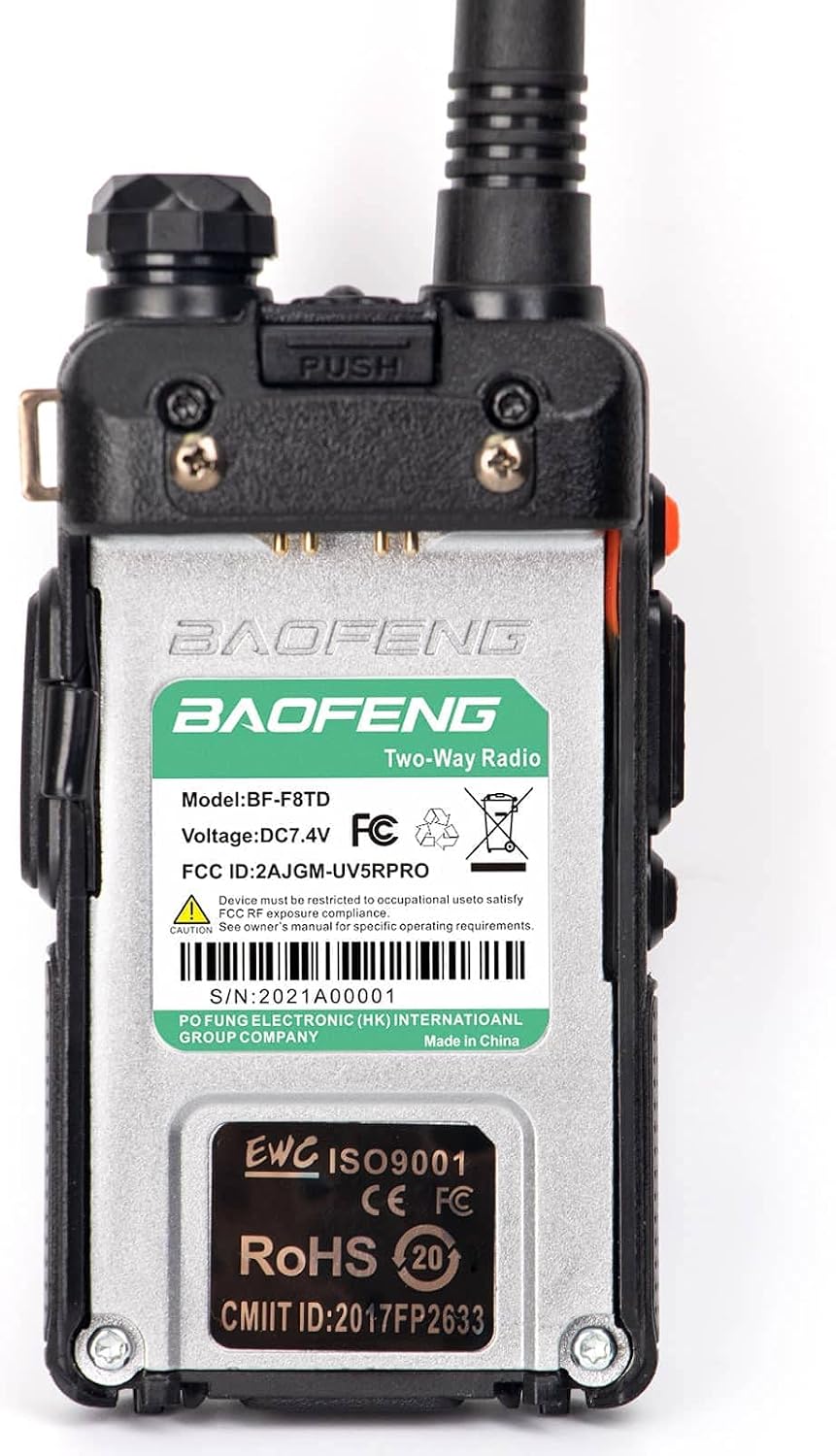
Image: Rear view of the radio displaying regulatory information including the model number (BF-F8TD), FCC ID (2AJGM-UV5RPRO), and other certifications.
8. Warranty and Support
8.1 FCC Certification
This device complies with FCC rules, part 15. The FCC ID for this product is 2AJGM-UV5RPRO. The FCC certification document is available for download under the product guides and documents section on the product listing page.
8.2 Manufacturer Support
For further assistance, technical support, or warranty inquiries, please refer to the contact information provided in the physical user manual included with your product or visit the official BAOFENG website.
9. Intended Use Cases
The BaoFeng UV-5R Pro is suitable for a variety of applications, including:
- Outdoor activities such as hiking, climbing, and camping.
- Professional use in transport and logistics.
- Disaster assistance and emergency communications.
- General two-way radio communication for personal or business use.

Image: Collage depicting diverse scenarios where the radio can be effectively used, such as outdoor adventures, transportation, emergency response, and camping.
Documents and downloads
Ask a question about this manual
Ask about setup, troubleshooting, compatibility, parts, safety, or missing instructions. Manuals+ will review the question and use this page’s manual context to help answer it.