
1. Introduction
Thank you for choosing the Ctronics 2.5K 4MP Indoor Camera. This manual provides detailed instructions for setting up, operating, and maintaining your camera. This camera features 2.5K 4MP resolution, dual-band 2.4/5GHz WiFi connectivity, Pan-Tilt-Zoom (PTZ) functionality with auto-tracking, color night vision, and two-way audio for enhanced indoor surveillance.

Figure 1: Ctronics 2.5K 4MP Indoor Camera. This image shows the compact design of the camera, suitable for indoor placement.
2. Package Contents
Please check the package for the following items:
- Ctronics 2.5K 4MP Indoor Camera (2 units)
- Power Adapter
- Mounting Screws
- Instruction Manual (this document)
3. Product Overview
The Ctronics 2.5K 4MP Indoor Camera is designed for versatile indoor surveillance. Key features include:
- 2.5K 4MP Resolution: Provides clear and detailed video footage.
- Dual-band WiFi (2.4/5GHz): Offers flexible and stable network connectivity.
- PTZ Functionality: 355° horizontal pan and 120° vertical tilt for wide area coverage.
- Auto Tracking: Automatically follows detected human movement.
- 8 Preset Positions: Quickly navigate to predefined viewing angles.
- Color Night Vision: Enhanced visibility in low-light conditions using IR and white LEDs.
- Two-Way Audio: Built-in microphone and speaker for real-time communication.
- Remote Access: Monitor via the Ctronics App on smartphones or the HIP2P client on PC.

Figure 2: Camera with 360-degree field of view. This image illustrates the camera's pan (355°) and tilt (120°) capabilities, providing extensive room coverage.
4. Setup
4.1 Powering On
- Connect the power adapter to the camera's power input port.
- Plug the power adapter into a wall outlet. The camera will power on and initiate its self-test sequence.
4.2 App Installation
Download the Ctronics App from your smartphone's app store (iOS or Android) or scan the QR code provided in the quick start guide.
4.3 Connecting to Wi-Fi
- Open the Ctronics App and create an account or log in.
- Follow the in-app instructions to add your camera. Ensure your smartphone is connected to the same Wi-Fi network (2.4GHz or 5GHz) that you intend to connect the camera to.
- The camera supports dual-band Wi-Fi for flexible network integration.

Figure 3: Camera with Dual-band WiFi indication. This image highlights the camera's compatibility with both 2.4 GHz and 5 GHz Wi-Fi networks, offering greater flexibility and speed.
4.4 Mounting the Camera
The camera can be placed on a flat surface or mounted to a ceiling using the provided screws.
- Tabletop Placement: Simply place the camera on a stable, flat surface.
- Ceiling Mounting: Use the mounting template (if provided) to mark drill holes. Secure the camera base to the ceiling with the mounting screws.

Figure 4: Camera Placement Example. This image shows the camera discreetly mounted on a ceiling in a living room, demonstrating typical indoor installation.
5. Operating the Camera
5.1 Live View
Access the live video feed through the Ctronics App or the HIP2P PC client. This allows real-time monitoring of your indoor space.

Figure 5: Ctronics App Interface. This image displays the mobile app interface, showing live camera feeds and various control options.
5.2 PTZ Control and Preset Positions
Use the controls within the app to pan (horizontal), tilt (vertical), and digitally zoom the camera. You can also save up to 8 preset positions for quick navigation to specific areas of interest.
5.3 Two-Way Audio
The camera features a built-in microphone and speaker. Tap the microphone icon in the app to speak through the camera, and listen to audio from the camera's location.

Figure 6: Two-Way Audio feature. This image illustrates the two-way audio function, showing a child and a mother communicating through the camera.
5.4 Night Vision Modes
The camera offers advanced night vision capabilities, including color night vision, thanks to integrated IR and white LEDs. You can switch between modes (e.g., Infrared Mode, Smart Mode for color night vision) via the app settings.

Figure 7: Color Night Vision. This image demonstrates the camera's color night vision capability in a dimly lit bedroom, providing clear visibility.
5.5 Human Detection and Auto Tracking
Utilizing AI technology, the camera can reliably detect human figures, automatically track their movement, and send instant notifications to your smartphone. This helps in monitoring suspicious activity.
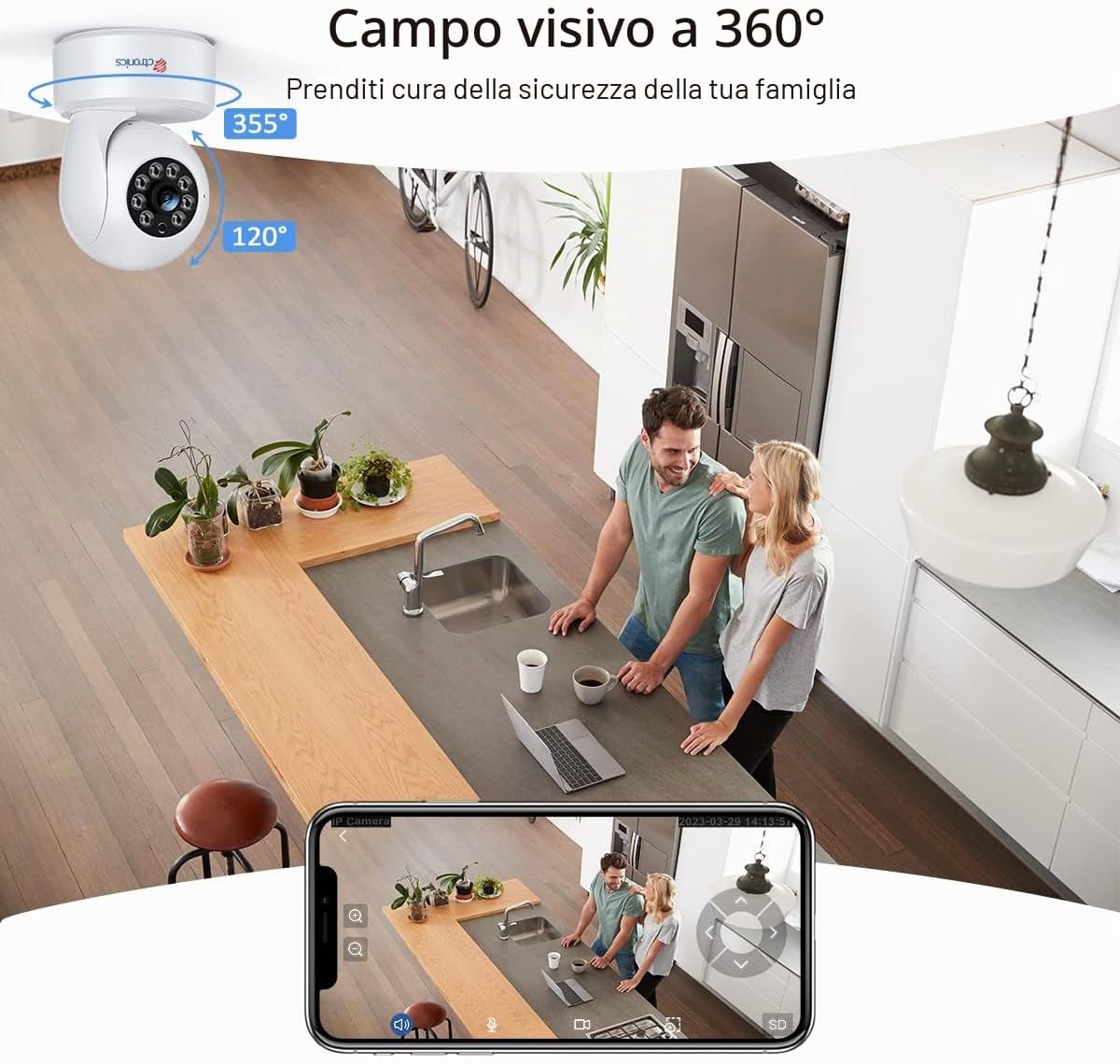
Figure 8: Human Detection and Auto Tracking. This image shows the camera's AI detecting and tracking a child and a dog, highlighting its intelligent surveillance features.
5.6 Recording and Storage
The camera supports local storage via a Micro-SD card (up to 128GB) and cloud storage options. Insert a Micro-SD card into the designated slot on the camera and format it through the app settings.

Figure 9: Micro SD Card Slot. This image shows the location for inserting a Micro-SD card into the camera for local video storage.
5.7 Remote Access (PC Client)
In addition to the mobile app, you can access live feeds and recordings via the Ctronics Windows client (HIP2P) on your computer.

Figure 10: Multi-Platform Access. This image illustrates the camera's compatibility with iOS, Android, Windows, and Mac OS, allowing access from various devices.
6. Maintenance
6.1 Cleaning
To maintain optimal performance, regularly clean the camera lens and body with a soft, dry cloth. Avoid using harsh chemicals or abrasive materials.
6.2 Firmware Updates
Periodically check the Ctronics App for available firmware updates. Keeping your camera's firmware up-to-date ensures access to the latest features and security enhancements.
7. Troubleshooting
| Problem | Possible Solution |
|---|---|
| Camera fails to connect to Wi-Fi. |
|
| No video feed. |
|
| Poor image quality. |
|
| Human detection is too sensitive/not sensitive enough. |
|
8. Specifications
| Feature | Detail |
|---|---|
| Model Name | 710C-P2 |
| Resolution | 2.5K 4MP (2560 x 1440) |
| Connectivity | Wireless (2.4/5GHz Wi-Fi) |
| PTZ Angles | Pan 355°, Tilt 120° |
| Night Vision | Color Night Vision, up to 20 meters |
| Audio | Two-Way Audio |
| Storage | Micro-SD Card (up to 128GB), Cloud Storage |
| Control Method | App (Ctronics), PC Client (HIP2P) |
| Power Supply | Wired Electric, 5V, 5W |
| Dimensions | 25 x 20 x 25 cm |
| Material | Acrylonitrile Butadiene Styrene (ABS) |
| Video Encoding | H.265 |
| Frame Rate | 15 frames per second |
9. Warranty and Support
Ctronics is committed to providing reliable products and customer satisfaction. For any technical issues or support inquiries, please contact Ctronics customer service. Technical support is available to assist you with setup, troubleshooting, and general product questions. Please note that support may be primarily available in English.
For the most up-to-date warranty information, please refer to the official Ctronics website or contact their customer support directly.

Figure 11: Data Security. Ctronics products are designed with data security in mind, including features like AES 128-bit encryption to protect your privacy.


