
Omethey Digital-57.09"
Omethey Digital 4-5 Gun Safe Instruction Manual
Model: Digital-57.09"
1. Introduction
Thank you for choosing the Omethey Digital 4-5 Gun Safe. This manual provides essential information for the safe and efficient operation, installation, and maintenance of your new gun safe. Please read this manual thoroughly before use and retain it for future reference.
This safe is designed to provide secure storage for firearms and other valuables, featuring a digital keypad for quick access and robust alloy steel construction.
2. Safety Information
- Always keep the emergency keys and external battery box in a secure location, separate from the safe itself, and out of reach of children.
- Ensure the safe is securely mounted to a wall or floor to prevent tipping, especially if children are present in the household.
- Do not store flammable liquids or other hazardous materials inside the safe.
- Never leave the safe door open or unlocked, even for short periods.
- Familiarize yourself with all operating procedures before storing any items.

Figure 2.1: The Omethey gun safe, illustrating the importance of keeping firearms and other potentially dangerous items securely stored and out of reach of children.
3. Package Contents
Please check the package contents against the list below. If any items are missing or damaged, contact customer support.
- Omethey Digital 4-5 Gun Safe (1 unit)
- Instruction Manual (1 copy)
- Inner Cabinet Key (2 keys)
- Emergency Key (2 keys)
- Emergency Battery Box (1 unit)
- Expansion Screws (5 screws)
Note: 4 AA batteries are required for operation and are not included. Please purchase them separately.

Figure 3.1: Visual representation of included accessories and product dimensions.
4. Setup
4.1 Battery Installation
- Locate the battery compartment on the inside of the safe door.
- Insert 4 AA batteries (not included) according to the polarity markings (+/-).
- Close the battery compartment cover.
4.2 Mounting the Safe
It is highly recommended to secure the safe to a wall or floor using the provided expansion screws to prevent unauthorized removal or tipping.
- Choose a suitable location for the safe, ensuring it is level and stable.
- Mark the positions for the pre-drilled holes on the back (3 holes) and bottom (2 holes) of the safe onto the wall or floor.
- Drill pilot holes at the marked positions using an appropriate drill bit for your wall/floor material.
- Align the safe with the drilled holes and insert the expansion screws.
- Tighten all screws securely.

Figure 4.1: Mounting points and installation steps for securing the safe.
5. Operating Instructions
5.1 Ways to Open the Safe
Your Omethey gun safe offers three methods for access:
- Digital Code + Handle: Enter your programmed digital code, then turn the handle.
- Emergency Key + Handle: Use the emergency key in the hidden keyhole, then turn the handle.
- Emergency Battery Box + Code + Handle: If internal batteries are depleted, connect the emergency battery box, enter your digital code, then turn the handle.
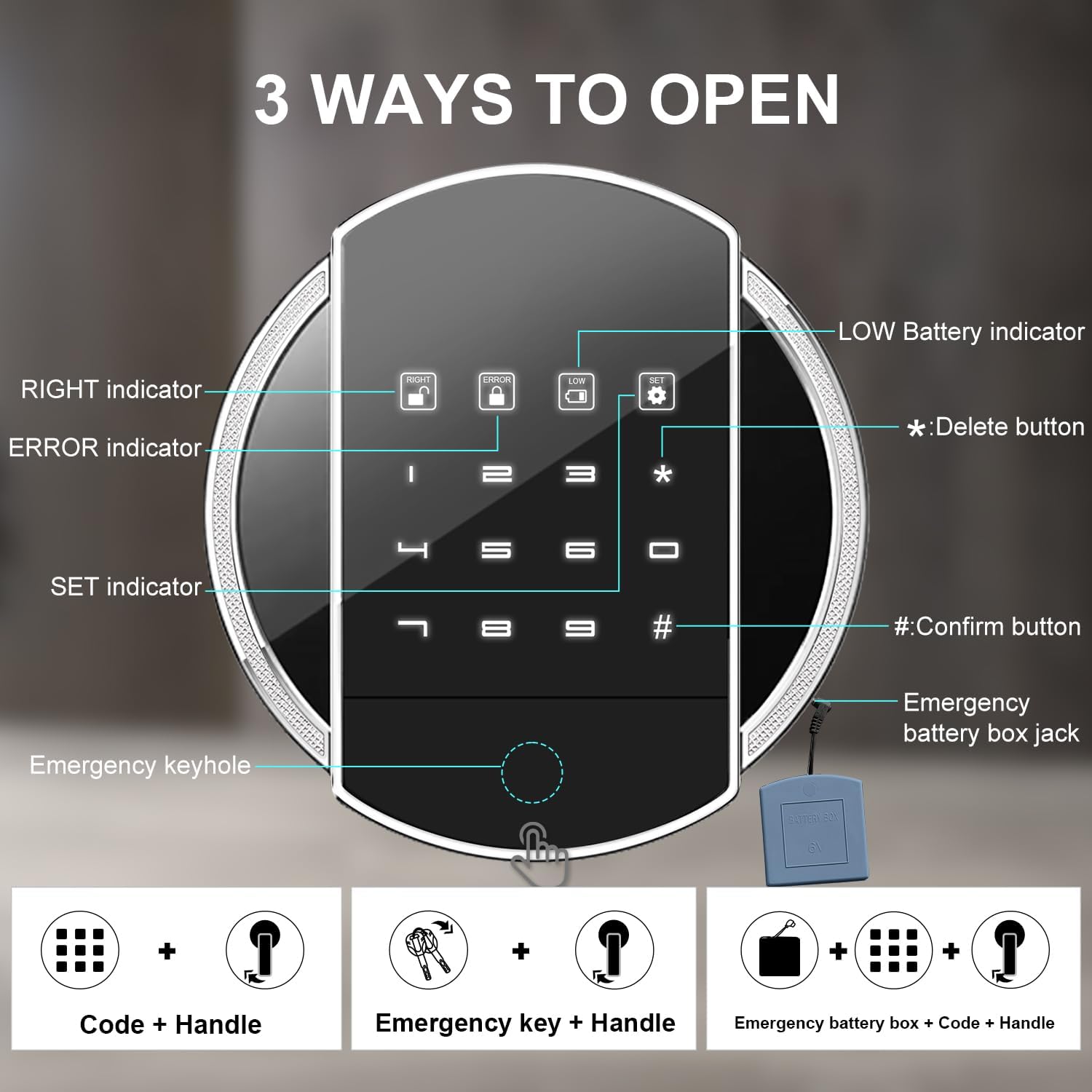
Figure 5.1: Overview of the digital keypad and safe opening methods.
5.2 Setting/Changing the Digital Code
- With the safe door open, press the 'SET' button on the keypad.
- Enter your desired 1-8 digit code.
- Press the '#' (Confirm) button to save the new code.
- Test the new code with the door open before closing it.
5.3 Backlit Keypad
The keypad features a backlight for easy visibility in both day and night conditions.

Figure 5.2: Backlit keypad for enhanced visibility.
5.4 Dual Alarm Function
The safe is equipped with a dual alarm system:
- Incorrect Entry Alarm: If 5 consecutive wrong fingerprint attempts or 3 consecutive incorrect password entries occur, the alarm will activate.
- Vibration Alarm: Violent vibrations or impacts can also trigger the alarm system.
To activate the alarm system manually, press '9' on the keypad.
5.5 Mute Function
To turn on or cancel the silent mode (mute function), press '*' then '1' on the keypad.

Figure 5.3: Explanation of the dual alarm and mute functions.
6. Maintenance
6.1 Battery Replacement
When the 'LOW' battery indicator lights up on the keypad, replace the 4 AA batteries promptly to ensure continuous operation. Use the emergency battery box if the internal batteries are completely depleted before replacement.
6.2 Cleaning
Clean the exterior of the safe with a soft, damp cloth. Avoid using abrasive cleaners or solvents that could damage the finish. Do not spray cleaning solutions directly onto the keypad or lock mechanism.
7. Troubleshooting
| Problem | Possible Cause | Solution |
|---|---|---|
| Keypad not responding | Dead batteries | Replace internal AA batteries or use the emergency battery box. |
| Safe will not open with code | Incorrect code entered; batteries low | Re-enter code carefully. Replace batteries if low. Use emergency key. |
| Alarm sounds unexpectedly | Vibration detected; multiple incorrect entries | Check for impacts or tampering. Ensure correct code entry. Use mute function if desired. |
| Door does not close properly | Obstruction; misaligned | Check for items blocking the door. Ensure safe is on a level surface. |
8. Specifications
- Brand: Omethey
- Model: Digital-57.09"
- Exterior Dimensions: 13.78"W x 11.81"D x 57.09"H
- Interior Dimensions: 13.58"W x 10.83"D x 55.91"H
- Lock Type: Digital Keypad, Key
- Material: Alloy Steel
- Capacity: 1.5 Cubic Meters
- Mounting Type: Floor Mount
- Alarm: Vibration, Incorrect Entry
- Water Resistance Level: Not Water Resistant
- Batteries Required: 4 AA (not included)
Figure 8.1: Detailed product dimensions and specifications.
9. Warranty and Support
For warranty information, technical support, or any questions regarding your Omethey Digital 4-5 Gun Safe, please refer to the contact information provided at the point of purchase or visit the official Omethey store online.
You can visit the Omethey Store for additional product information and support: Omethey Official Store
Related documentsDigital-57.09"


Ask a question about this manual
Ask about setup, troubleshooting, compatibility, parts, safety, or missing instructions. Manuals+ will review the question and use this page’s manual context to help answer it.