Introduction
Thank you for choosing K KASONIC Solar Motion Sensor LED Security Lights. This product is designed to provide efficient and reliable outdoor lighting with advanced motion sensing capabilities and solar charging. Please read this manual thoroughly before installation and operation to ensure proper use and longevity of your lights.
Safety Information
- Ensure the solar panel receives direct sunlight for optimal charging.
- Do not disassemble or modify the product. This may cause damage and void the warranty.
- Keep the product away from fire and extreme heat sources.
- Avoid submerging the product in water, despite its IP65 waterproof rating, prolonged submersion is not recommended.
- Handle with care during installation to prevent damage to components.
Package Contents
Please verify that all components are present in your package:
- 2 x K KASONIC Solar Motion Sensor LED Security Lights
- 2 x Ground Stakes
- 2 x Bags of Accessories (Screws, Wall Plugs)
- 1 x User Manual
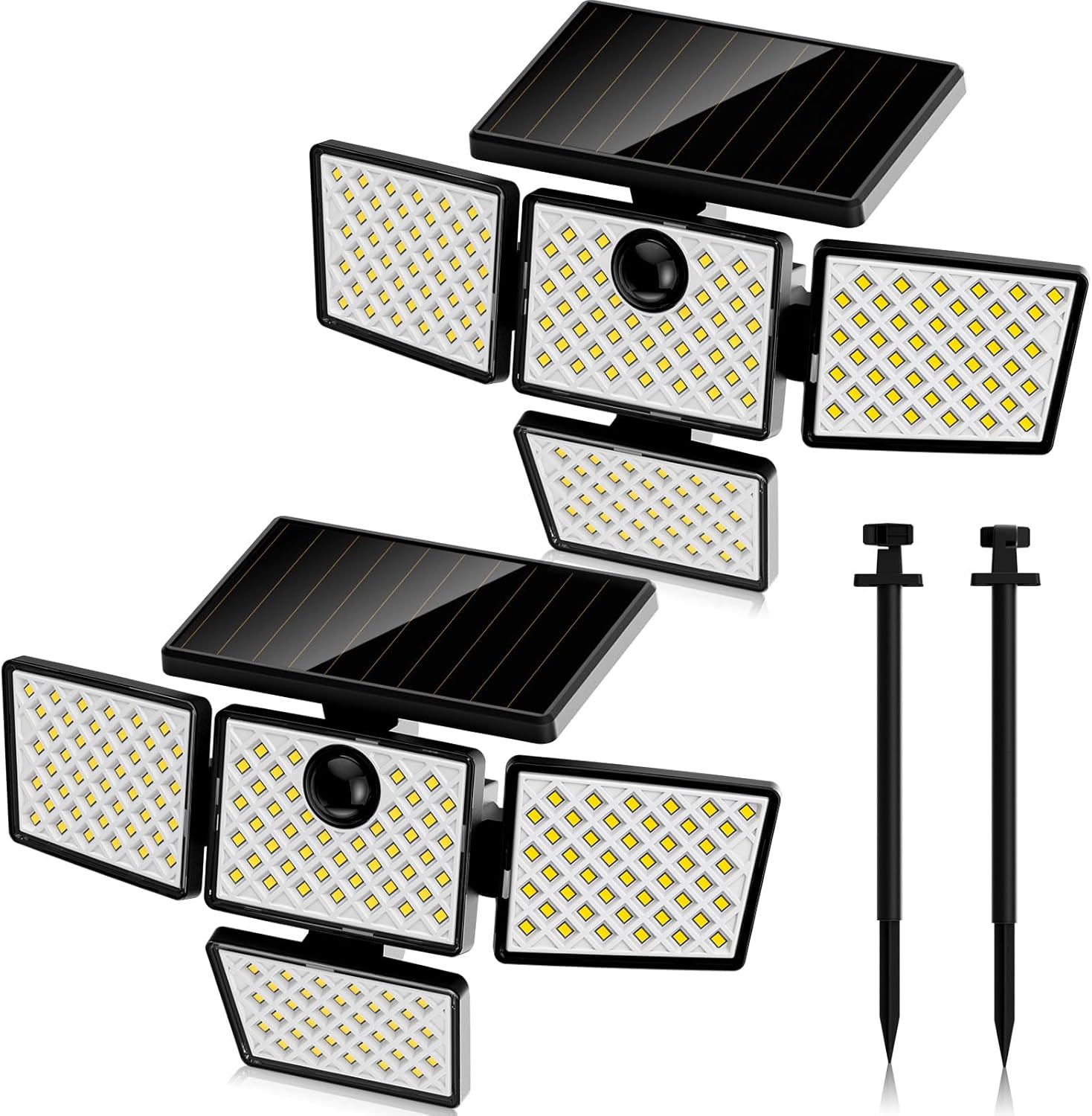
Image: Contents of the K KASONIC Solar Motion Sensor LED Security Lights package.
Product Overview and Features
The K KASONIC Solar Motion Sensor LED Security Light features a robust design with multiple adjustable heads and a high-efficiency solar panel. Key features include:
- 2-in-1 Installation: Can be wall-mounted or ground-inserted.
- 4 Rotatable Heads: Allows for up to 270° lighting coverage.
- High Sensitivity PIR Motion Detector: Detects movement within a 120° area up to 39ft (12m).
- 3 Lighting Modes: Sensor Mode, Dim to Sensor Mode, Always On Mode.
- 2200mAh Rechargeable Battery: Ensures long working hours after sufficient solar charging.
- IP65 Waterproof: Designed to withstand various weather conditions.
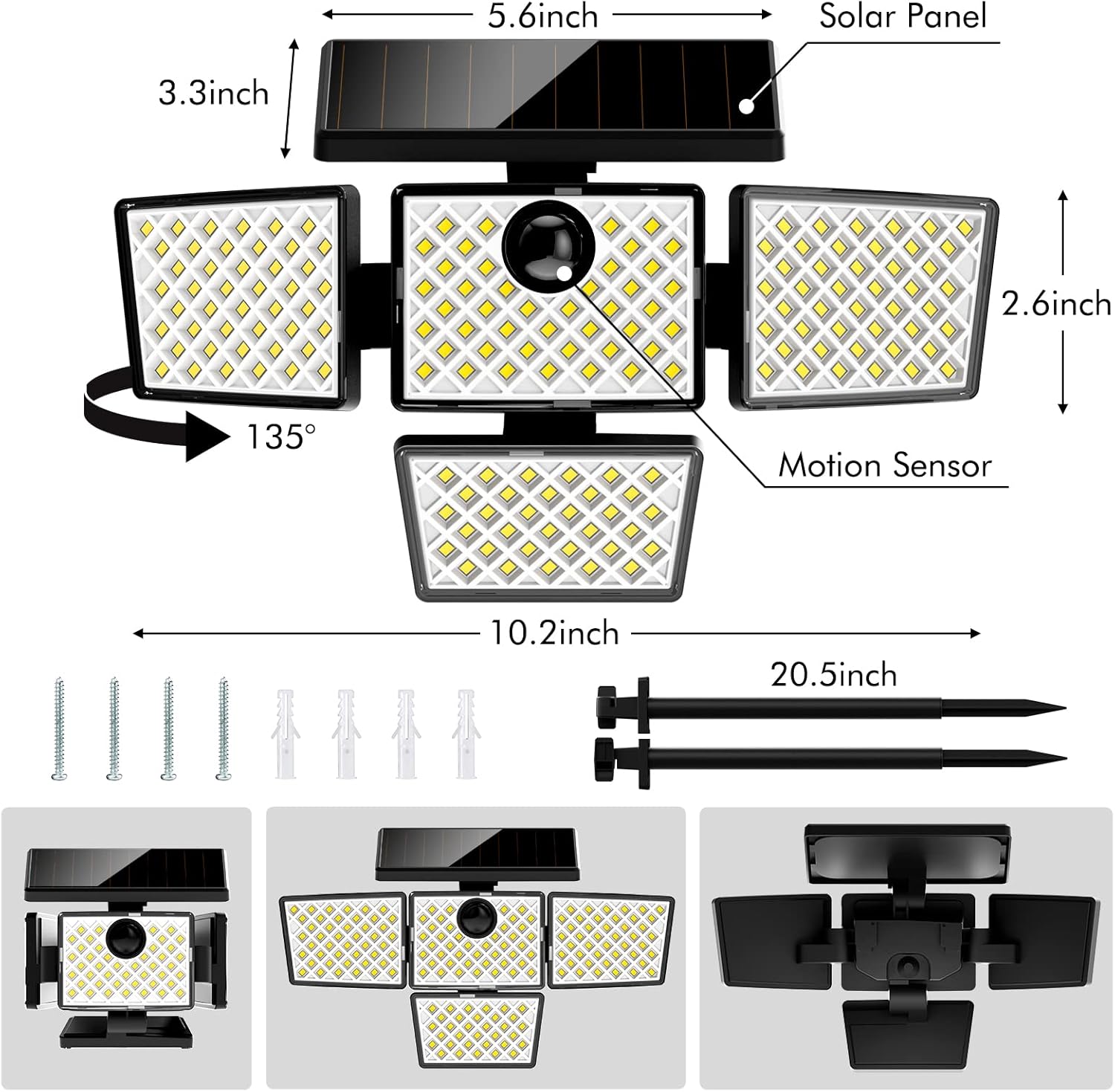
Image: Detailed view of the product components and dimensions.

Image: Motion sensor detection range and distance.

Image: Adjustable lighting angle of the light heads.
Setup and Installation
Before first use, ensure the solar light is placed in direct sunlight for at least 24 hours to fully charge the battery. The unit is shipped in Mode 4 (off). Press the button once to activate Mode 1.
Wall Mounted Installation
- Choose a location that receives ample direct sunlight throughout the day and is 5-8 feet high.
- Use the provided screws and wall plugs to fix the lamp holder securely to the wall.
- Turn on the switch located on the back of the light unit.
- Hang the light unit onto the fixed lamp holder, ensuring it clicks into place. Adjust the light heads as needed.

Image: Wall-mounted installation steps.
Ground Inserted Installation
- Assemble the ground stake by connecting the sections.
- Attach the light unit to the top of the assembled ground stake.
- Choose a location in your garden, pathway, or patio that receives ample direct sunlight.
- Firmly insert the ground stake into the soil. Ensure the solar panel is facing upwards to maximize sun exposure.

Image: Ground-inserted installation method.

Image: Solar charging and lighting modes in different installation types.
Operating Instructions
The K KASONIC Solar Motion Sensor LED Security Light offers three distinct lighting modes, selectable via the button on the unit. The unit is off when unboxed (Mode 4). Press the button to cycle through the modes.
- Mode 1 (Sensor Mode):
The light remains off until motion is detected. Upon detection, it illuminates at 100% brightness for 15 seconds, then turns off if no further motion is sensed. - Mode 2 (Dim to Sensor Mode):
The light stays on at a dim brightness (30%) in darkness. When motion is detected, it brightens to 100% for 15 seconds, then returns to dim brightness if no further motion is sensed. This mode operates for approximately 6 hours after dark. - Mode 3 (Always On Mode):
The light turns on at medium brightness and stays on for 3-4 hours after dark, regardless of motion. After this period, it automatically switches to Mode 1.

Image: Explanation of the three lighting modes.
Charging
The K KASONIC Solar Motion Sensor LED Security Lights are powered by a built-in 2200mAh lithium-ion rechargeable battery, which is charged by the integrated high-efficiency solar panel. For optimal performance:
- Install the light in a location where the solar panel receives at least 6-8 hours of direct sunlight daily.
- Cloudy weather or shaded areas will reduce charging efficiency and may affect the light's operating time at night.
- The photoelectric conversion efficiency is as high as 30%, ensuring effective charging even in less ideal conditions.

Image: Battery capacity information.

Image: High conversion and long working hours.
Maintenance
- Regularly clean the solar panel surface with a soft, damp cloth to remove dust, dirt, or debris. A clean panel ensures maximum charging efficiency.
- Check the mounting screws or ground stake periodically to ensure the light remains securely in place.
- In areas with heavy snow, clear snow from the solar panel to allow for charging.
- The light is IP65 waterproof, meaning it is protected against dust and low-pressure water jets. It is designed to withstand rain and typical outdoor conditions.

Image: All-weather durability of the product.
Troubleshooting
| Problem | Possible Cause | Solution |
|---|---|---|
| Light does not turn on at night. | Insufficient solar charge. | Ensure the solar panel is in direct sunlight for 6-8 hours daily. Clean the solar panel. |
| Light flickers or has short illumination time. | Battery not fully charged or aging battery. | Relocate the light to a sunnier spot. Allow several days for full charge. If issue persists after extended use, battery may need replacement (contact support). |
| Motion sensor not detecting. | Sensor obstructed or incorrect mode. | Ensure the sensor lens is clean and unobstructed. Verify the light is in Mode 1 or Mode 2. |
| Light is always on (or off) during the day. | Light sensor interference or incorrect mode. | Ensure no external light source (e.g., street light) is shining directly on the solar panel. Check the selected lighting mode. |
Specifications
| Feature | Detail |
|---|---|
| Model Name | Solar Outdoor Light |
| Model Number | KASL29 |
| Power Source | Solar Powered |
| Battery | 2200mAh Lithium-ion (Rechargeable) |
| Light Source | LED |
| Motion Sensor Angle | 120° |
| Motion Sensor Distance | Up to 39ft (12m) |
| Lighting Angle | Up to 270° (with 4 rotatable heads) |
| Water Resistance | IP65 |
| Material | Acrylonitrile Butadiene Styrene (ABS) |
| Dimensions (approx.) | 6.69"L x 4.6"W x 10"H |
| Item Weight | 2 Pounds (per unit) |
Warranty and Support
K KASONIC is committed to providing high-quality products and professional after-sales service. For any questions, concerns, or technical assistance regarding your Solar Motion Sensor LED Security Lights, please contact our customer support team. Refer to your purchase documentation for specific warranty details and contact information.
We value your satisfaction and are here to ensure you have a positive experience with our products.