1. Product Overview
The hizpo Android 13 Car Radio Stereo is an in-dash head unit designed for Toyota Corolla 12 models from 2018 to 2021. It features a 10.1-inch QLED touchscreen, integrated GPS navigation, and supports wireless CarPlay and Android Auto. This manual provides instructions for installation, operation, and maintenance.

Figure 1: Main unit of the hizpo Android 13 Car Radio Stereo.
2. Package Contents
Verify that all components are present in the package before proceeding with installation.
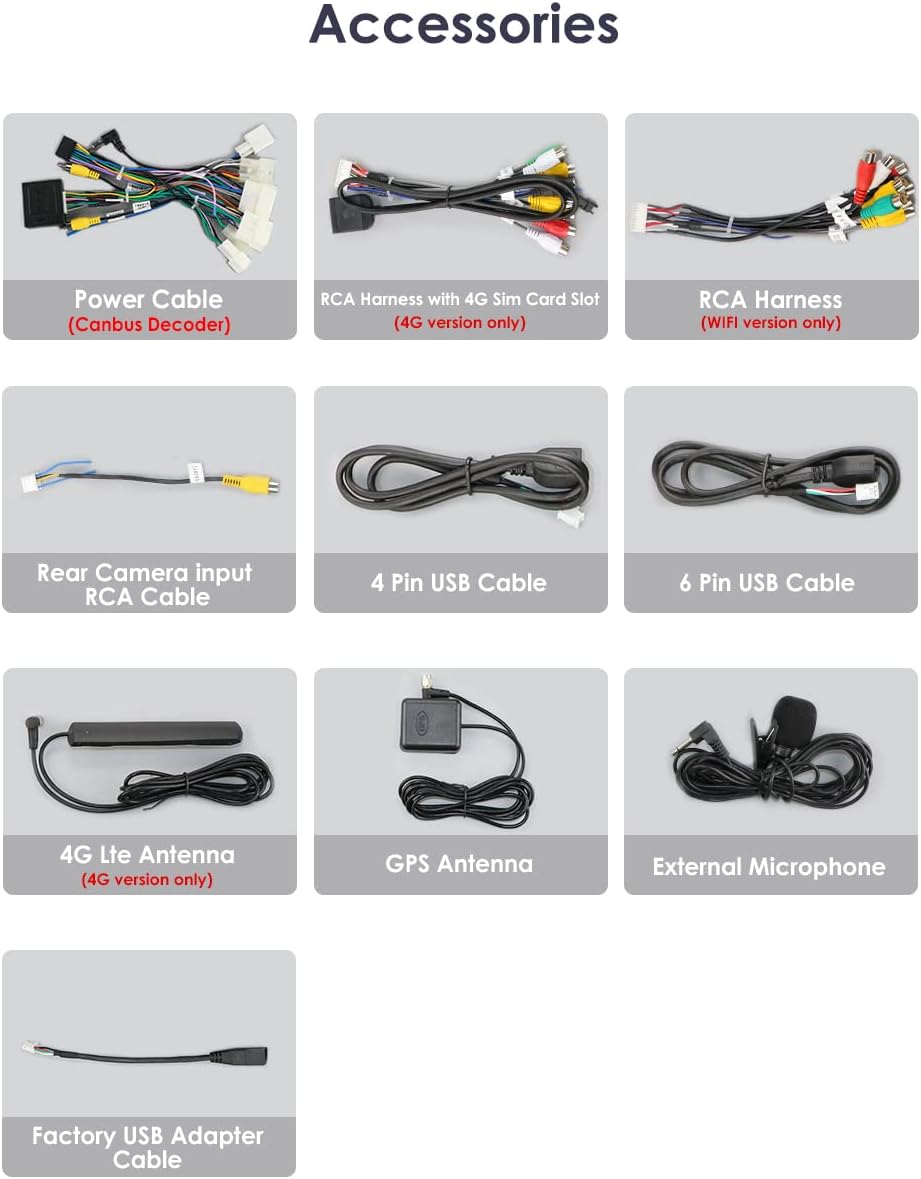
Figure 2: Included accessories such as power cables, RCA harnesses, USB cables, GPS antenna, and external microphone.
- hizpo Android 13 Head Unit
- Power Cable (with Canbus Decoder)
- RCA Harness (4G SIM Card Slot - 4G version only)
- RCA Harness (WiFi version only)
- Rear Camera Input RCA Cable
- 4 Pin USB Cable
- 6 Pin USB Cable
- 4G LTE Antenna (4G version only)
- GPS Antenna
- External Microphone
- Factory USB Adapter Cable
3. Setup and Installation
Professional installation is recommended for this product. Incorrect installation may damage the vehicle's electrical system or the head unit. Ensure the vehicle's battery is disconnected before beginning installation.
3.1 Pre-Installation Check
- Confirm compatibility with your Toyota Corolla 12 (2018-2021).
- Inspect all cables and connectors for damage.
3.2 Installation Steps (General Guide)
- Carefully remove the factory radio and trim panels from your vehicle.
- Connect the provided wiring harnesses to the vehicle's existing wiring. Ensure all connections are secure.
- Connect the GPS antenna and 4G LTE antenna (if applicable) to the head unit and route them to an optimal location for signal reception.
- Connect the external microphone and route it to a suitable position for clear voice input.
- If installing a rear-view camera, connect its RCA cable to the head unit and route the power/signal wires to the camera.
- Mount the hizpo head unit into the dashboard opening.
- Reconnect the vehicle's battery and perform initial power-on tests.
- Reinstall all trim panels.

Figure 3: Visual comparison of the car dashboard before and after the head unit installation.

Figure 4: The hizpo car stereo seamlessly integrated into the Toyota Corolla dashboard.
4. Operating Instructions
4.1 Initial Power-On and Basic Settings
- Upon first power-on, the system will guide you through initial setup, including language selection and time zone.
- Access the main menu by tapping the home icon.
- Adjust screen brightness and volume using the quick settings panel.
4.2 Navigation
The head unit comes with pre-installed GPS navigation capabilities. You can use the built-in maps or download preferred navigation apps from the Play Store.
- Tap the 'Maps' icon to launch the navigation application.
- Enter your destination using the on-screen keyboard or voice commands.
- Follow the spoken and visual directions for your route.
4.3 CarPlay and Android Auto
Connect your smartphone for seamless integration of apps, navigation, music, and calls.

Figure 5: The head unit supports both Apple CarPlay and Android Auto for smartphone integration.
- Wireless CarPlay: Ensure Bluetooth and Wi-Fi are enabled on your iPhone. Pair your iPhone with the head unit via Bluetooth, then follow the prompts to activate CarPlay.
- Wireless/Wired Android Auto: For wireless Android Auto, ensure Bluetooth and Wi-Fi are enabled on your Android phone. Pair your phone via Bluetooth and follow the on-screen instructions. For wired connection, connect your Android phone using a USB cable.
Video 1: Demonstration of the head unit's user interface, including CarPlay, Android Auto, radio functions, DSP settings, and voice control features.
4.4 Bluetooth Connectivity
Pair your phone via Bluetooth for hands-free calling and audio streaming.
- Go to 'Settings' > 'Bluetooth' on the head unit.
- Enable Bluetooth on your phone and search for available devices.
- Select the head unit from the list and confirm the pairing code.
- Once connected, you can make/receive calls and play music from your phone.
4.5 Radio (FM/AM/RDS)
Access local radio stations with clear reception and RDS information.
- Tap the 'Radio' icon to open the radio interface.
- Use the scan function to find available stations or manually tune to a frequency.
- Save your favorite stations as presets for quick access.
4.6 Digital Sound Processor (DSP)
Customize your audio experience with the built-in DSP.

Figure 6: The DSP interface allows for detailed audio adjustments, including equalization and sound field settings.
- Access DSP settings from the main menu.
- Adjust equalizer bands, bass enhancement, sound field, and bass filtering to suit your preferences.
- Pre-set modes like Standard, Rock, Soft, and Classical are available.
4.7 Split Screen Functionality
Multitask by running two applications simultaneously on the screen.

Figure 7: The split screen feature allows simultaneous use of two applications, such as navigation and music playback.
- While an app is open, swipe from the side or long-press the app icon (depending on UI version) to activate split-screen mode.
- Select a second app to run alongside the first.
4.8 Rear View System
Enhance parking safety with automatic display of the rear-view camera feed.

Figure 8: The rear view system automatically activates when the vehicle is in reverse, displaying the camera feed.
- When a compatible backup camera is correctly installed and connected, the display will automatically switch to the camera view when the vehicle is put into reverse gear.
4.9 Day and Night Mode
The system automatically adjusts screen brightness and color schemes for optimal visibility in varying light conditions.

Figure 9: The head unit transitions between bright day mode and a less glaring night mode for comfortable viewing.
- The display automatically switches between day and night modes based on ambient light or vehicle headlight status.
- Manual adjustment options may be available in the display settings.
4.10 Steering Wheel Controls (SWC)
Program your vehicle's steering wheel buttons to control the head unit functions.
- Navigate to 'Car Settings' > 'Steering wheel study' or 'KeyStudy'.
- Follow the on-screen instructions to assign functions (e.g., volume up/down, track skip, mode) to your steering wheel buttons.
5. Maintenance
5.1 Screen Cleaning
- Use a soft, lint-free cloth to gently wipe the touchscreen.
- For stubborn smudges, slightly dampen the cloth with water or a screen-safe cleaner. Avoid harsh chemicals.
5.2 Software Updates
- Periodically check for software updates in the 'Settings' menu to ensure optimal performance and access to new features.
- Follow the on-screen instructions carefully during the update process.
5.3 Cooling Fan
The unit may include a small cooling fan to dissipate heat. Ensure that the fan vents are not obstructed to maintain proper airflow and prevent overheating.
6. Troubleshooting
If you encounter issues, refer to the following common troubleshooting steps:
- No Power: Check all power connections and vehicle fuses. Ensure the unit is properly seated.
- No Sound: Verify speaker connections, volume levels, and DSP settings. Check if the mute function is active.
- GPS Signal Issues: Ensure the GPS antenna is correctly installed and has a clear line of sight to the sky.
- Bluetooth Connection Problems: Delete previous pairings on both the head unit and your phone, then attempt to re-pair. Ensure Bluetooth is enabled on both devices.
- Touchscreen Unresponsive: Try restarting the head unit. If the issue persists, a factory reset might be necessary (note: this will erase all user data).
- CarPlay/Android Auto Not Connecting: Ensure your phone's operating system is up to date. Check USB cable integrity for wired connections. Verify Bluetooth and Wi-Fi are active for wireless connections.
For persistent issues, contact hizpo customer support.
7. Specifications
| Feature | Specification |
|---|---|
| Brand | hizpo |
| Model | B0BVMCM64V |
| Operating System | Android 13 |
| Screen Size | 10.1 Inches |
| Display Type | QLED Touchscreen |
| Resolution | 720 x 1280 |
| Memory (RAM) | 4GB |
| Storage (ROM) | 32GB |
| Processor | 8 Core (Unisoc 7862, 1.8-2.0GHz) |
| Connectivity | Bluetooth, Cellular, USB, Wi-Fi |
| Special Features | CarPlay, Android Auto, GPS Navigation, SWC, RDS, DSP |
| Vehicle Service Type | Car (Toyota Corolla 12, 2018-2021) |
| Item Weight | 3.67 pounds |
| Package Dimensions | 14.48 x 9.33 x 4.02 inches |
8. Warranty and Support
8.1 Warranty Information
This hizpo product is covered by a 1-Year Warranty from the date of purchase. The warranty covers manufacturing defects and malfunctions under normal use. Please retain your proof of purchase for warranty claims.
8.2 Customer Support
For technical assistance, troubleshooting, or warranty inquiries, please contact hizpo customer service. Hizpo is committed to providing attentive after-sales services.
- Refer to the contact information provided with your product packaging or on the official hizpo website.