
WANAI D-Air Conditioner
WANAI 8,000 BTU Portable Air Conditioner User Manual
Model: D-Air Conditioner
1. Important Safety Information
Please read this manual carefully before operating your WANAI Portable Air Conditioner. Keep these instructions for future reference. Failure to follow these instructions may result in electric shock, fire, or personal injury.
- Always plug the unit into a grounded 3-prong outlet. Do not remove the grounding prong.
- Do not operate the unit with a damaged power cord or plug.
- Ensure the unit is placed on a flat, stable surface to prevent tipping.
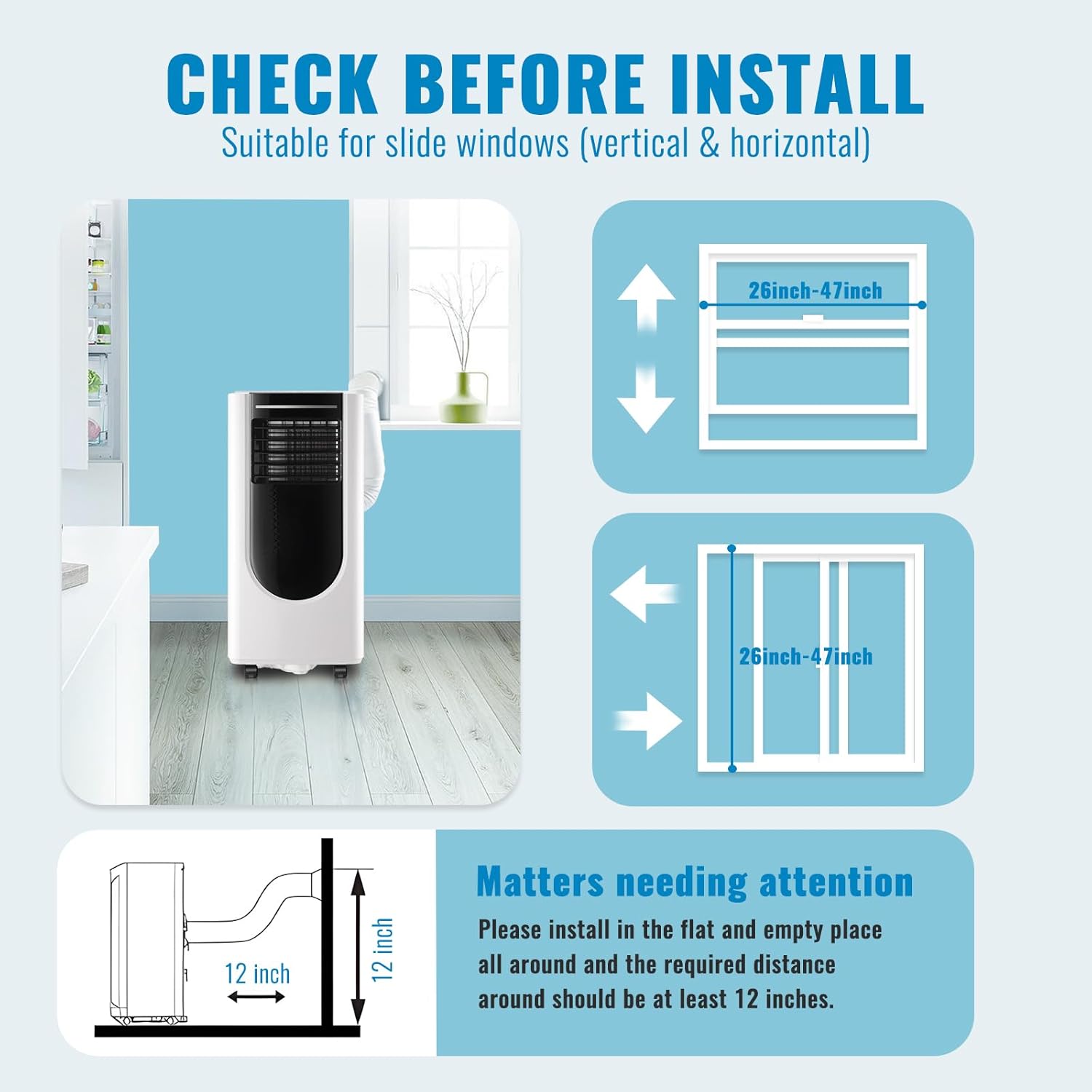
- Maintain at least 12 inches (30 cm) of clear space around the unit for proper ventilation.
- Do not block air inlets or outlets.
- Unplug the unit before cleaning, servicing, or moving.
- Keep children and pets away from the unit during operation.
- Do not use the unit in wet areas or near water.
2. Product Overview
2.1 Product Components
The WANAI Portable Air Conditioner comes with all necessary components for quick setup and operation.

2.2 Key Features
This portable air conditioner is designed for efficient cooling, dehumidification, and air circulation.
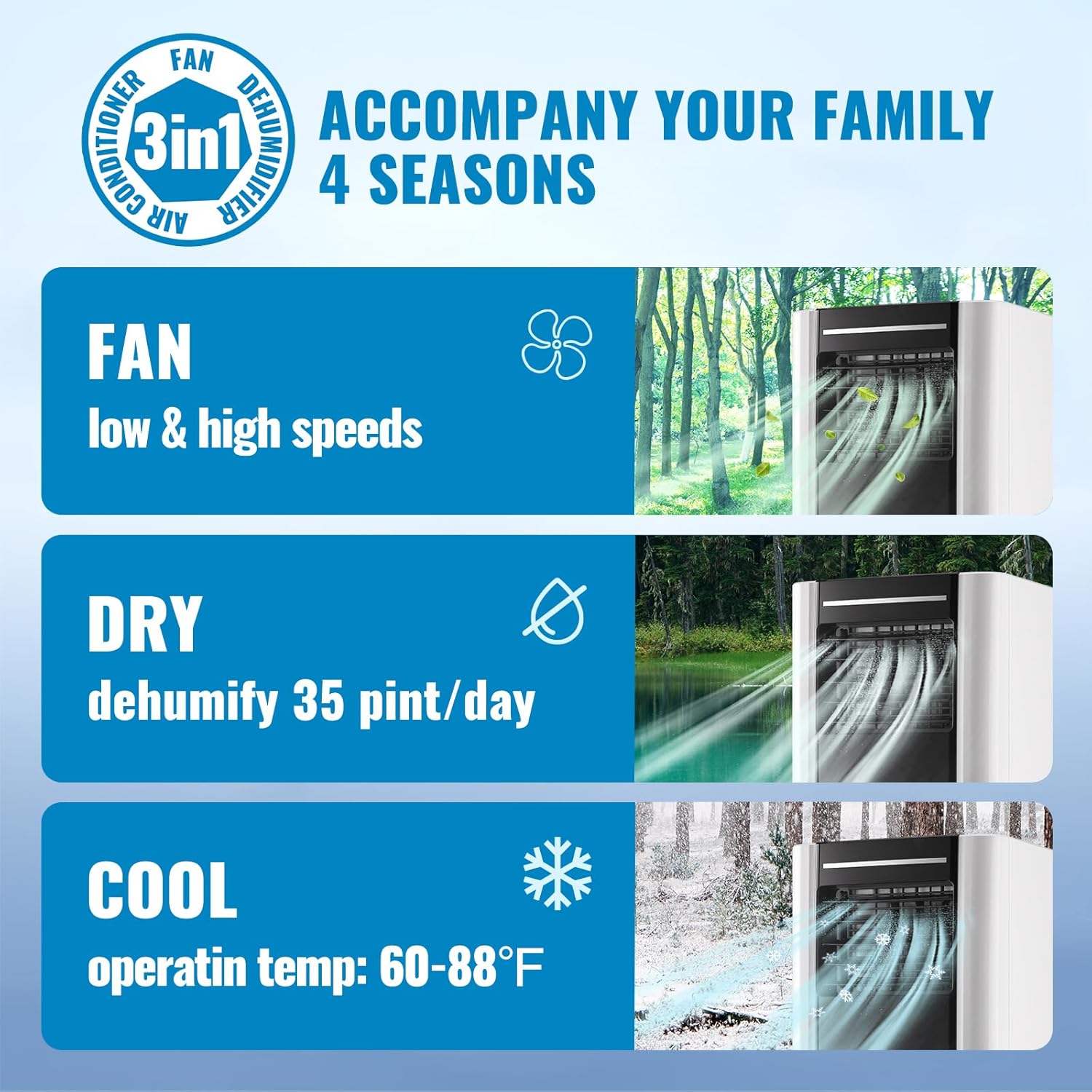
- 3-in-1 Functionality: Cool, Fan, and Dehumidifier modes for versatile use.
- Compact Design: Measuring 13 x 11.1 x 31.3 inches, ideal for various room sizes.
- Quiet Operation: Noise level less than 54dB for minimal disturbance.
- Easy Mobility: Equipped with four bottom universal wheels for effortless movement.
- User-Friendly Controls: Features an LED display and remote control for convenient operation.
- Washable Filter: Reusable air filter for easy maintenance and improved air quality.


3. Setup and Installation
3.1 Before Installation
Ensure your window type is compatible and there is sufficient clearance around the unit.
3.2 Installation Steps
Follow these steps to install your portable air conditioner:
- Connect the hose connector to the exhaust hose.
- Connect the window kit adapter to the exhaust hose.
- Adjust the length of the window kit to fit your window opening.
- Attach the hose connector to the machine's exhaust port.
- Insert the exhaust hose into the adjusted window kit.
- Plug the unit into a grounded electrical outlet and turn it on.

Video: Check before you get the portable AC. This video provides a visual guide on what to check and how to set up the portable air conditioner.
4. Operating Instructions
4.1 Control Panel and Remote Control
The unit can be operated using the intuitive LED touch screen control panel or the included remote control.

4.2 Operating Modes
The unit offers three distinct operating modes:
- Cool Mode: Provides powerful cooling to reduce room temperature. Set desired temperature between 60°F to 88°F.
- Fan Mode: Circulates air without cooling, offering low and high-speed options.
- Dehumidify Mode: Removes excess moisture from the air, with a capacity of 35 pints per day.

4.3 Setting Temperature and Timer
Use the temperature up/down buttons on the control panel or remote to set your desired temperature. The 24-hour timer allows you to schedule the unit to turn on or off automatically.
5. Maintenance and Care
Regular maintenance ensures optimal performance and extends the lifespan of your air conditioner.
5.1 Cleaning the Air Filter
The washable air filter should be cleaned regularly (every two weeks or more often depending on usage) to maintain efficiency.
- Unplug the air conditioner from the power outlet.
- Locate the air filter cover on the back of the unit and remove it.
- Gently pull out the air filter.
- Wash the filter under running water or use a vacuum cleaner to remove dust.
- Allow the filter to air dry completely before reinserting it.
- Replace the filter cover.

5.2 Draining Water
The unit has a built-in dehumidifier function which collects water. When the water tank is full, the 'Water Full Indicator' will light up, and the unit will stop operating. You will need to drain the collected water.
- Turn off the unit and unplug it from the power outlet.
- Place a shallow pan or bucket under the drain hole at the bottom rear of the unit.
- Remove the drain plug. Water will begin to flow out.
- For continuous drainage, attach the included drain hose to the drain hole and direct it to a floor drain or larger container.
- Once drained, replace the drain plug securely.

5.3 Storage
When storing the unit for an extended period:
- Drain all condensed water from the unit.
- Clean the air filter.
- Store the unit in a cool, dry place, away from direct sunlight and extreme temperatures.
- Cover the unit to protect it from dust.
6. Troubleshooting Guide
Before contacting customer support, please refer to the following table for common issues and their solutions.
| Problem | Possible Cause | Solution |
|---|---|---|
| Unit does not turn on | No power supply; Power cord not plugged in; Water tank full. | Check power outlet; Plug in power cord securely; Drain water tank. |
| Unit does not cool effectively | Air filter dirty; Room too large; Doors/windows open; Exhaust hose blocked or detached. | Clean air filter; Ensure room size is within specifications; Close doors/windows; Check exhaust hose for blockages or proper connection. |
| Unit is noisy | Unit not on a flat surface; Air filter dirty; Obstruction in fan. | Place unit on a flat, stable surface; Clean air filter; Check for and remove any obstructions. |
| Water leakage | Drain plug not securely closed; Drain hose not properly connected. | Ensure drain plug is tightly closed; Reconnect drain hose properly. |
7. Specifications
Detailed technical specifications for the WANAI 8,000 BTU Portable Air Conditioner.
| Specification | Value |
|---|---|
| Brand Name | WANAI |
| Model Info | D-Air Conditioner |
| Product Dimensions | 13 x 11.1 x 31.3 inches |
| Cooling Power | 8000 British Thermal Units (ASHRAE) |
| Capacity | 0.6 Tons |
| Noise Level | 54 dB |
| Installation Type | Window |
| Form Factor | Portable |
| Special Features | Dehumidifier, Dust Filter, Fast Cooling, Remote Controlled |
| Color | White |
| Voltage | 115 Volts |
| Wattage | 300.00 |
| Included Components | Drain hose, Remote control |
| Floor Area Coverage | Up to 250 Square Feet |

8. Warranty and Support
WANAI products are manufactured to the highest quality standards. For specific warranty details, please refer to the warranty card included with your purchase or visit the official WANAI website.
If you encounter any issues that cannot be resolved using the troubleshooting guide, or for further assistance, please contact WANAI customer support. Have your model number (D-Air Conditioner) and purchase information ready when contacting support.
Online Support: Visit the official WANAI website for FAQs and support resources. WANAI Store on Amazon