Introduction
This manual provides essential instructions for the safe and efficient operation, maintenance, and troubleshooting of your De'Longhi ECAM46860S Eletta Evo fully automatic espresso coffee maker. Please read all instructions carefully before using the appliance and retain this manual for future reference.
Important Safety Information
Always follow basic safety precautions when using electrical appliances to reduce the risk of fire, electric shock, and injury to persons. This appliance is intended for household use only.
- Do not touch hot surfaces. Use handles or knobs.
- To protect against fire, electric shock, and personal injury, do not immerse cord, plugs, or appliance in water or other liquid.
- Unplug from outlet when not in use and before cleaning. Allow to cool before putting on or taking off parts, and before cleaning the appliance.
- Do not operate any appliance with a damaged cord or plug, or after the appliance malfunctions or has been damaged in any manner.
- The use of accessory attachments not recommended by the appliance manufacturer may result in fire, electric shock, or personal injury.
- Do not use outdoors.
- Do not let cord hang over edge of table or counter, or touch hot surfaces.
- Do not place on or near a hot gas or electric burner, or in a heated oven.
- Always attach plug to appliance first, then plug cord into the wall outlet. To disconnect, turn any control to 'off', then remove plug from wall outlet.
- Do not use appliance for other than intended use.
Product Overview
The De'Longhi Eletta Evo is a fully automatic espresso machine designed for convenience and quality. It features an integrated grinder, a LatteCrema system for milk-based beverages, and a user-friendly control panel.

Image 1: Front view of the De'Longhi ECAM46860S Eletta Evo fully automatic espresso machine. It shows the main unit with a silver front panel, a black top, and a digital display. To the left, the LatteCrema milk carafe is attached, dispensing frothed milk into a glass containing a layered latte. The drip tray and cup support grid are visible at the base.
Main Components:
- Control Panel: Features a display and touch buttons for beverage selection and machine settings.
- Coffee Bean Hopper: Located at the top, for whole coffee beans.
- Water Tank: Removable tank for fresh water, typically located on the side or rear.
- LatteCrema System: Detachable milk carafe for automatic milk frothing.
- Coffee Spouts: Adjustable height spouts for dispensing coffee.
- Drip Tray and Grounds Container: Collects excess liquid and spent coffee grounds.
- Brew Unit: Internal component responsible for brewing coffee.
Setup and First Use
1. Unpacking
- Remove all packaging materials from the appliance and its accessories.
- Place the machine on a stable, level surface away from water splashes and heat sources.
2. Initial Cleaning
- Wash the water tank, drip tray, grounds container, and milk carafe with warm water and mild detergent. Rinse thoroughly.
- Wipe the exterior of the machine with a damp cloth.
3. Filling the Water Tank
- Remove the water tank from the machine.
- Fill the tank with fresh, cold tap water up to the MAX level indicator.
- Replace the water tank securely in the machine.
4. Filling the Coffee Bean Hopper
- Open the lid of the coffee bean hopper.
- Pour fresh whole coffee beans into the hopper. Do not use ground coffee in the bean hopper.
- Close the lid.
5. First Use / Priming the Circuit
- Plug the appliance into a power outlet.
- Turn on the machine using the power button.
- The machine will display instructions to prime the circuit. Follow the on-screen prompts, which typically involve placing a container under the hot water spout and dispensing water. This process removes air from the internal circuits.
- Once priming is complete, the machine is ready for use.
Operating Instructions
Control Panel Overview

Image 2: A close-up view of the De'Longhi ECAM46860S Eletta Evo's touch control panel. The digital display shows "Select your beverage". Below the display, various beverage icons are visible, including Latte Macchiato, Cappuccino, Espresso, and Coffee. A finger is shown pressing the 'Latte Macchiato' icon, indicating beverage selection.
The intuitive touch control panel allows for easy selection of various coffee and milk-based beverages. Icons represent different drink options, and settings can be adjusted via the display.
Making Espresso or Coffee
- Ensure the water tank is filled and the bean hopper contains coffee beans.
- Place one or two cups under the coffee spouts.
- Select your desired beverage (e.g., Espresso, Coffee) from the control panel.
- The machine will automatically grind the beans, brew, and dispense the coffee.
- To stop dispensing early, press the selected beverage button again.
Using the LatteCrema System (Cappuccino, Latte Macchiato, Hot Milk)
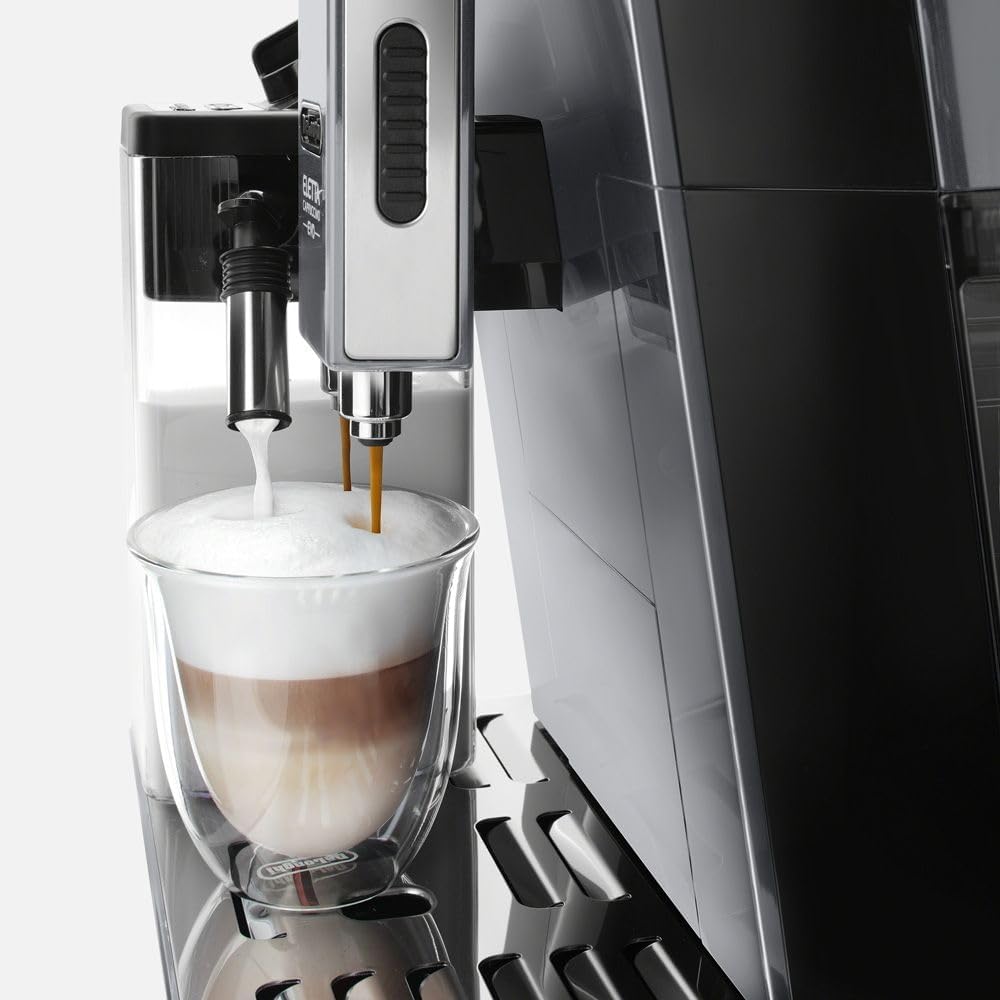
Image 3: A close-up shot of the De'Longhi ECAM46860S Eletta Evo in operation. The machine is simultaneously dispensing frothed milk from the LatteCrema system's spout and espresso from the coffee spout into a clear glass, creating a layered milk-based coffee drink. The rich foam layer is clearly visible at the top of the beverage.
- Fill the LatteCrema milk carafe with cold milk (dairy or non-dairy). Do not exceed the MAX level.
- Attach the milk carafe to the machine's milk spout.
- Place a suitable cup under the milk and coffee spouts.
- Select your desired milk-based beverage (e.g., Cappuccino, Latte Macchiato, Hot Milk) from the control panel.
- The machine will automatically froth and dispense the milk, followed by the coffee (if applicable).
- After dispensing, the machine may prompt for a quick clean of the milk system.
Adjusting Coffee Strength and Volume
- Coffee Strength: Before selecting a beverage, you can often adjust the strength (e.g., extra-mild, mild, normal, strong, extra-strong) using a dedicated button or menu option on the display.
- Coffee Volume: For most beverages, you can program your preferred volume. While the machine is dispensing, press and hold the beverage button until the desired volume is reached, then release. The machine will save this setting for future use.
Hot Water Function
- Place a cup under the hot water spout (or coffee spouts if no dedicated hot water spout).
- Select the 'Hot Water' function from the control panel.
- Press the button to start dispensing hot water. Press again to stop.
Maintenance and Cleaning
Regular cleaning and maintenance ensure optimal performance and longevity of your coffee machine.
Daily Cleaning
- Drip Tray and Grounds Container: Empty and rinse daily. The machine will indicate when the grounds container needs emptying.
- Coffee Spouts: Wipe with a damp cloth.
- Water Tank: Rinse daily and refill with fresh water.
LatteCrema System Cleaning
After each use of the milk system, perform the 'CLEAN' function as prompted by the machine. For thorough cleaning:
- Remove the milk carafe from the machine.
- Disassemble the carafe components (lid, milk intake tube, frothing device).
- Wash all components with warm water and mild detergent. Use the provided brush for small parts.
- Rinse thoroughly and reassemble.
- The carafe can also be stored in the refrigerator with milk.
Brew Unit Cleaning (Weekly/Bi-weekly)
- Turn off and unplug the machine.
- Open the service door (usually on the side or front).
- Press the two red release buttons and pull out the brew unit.
- Rinse the brew unit under running tap water until no coffee residue is visible. Do not use detergent.
- Clean the inside of the machine where the brew unit sits with a brush and damp cloth.
- Allow the brew unit to air dry completely before reinserting.
Descaling Procedure (As prompted by machine)
The machine will indicate when descaling is required. Use only De'Longhi descaler. Follow the on-screen instructions precisely:
- Empty the water tank and drip tray.
- Pour the descaler solution into the water tank, diluted as per descaler instructions, and fill with water up to the indicated level.
- Place a large container (at least 1.5 liters) under the coffee and hot water spouts.
- Start the descaling cycle as prompted by the machine. This process involves several rinsing phases.
- Once the descaling cycle is complete, rinse the water tank and fill with fresh water. Perform the final rinsing cycles as instructed by the machine.
Water Filter Replacement
If using a water filter, replace it approximately every 2 months, or as indicated by the machine. Refer to the filter's instructions for specific replacement steps.
Troubleshooting
| Problem | Possible Cause | Solution |
|---|---|---|
| Coffee is not hot enough | Cups are cold; machine not preheated; descaling needed. | Warm cups with hot water; allow machine to complete preheating cycle; descale the machine. |
| No coffee is dispensed | Water tank empty; brew unit clogged; machine needs descaling. | Fill water tank; clean brew unit; descale the machine. |
| Milk does not froth properly | Milk carafe dirty; milk too warm; wrong type of milk. | Clean LatteCrema system thoroughly; use cold milk (4-6°C); ensure milk is suitable for frothing. |
| Machine displays 'Descaling required' | Mineral buildup in the machine. | Perform the descaling procedure as outlined in the maintenance section. |
| Grinder is noisy or not grinding | Foreign object in grinder; bean hopper empty. | Turn off and unplug, carefully check for and remove any foreign objects (e.g., stones); fill bean hopper. |
Specifications
- Brand: De'Longhi
- Model: ECAM4686
- Coffee Maker Type: Espresso Machine
- Operation Mode: Fully Automatic
- Coffee Input Type: Beans
- Product Dimensions: 18.36 x 10.2 x 14.16 inches
- Item Weight: 29.4 pounds
- UPC: 044387746861
- Date First Available: February 13, 2023
Warranty and Support
For warranty information, technical support, or service inquiries, please refer to the warranty card included with your product or visit the official De'Longhi website. Keep your proof of purchase for warranty claims.


