
Introduction
This manual provides detailed instructions for the installation, operation, and maintenance of your Soundigital 400.4 EVOX 4-Channel Vehicle Amplifier. Please read this manual thoroughly before attempting installation or operation to ensure proper use and to prevent damage to the unit or your vehicle's audio system.
Safety Information
- Always disconnect the vehicle's battery negative terminal before starting any electrical work.
- Ensure all wiring is properly insulated to prevent short circuits.
- Mount the amplifier securely in a dry, well-ventilated area, away from direct sunlight, heat sources, and moisture.
- Use appropriate gauge power and ground wires as specified in the installation section.
- If you are unsure about any part of the installation process, consult a professional car audio installer.
Package Contents
Verify that all items are present in the package:
- Soundigital 400.4 EVOX 4-Channel Vehicle Amplifier
- User Manual (this document)
- Mounting Hardware (screws)
Product Overview
The Soundigital 400.4 EVOX is a compact and powerful 4-channel amplifier designed for vehicle audio systems. It delivers 100 watts RMS per channel at 4 ohms, providing clean power for speakers or subwoofers. Its robust design ensures reliable performance.

Figure 1: Angled view of the Soundigital 400.4 EVOX amplifier, showcasing its compact design and branding.

Figure 2: Top view of the amplifier, highlighting the Soundigital logo and EVOX series designation.
Setup and Installation
Proper installation is crucial for optimal performance and safety. Follow these steps carefully.
1. Mounting the Amplifier
- Choose a mounting location that is dry, well-ventilated, and protected from excessive heat or moisture. Common locations include under a seat, in the trunk, or behind a panel.
- Ensure there is sufficient airflow around the amplifier for cooling.
- Use the provided mounting screws to secure the amplifier firmly to a solid surface.
2. Power Connections

Figure 3: Detailed view of the power input (GND, REM, +12V) and speaker output terminals on the Soundigital 400.4 EVOX amplifier.
- Ground (GND): Connect a short (less than 1 meter) heavy-gauge wire from the amplifier's GND terminal to a clean, unpainted metal point on the vehicle's chassis. Ensure a good electrical connection.
- Remote (REM): Connect a remote turn-on wire from your head unit's remote output to the amplifier's REM terminal. This wire turns the amplifier on and off with your head unit.
- +12V: Connect a heavy-gauge power wire from the amplifier's +12V terminal directly to the positive terminal of the vehicle's battery. Install an appropriate fuse holder with a fuse (not included) within 18 inches (45 cm) of the battery.
3. Speaker Connections
The 400.4 EVOX amplifier supports both stereo and bridged configurations.

Figure 4: Side view of the amplifier, illustrating the layout of the power and speaker terminal block.
- Stereo Mode (4 Channels): Connect each speaker to its respective channel output (CH1+, CH1-, CH2+, CH2-, CH3+, CH3-, CH4+, CH4-). Ensure correct polarity. The minimum impedance for stereo operation is 2 ohms per channel.
- Bridged Mode (2 Channels): For higher power output to two speakers or subwoofers, bridge channels. For example, to bridge channels 1 and 2, connect the speaker's positive terminal to CH1+ and the speaker's negative terminal to CH2-. Refer to the amplifier's labeling for specific bridging points (e.g., 'BRIDGE 4Ω'). The minimum impedance for bridged operation is 4 ohms per pair of channels.
4. Input Connections
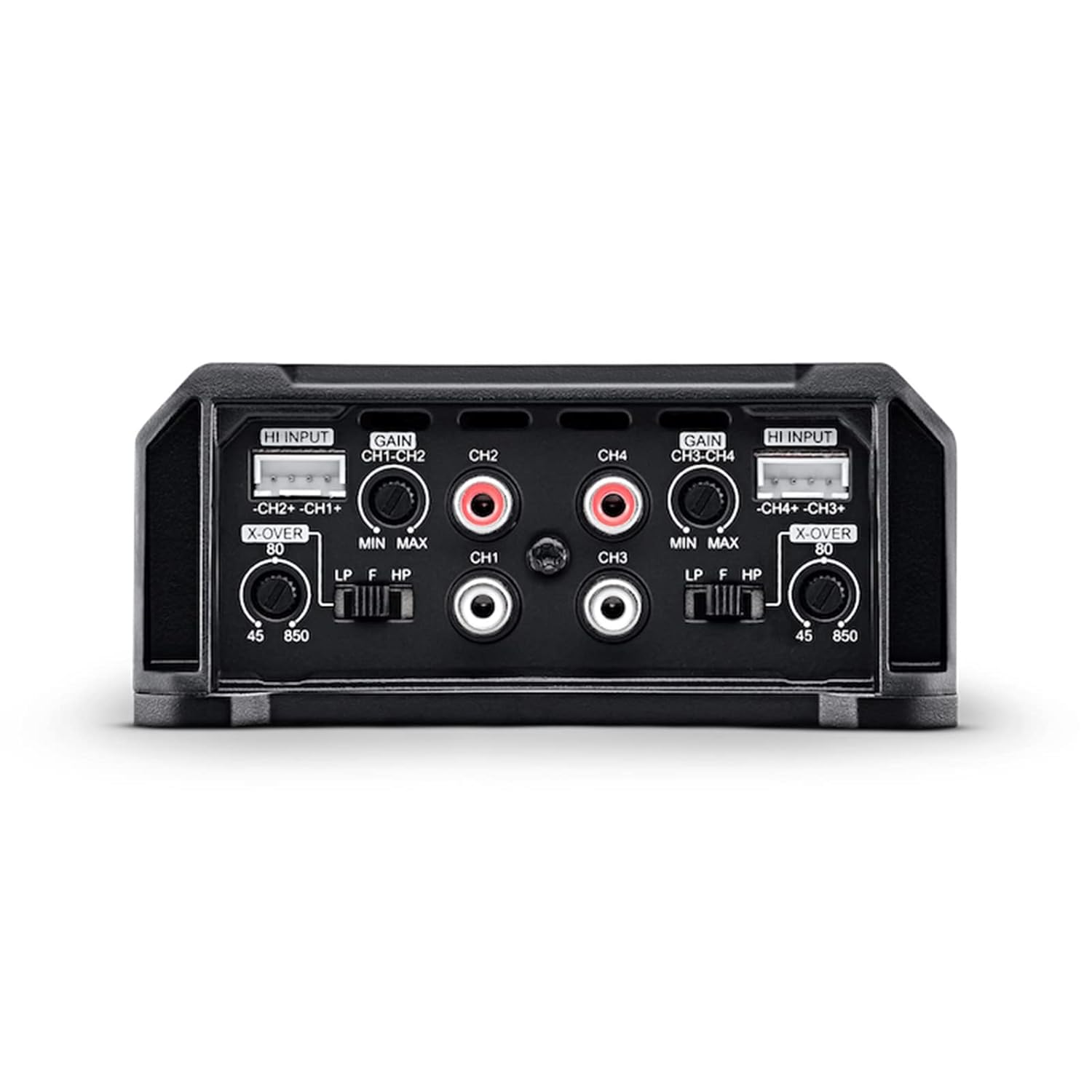
Figure 5: Detailed view of the input section, including HI INPUT, RCA inputs (CH1-CH4), GAIN controls, and X-OVER switches.
- RCA Inputs: Connect RCA cables from your head unit's pre-amp outputs to the amplifier's RCA inputs (CH1, CH2, CH3, CH4).
- High-Level Inputs (HI INPUT): If your head unit does not have RCA outputs, use the high-level inputs. Connect your head unit's speaker outputs directly to the HI INPUT terminals. The amplifier will automatically detect the signal and turn on.
5. Crossover and Gain Adjustment

Figure 6: Side view of the amplifier showing the GAIN, X-OVER, LP, and HP controls for channels 1-2 and 3-4.
- X-OVER Switch: Select the desired crossover mode for each channel pair (CH1-CH2 and CH3-CH4):
- LP (Low Pass): Allows only low frequencies to pass. Use for subwoofers. Adjust the frequency using the 'LP F' knob (e.g., 45-850 Hz).
- HP (High Pass): Allows only high frequencies to pass. Use for full-range speakers or tweeters. Adjust the frequency using the 'HP F' knob (e.g., 45-850 Hz).
- FULL (Full Range): Allows all frequencies to pass. Use for full-range speakers without frequency filtering.
- GAIN Control: Adjust the GAIN knob for each channel pair (CH1-CH2 and CH3-CH4) to match the output voltage of your head unit. Start with the gain at minimum (MIN) and slowly increase it until you hear distortion, then back off slightly. This is not a volume control.
Operating Instructions
Once installed and configured, operating your Soundigital 400.4 EVOX amplifier is straightforward.
- Turn on your vehicle's ignition and head unit. The amplifier should power on automatically via the remote turn-on signal.
- Play audio through your head unit.
- Adjust the volume on your head unit to your desired listening level. Avoid setting the head unit volume to maximum, as this can introduce distortion.
- If necessary, fine-tune the GAIN and X-OVER settings on the amplifier to achieve the desired sound balance and clarity.
Maintenance
The Soundigital 400.4 EVOX amplifier requires minimal maintenance to ensure long-term performance.
- Periodically check all wiring connections to ensure they are secure and free from corrosion.
- Keep the amplifier clean and free of dust and debris. Use a soft, dry cloth for cleaning. Do not use liquid cleaners.
- Ensure that the amplifier's cooling fins are not obstructed to maintain proper heat dissipation.
Troubleshooting
If you encounter issues with your amplifier, refer to the following common problems and solutions:
| Problem | Possible Cause | Solution |
|---|---|---|
| Amplifier does not turn on | No power to +12V terminal Poor ground connection No remote turn-on signal Blown fuse | Check power wire and battery connection Verify ground connection is secure and clean Check remote wire connection to head unit Inspect and replace fuse if necessary |
| No sound output | RCA cables disconnected/damaged Speaker wires disconnected/shorted Gain set too low Head unit output issue | Check RCA connections Verify speaker wiring and polarity Increase gain slowly Test head unit with another amplifier or speakers |
| Distorted sound | Gain set too high Speaker impedance too low Poor quality audio source | Reduce gain setting Check speaker impedance against amplifier specifications Use a higher quality audio source |
| Amplifier overheats | Insufficient ventilation Improper impedance load Sustained high volume | Relocate amplifier for better airflow Verify speaker impedance matches amplifier requirements Reduce listening volume |
Specifications
| Feature | Specification |
|---|---|
| Model | 400.4 EVOX2 |
| Number of Channels | 4 |
| Output Power (RMS) | 100 Watts per channel (at 4 ohms) |
| Minimum Stereo Impedance | 2 Ohms |
| Minimum Bridged Impedance | 4 Ohms |
| Voltage | 12.6 Volts, 16 Volts (Maximum Supply Voltage) |
| Mounting Type | Surface Mount |
| Material | Metal |
| Item Weight | 1.43 pounds |
| Package Dimensions | 7.6 x 6.02 x 2.95 inches |
| UPC | 657768302299 |
Warranty and Support
For warranty information and technical support, please refer to the documentation provided by your retailer or contact Soundigital directly. As this product is listed as 'Renewed', specific warranty terms may vary and should be confirmed with the seller at the time of purchase.