
1. Introduction
The AXFEE Scart to HDMI Converter is designed to convert analog SCART input signals into digital HDMI output signals. This allows older devices equipped with a SCART port, such as DVD players, set-top boxes, VHS players, and gaming consoles (e.g., PS2, Xbox), to connect to modern HDTVs, monitors, or projectors that only have HDMI inputs. The converter supports 720P and 1080P high-definition output resolutions, providing an enhanced visual experience.
Key Features:
- Converts SCART input to HDMI output (HDMI to SCART is not supported).
- Supports 720P/1080P HD resolution output.
- Advanced signal processing for high-quality transmission.
- Compact and lightweight design, powered via USB cable.
- Compatible with various SCART input formats (PAL, NTSC3.58, NTSC4.43, SECAM, PAL/M, PAL/N).
2. Safety Information
- Ensure the converter is connected to a stable 5V 1A USB power source. Insufficient power may lead to improper operation or no signal.
- Do not expose the device to moisture, extreme temperatures, or direct sunlight.
- Avoid disassembling or modifying the converter, as this will void the warranty and may cause damage.
- Keep out of reach of children.
- Disconnect power before cleaning. Use a soft, dry cloth for cleaning.
3. Package Contents
Please check the package for the following items:
- 1 x AXFEE Scart to HDMI Converter
- 1 x USB Power Cable
- 1 x User Manual (this document)
4. Product Overview
The AXFEE Scart to HDMI Converter is a compact device designed for ease of use. Below is a diagram illustrating its main components and dimensions.

This image displays the converter's ports. The SCART input connects to older devices, the HDMI output connects to modern displays, and a Micro USB port provides power. A small switch allows selection between 720P and 1080P output resolutions.

This image provides the physical dimensions of the converter, including the length of the SCART and HDMI connectors and the overall cable length, which is approximately 100cm (39.4 inches).
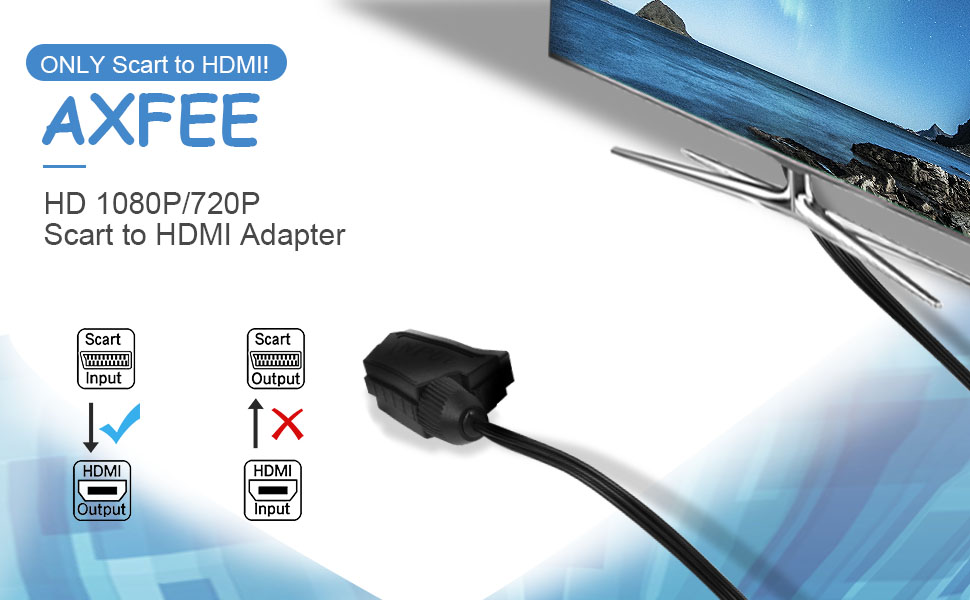
This image shows the AXFEE Scart to HDMI converter connected to a television, demonstrating its typical application for displaying content from a SCART source on an HDMI screen.
Port Descriptions:
- SCART Input Port: Connects to source devices such as N64, PS2, game consoles, DVD players, and set-top boxes.
- HDMI Output Port: Connects to display devices like HDTVs, monitors, or projectors.
- Micro USB Power Input: Requires a DC 5V 1A power supply via the included USB cable. This connection is essential for the converter to function.
- 720P/1080P Switch: A small switch on the HDMI connector allows you to select the desired output resolution.
5. Setup Instructions
Follow these steps to connect your AXFEE Scart to HDMI Converter:
- Connect Power: Connect the provided USB power cable to the Micro USB port on the converter. Plug the other end of the USB cable into a 5V 1A USB power source (e.g., a TV's USB port, a USB wall adapter, or a power bank). Note: This step is crucial for the converter to operate.
- Connect SCART Input: Plug the SCART connector of the converter into the SCART output port of your source device (e.g., DVD player, VHS, game console).
- Connect HDMI Output: Connect the HDMI connector of the converter into an available HDMI input port on your display device (e.g., HDTV, monitor, projector).
- Select Resolution: Use the 720P/1080P switch on the HDMI connector to select your desired output resolution. If your display device only supports 720P, set the switch to 720P.
- Power On Devices: Power on your source device and your display device. Select the correct HDMI input on your display.
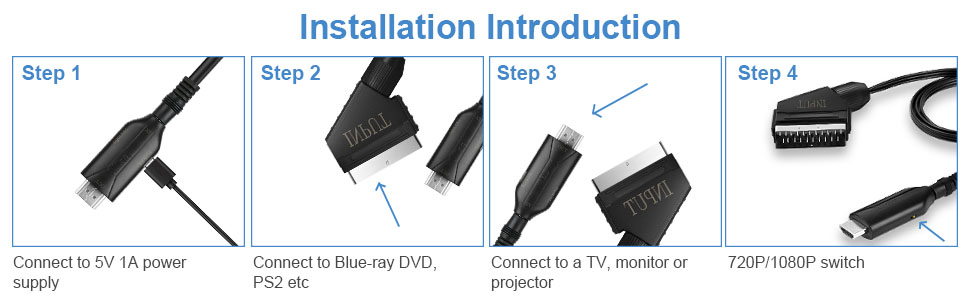
This diagram illustrates the four main steps for connecting the converter: providing 5V 1A power, connecting the SCART input to a source device, connecting the HDMI output to a display, and setting the resolution switch.

This image demonstrates a typical setup where the converter is connected to a television, highlighting its plug-and-play nature for devices like TVs, PlayStation consoles, and DVD players.
6. Operating Instructions
Once the converter is properly set up, operation is straightforward:
- Resolution Selection: Use the small switch located on the HDMI connector to toggle between 720P and 1080P output resolutions. Select the resolution that best suits your display device and content.
- Source Playback: Begin playback on your SCART source device (e.g., play a DVD, start a game). The signal will be automatically converted and displayed on your HDMI screen.

This image illustrates the converter's ability to output in either 720P or 1080P, with a close-up of the resolution switch on the HDMI connector. Users should select the appropriate resolution for their display.
7. Maintenance
To ensure the longevity and optimal performance of your converter, follow these simple maintenance guidelines:
- Cleaning: Use a soft, dry, lint-free cloth to clean the exterior of the converter. Do not use liquid cleaners or aerosols.
- Storage: When not in use, store the converter in a cool, dry place, away from direct sunlight and excessive dust.
- Handling: Handle the connectors carefully to avoid bending pins or damaging the ports.
8. Troubleshooting
If you encounter issues with your AXFEE Scart to HDMI Converter, please refer to the following common problems and solutions:
| Problem | Possible Cause / Solution |
|---|---|
| No Picture / No Signal |
|
| Picture is Dark or Poor Quality |
|
| No Audio |
|
| Converter Feels Warm |
|
9. Specifications
| Feature | Detail |
|---|---|
| Brand | AXFEE |
| Model Number | Q1-3375742 |
| Input Port | 1 x SCART |
| Output Port | 1 x HDMI |
| HDMI Output Resolution | 720P / 1080P (Switchable) |
| SCART Input Formats | PAL, NTSC3.58, NTSC4.43, SECAM, PAL/M, PAL/N |
| Power Supply | DC 5V 1A (via Micro USB) |
| Compatible Devices | Monitor, PlayStation, Video Game Console, Home Theater, HDTV, STB, VHS, Xbox, Sky, Blu-Ray players with SCART output |
| Item Weight | 0.06 Kilograms |
| Product Finish Type | HDMI |
10. Warranty Information
This AXFEE product comes with a limited warranty. For specific details regarding the warranty period and coverage, please refer to the documentation provided with your purchase or contact AXFEE customer support. The warranty typically covers manufacturing defects under normal use conditions.
11. Customer Support
If you have any questions, require technical assistance, or experience issues not covered in this manual, please contact AXFEE customer support. You can typically find contact information on the product packaging, the retailer's website, or the official AXFEE website.
When contacting support, please be prepared to provide your product model number (Q1-3375742) and a detailed description of the issue.