1. Introduction
Thank you for choosing the MOMAX Universal Travel Adapter. This compact and versatile power solution is designed to meet your charging needs across more than 150 countries, providing 35W Power Delivery (PD) fast charging with multiple USB-C and USB-A ports. This manual provides important information on how to safely and effectively use your adapter.

Figure 1: Front view of the MOMAX Universal Travel Adapter.
2. Safety Precautions
Please read all safety instructions carefully before using the product. Failure to follow these instructions may result in electric shock, fire, or serious injury.
- NOT a Voltage Converter: This travel adapter is NOT a voltage converter. It is compatible only with devices that support a wide voltage range of 100V to 250V. Ensure your device's voltage is within this range before plugging it in.
- Indoor Use Only: This product is designed for indoor use in dry locations only. Do not expose to rain, moisture, or extreme temperatures.
- Overload Protection: Do not exceed the maximum power rating of 1250W (at 110-130V) or 2500W (at 220-250V). Overloading can cause damage to the adapter and connected devices, and may pose a fire hazard.
- Dual Fuse Protection: The adapter is equipped with a replaceable 10A overload fuse. A spare fuse is included for convenience. If the adapter stops working, check and replace the fuse if necessary.
- Child Safety: Keep out of reach of children. The adapter features safety shutters to prevent foreign objects from being inserted into the AC outlet.
- Proper Handling: Do not disassemble, modify, or attempt to repair the adapter. Contact customer support if the product is damaged or malfunctions.

Figure 2: Comprehensive safety features including replaceable fuses.
3. Product Features & Components
The MOMAX Universal Travel Adapter is an all-in-one solution for your global charging needs.
- Universal Compatibility: Covers over 150 countries with built-in US/EU/UK/AUS plug types.
- Multiple Charging Ports: Equipped with 1 AC outlet, 3 USB-C ports, and 2 USB-A ports, allowing simultaneous charging of up to 6 devices.
- 35W PD Fast Charging: The dedicated 35W USB-C port supports Power Delivery for rapid charging of compatible laptops, tablets, and smartphones.
- Compact & Lightweight: Designed for portability, making it an ideal travel companion.

Figure 3: Worldwide plug compatibility.

Figure 4: Compact design for easy travel.
4. Setup & Plug Selection
To use the adapter, simply slide the appropriate plug selector on the side of the unit to extend the desired prongs for your region.
- USA/AUS Plug: Slide the top lever to extend the Type A/B (USA) or Type I (Australia/New Zealand) prongs.
- UK Plug: Slide the middle lever to extend the Type G (UK) prongs.
- EU Plug: Slide the bottom lever to extend the Type C/E/F (Europe) prongs.

Figure 5: Extending the USA/AUS plug.

Figure 6: Extending the UK plug.

Figure 7: Extending the EU plug.
Once the desired plug is extended, insert the adapter into the wall outlet. The adapter is designed to fit national sockets without blocking adjacent outlets.

Figure 8: Adapter fitting perfectly into various national sockets.
5. Operating Instructions
After selecting the correct plug and inserting the adapter into the wall outlet, you can begin charging your devices.
- Connecting Devices: Plug your devices' charging cables into the available USB-C or USB-A ports, or use the universal AC outlet for larger appliances.
- Fast Charging: The 35W USB-C port (USB-C1) provides optimal fast charging for compatible devices. For example, a MacBook Air (M2) can be charged efficiently.
- Simultaneous Charging: You can charge up to 6 devices concurrently using the combination of AC outlet, USB-C, and USB-A ports.
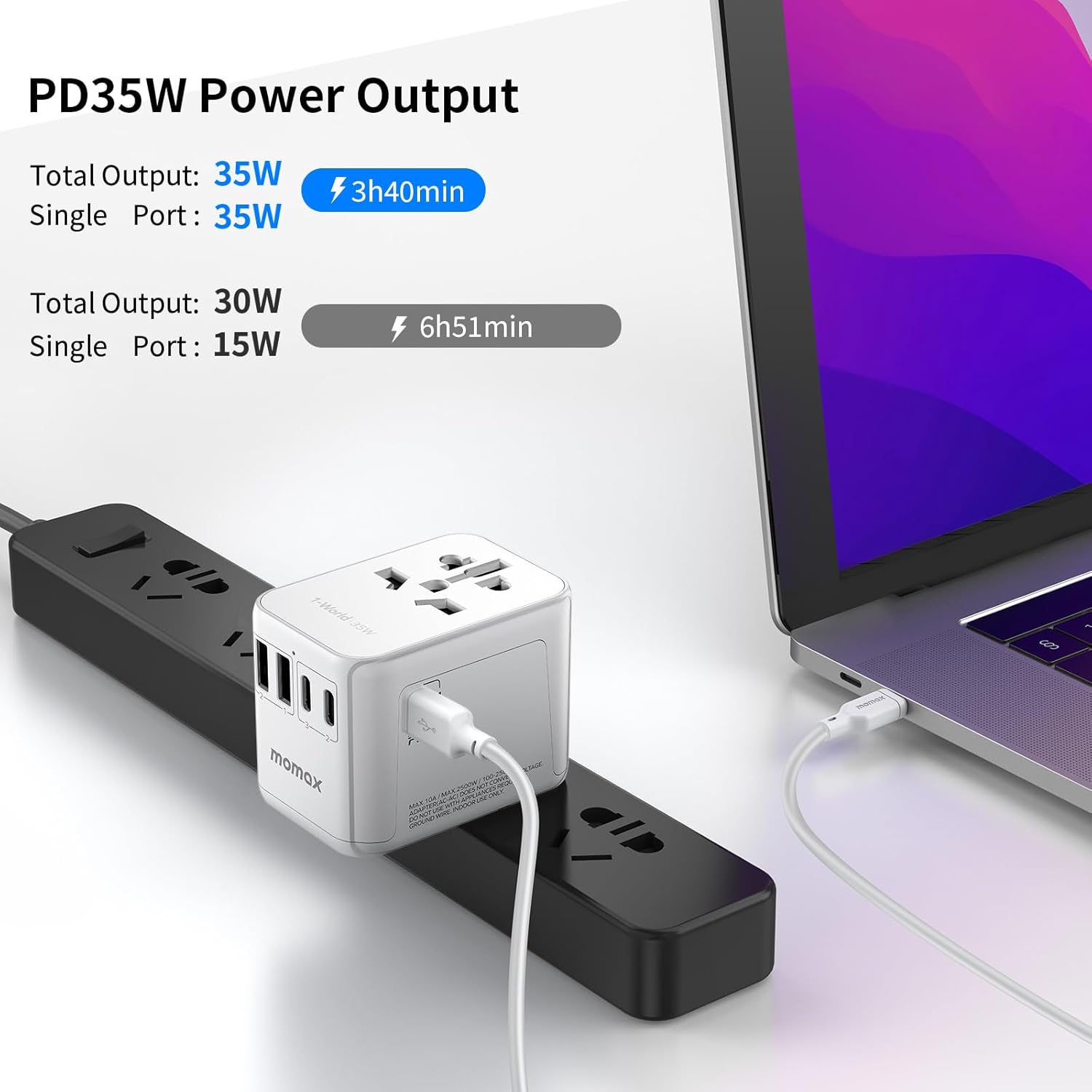
Figure 9: Charging a laptop with 35W PD output.

Figure 10: Simultaneous fast charging for up to 6 devices.
Important Note: Not a Voltage Converter
This adapter does NOT convert voltage. It passes through the input voltage directly to the AC outlet. Ensure your electronic devices are dual voltage (100-250V) or compatible with the local voltage of the country you are visiting. Using devices that are not voltage compatible can cause damage to your device and the adapter, and may pose a safety risk.

Figure 11: Max supported power and voltage compatibility reminder.
6. Technical Specifications
| Specification | Detail |
|---|---|
| Model Number | UA9 |
| Input Voltage | 100-250V AC, 50/60Hz |
| Max AC Power Rating | 10A Max, 2500W Max (at 250V), 1250W Max (at 125V) |
| USB-C1 Output | 5.0V=3.0A / 9.0V=3.0A / 12.0V=2.9A / 15.0V=2.33A / 20.0V=1.75A (35.0W Max) |
| USB-C2/C3 Output | 5.0V=3.0A (15.0W Max) per port |
| USB-A1/A2 Output | 5.0V=2.4A (12.0W Max) per port |
| Combined USB Output | USB-C1+C2/C3: 20W Max; USB-A1+A2: 15W Max; Total Combined: 35W Max |
| Product Dimensions | 2.8 x 2.13 x 2.13 inches |
| Item Weight | 5.3 ounces |
Output Diagrams
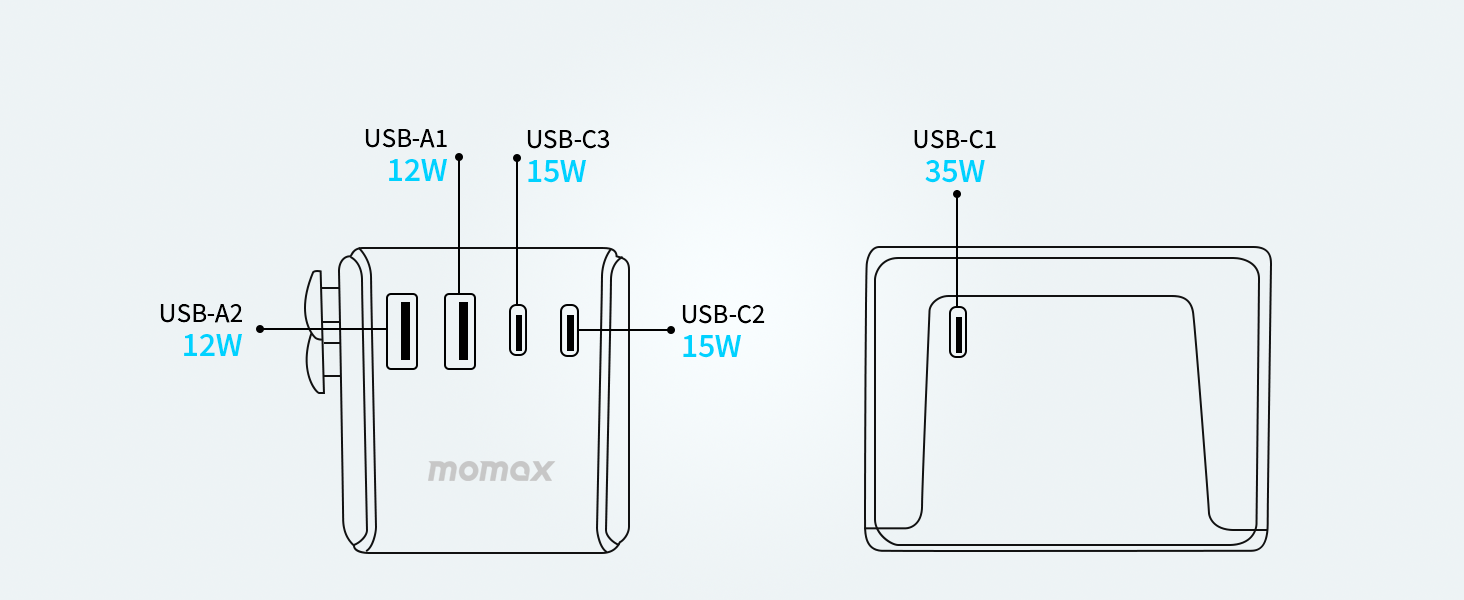
Figure 12: Individual port output capabilities.

Figure 13: Combined port output capabilities.
7. Maintenance
To ensure the longevity and optimal performance of your MOMAX Universal Travel Adapter, follow these simple maintenance guidelines:
- Cleaning: Disconnect the adapter from the power outlet and all devices before cleaning. Use a soft, dry cloth to wipe the surface. Do not use liquid cleaners or aerosols.
- Storage: When not in use, store the adapter in a cool, dry place away from direct sunlight and moisture. Ensure all prongs are retracted into the unit.
- Fuse Replacement: If the adapter stops functioning, the fuse may need replacement. Unscrew the fuse holder (usually located near the AC outlet) and replace the 10A fuse with the spare provided or a new one of the same rating.
8. Troubleshooting
If you encounter issues with your MOMAX Universal Travel Adapter, please refer to the following common problems and solutions:
- Adapter not powering on/charging devices:
- Ensure the adapter is fully inserted into a live wall outlet.
- Check if the fuse needs replacement (refer to Maintenance section).
- Verify that the wall outlet is functioning by testing it with another device.
- Devices charging slowly:
- Ensure you are using the 35W USB-C1 port for devices requiring fast charging.
- Check your device's charging cable for damage or compatibility.
- Reduce the number of devices being charged simultaneously to see if performance improves.
- Adapter feels warm during use:
- It is normal for the adapter to feel slightly warm during operation, especially when charging multiple devices or high-power devices.
- If it becomes excessively hot or emits a burning smell, immediately unplug it and discontinue use. Contact customer support.
- Plug prongs not extending/retracting smoothly:
- Ensure no debris is obstructing the sliding mechanism.
- Apply gentle, even pressure when sliding the levers. Do not force them.
9. Warranty & Support
MOMAX products are manufactured with high-quality materials and undergo rigorous testing. For warranty information and customer support, please refer to the warranty card included with your product or visit the official MOMAX website. If you have any questions or require assistance, do not hesitate to contact our customer service team.
Manufacturer: Momax Technology Ltd.