
1. Introduction
The DaranEner NEO Portable Power Station is a versatile and high-capacity power solution designed for various applications, including home emergency backup, outdoor activities, and RV use. Featuring a 1382.4Wh LiFePO4 battery and an 1800W AC output (3000W surge), it provides reliable power for a wide range of devices and appliances.
This manual provides essential information for the safe and efficient operation, maintenance, and troubleshooting of your DaranEner NEO Portable Power Station. Please read it thoroughly before use and retain it for future reference.
2. Safety Instructions
To ensure safe operation, always follow these guidelines:
- Do not disassemble, repair, or modify the unit. Incorrect reassembly may cause fire or electric shock.
- Do not place the unit near fire or expose it to heat. Keep out of direct sunlight.
- Do not charge, use, or store the unit in a bathroom or in an area exposed to water or moisture.
- Use only the original charger and cables provided or approved by DaranEner.
- Keep the unit away from children and pets.
- Do not use the unit if it is damaged or has been dropped.
- Ensure proper ventilation during use and charging to prevent overheating.
- Avoid dropping metal objects into the unit's ports, as this may cause short circuits.
3. Product Overview: Components and Ports
Familiarize yourself with the various components and connection ports of your DaranEner NEO Portable Power Station.
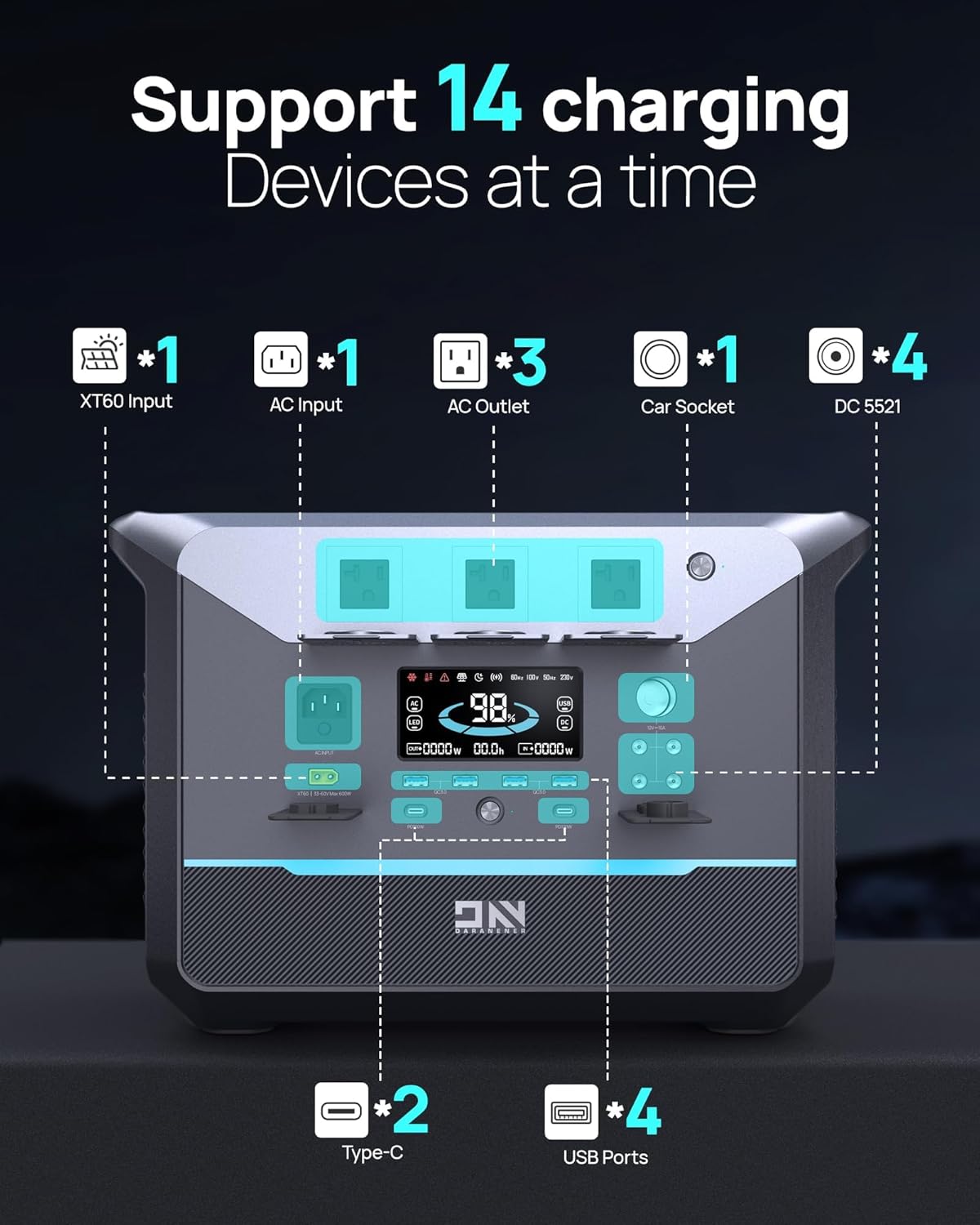
Figure 3.1: Front panel of the DaranEner NEO Portable Power Station, showing various input and output ports, including XT60 Input, AC Input, AC Outlets, Car Socket, DC 5521, Type-C, and USB Ports, along with the display screen.
- XT60 Input: For solar panel connection.
- AC Input: For wall charging.
- AC Outlets: Standard household outlets for AC appliances.
- Car Socket: 12V DC output for car appliances.
- DC 5521 Output: For various DC devices.
- Type-C Ports: USB-C ports for fast charging compatible devices.
- USB Ports: Standard USB-A ports for charging mobile devices.
- Display Screen: Shows battery level, input/output wattage, and other status indicators.
4. Setup
4.1 Initial Charging
Before first use, fully charge the DaranEner NEO Portable Power Station. Connect the provided AC charging cable to the AC Input port on the unit and then to a wall outlet. The display will indicate charging status. A full charge from 0% to 100% typically takes approximately 1.3 hours using AC input.

Figure 4.1: The power station connected to a wall outlet for charging, illustrating its fast charging capability.
4.2 Placement
Place the power station on a stable, flat surface in a well-ventilated area. Avoid placing it in direct sunlight, near heat sources, or in enclosed spaces that could restrict airflow.
5. Operating Instructions
5.1 Powering On/Off
To turn on the power station, press and hold the main power button for a few seconds until the display illuminates. To turn it off, press and hold the main power button again until the display turns off.
5.2 Charging Devices
The DaranEner NEO offers multiple output options:
- AC Output: Press the AC power button to activate the AC outlets. Plug your AC appliances into the available ports. The unit provides up to 1800W continuous power with a 3000W surge capacity.
- DC Output: Press the DC power button to activate the car socket and DC 5521 ports. Connect your 12V DC devices.
- USB Output: The USB-A and USB-C ports are typically active when the unit is on. Simply plug in your USB-compatible devices for charging.
- Wireless Charging: Place your Qi-compatible device on the wireless charging pad located on top of the unit. Ensure the device is centered for optimal charging.

Figure 5.1: The power station connected to and powering various household items, demonstrating its versatility.
5.3 Recharging the Power Station
The power station can be recharged using several methods:
- AC Wall Outlet: Connect the AC charging cable to the AC Input port and a wall outlet. Full charge in approximately 1.3 hours.
- Solar Panel: Connect compatible solar panels (max 600W) to the XT60 Input port. Charging time varies based on sunlight intensity and panel wattage.
- Car Charger: Use a compatible car charger to recharge the unit from your vehicle's 12V outlet.

Figure 5.2: The power station being recharged by a solar panel, illustrating one of the three available charging methods.
5.4 Uninterruptible Power Supply (UPS) Function
The DaranEner NEO features a UPS function that provides continuous power to connected devices during an outage. When connected to an AC wall outlet, the unit can pass through power to connected devices. In the event of a power failure, it automatically switches to battery power within 20ms, ensuring uninterrupted operation for sensitive electronics like refrigerators, computers, and routers.
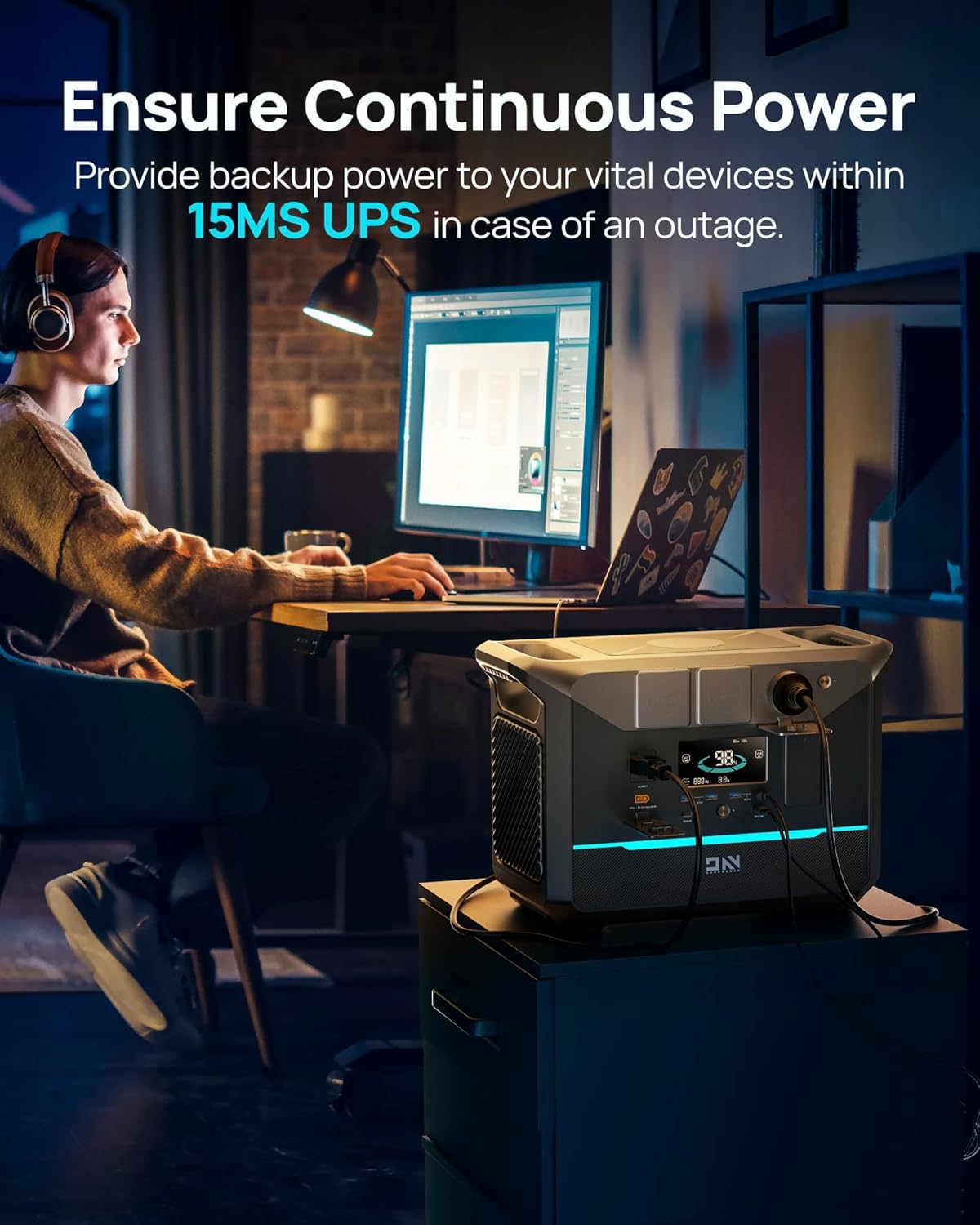
Figure 5.3: The power station connected to a computer setup, demonstrating its Uninterruptible Power Supply (UPS) capability during a power outage.
5.5 Official Product Videos
Power Station Home Use 1800
This video demonstrates the DaranEner NEO Portable Power Station's use in a home setting, showcasing its ability to power various appliances during an outage and its seamless integration into daily life.
Portable Power Station 1800W
This video highlights the DaranEner NEO Portable Power Station's features and benefits for outdoor and mobile use, including its portability and solar charging capabilities.
6. Maintenance
6.1 Storage
When storing the power station for extended periods, ensure it is charged to approximately 50-80% and stored in a cool, dry place away from direct sunlight and extreme temperatures. Recharge the unit every 3-6 months to maintain battery health.
6.2 Cleaning
Clean the exterior of the unit with a soft, dry cloth. Do not use abrasive cleaners or solvents. Keep all ports free of dust and debris.
6.3 Battery Care
The DaranEner NEO uses LiFePO4 batteries, known for their long lifespan (3500+ cycles). To maximize battery life, avoid fully discharging the unit frequently and store it with a partial charge.

Figure 6.1: An internal diagram of the power station highlighting its LiFePO4 battery cells and Battery Management System (BMS), indicating a 10-year lifespan.
7. Troubleshooting
If you encounter issues with your DaranEner NEO Portable Power Station, refer to the following common problems and solutions:
| Problem | Possible Cause | Solution |
|---|---|---|
| Unit does not turn on | Low battery; Power button not pressed long enough | Charge the unit; Press and hold the power button for 3-5 seconds. |
| AC output not working | AC output not activated; Overload protection triggered | Press the AC power button; Reduce connected load, then restart AC output. |
| Slow charging via solar | Insufficient sunlight; Incorrect panel angle; Incompatible solar panel | Ensure direct sunlight; Adjust panel angle; Verify panel specifications. |
| Display not working | Unit off; Display error | Turn on the unit; Contact customer support if issue persists. |
If the problem persists after trying these solutions, please contact DaranEner customer support.
8. Specifications
| Feature | Specification |
|---|---|
| Brand | DaranEner |
| Model Name | NEO |
| Wattage (Output) | 1800W |
| Starting Wattage (Surge) | 3000W |
| Battery Capacity | 1382.4Wh |
| Battery Type | LiFePO4 (Lithium Iron Phosphate) |
| Voltage | 110V |
| Power Source | Battery Powered |
| Recharge Methods | AC Wall Outlet, Solar Panel, Car Charger |
| Product Dimensions | 18.74"L x 13.58"W x 10.24"H |
| Item Weight | 45 Pounds |
| Total Power Outlets | 3 AC Outlets + DC/USB Ports |
| Special Feature | Portable, UPS Functionality |
9. Warranty and Support
9.1 Warranty Information
The DaranEner NEO Portable Power Station comes with a 1-year manufacturer's warranty. This warranty covers defects in materials and workmanship under normal use. Please retain your proof of purchase for warranty claims.
9.2 Customer Support
For technical assistance, warranty inquiries, or any questions regarding your DaranEner NEO Portable Power Station, please contact DaranEner customer service. Our dedicated team is available to provide support and solutions.
You can typically find contact information on the official DaranEner website or through your purchase platform.


