
ODK B01XS110101004SA-1
ODK 48 Inch Computer Desk User Manual
Model: B01XS110101004SA-1
Product Overview
The ODK 48 Inch Computer Desk is designed for home office and gaming environments, offering a blend of functionality and modern aesthetics. It features integrated power solutions, ample storage, adjustable ergonomics, and customizable lighting to enhance your workspace.

Figure 1: The ODK 48 Inch Computer Desk, showcasing its monitor stand, LED lighting, and three integrated drawers.
Key Features:
- Integrated Power & USB: Equipped with 2 standard power outlets (120V/12A) and 2 USB charging ports (5V-2A) for convenient device charging.
- Spacious Storage: Includes three large-capacity fabric drawers to keep your office supplies organized and dust-free.
- Adjustable Monitor Stand: A 3-gear adjustable monitor stand (3.2", 4.3", 5.5" heights) provides ergonomic viewing angles and is removable without leaving screw holes.
- Customizable LED Lighting: Features an LED strip with 10 static colors, 6 brightness levels, 10 dynamic modes, and a memory function, controlled by an easy-to-use switch.
- Durable Construction: Constructed with metal legs and a sturdy wood desktop, ensuring stability and high bearing capacity.
- Optimal Dimensions: Desktop size of 19.7"(D) x 47.3"(W) x 31"(H) (desk height) plus monitor stand height, offering ample workspace and legroom.
Setup and Assembly
The ODK Computer Desk is designed for straightforward assembly. All necessary parts are clearly labeled, and detailed instructions are provided to guide you through each step.
Before You Begin:
- Unpack all components and verify against the parts list in the instruction manual.
- Ensure you have adequate space for assembly.
- While one person can assemble the desk, two people are recommended for easier and safer installation, especially when handling larger components.
- Keep all small parts (screws, bolts) organized to prevent loss.
Assembly Steps:
- Begin by assembling the main desk frame according to the provided diagrams.
- Attach the desktop securely to the assembled frame.
- Install the fabric drawers into their designated slots.
- Mount the monitor stand to the desktop. Note that the monitor stand can be installed at different heights or omitted if not desired.
- Connect the power strip and LED light strip as indicated in the manual.
- Attach the versatile hook to the side of the desk.

Figure 2: Detailed dimensions of the desk and its adjustable monitor stand components.
Operating Instructions
Using the USB Charging Ports and Power Outlets:
The desk is equipped with a built-in power strip for convenient access to power. Simply plug the desk's main power cord into a standard wall outlet. You can then use the two 120V/12A AC outlets for devices like monitors or laptops, and the two 5V-2A USB ports for charging smartphones, tablets, or other USB-powered accessories.

Figure 3: Power outlets and USB ports for convenient charging.
Adjusting the LED Lights:
The LED light strip under the monitor stand offers various customization options. Use the inline control panel to adjust the lighting:
- On/Off Button: Press to turn the lights on or off.
- Color Button: Cycle through 10 static colors.
- Brightness Buttons: Adjust the brightness across 6 grades.
- Mode Button: Select from 10 dynamic lighting modes.
- Memory Function: The lights will remember your last setting when turned off and on again.

Figure 4: LED light strip with various color and mode options.
Adjusting the Monitor Stand Height:
The monitor stand can be set at three different heights to optimize your viewing angle and ergonomic posture. Refer to the assembly instructions for detailed steps on how to adjust or remove the stand.
- The available heights are approximately 3.2 inches, 4.3 inches, and 5.5 inches from the desktop.
- Choose the height that best suits your seating position and monitor size to reduce eye strain and improve focus.
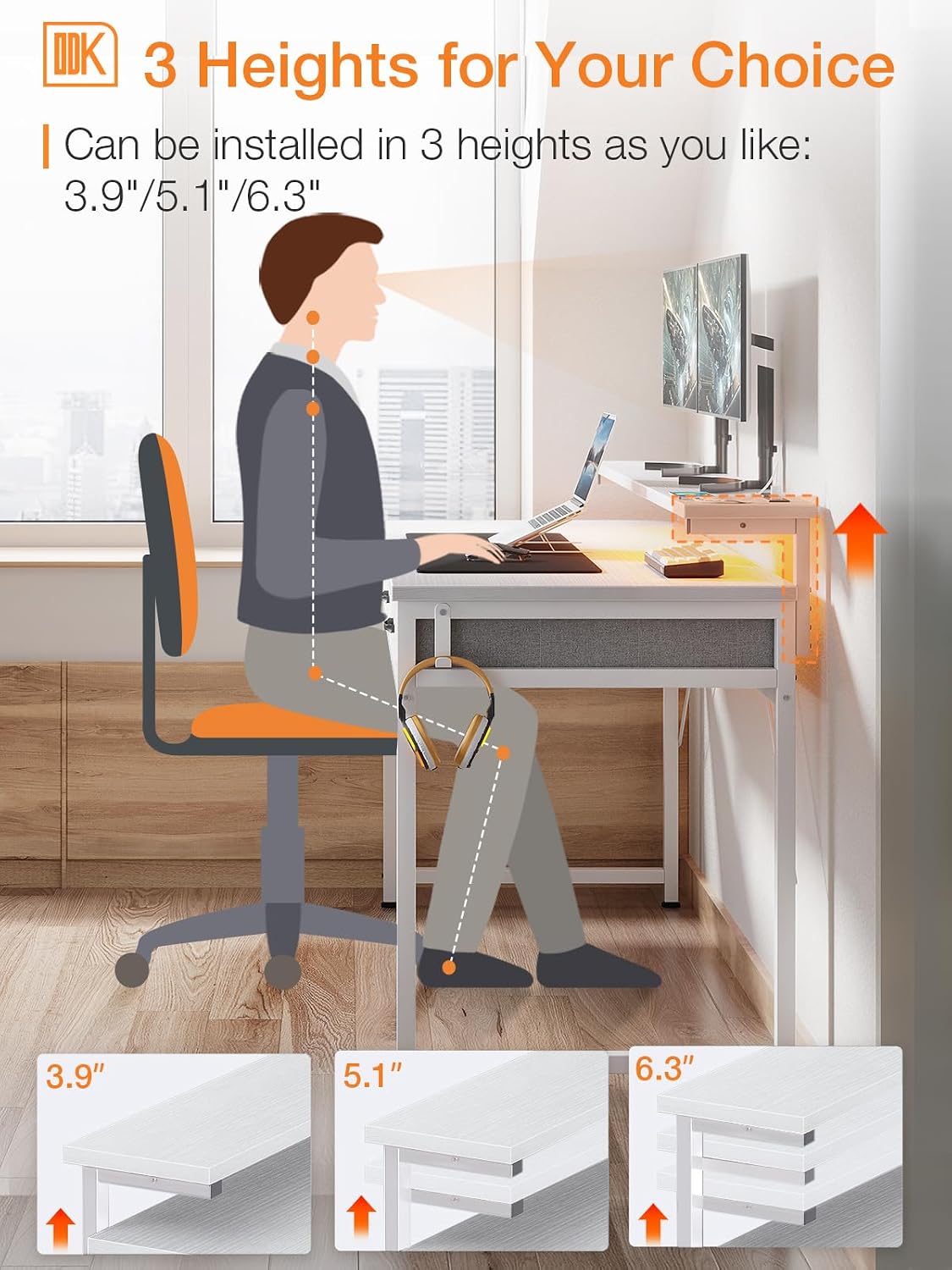
Figure 5: Monitor stand adjustable to three ergonomic heights.
Product Feature Demonstration Video:
Video 1: A demonstration of the ODK Desk's features, including the three fabric drawers and the adjustable monitor stand. This video highlights the practical aspects and storage solutions of the desk.
Maintenance
Proper care and maintenance will ensure the longevity and appearance of your ODK Computer Desk.
- Cleaning the Desktop: Wipe the wood desktop surface with a soft, damp cloth. Avoid abrasive cleaners or harsh chemicals that could damage the finish.
- Cleaning Fabric Drawers: For light cleaning, use a lint roller or a soft brush to remove dust and debris. For spills, gently blot with a clean, damp cloth and mild soap, then air dry. Do not machine wash.
- Metal Frame: Clean the metal legs with a soft cloth. If necessary, use a mild all-purpose cleaner.
- Electrical Components: Ensure the desk is unplugged before cleaning near the power outlets or USB ports. Use a dry cloth to wipe these areas.
- Regular Checks: Periodically check all screws and connections to ensure they remain tight. Tighten if necessary to maintain stability.
Troubleshooting
If you encounter any issues with your ODK Computer Desk, please refer to the following common solutions. If the problem persists, contact customer support.
| Problem | Possible Cause | Solution |
|---|---|---|
| Desk is wobbly or unstable. | Loose screws or uneven floor. | Ensure all screws are tightened. Adjust the foot mats on the bottom of the legs to level the desk on uneven surfaces. |
| LED lights are not working. | Power connection issue or light strip malfunction. | Check if the desk's main power cord is securely plugged into a working outlet. Verify the LED light strip's connection to the power source and control panel. Ensure the lights are turned on via the control panel. |
| USB ports or power outlets are not functioning. | Desk not powered or internal wiring issue. | Confirm the desk's main power cord is plugged in and receiving power. Test with a different device. If still not working, contact customer support. |
| Drawers do not slide smoothly. | Improper installation or obstruction. | Ensure the fabric drawers are correctly inserted and not overloaded. Check for any obstructions in the drawer slots. |
| Missing or damaged parts upon arrival. | Shipping damage or packaging error. | Do not attempt to force assembly. Immediately contact ODK customer service with details of the missing or damaged parts. |
Specifications
| Feature | Detail |
|---|---|
| Brand | ODK |
| Model Number | B01XS110101004SA-1 |
| Product Dimensions (D x W x H) | 19.7"D x 48"W x 45.6"H (overall with monitor stand) |
| Desktop Height | 31" |
| Monitor Stand Adjustable Heights | 3.2", 4.3", 5.5" |
| Color | White |
| Material | Wood (desktop), Metal (legs) |
| Number of Drawers | 3 (fabric) |
| Power Outlets | 2 AC Outlets (120V/12A) |
| USB Charging Ports | 2 USB Ports (5V-2A) |
| LED Lights | 10 Static Colors, 6 Brightness Grades, 10 Dynamic Modes, Memory Function |
| Item Weight | 18.26 Kilograms |
| Assembly Required | Yes |
Customer Support
For any questions, concerns, or assistance with your ODK Computer Desk, please contact our professional customer support team. We are committed to helping you resolve any issues promptly.
- Contact Method: Please refer to the contact information provided on the product packaging or the official ODK website.
- Response Time: Our team aims to respond to inquiries within 24 hours.
- When Contacting: Please have your model number (B01XS110101004SA-1) and a description of your issue ready to expedite the support process.
We appreciate your purchase and are here to ensure your satisfaction with your ODK product.
Related documentsB01XS110101004SA-1


Ask a question about this manual
Ask about setup, troubleshooting, compatibility, parts, safety, or missing instructions. Manuals+ will review the question and use this page’s manual context to help answer it.