
1. Introduction
This manual provides essential instructions for the safe and efficient use of your BigBlue CellPowa 2500 Solar Generator. Please read this manual thoroughly before operating the device and retain it for future reference. The BigBlue CellPowa 2500 is a portable power station designed to provide reliable power for various applications, including home backup, outdoor activities, and emergency situations.
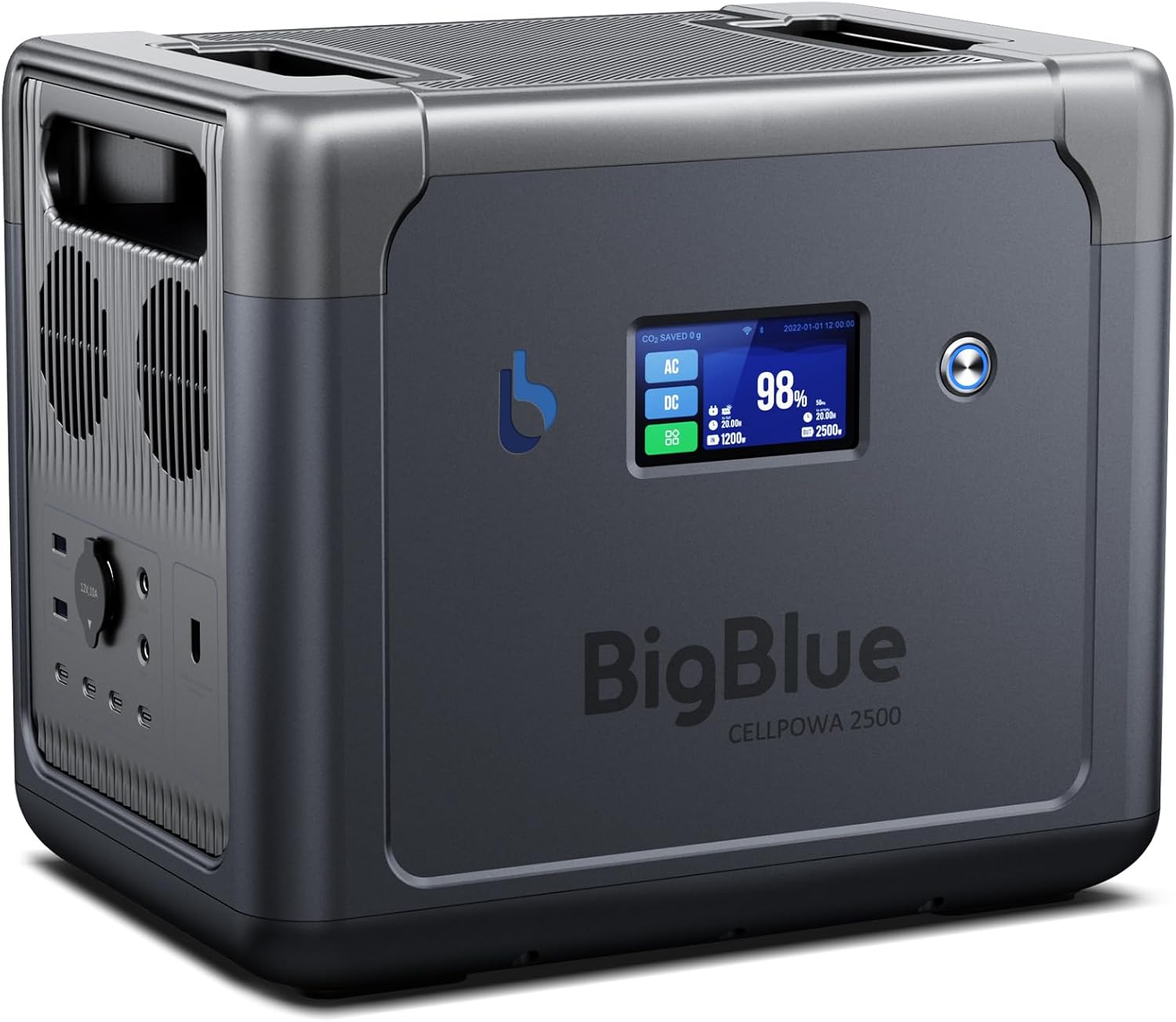
Figure 1: BigBlue CellPowa 2500 Solar Generator
2. Package Contents
Verify that all items listed below are included in your package:
- BigBlue CellPowa 2500 Portable Power Station
- AC Charging Cable
- MC-4-to-XT60 Solar Cable
- XT60 Car Lighter Cable
- Stylus Pen
- Accessory Bag
- User Manual (this document)
3. Setup
3.1 Initial Charging
Before first use, fully charge the CellPowa 2500. Use the provided AC charging cable to connect the unit to a standard wall outlet. The unit can reach 80% charge in approximately 1.5 hours with a 1200W input. You can adjust the AC recharging input power to 400W, 800W, or 1200W to manage charging speed and battery longevity.

Figure 2: AC Charging Connection
3.2 App Connection
The BigBlue CellPowa 2500 can be controlled and monitored via the BigBlue Energy smartphone application. Download the app from your device's app store. Connect to the power station via Wi-Fi or Bluetooth for remote access to charging capabilities, output control, and device health monitoring.

Figure 3: BigBlue Energy App Interface
4. Operation
4.1 Powering On/Off
Locate the main power button on the unit. Press and hold to turn the unit on or off. The LCD touch screen will illuminate upon activation.
4.2 Connecting Devices
The CellPowa 2500 features multiple output ports:
- 6 AC Outlets (2500W continuous, 5000W peak)
- 2 DC Outputs
- 1 Car Charge Output
- 2 USB-A Fast Charging Ports
- 2 USB-C PD 45W Ports
- 2 USB-C PD 100W Ports
Connect your devices to the appropriate ports. Ensure the total wattage of connected devices does not exceed the unit's continuous output capacity.

Figure 4: Available Output Ports
4.3 Uninterruptible Power Supply (UPS) Function
The CellPowa 2500 can function as an Uninterruptible Power Supply. When connected to an AC power source and powering devices, it will automatically switch to battery power within 10 milliseconds if the incoming power supply is interrupted. This ensures continuous operation for essential devices.
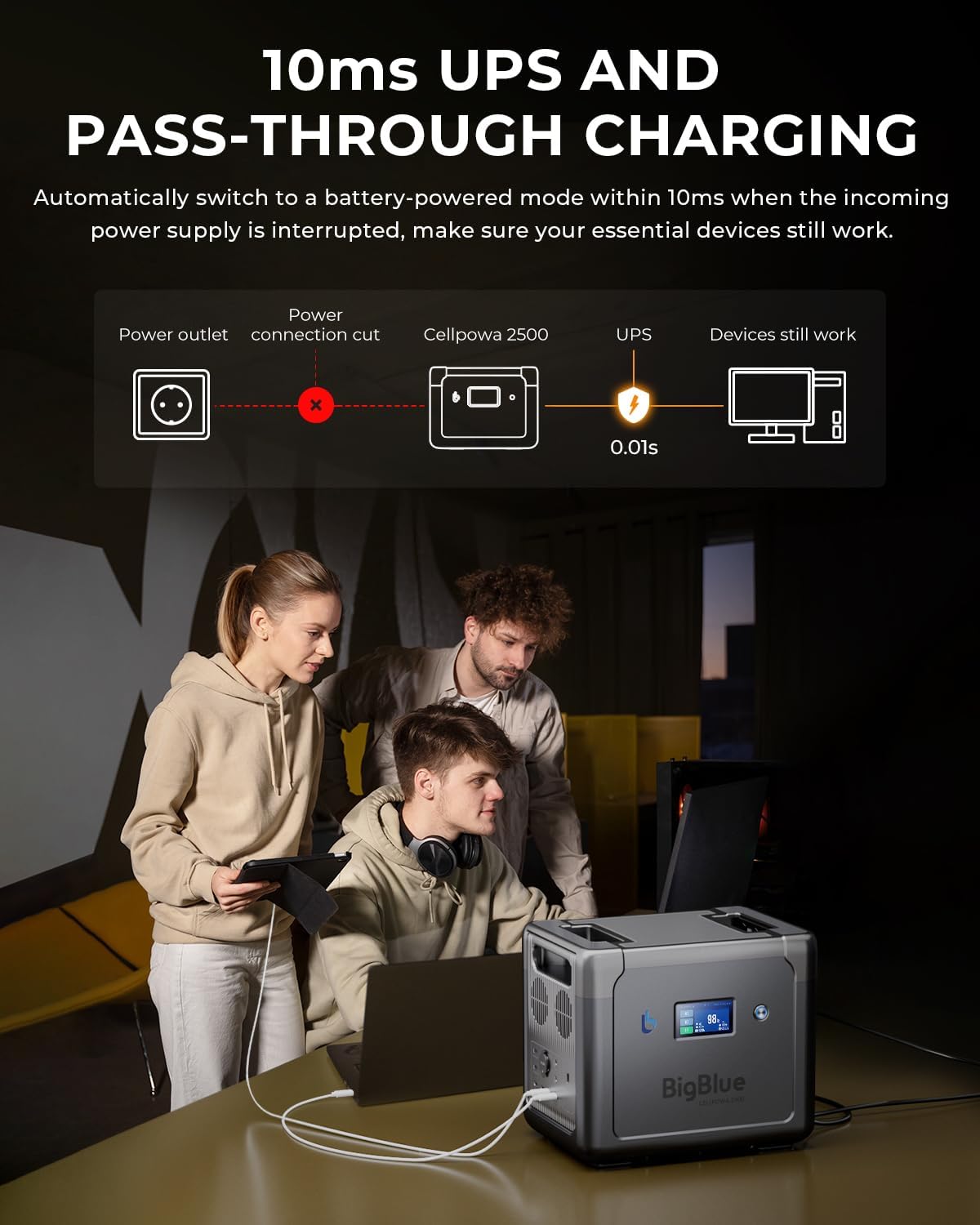
Figure 5: UPS Functionality
4.4 Utmost-B Charging Mode (Boost-Up)
For high-wattage devices, the Utmost-B Charging Mode can boost the total loaded power up to 3500W. This allows the CellPowa 2500 to temporarily support devices that exceed its continuous 2500W output, useful in emergency situations.

Figure 6: Utmost-B Mode for High-Wattage Devices
4.5 GPS Function
The CellPowa 2500 includes a GPS positioning function. This can be enabled via the touch screen or the BigBlue Energy app to obtain the current longitude and latitude, which can be useful in outdoor emergencies.
4.6 LCD Touch Screen
The integrated LCD touch screen displays critical information such as battery level, current input/output, AC/DC status, and recharge duration. Use the stylus pen or your finger to navigate the menu and adjust settings.

Figure 7: LCD Touch Screen Display
4.7 Power Saving Mode
When the 'Power Saving Mode' is active and the total load power is less than 5W, the AC charging ports will switch off after 10 minutes. The entire product will then automatically switch off after 6 hours to conserve battery life.
5. Charging the CellPowa 2500
5.1 AC Wall Charging
Connect the provided AC charging cable to the unit and a wall outlet. You can select input power options of 400W, 800W, or 1200W via the unit's interface or the app. A 1200W input can charge the unit to 80% in approximately 1.5 hours.
5.2 Solar Charging
The CellPowa 2500 supports up to 1200W maximum solar input. Use the provided MC-4-to-XT60 solar cable to connect compatible solar panels (sold separately). The Maximum Power Point Tracking (MPPT) algorithm ensures efficient solar energy conversion, storing up to 98% of solar generation.

Figure 8: Solar Charging Setup
5.3 Car Charging
Utilize the XT60 car lighter cable to charge the CellPowa 2500 from your vehicle's 12V or 24V outlet. Ensure the vehicle engine is running during car charging to prevent draining the car's battery.
5.4 Charging Capacity Limit
To preserve battery lifespan, you can set an intended charging rate from 20% to 100% capacity. This feature is accessible through the unit's interface or the BigBlue Energy app.

Figure 9: Charging Limit Settings
6. Maintenance
6.1 Battery Longevity
The CellPowa 2500 uses an EV-grade LiFePO4 battery, offering a cycle life of 3500+ cycles to 80% capacity. The Battery Management System (BMS) includes 6 built-in protection modules for safety and efficiency, monitoring current, voltage, input, and output.
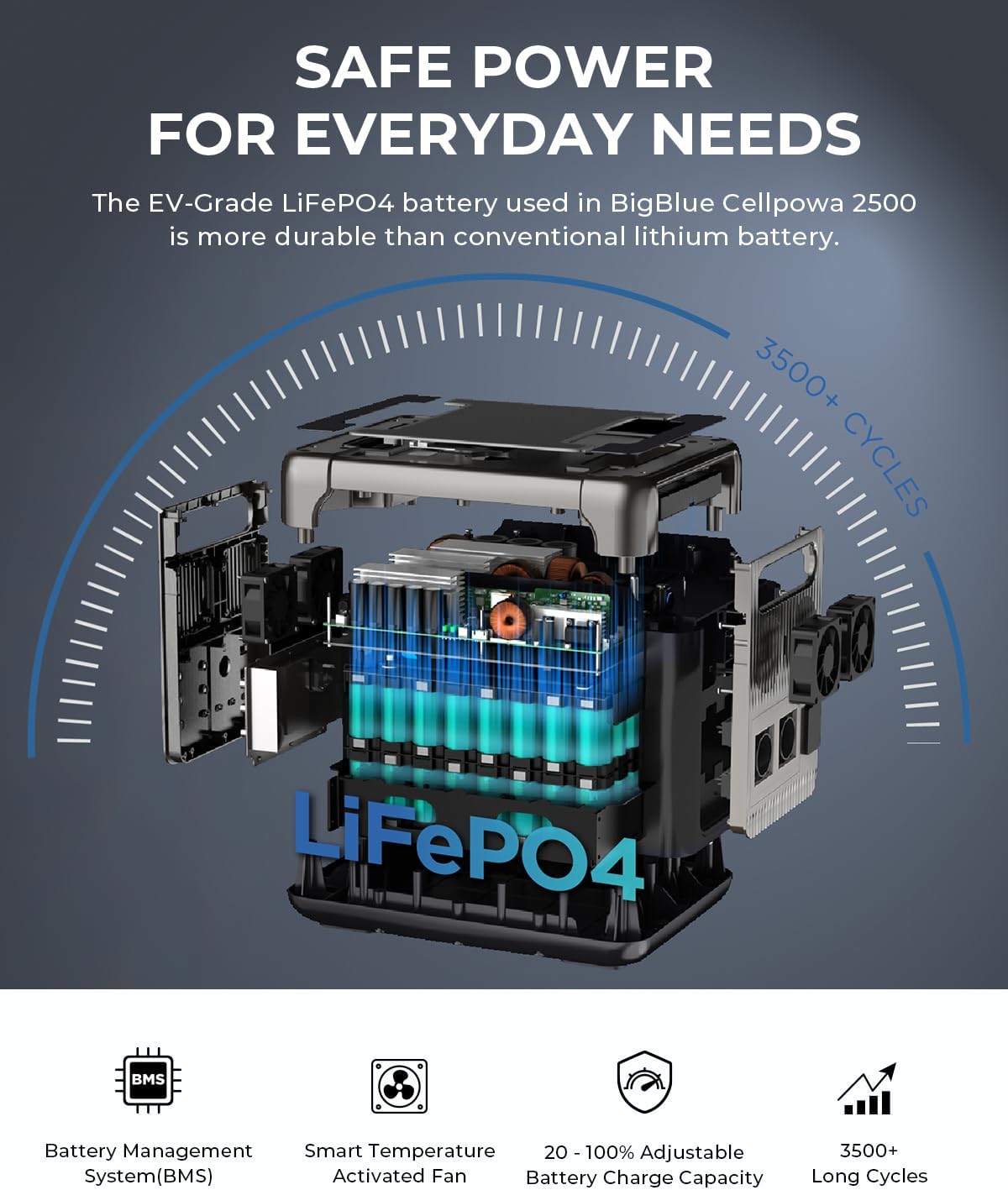
Figure 10: LiFePO4 Battery Structure
6.2 Storage
For optimal battery health during storage, keep the unit fully charged every 3-6 months. Alternatively, keep it plugged in when not in use and discharge it to 50% every 3-4 months. Avoid prolonged periods of complete discharge, as this can negatively impact battery lifespan. Store the power station in a dry, cool place, away from direct sunlight and extreme temperatures.
6.3 Cleaning
Use a soft, dry cloth to clean the exterior of the unit. Do not use abrasive cleaners or immerse the unit in water.
7. Troubleshooting
If you encounter issues with your CellPowa 2500, consider the following:
- Unit Not Powering On: Ensure the battery is charged. If completely drained, it may require a brief period of charging before it can power on.
- Devices Not Receiving Power: Check if the specific output ports (AC/DC/USB) are enabled on the unit or via the app. Verify that the device's power consumption does not exceed the port's or unit's maximum output.
- Charging Issues: Confirm that charging cables are securely connected. Check the selected input wattage and ensure the power source is active.
- App Connectivity: Ensure Wi-Fi or Bluetooth is enabled on your smartphone and the CellPowa 2500. Restart both devices if connection issues persist.
- Automatic Shutdown: Review the Power Saving Mode settings if the unit shuts down unexpectedly.
For persistent issues, refer to the BigBlue Energy app for diagnostic information or contact BigBlue customer support.
8. Specifications
| Feature | Specification |
|---|---|
| Brand | BigBlue |
| Model Name | Cellpowa 2500 |
| Wattage (Output) | 2500 Watts (Continuous) |
| Starting Wattage (Peak) | 5000 Watts |
| Battery Capacity | 1843Wh |
| Battery Type | LiFePO4 |
| AC Input | Up to 1200W (Adjustable) |
| Solar Input | Up to 1200W (MPPT) |
| Car Charger Input | 240W Max (12V/24V) |
| AC Outputs | 6 |
| DC Outputs | 2 |
| USB-A Ports | 2 (Fast Charge) |
| USB-C Ports | 4 (2x PD 45W, 2x PD 100W) |
| UPS Function | 10ms Switchover |
| Special Features | APP Control, GPS, Utmost-B Mode (3500W Boost) |
| Product Dimensions | 10.89"L x 12.8"W x 15.1"H |
9. Safety Information
- Do not attempt to jump-start a vehicle with this power station.
- Store the power station in a well-ventilated, dry, and cool environment. Avoid direct sunlight and extreme temperatures.
- Do not use the unit in tightly enclosed areas to prevent overheating.
- Keep the battery out of direct sunlight during solar charging to prevent overheating.
- Ensure the car engine is running when charging the unit via a car charger to avoid draining the vehicle's battery.
- Do not transport this capacity battery on an airplane.
- Handle the unit with care. The hard plastic material, while designed for portability, can be prone to damage from hard falls or bumps, which could potentially harm internal components.
10. Warranty and Support
The BigBlue CellPowa 2500 comes with a 2-year warranty. For technical support, warranty claims, or further assistance, please refer to the contact information provided on the BigBlue official website or within the BigBlue Energy application.


