
FMART C200
FMART C200 Robot Vacuum and Mop Combo User Manual
Model: C200
Introduction
Thank you for choosing the FMART C200 Robot Vacuum and Mop Combo. This device is designed to provide efficient and convenient cleaning for your home, featuring powerful suction, intelligent navigation, and a 2-in-1 vacuuming and mopping function. This manual provides essential information for setting up, operating, and maintaining your robot vacuum to ensure optimal performance and longevity.

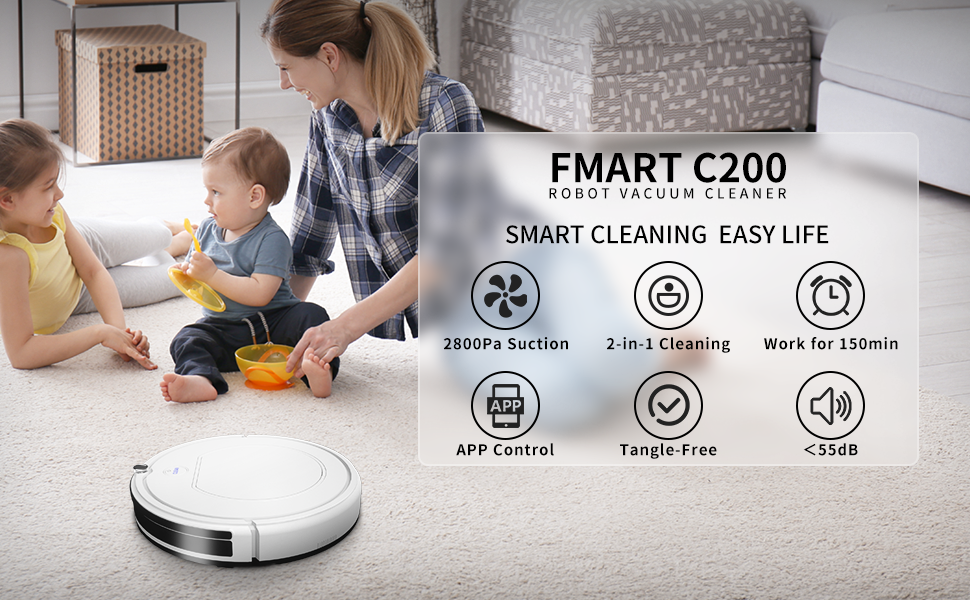
The FMART C200 Robot Vacuum and Mop Combo, a versatile cleaning device for various floor types.
Product Features
- 2-in-1 Sweeping and Mopping: Equipped with 2800Pa suction for vacuuming and a 128ml water tank for wet mopping, handling both dry debris and liquid spills.
- Tangle-Free Suction Port: Single-port design effectively prevents hair from tangling, making it ideal for pet owners.
- Intelligent App Control: Manage cleaning schedules, modes, and suction settings via the FMART app, with intelligent voice assistant feedback.
- Smart Sensors: Built-in infrared sensors provide anti-collision and anti-drop capabilities, protecting furniture and preventing falls.
- Low Noise Operation: Operates at less than 55dB, ensuring a quiet cleaning experience that won't disturb your household.
- Extended Runtime & Self-Charging: A 2000mAh battery provides up to 120 minutes of cleaning, and the robot automatically returns to its charging dock when needed.
The FMART C200 Robot Vacuum features 2800Pa strong suction power, effectively cleaning various types of debris from floors.

Designed with a tangle-free suction port, the FMART C200 is ideal for homes with pets, preventing hair from getting caught.

The FMART C200 offers 2-in-1 vacuuming and mopping. It includes a 350ml dust box for dry debris and a 128ml water tank for wet mopping, capable of cleaning up to 1600 sq ft.

Equipped with smart sensors for anti-collision, anti-drop, and auto-crossing, the robot navigates your home safely and efficiently, avoiding obstacles and falls.

Operating at less than 55dB, the FMART C200 maintains a low noise level, ensuring it does not disturb daily activities or rest.
Setup
1. Unpacking and Placement
- Carefully remove all components from the packaging.
- Place the charging dock against a wall in an open area, ensuring there are no obstacles within 1 meter (3 feet) to the sides and 2 meters (6 feet) in front.
- Connect the power adapter to the charging dock and plug it into a wall outlet.
2. Initial Charging
Before first use, fully charge the robot vacuum. Place the robot onto the charging dock, ensuring the charging contacts align. The indicator light will show charging status. A full charge typically takes 4-5 hours.

The robot vacuum automatically returns to its charging dock when the battery is low or after completing a cleaning cycle.
3. App Connection (FMART App)
For full control and smart features, connect your FMART C200 to the FMART mobile application.

Follow these steps to connect your FMART C200 to the FMART app:
- Download the FMART App from your app store or by scanning the QR code on the product packaging. You can also visit http://smartapp.tuya.com/fmart.
- Create an account and log in to the FMART App.
- Allow Bluetooth permission within the App when prompted.
- Turn on the FMART C200 robot vacuum.
- Ensure your phone is connected to a 2.4GHz Wi-Fi network and Bluetooth is enabled.
- In the FMART App, click 'Add device' and follow the on-screen instructions to add the C200 robot vacuum.
Once connected, you can control your robot, set cleaning schedules, and monitor its status directly from your smartphone.

Control your FMART C200 Robot Vacuum via the FMART app, which supports Bluetooth connection. The app allows you to manage working hours, view power status, change cleaning modes, and adjust suction settings.
Operating Instructions
1. Starting and Pausing Cleaning
- Manual Start: Press the 'CLEAN' button on the robot or in the app to start cleaning.
- Pause: Press the 'CLEAN' button again or use the app to pause cleaning.
- Return to Dock: Press the home button on the robot or in the app to send the robot back to its charging dock.
2. Cleaning Modes
The FMART C200 offers various cleaning modes accessible via the FMART app:
- Smart Mode: The robot intelligently navigates to clean your entire floor area.
- Random Mode: The robot cleans in a random pattern, suitable for smaller areas.
- Wall Follow Mode: The robot cleans along walls and edges.
- Manual Control: Use the directional controls in the app to guide the robot manually.
3. Mopping Function
To use the mopping function:
- Fill the 128ml water tank with clean water. Do not use detergents or cleaning solutions that are not approved for robot vacuums.
- Attach the mopping cloth securely to the water tank.
- Insert the filled water tank into the robot.
- Start a cleaning cycle. The robot will vacuum and mop simultaneously.
The constant humidity water tank ensures even water distribution for effective wet mopping without leaving excessive moisture.
Maintenance
Regular maintenance is crucial for the optimal performance and longevity of your FMART C200. Always turn off the robot and disconnect it from the charging dock before performing any maintenance.

The underside of the robot features double side brushes for thorough cleaning, a tangle-free suction port to prevent hair clogging, and a constant humidity water tank for effective wet mopping without leaving marks.
This image highlights the advantage of FMART's tangle-free suction port over conventional roller brushes, which often accumulate tangled hair.
1. Dust Box and Filter Cleaning
- Open the top cover of the robot and remove the 350ml dust box.
- Empty the dust box into a trash bin.
- Remove the filter and tap it gently to remove dust. Rinse the filter with water if necessary, but ensure it is completely dry before reinserting.
- Wipe the inside of the dust box with a dry cloth.
- Reinstall the filter and dust box.
2. Water Tank and Mopping Cloth Cleaning
- Remove the water tank from the robot.
- Empty any remaining water from the tank.
- Detach the mopping cloth and wash it by hand or machine. Allow it to air dry completely.
- Rinse the water tank with clean water and allow it to air dry.
3. Side Brush Cleaning
- Periodically check the side brushes for tangled hair or debris.
- Gently pull the brushes off their posts.
- Remove any hair or debris and reinstall the brushes. Replace worn brushes as needed.
4. Sensor Cleaning
- Wipe the anti-drop sensors (located on the bottom of the robot) and anti-collision sensors (on the bumper) with a clean, dry cloth.
- Ensure the charging contacts on both the robot and the charging dock are clean.
Troubleshooting
If you encounter issues with your FMART C200, refer to the following common problems and solutions:
- Robot does not turn on or charge:
- Ensure the charging dock is powered on and the robot is correctly aligned with the charging contacts.
- Check if the power adapter is securely plugged into both the dock and the wall outlet.
- Verify that the robot's power switch is in the 'ON' position.
- Robot cannot connect to the app:
- Confirm your phone is connected to a 2.4GHz Wi-Fi network (5GHz is not supported).
- Ensure Bluetooth is enabled on your phone and the robot is within range.
- Restart the robot and your phone, then try the connection process again.
- Check if the FMART app has the necessary permissions (e.g., location, Bluetooth).
- Robot gets stuck frequently:
- Clear obstacles like cables, toys, or loose rugs from the cleaning path.
- Ensure the anti-collision sensors are clean and unobstructed.
- For high thresholds or thick carpets, the robot may struggle to cross.
- Poor cleaning performance:
- Empty the dust box and clean the filter regularly.
- Clean the side brushes and suction port to remove tangled hair or debris.
- Ensure the water tank is filled and the mopping cloth is clean for mopping tasks.
- Unusual noises:
- Check the side brushes and suction port for any foreign objects.
- Ensure the wheels are free of debris.
If the problem persists, please refer to the FMART official website for further support or contact customer service.
Specifications
| Feature | Detail |
|---|---|
| Brand | FMART |
| Model Name | C200 |
| Special Feature | Robot Vacuum Cleaner |
| Product Dimensions | 12.5"L x 12.5"W x 3.3"H |
| Filter Type | Cartridge |
| Battery Life | 120 minutes |
| Power Source | Battery Powered |
| Control Method | App |
| Compatible Devices | Amazon Echo |
| Form Factor | Robotic |
| Item Weight | 7.3 pounds |
| Manufacturer | FMART |
| ASIN | B0BV9J7SXC |
| Item Model Number | C200 |
| Batteries | 1 Lithium Ion battery required (included) |
| Surface Recommendation | Pet hair, Hard flooring, Low pile carpet |
Warranty and Support
For detailed warranty information, technical support, or to purchase replacement parts, please visit the official FMART website or contact their customer service directly. Keep your purchase receipt as proof of purchase for warranty claims.
Ask a question about this manual
Ask about setup, troubleshooting, compatibility, parts, safety, or missing instructions. Manuals+ will review the question and use this page’s manual context to help answer it.