
1. Introduction
Thank you for choosing The Cut Buddy Cordless Hair & Beard Trimmer. This device is designed for precise and comfortable grooming, suitable for various hair types and lengths. Please read this manual thoroughly before first use to ensure proper operation and maintenance.
2. What's Included
Your Cut Buddy Clipper & Grooming Set includes the following items:
- Cordless Hair & Beard Trimmer
- 7 Guard Combs (various lengths)
- Travel Case
- Barber Grade Scissors
- Comb
- USB Charger
- Lubricant Oil
- Cleaning Brush
- Protective Cap

3. Product Features
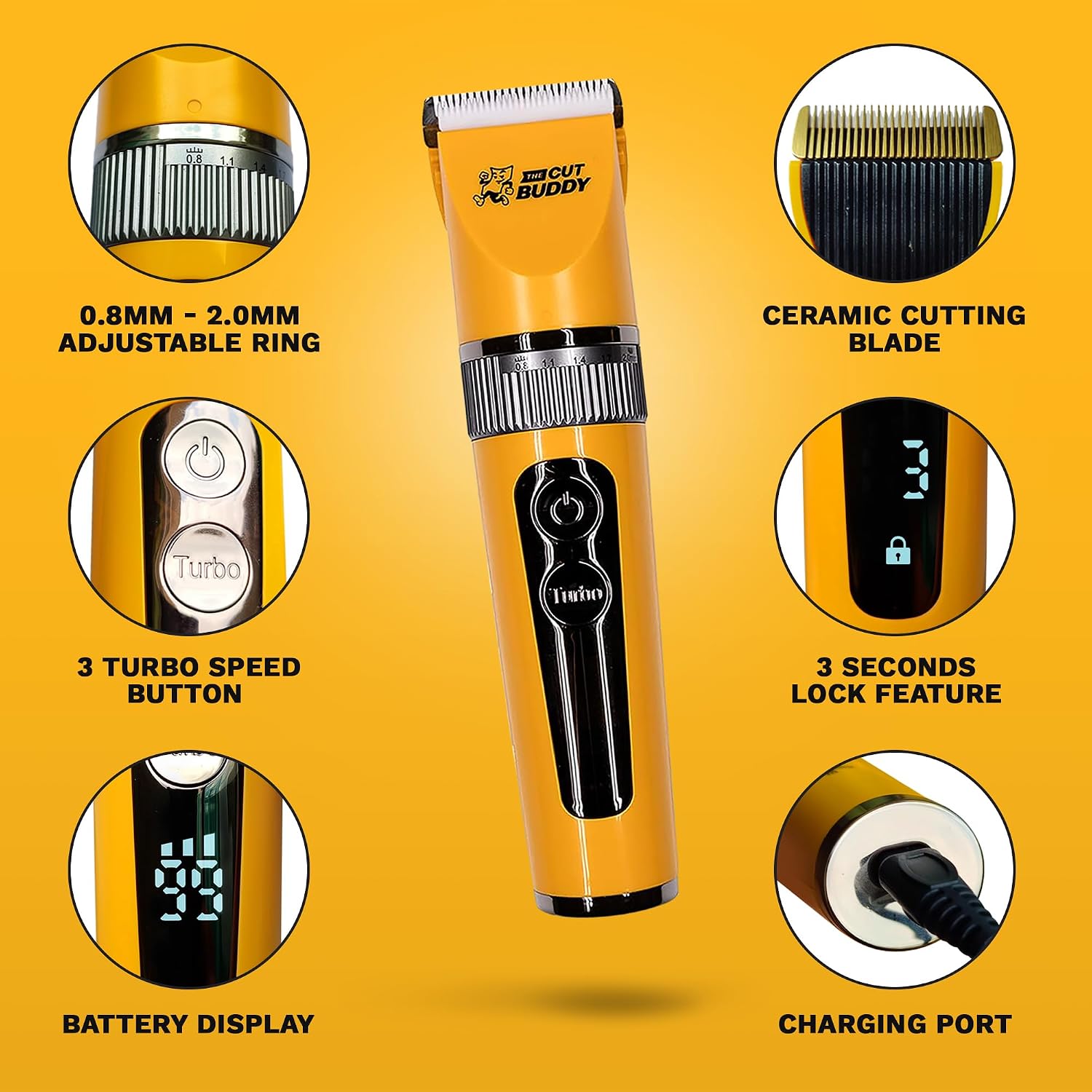
- Titanium-Ceramic Blades: Durable blades designed to stay cool, quiet, and sharp.
- Adjustable Blade Length: Integrated collar allows adjustment from 0.8mm to 2.0mm for precise cutting.
- Custom Speed Control: Choose from 3 RPM levels (6000, 6500, 7000) for personalized grooming.
- High-Capacity Li-Ion Battery: Provides up to 200 minutes of cordless operation on a single charge.
- Waterproof Design (IPX6): The clipper is water-resistant, allowing for easy cleaning under running water.
- LED Display: Shows battery percentage and selected speed.
- 3-Second Lock Feature: Prevents accidental activation during travel or storage.
- Quiet Operation: Engineered for low noise and vibration for a comfortable grooming experience.


4. Setup
- Initial Charge: Before first use, fully charge the hair clipper using the provided USB charging cord. The LED display will indicate the battery level.
- Unlock Device: If the lock icon is displayed, press and hold the power button for 3 seconds to unlock the clipper.
- Select Blade Length: Rotate the adjustable collar to select your desired blade length (0.8mm to 2.0mm).
- Attach Guard Comb (Optional): For longer cuts, select the appropriate guard comb and securely attach it over the blade. Ensure it clicks into place.
5. Operating Instructions
- Power On/Off: Press the power button once to turn the clipper on. Press it again to turn it off.
- Adjust Speed: While the clipper is on, press the 'Turbo' button to cycle through the three available speed settings (6000, 6500, 7000 RPM).
- Begin Trimming: Hold the clipper firmly and move it against the direction of hair growth for an even cut. Use a comb to guide the hair if needed.
- Facial Hair/Body Grooming: The adjustable blade and various guards make it suitable for precise beard trimming, detailing, and body grooming.
- Lock Feature: To prevent accidental activation, press and hold the power button for 3 seconds until the lock icon appears on the LED display. Repeat to unlock.
6. Maintenance
Regular maintenance ensures optimal performance and extends the life of your clipper.
- Cleaning: After each use, turn off the clipper and remove any attached guard. Use the provided cleaning brush to remove loose hairs from the blades. Since the clipper is IPX6 waterproof, you can rinse the blades under running water. Ensure the clipper is completely dry before storage.
- Oiling: Apply a small drop of the included lubricant oil to the blades after every few uses, or as needed. Turn the clipper on for a few seconds to distribute the oil evenly. This helps maintain blade sharpness and smooth operation.
- Storage: Store the clipper and all accessories in the provided travel case in a cool, dry place.
7. Troubleshooting
| Problem | Possible Cause | Solution |
|---|---|---|
| Clipper not turning on | Low battery; Device locked | Charge the clipper; Press and hold power button for 3 seconds to unlock. |
| Clipper stops holding a charge | Excess oil clogging motor; Faulty battery | Clean the motor area; Contact customer support for warranty claim. |
| Poor cutting performance | Dull blades; Hair buildup; Incorrect blade adjustment | Clean and oil blades; Adjust blade length or use appropriate guard. |
| Excessive noise or vibration | Lack of lubrication; Hair caught in blades | Apply lubricant oil to blades; Clean blades thoroughly. |
8. Specifications
- Model: 2006
- Blade Material: Titanium, Ceramic
- Power Source: Battery Powered (Li-Ion)
- Operating Time: Up to 200 minutes cordless
- RPM Speeds: 6000, 6500, 7000 RPM
- Adjustable Blade Length: 0.8mm - 2.0mm
- Water Resistance: IPX6
- Item Weight: 0.54 Kilograms (approx. 1.19 Pounds)
- Color: Yellow
- UPC: 850026954142
- Manufacturer: The Cut Buddy
- Date First Available: February 9, 2023
9. Warranty and Support
The Cut Buddy Cordless Hair & Beard Trimmer comes with a 1-year manufacturer's warranty. A lifetime warranty is provided for Veterans. For warranty claims, technical support, or any product-related inquiries, please contact The Cut Buddy customer service directly. Refer to the product packaging or official website for contact details.