
1. Introduction
The Yale Mini Electronic Safe YSV/170/DB2/B is designed to provide a basic level of security for important small items such as passports, credit cards, keys, cash, and other valuables. This safe features a user-friendly electronic keypad for access and includes emergency override keys for convenience. Please read this manual carefully before operating your safe to ensure proper use and security.
Key Features:
- Standard Security: Offers fundamental protection for your everyday valuables.
- Keypad Entry: Access with a 3 to 8-digit user-defined PIN code.
- Emergency Access: Two mechanical override keys are provided for manual opening.
- Automatic Lockout: Keypad locks for 20 seconds after 3 incorrect PIN entries, and for 5 minutes after 3 additional incorrect entries.
- Anti-Bump Solenoid: Locking mechanism designed to prevent opening via shock.
- Easy PIN Reset: A reset button is conveniently located inside the safe.
2. Setup
2.1 Unpacking and Contents
Carefully remove the safe from its packaging. Ensure all components are present:
- 1 x Yale Mini Electronic Safe
- 2 x Mechanical Override Keys
- 4 x AA Batteries
- 1 x Pack of Fixing Bolts (for wall or floor mounting)
- 1 x User Manual
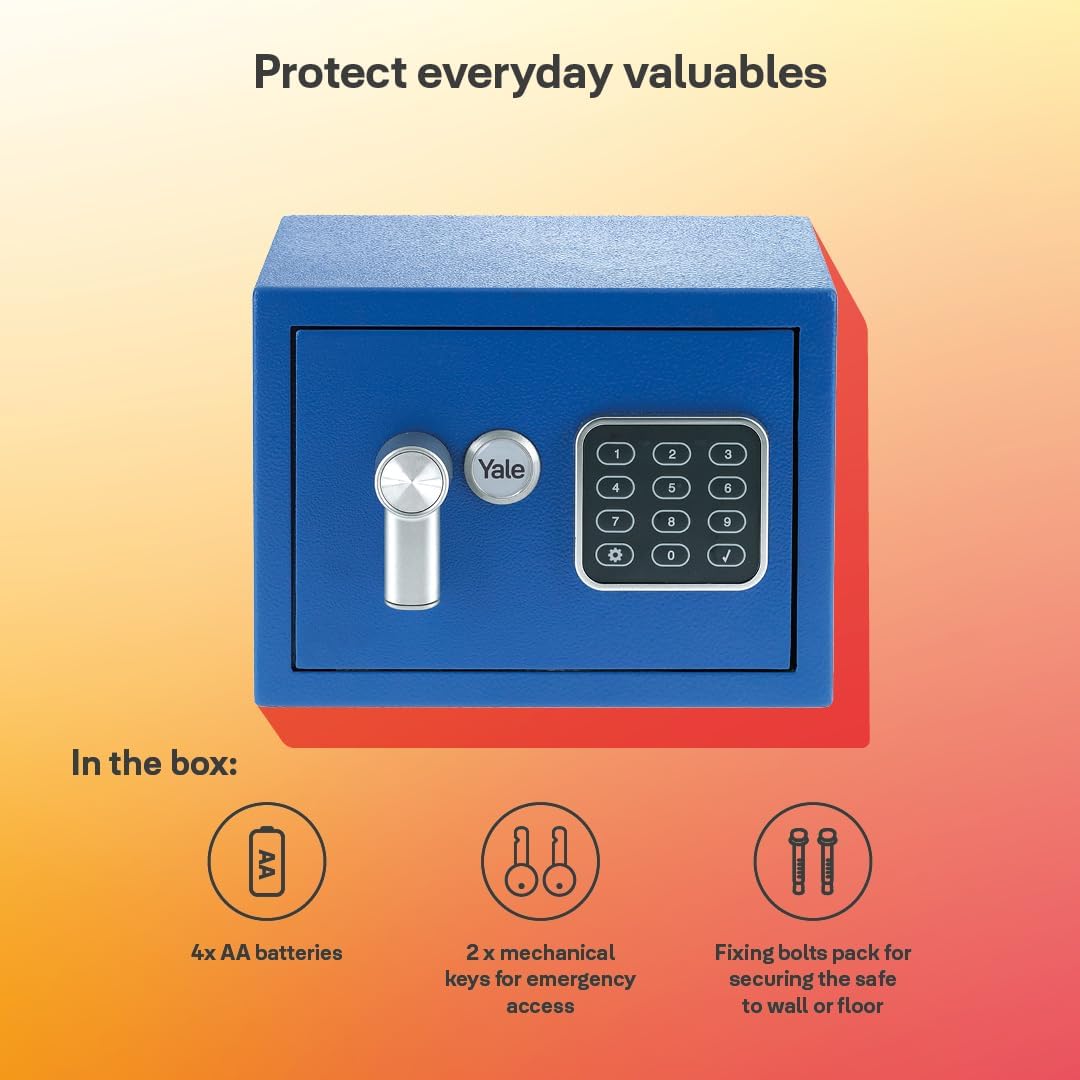
Figure 2.1: Included components: safe, batteries, mechanical keys, and fixing bolts.
2.2 Battery Installation
- Open the safe using one of the mechanical override keys. Insert the key into the keyhole, turn it, and rotate the handle to open the door.
- Locate the battery compartment on the inside of the safe door.
- Insert the 4 AA batteries, ensuring correct polarity (+/-).
- Close the battery compartment cover.
2.3 Initial PIN Code Setup
Upon first use, you will need to set your personal PIN code.
- With the safe door open, press the red reset button located on the inside of the door, near the hinge. You will hear a beep.
- Within 5 seconds, enter your desired 3 to 8-digit PIN code on the keypad.
- Press the '#' button to confirm your new PIN code. The safe will beep twice to confirm successful programming.
- Test the new PIN code with the door open before closing it. Enter your new PIN, then press '#', and turn the handle.
2.4 Mounting the Safe (Optional)
For enhanced security, the safe can be fixed to a wall or floor using the provided fixing bolts.
- Choose a suitable location for mounting.
- Mark the drilling points through the pre-drilled holes inside the safe.
- Drill pilot holes in the wall or floor.
- Align the safe with the drilled holes and secure it using the fixing bolts.
3. Operating Instructions
3.1 Opening the Safe with PIN Code
- Enter your 3 to 8-digit PIN code on the keypad.
- Press the '#' button.
- The green LED will illuminate, and you will hear a beep. Within 5 seconds, turn the handle clockwise to open the safe door.

Figure 3.1: Key components for safe operation.
3.2 Closing and Locking the Safe
- Close the safe door.
- Turn the handle counter-clockwise to lock the safe. The safe will automatically lock.
3.3 Changing the PIN Code
- Open the safe using your current PIN code.
- Press the red reset button on the inside of the door. You will hear a beep.
- Within 5 seconds, enter your new 3 to 8-digit PIN code.
- Press the '#' button to confirm. The safe will beep twice.
- Test the new PIN code with the door open before closing it.
3.4 Emergency Override Key Access
In case of forgotten PIN code or battery failure, you can use the mechanical override key:
- Locate the keyhole cover, usually hidden behind the Yale logo or a small panel on the front of the safe.
- Remove the cover to expose the keyhole.
- Insert one of the mechanical override keys and turn it.
- While the key is turned, rotate the handle to open the safe door.
- Once open, you can replace the batteries or reset the PIN code.
3.5 LED Status Indicators
- Green Light: Indicates the safe is open or ready to accept a PIN.
- Red Light: Indicates an error, such as an incorrect PIN entry.
- Flashing Red Light: Indicates low battery power. Replace batteries promptly.
4. Maintenance
4.1 Battery Replacement
When the red LED flashes during operation, it indicates low battery power. Replace all four AA batteries immediately to ensure continued functionality.
- Open the safe door.
- Open the battery compartment on the inside of the door.
- Remove the old batteries and dispose of them responsibly.
- Insert four new AA batteries, observing correct polarity.
- Close the battery compartment.
4.2 Cleaning
Clean the safe exterior with a soft, damp cloth. Do not use abrasive cleaners or solvents, as these may damage the finish or electronic components.
5. Troubleshooting
5.1 Safe Does Not Open with PIN Code
- Incorrect PIN: Ensure you are entering the correct 3 to 8-digit PIN code.
- Low Batteries: If the red LED flashes, the batteries are low. Use the mechanical override key to open the safe and replace the batteries.
- Keypad Lockout: If you enter an incorrect PIN three times, the keypad will lock for 20 seconds. After three more incorrect entries, it will lock for 5 minutes. Wait for the lockout period to expire before trying again.

Figure 5.1: Two-stage lockout mechanism for the electronic keypad.
5.2 Cannot Reset PIN Code
- Ensure the safe door is open when attempting to reset the PIN.
- Press the red reset button firmly and ensure you hear a beep.
- Enter the new PIN and press '#' within 5 seconds of pressing the reset button.
5.3 Mechanical Key Does Not Work
- Ensure the key is fully inserted into the keyhole.
- Turn the key completely before attempting to turn the handle.
6. Specifications
| Model Number | YSV/170/DB2/B |
| Brand | Yale |
| Material | Alloy Steel |
| Lock Type | Key, Electronic |
| Exterior Dimensions (H x W x D) | 17 x 23 x 17 cm (6.7 x 9.1 x 6.7 inches) |
| Interior Dimensions (H x W x D) | 16 x 22 x 11 cm (6.3 x 8.7 x 4.3 inches) |
| Capacity | 3.8 Liters |
| Weight | 2.3 Kilograms (5.1 lbs) |
| Batteries Required | 4 x AA (Included) |
| Mounting Type | Wall Mount |
| Special Feature | Portable |
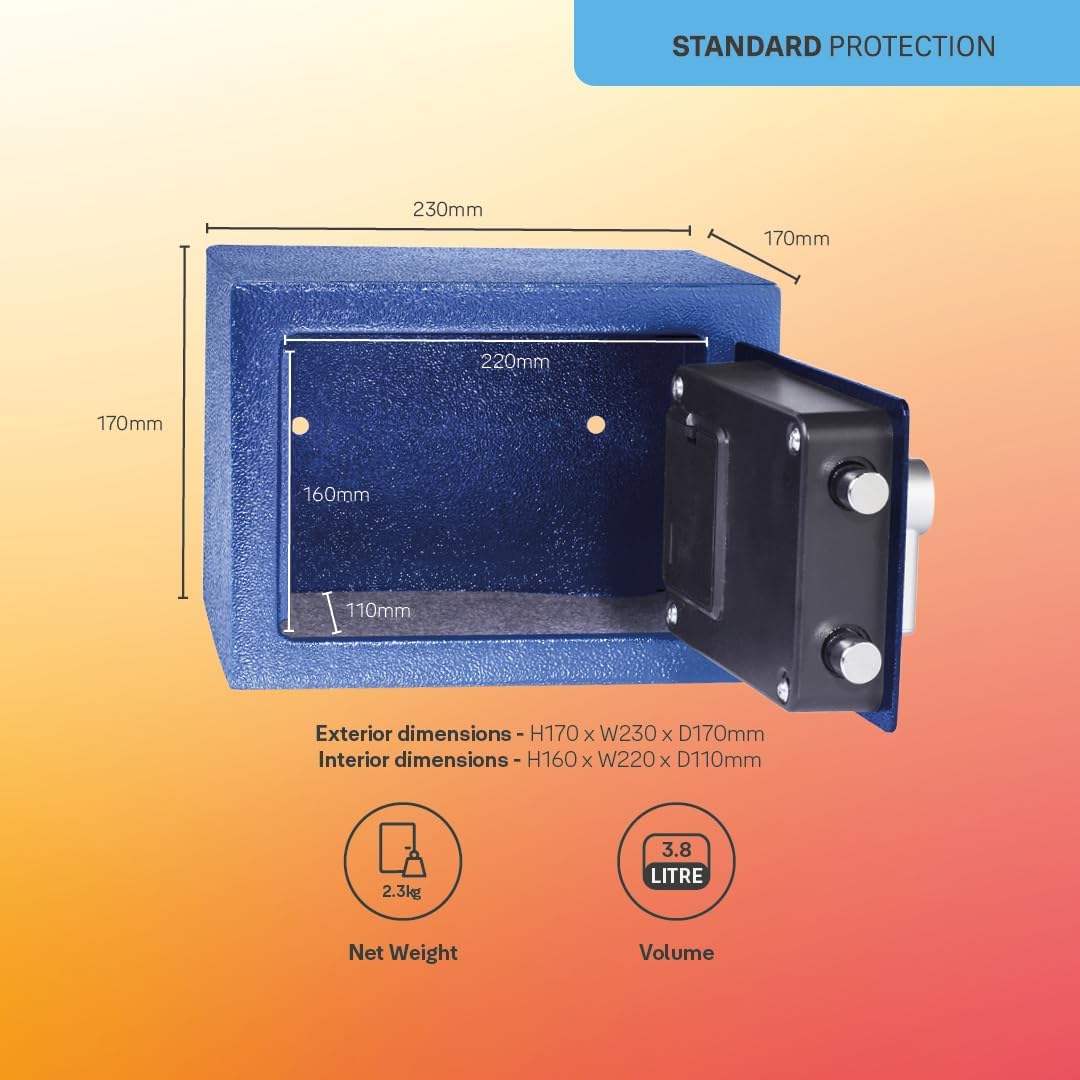
Figure 6.1: Safe dimensions and specifications.
7. Warranty and Support
7.1 Spare Parts Availability
Spare parts for the Yale Mini Electronic Safe YSV/170/DB2/B are available for 2 years from the date of purchase. Please contact Yale customer support for assistance with spare parts.
7.2 Customer Support
For further assistance, technical support, or warranty claims, please refer to the official Yale website or contact their customer service department. You can find more information regarding privacy and legal policies at Yale Privacy and Legal Center.


