
Introduction
The GOOLOO GTX180 Portable Power Station is a versatile and compact power solution designed for various applications, including home use, camping, hiking, and emergency situations. With a 180Wh capacity and multiple output ports, it can power a wide range of electronic devices and small appliances. This manual provides detailed instructions for the safe and efficient operation, charging, and maintenance of your power station.
What's Included
Upon unboxing your GOOLOO GTX180 Portable Power Station, please ensure all the following components are present:
- GOOLOO GTX180 Portable Power Station (Host)
- Car Inverter
- Type-C to Type-C Charging Cable
- USB-A to USB-C Cable
- Carrying Strap
- Hook
- Carrying Bag
- User Manual

Image: All components included with the GOOLOO GTX180 Portable Power Station.
Product Features
The GOOLOO GTX180 is equipped with several features designed for convenience, efficiency, and safety:
- Detachable and Portable Design: The power station is compact and lightweight (3.1 lbs), with a detachable inverter, making it highly portable for various uses.
- High Capacity: Features a 180Wh (50000mAh) battery capacity, capable of charging multiple devices.
- Fast Charging: Supports 100W fast charging, allowing the unit to be fully charged in approximately 2 hours.
- Multiple Output Ports: Equipped with 8 output ports, including 2 USB QC3.0, 1 USB-A (5V/2.4A), 1 USB-C (100W In/Out), 1 USB-C (30W Out), 1 AC outlet, 1 DC (15V/10A), and 1 car port, enabling simultaneous charging of up to 8 devices.
- Solar Charging Capability: Compatible with solar panels that have a Type-C port, featuring a built-in MPPT controller for efficient solar charging.
- Smart Digital Screen: A 3.2-inch digital screen clearly displays input/output wattage, battery power percentage, and low temperature reminders.
- Emergency LED Light: Includes 3 modes of LED work lights: Flashlight, Strobe, and SOS, suitable for night lighting and emergency situations.
- 8 Battery Safety Features: Built-in protection features ensure safe operation, including safeguards against over-charge, over-current, short-circuit, low-temperature, high-temperature, over-voltage, and over-load, along with AI software management.
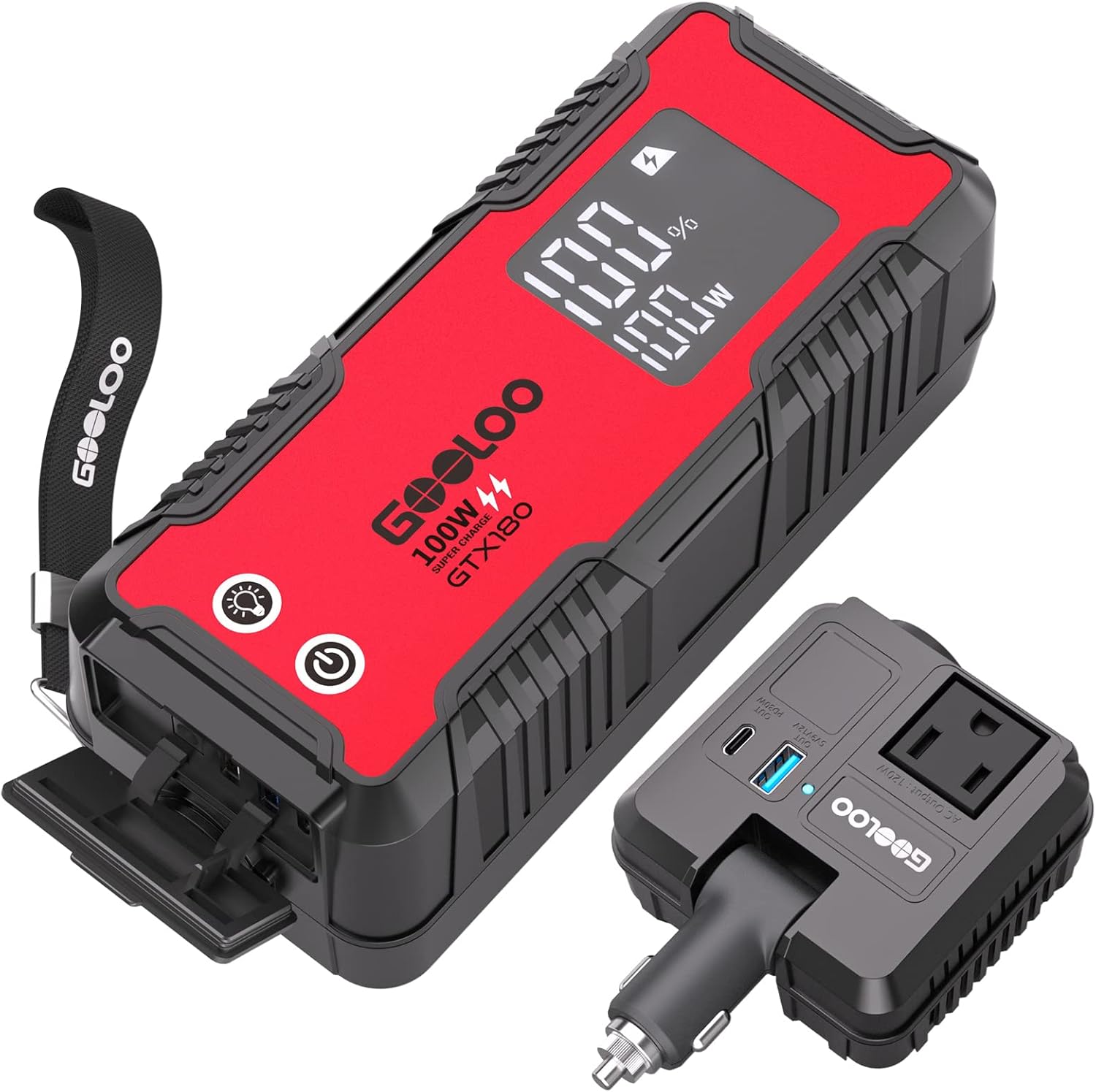
Image: The GOOLOO GTX180 Power Station with its detachable car inverter, highlighting its compact design and various ports.

Image: Visual representation of the 180Wh capacity and the 8 diverse output ports available on the power station.
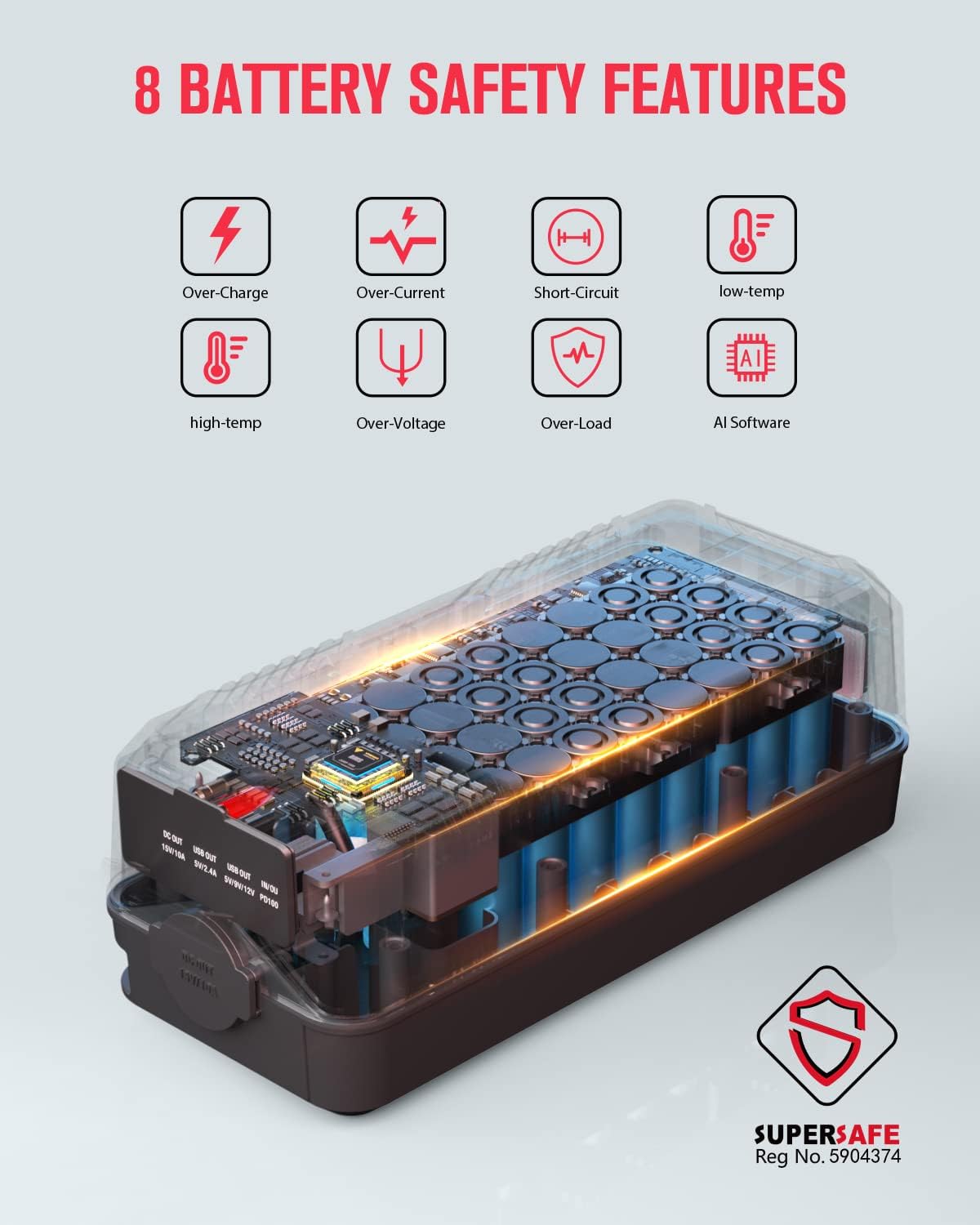
Image: An infographic illustrating the 8 comprehensive battery safety features integrated into the GOOLOO GTX180.
Setup & Operation
To begin using your GOOLOO GTX180 Portable Power Station:
- Power On: Press the power button located on the unit. The 3.2-inch digital screen will illuminate, displaying the current battery percentage and wattage information.
- Connect Devices: Identify the appropriate output port for your device (USB-A, USB-C, AC outlet, or DC port). Plug your device's charging cable or power adapter into the corresponding port on the power station or the detachable car inverter.
- Using the Detachable Inverter: The car inverter can be plugged into the car port on the power station to provide AC power. It also features additional USB-A and USB-C ports. Ensure the inverter is securely connected before use.
- LED Light Function: Press and hold the light button to turn on the flashlight. Press it again for strobe mode, and a third time for SOS mode. Press and hold to turn off.
Video: This video provides a detailed overview of the GOOLOO Power Station, demonstrating its features, included accessories, and various charging capabilities for different devices. It highlights the compact size, multiple ports, and the detachable inverter for versatile power solutions.
Charging the Power Station
The GOOLOO GTX180 offers multiple convenient ways to recharge its internal battery:
- Wall Charging: Use the provided Type-C to Type-C charging cable with a compatible PD100W wall charger (not included) to achieve a full charge in approximately 2 hours.
- Car Charging: Connect the power station to your vehicle's 12V car socket using the car inverter and the appropriate cable. This method allows for convenient recharging while on the go.
- Solar Charging: For outdoor adventures, the power station can be recharged using compatible solar panels with a Type-C output. The built-in MPPT controller optimizes the charging speed from solar input.

Image: Visual guide to the various charging methods for the GOOLOO GTX180, including wall, car, and solar options, along with their approximate charging times.
Maintenance
To ensure the longevity and optimal performance of your GOOLOO GTX180 Portable Power Station, follow these maintenance guidelines:
- Store the unit in a cool, dry place away from direct sunlight and extreme temperatures.
- Avoid exposing the power station to water or excessive moisture. While it has some water resistance, it is not fully waterproof.
- Charge the unit fully at least once every 3-6 months to maintain battery health, even if not in regular use.
- Clean the exterior with a soft, dry cloth. Do not use abrasive cleaners or solvents.
- Keep the ports free from dust and debris.
Troubleshooting
If you encounter issues with your GOOLOO GTX180, consider the following common troubleshooting steps:
- Unit Not Turning On: Ensure the battery is charged. If the battery is depleted, connect it to a power source and allow it to charge for a few minutes before attempting to power on again.
- Devices Not Charging: Verify that the power station is turned on and has sufficient battery charge. Check that the cables are securely connected to both the power station and your device. Ensure the device's power requirements do not exceed the power station's output limits for the specific port.
- Overload Protection: If the unit shuts down unexpectedly, it may be due to an overload. Disconnect the devices, wait a few minutes, and then restart the power station. Reduce the load by connecting fewer or lower-power devices.
- Temperature Warnings: The smart digital screen may display a low or high temperature reminder. Operate the unit within its recommended temperature range (typically 0°C to 40°C or 32°F to 104°F) to prevent automatic shutdown.
If problems persist, please refer to the warranty and support section for further assistance.
Specifications
| Attribute | Detail |
|---|---|
| Model Number | GTX180 |
| Battery Capacity | 180 Watt-hours (50000mAh) |
| Item Weight | 3.1 pounds |
| Product Dimensions | 9.45 x 3.94 x 3.54 inches |
| Voltage (AC Output) | 110 Volts (AC) |
| Battery Type | Lithium Ion (16 cells included) |
| Fast Charge Support | PD100W In/Out |
| Special Features | Detachable AC Outlet, Small Size & Quiet, Waterproof & Dustproof, 8 Safety Protections |
Warranty & Support
The GOOLOO GTX180 Portable Power Station comes with an 18-month warranty from the date of purchase. This warranty covers defects in materials and workmanship under normal use.
For technical support, warranty claims, or any questions regarding your product, please contact GOOLOO customer service. Refer to the contact information provided on the product packaging or the official GOOLOO website for the most up-to-date support channels.