
Introduction
This manual provides instructions for the Azwok replacement remote control, designed for various JVC TV models. This remote control is a direct replacement for original JVC RM-C3362, RM-C3367, and RM-C3407 remotes, offering all major buttons and functions. No programming is required; simply install batteries to begin operation.
Setup: Battery Installation
To prepare your remote control for use, you will need two AAA batteries (not included).
- Locate the battery compartment on the back of the remote control.
- Slide the battery compartment cover downwards and remove it.
- Insert two AAA batteries, ensuring the positive (+) and negative (-) terminals align correctly with the markings inside the compartment.
- Replace the battery compartment cover by sliding it back into place until it clicks securely.

Figure 1: Battery compartment with AAA batteries. Ensure correct polarity when inserting batteries.
Once batteries are installed, the remote control is ready for immediate use with compatible JVC TV models.
Operating Instructions
This remote control is designed to function identically to your original JVC remote. Point the remote control directly at your JVC TV's infrared receiver.
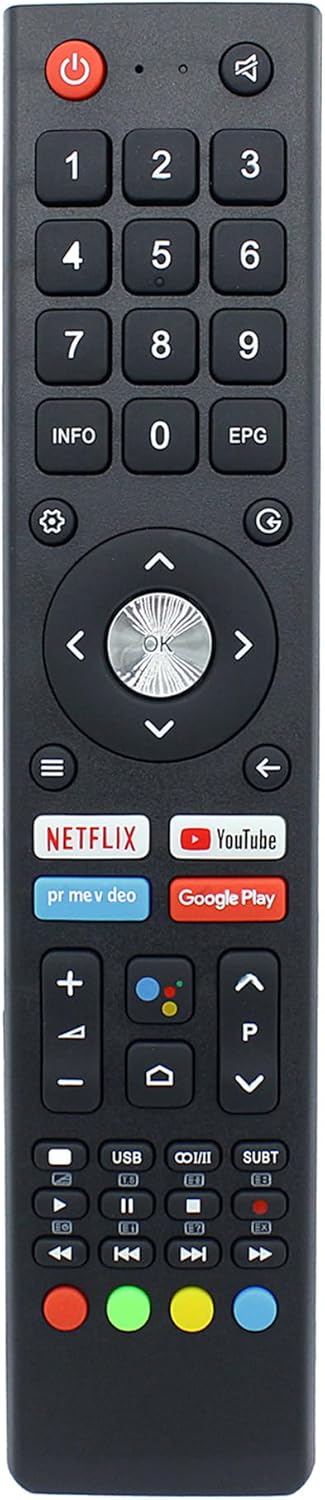
Figure 2: Front view of the remote control with key buttons labeled.
- Power Button (⏻): Turns the TV on or off.
- Number Pad (0-9): Directly select channels.
- Volume Up/Down (+/-): Adjusts the TV volume.
- Channel Up/Down (PΛ/PΙ): Changes TV channels.
- Navigation Pad (Arrows and OK): Navigate through menus and confirm selections.
- Back Button (↩): Returns to the previous screen or menu.
- Home Button (⌂): Accesses the TV's main home screen or smart TV interface.
- Dedicated App Buttons: Quick access to streaming services like Netflix, YouTube, and Google Play.
- Mute Button (🔇): Mutes or unmutes the TV audio.
- Info Button: Displays program information.
- EPG Button: Accesses the Electronic Program Guide.
- Media Control Buttons: Play, Pause, Stop, Fast Forward, Rewind, Next, Previous for media playback.
For specific functions related to your JVC TV model, please refer to your television's user manual.
Maintenance
To ensure the longevity and proper functioning of your remote control:
- Keep the remote control clean by wiping it with a soft, dry cloth.
- Avoid exposing the remote to extreme temperatures, direct sunlight, or moisture.
- Do not drop the remote control or subject it to strong impacts.
- If the remote will not be used for an extended period, remove the batteries to prevent leakage.
Troubleshooting
If your remote control is not functioning as expected, please follow these steps:
- Check Batteries: Ensure that the batteries are inserted correctly with the correct polarity (+/-). Replace old batteries with fresh AAA batteries. A common issue is depleted or incorrectly installed batteries.
- Line of Sight: Make sure there are no obstructions between the remote control and the TV's infrared sensor. The remote requires a clear line of sight to operate.
- Remote Indicator Light: Some remotes have an indicator light that flashes when a button is pressed. If this light does not illuminate, it may indicate a battery issue or a malfunction with the remote itself.
- Compatibility: Verify that your JVC TV model is listed as compatible with this remote control (LT-32N3115A, LT-40N5115A, LT-50N7115A, LT-55N7115A, LT-65N7115A).
- No Programming Required: This remote is designed to work out of the box. Do not attempt to program it, as this is not necessary and may cause issues.
If the issue persists after following these steps, please refer to the "Support" section for further assistance.
Specifications
| Model Number | RM-UV018-JV |
| Compatible Remote Models | RM-C3362, RM-C3367, RM-C3407 |
| Compatible TV Models | JVC LT-32N3115A, LT-40N5115A, LT-50N7115A, LT-55N7115A, LT-65N7115A |
| Power Source | 2 x AAA Batteries (not included) |
| Product Dimensions | 8.27 x 1.77 x 0.59 inches |
| Item Weight | 2.11 ounces |
| Color | Black |
| Special Feature | No Programming Required |
Warranty
This Azwok replacement remote control comes with a 12-month replacement warranty. This warranty covers defects in materials and workmanship under normal use. If the product fails to function correctly within this period, a replacement will be provided.
Support
For further assistance, questions regarding compatibility, or warranty claims, please contact the seller directly through the platform where the purchase was made. It is recommended to provide your product model number (RM-UV018-JV) and your JVC TV model number when seeking support.
If your specific TV model is not listed in the compatibility section or if your original remote differs significantly, please reach out to confirm suitability before purchase or for troubleshooting.